

編輯:關於 Android 程式設計
需求:
讓使用者輸入檔名與內容,分別存進手機內部儲存空間與外部儲存(SD 卡),而且兩邊都要能再讀回來。
步驟:
1. 建立名為 CDsaveFile 的 Android 專案
2. 撰寫版面 activity_main.xml:
<LinearLayout xmlns:android="https://schemas.android.com/apk/res/android" xmlns:tools="https://schemas.android.com/tools" android:layout_width="match_parent" android:layout_height="match_parent" android:orientation="vertical" tools:context="hhh.exercise.cdsavefile.MainActivity" > <LinearLayout android:layout_width="match_parent" android:layout_height="wrap_content" android:orientation="horizontal" > <TextView android:layout_width="wrap_content" android:layout_height="wrap_content" android:text="@string/textView_inputFileName" android:textColor="#00ff00" android:textSize="26sp" /> <EditText android:id="@+id/editView_fileName" android:layout_width="match_parent" android:layout_height="wrap_content" android:gravity="center" android:hint="@string/editView_fileName" android:maxLines="1" android:textColor="#ff0000" android:textSize="26sp" /> <requestFocus /> </LinearLayout> <TextView android:layout_width="match_parent" android:layout_height="wrap_content" android:text="@string/textView_inputFileContent" android:textColor="#00ff00" android:textSize="26sp" /> <EditText android:id="@+id/editView_fileContent" android:layout_width="match_parent" android:layout_height="wrap_content" android:gravity="center" android:hint="@string/editView_fileContent" android:maxLines="2" android:minLines="2" android:textColor="#ff0000" android:textSize="26sp" /> <LinearLayout android:layout_width="match_parent" android:layout_height="wrap_content" android:orientation="horizontal" > <Button android:id="@+id/button_saveToPhone" android:layout_width="0dp" android:layout_height="wrap_content" android:layout_weight="1" android:text="@string/button_saveToPhone" android:textColor="#ff00ff" android:textSize="24sp" /> <Button android:id="@+id/button_readFromPhone" android:layout_width="0dp" android:layout_height="wrap_content" android:layout_weight="1" android:text="@string/button_readFromPhone" android:textColor="#00ffff" android:textSize="24sp" /> </LinearLayout> <LinearLayout android:layout_width="match_parent" android:layout_height="wrap_content" android:orientation="horizontal" > <Button android:id="@+id/button_saveToSD" android:layout_width="0dp" android:layout_height="wrap_content" android:layout_weight="1" android:text="@string/button_saveToSD" android:textColor="#ff00ff" android:textSize="24sp" /> <Button android:id="@+id/button_readFromSD" android:layout_width="0dp" android:layout_height="wrap_content" android:layout_weight="1" android:text="@string/button_readFromSD" android:textColor="#00ffff" android:textSize="24sp" /> </LinearLayout> <EditText android:id="@+id/editText_showResult" android:layout_width="match_parent" android:layout_height="wrap_content" android:gravity="center" android:maxLines="3" android:minLines="3" android:hint="@string/editText_showResult" android:textColor="#cccc00" android:textSize="30sp" /> </LinearLayout>
3. 主活動 MainActivity.java:
Activity 這邊只做兩件事:把按鈕事件轉交給 FileService,以及在下手寫檔前先確認 SD 卡可用空間。
package hhh.exercise.cdsavefile; import android.annotation.SuppressLint; import android.annotation.TargetApi; import android.app.Activity; import android.os.Build; import android.os.Bundle; import android.os.Environment; import android.os.StatFs; import android.view.View; import android.view.Window; import android.view.View.OnClickListener; import android.widget.Button; import android.widget.EditText; import android.widget.Toast; import hhh.exercise.service.FileService; public class MainActivity extends Activity implements OnClickListener { private EditText editView_fileName; private EditText editView_fileContent; private EditText editText_showResult; private FileService service; @Override protected void onCreate(Bundle savedInstanceState) { super.onCreate(savedInstanceState); requestWindowFeature(Window.FEATURE_NO_TITLE); setContentView(R.layout.activity_main); // 實例化 FileService 類,該類用於處理按鈕觸發的事件的具體操作 service = new FileService(getApplicationContext()); // 獲取布局中的控件 editView_fileName = (EditText) findViewById(R.id.editView_fileName); editView_fileContent = (EditText) findViewById(R.id.editView_fileContent); editText_showResult = (EditText) findViewById(R.id.editText_showResult); // 獲取按鈕並創建觸發事件 ((Button) findViewById(R.id.button_saveToPhone)).setOnClickListener(this); ((Button) findViewById(R.id.button_readFromPhone)).setOnClickListener(this); ((Button) findViewById(R.id.button_saveToSD)).setOnClickListener(this); ((Button) findViewById(R.id.button_readFromSD)).setOnClickListener(this); } /** * 為每一個按鈕創建觸發的事件 * * @param v觸發事件的View對象 */ @Override public void onClick(View v) { String fileName = editView_fileName.getText().toString(); String fileContent = editView_fileContent.getText().toString(); // 判斷文件名,文件名要求不為空 if (fileName == null || "".equals(fileName.trim())) { Toast.makeText(getApplicationContext(), R.string.toast_missFileName, 0).show(); } else { // 輸入的文件名不為空,對每個按鈕的觸發事件進行處理 String result = null; switch (v.getId()) { case R.id.button_saveToPhone: try { // 存儲文件到手機上 service.saveToPhone(fileName, fileContent); // 清空內容輸入框 editView_fileContent.setText(""); Toast.makeText(getApplicationContext(), R.string.toast_saveToPhone_success, 0).show(); } catch (Exception e) { Toast.makeText(getApplicationContext(), R.string.toast_saveToPhone_fail, 0).show(); e.printStackTrace(); } break; case R.id.button_readFromPhone: try { // 讀取手機文件中的內容 result = service.readFromPhone(fileName); // 將內容顯示在空間中 editText_showResult.setText(result); } catch (Exception e) { Toast.makeText(getApplicationContext(), R.string.toast_readFromPhone_fail, 0).show(); e.printStackTrace(); } break; case R.id.button_saveToSD: // 判斷sd卡是否存在,並且可以使用,空間足夠 int flag = judgeSD(); if (flag == 0 || flag == 1) { Toast.makeText(getApplicationContext(), R.string.toast_noSD, 0).show(); } else { try { service.saveToSD(fileName, fileContent); editView_fileContent.setText(""); Toast.makeText(getApplicationContext(), R.string.toast_saveToSD_success, 0).show(); } catch (Exception e) { Toast.makeText(getApplicationContext(), R.string.toast_saveToSD_fail, 0).show(); e.printStackTrace(); } } break; case R.id.button_readFromSD: // 判斷SD卡能夠讀取 int flag2 = judgeSD(); if (flag2 != 0) { try { result = service.readFromSD(fileName); editText_showResult.setText(result); } catch (Exception e) { Toast.makeText(getApplicationContext(), R.string.toast_readFromSD_fail, 0).show(); e.printStackTrace(); } } else { Toast.makeText(getApplicationContext(), R.string.toast_noSD, 0).show(); } break; default: break; } } } /** * 判斷SD卡是否存在,並且可以讀寫,空間足夠。 * * @return */ @TargetApi(Build.VERSION_CODES.JELLY_BEAN_MR2) @SuppressLint("NewApi") @SuppressWarnings("deprecation") private int judgeSD() { int flag = 0; // SD卡存在且可以讀取 if (Environment.MEDIA_MOUNTED.equals(Environment.getExternalStorageState())) { // 獲取SD卡的路勁 String path = Environment.getExternalStorageDirectory().getPath(); // 調用C的類庫 StatFs fs = new StatFs(path); long availabeBolocks = 0; long bolockSize = 0; // 為了兼容低版本,所以獲取當前應用所在系統的版本號,進而判斷 // 分為兩種。版本低於4.3的和高於等於4.3的(4.3的版本等級為18) if (Build.VERSION.SDK_INT >= 18) { // 獲取可用的塊 availabeBolocks = fs.getAvailableBlocksLong(); // 獲取每個塊的大小 bolockSize = fs.getBlockSizeLong(); } else { // 獲取可用的塊 availabeBolocks = fs.getAvailableBlocks(); // 獲取每個塊的大小 bolockSize = fs.getBlockSize(); } // 計算sd卡可用空間的大小(單位用MB) long availableByte = availabeBolocks * bolockSize; float availableMB = (float) availableByte / 1024 / 1024; // 空間小於1MB,不允許寫入數據(實際上時空間小於寫入文件的大小,就不允許寫入,這裡時認為文件大小為1MB) if (availableMB < 1) { flag = 1; } else { flag = 2; } return flag; } else { return flag; } } }
真正動檔案的邏輯集中在 FileService,四個方法分別對應內部與外部的存、讀:
package hhh.exercise.service; import java.io.BufferedReader; import java.io.BufferedWriter; import java.io.File; import java.io.FileReader; import java.io.FileWriter; import java.io.InputStream; import java.io.InputStreamReader; import java.io.OutputStream; import java.io.OutputStreamWriter; import android.content.Context; import android.os.Environment; /** * @author HHH * */ public class FileService { public Context context; public FileService(Context context) { super(); this.context = context; } /** * 保存文件到手機內存中 * * @param fileName * @param fileContent * @return * @throws Exception */ public void saveToPhone(String fileName, String fileContent) throws Exception { OutputStream outputStream = context.openFileOutput(fileName, Context.MODE_PRIVATE); BufferedWriter bufferedWriter = new BufferedWriter(new OutputStreamWriter(outputStream)); bufferedWriter.write(fileContent); bufferedWriter.close(); } /** * 從手機中讀取文件 * * @param fileName * @return * @throws Exception */ public String readFromPhone(String fileName) throws Exception { StringBuilder sBuilder = new StringBuilder(); InputStream inputStream = context.openFileInput(fileName); BufferedReader bufferedReader = new BufferedReader(new InputStreamReader(inputStream)); String line = null; while ((line = bufferedReader.readLine()) != null) { sBuilder.append(line); } bufferedReader.close(); return sBuilder.toString(); } /** * 把輸入的內容存入到SD卡中 * * @param fileName * @param fileContent * @throws Exception */ public void saveToSD(String fileName, String fileContent) throws Exception { // 獲取sd卡的路徑 String path = Environment.getExternalStorageDirectory().getPath(); File file = new File(path, fileName); BufferedWriter bufferedWriter = new BufferedWriter(new FileWriter(file)); bufferedWriter.write(fileContent); bufferedWriter.close(); } /** * 從sd卡中讀取文件 * * @param fileContent * @return * @throws Exception */ public String readFromSD(String fileName) throws Exception { StringBuilder sBuilder = new StringBuilder(); String path = Environment.getExternalStorageDirectory().getPath(); BufferedReader bufferedReader = new BufferedReader(new FileReader(new File(path, fileName))); String line = null; while ((line = bufferedReader.readLine()) != null) { sBuilder.append(line); } bufferedReader.close(); return sBuilder.toString(); } }
字串資源 strings.xml:
<?xml version="1.0" encoding="utf-8"?> <resources> <string name="app_name">CDsaveFile</string> <string name="hello_world">Hello world!</string> <string name="action_settings">Settings</string> <string name="textView_inputFileName">請輸入文件名</string> <string name="editView_fileName">FileName</string> <string name="textView_inputFileContent">請輸入文件內容</string> <string name="editView_fileContent">FileContent</string> <string name="button_saveToPhone">存到手機</string> <string name="button_saveToSD">存到SD卡</string> <string name="button_readFromPhone">讀取手機</string> <string name="button_readFromSD">讀取SD</string> <string name="editText_showResult">Here is the result of the reading</string> <string name="toast_missFileName">請輸入文件名,文件名不可為空</string> <string name="toast_saveToPhone_success">存儲到手機成功</string> <string name="toast_saveToPhone_fail">存儲到手機失敗啦......</string> <string name="toast_saveToSD_success">存儲到SD成功</string> <string name="toast_saveToSD_fail">存儲到SD失敗啦......</string> <string name="toast_noSD">sd不存在或空間不足</string> <string name="toast_readFromPhone_fail">無法讀取手機文件</string> <string name="toast_readFromSD_fail">無法讀取SD文件</string> </resources>
4. 在 AndroidManifest.xml 補上權限
<uses-permission android:name="android.permission.WRITE_EXTERNAL_STORAGE"/> <uses-permission android:name="android.permission.READ_EXTERNAL_STORAGE"/>
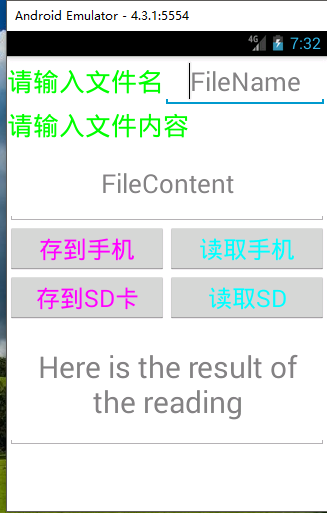
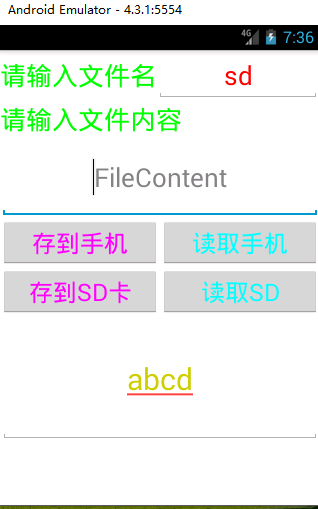
5. 部署到模擬器,進入程式後畫面如下:
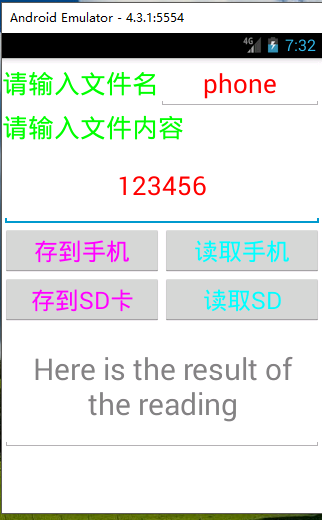
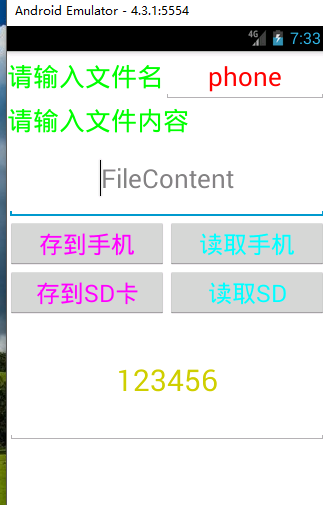
先試內部儲存:存檔成功後再讀回來。
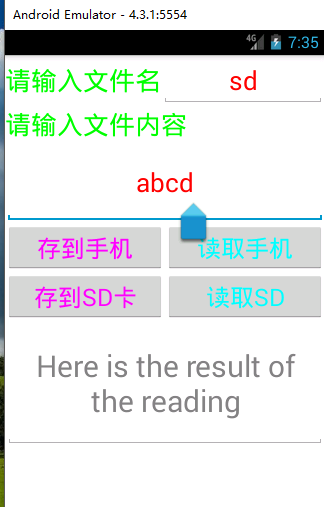
再試外部儲存:
實務上要提醒兩點:Android 6.0 起 WRITE/READ_EXTERNAL_STORAGE 屬危險權限,必須執行期動態申請;Android 10 之後更建議改用 Scoped Storage 或 SAF,直接寫 getExternalStorageDirectory() 已不再是好做法。
以上就是本文的全部內容,希望對大家的學習有所幫助。
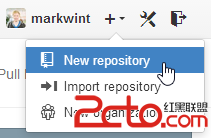 圖文教程:在 Android Studio 中接入 GitHub 完成首次推送
第一步:在 GitHub 上創建倉庫 登錄 GitHub,點擊右上角「+」,選擇 New repository。 填寫表單,新建名為 testproject 的倉庫,並
 Android 基礎筆記:網絡訪問與異步消息處理入門
這份筆記把網絡訪問、異步消息處理以及一個模仿新聞客戶端的小案例串了起來,涵蓋 GET/POST 提交數據等常見場景,適合入門鞏固。 訪問網絡資源的基本步驟 Androi
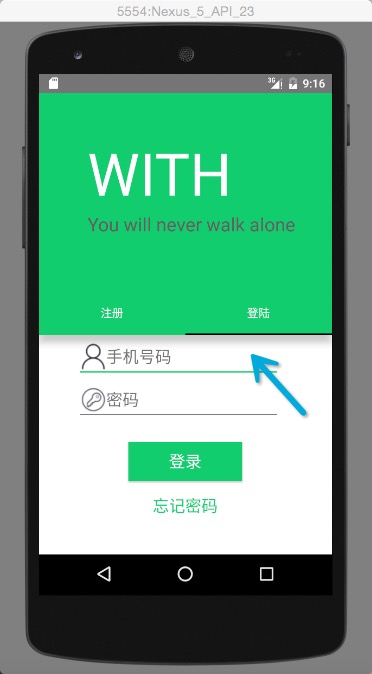 Android 自定義陰影效果:LayerDrawable 遮罩原理與實作
Android 5.x 之後,Google 加入了 android:elevation 與 android:translationZ 兩個屬性,對應垂直方向上的高度變化,
 Android 學習筆記二十:Toast 吐司、Notification 通知與 PopupWindow 彈出視窗
Toast 吐司 Toast 是我們日常開發中經常使用的元件。它是 Android 系統用來顯示訊息的一種機制,與 Dialog 不同,Toast 不會取得焦點,通常在顯