

編輯:關於 Android 程式設計
對程序員來說,做任何交易軟件最頭疼的就是實現各種指標算法。本文以 SAR 算法的實現過程為例,說明如何借助 Warensoft Stock Service 快速搭建高頻交易軟件。
目前 Warensoft Stock Service 已提供 C# 版客戶端驅動,可直接在 NuGet 上搜索 Warensoft 並安裝。該驅動已編譯為跨平台的 .NET Standard 1.6 版本,可廣泛應用於桌面程序(WPF、WinForm)、Xamarin 手機應用(WP、Android、iOS)以及 Web(ASP.NET、ASP.NET Core),支持的系統涵蓋 Windows、Android、iOS、macOS、Linux。
下面以 Android 為例(本 Demo 也可平移到 WPF),說明 SAR 指標的實現過程,其他指標的綜合應用會在後續文章專門講解。
軟件環境說明
IDE:VS2017 RC
客戶端:Android 4.4
伺服器環境:Ubuntu 16
客戶端運行環境:Xamarin.Forms
客戶端圖形組件:OxyPlot
建立一個 Xamarin.Forms 手機 App
這裡選擇基於 XAML 的 App,注意共享庫使用 PCL。
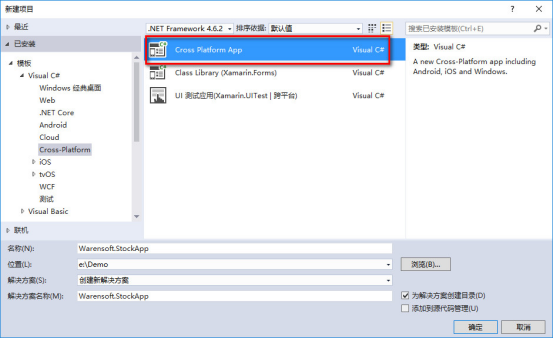
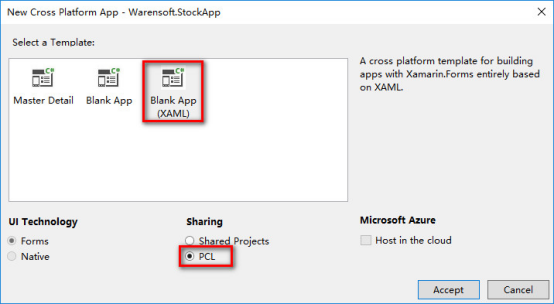
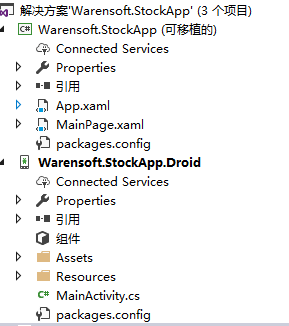
工程目錄如下圖所示:
添加 NuGet 引用包
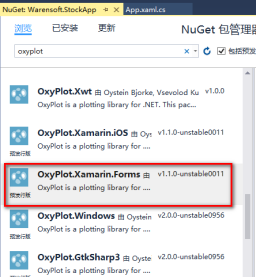
首先為 Warensoft.StockApp 共享庫添加 Oxyplot 引用(此處可能需要科學上網),如下圖:
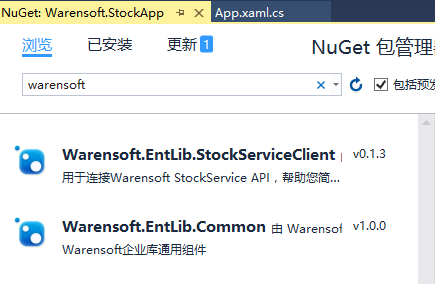
接著分別安裝 Warensoft.EntLib.Common 和 Warensoft.EntLib.StockServiceClient,如下圖:
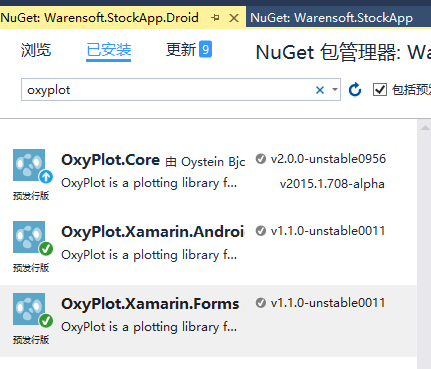
然後為 Warensoft.StockApp.Droid 添加 OxyPlot 的 NuGet 引用:
接著在 Android 的 MainActivity 中加入平台註冊代碼:
OxyPlot.Xamarin.Forms.Platform.Android.PlotViewRenderer.Init();
MainActivity.cs 代碼如下:
protected override void OnCreate(Bundle bundle) { TabLayoutResource = Resource.Layout.Tabbar; ToolbarResource = Resource.Layout.Toolbar; OxyPlot.Xamarin.Forms.Platform.Android.PlotViewRenderer.Init(); base.OnCreate(bundle); global::Xamarin.Forms.Forms.Init(this, bundle); LoadApplication(new App()); } 實現主窗口
主界面採用 MVVM 模式實現。關於 MVVM 的講解網上不勝枚舉,後續文章我也會分享自己的理解。本 Demo 的 MVVM 框架已集成在 Warensoft.EntLib.Common 中,使用起來很簡單。
第一步:編寫主界面(需了解 XAML 語法),修改 MainPage.xaml:
<?xml version="1.0" encoding="utf-8" ?> <ContentPage xmlns="https://xamarin.com/schemas/2014/forms" xmlns:x="https://schemas.microsoft.com/winfx/2009/xaml" xmlns:local="clr-namespace:Warensoft.StockApp" xmlns:oxy="clr-namespace:OxyPlot.Xamarin.Forms;assembly=OxyPlot.Xamarin.Forms" x:Class="Warensoft.StockApp.MainPage"> <!-- 此處要注意在頭中注冊OxyPlot的命名空間 xmlns:oxy="clr-namespace:OxyPlot.Xamarin.Forms;assembly=OxyPlot.Xamarin.Forms"--> <Grid> <!--此處添加圖形組件--> <oxy:PlotView Model="{Binding Model}" VerticalOptions="Center" HorizontalOptions="Center" /> </Grid> </ContentPage> 第二步:打開 MainPage.xaml.cs,為視圖添加對應的模型(注意引入 Warensoft.EntLib.Common):
public partial class MainPage : ContentPage { public MainPage() { InitializeComponent(); //此處注冊ViewModel this.BindingContext = new MainPageViewModel(); } } public class MainPageViewModel : ViewModelBase { public override Task ShowCancel(string title, string message) { throw new NotImplementedException(); } public override Task<bool> ShowConfirm(string title, string message) { throw new NotImplementedException(); } public override void ShowMessage(string message) { Application.Current.MainPage.DisplayAlert("提示",message,"OK"); } protected override void InitBindingProperties() { } } 第三步:定義圖表模型,為其添加 X、Y 坐標軸,並加入一根 K 線和一條直線:
public PlotModel Model { get { return this.GetProperty<PlotModel>("Model"); } set { this.SetProperty("Model", value); } } protected override void InitBindingProperties() { this.Model = new PlotModel(); //添加X、Y軸 this.Model.Axes.Add(new OxyPlot.Axes.DateTimeAxis() { Position = AxisPosition.Bottom, StringFormat = "HH:mm", MajorGridlineStyle = LineStyle.Solid, IntervalType = DateTimeIntervalType.Minutes, IntervalLength = 30, MinorIntervalType = DateTimeIntervalType.Minutes, Key = "Time", }); this.Model.Axes.Add(new OxyPlot.Axes.LinearAxis() { Position = AxisPosition.Right, MajorGridlineStyle = LineStyle.Solid, MinorGridlineStyle = LineStyle.Dot, IntervalLength = 30, IsPanEnabled = false, IsZoomEnabled = false, TickStyle = TickStyle.Inside, }); //添加K線和直線 this.candle = new OxyPlot.Series.CandleStickSeries(); this.line = new OxyPlot.Series.LineSeries() { Color = OxyColors.Blue }; this.Model.Series.Add(this.candle); this.Model.Series.Add(this.line); } 第四步:添加獲取 K 線的函數(以 OKCoin 為例):
/// <summary> /// 讀取OKCoin的15分鐘K線 /// </summary> /// <returns></returns> public async Task<List<Kline>> LoadKline() { var url = $"https://www.okcoin.cn/api/v1/kline.do?symbol=btc_cny&type=15min&size=100"; HttpClient client = new HttpClient(); var result = await client.GetStringAsync(url); dynamic k = Newtonsoft.Json.JsonConvert.DeserializeObject(result); List<Kline> lines = new List<Kline>(); int index = 0; foreach (var item in k) { List<double> d = new List<double>(); foreach (var dd in item) { d.Add((double)((dynamic)dd).Value); } lines.Add(new Kline() { Data = d.ToArray()}); index++; } return lines; } 第五步:添加定時刷新並繪製圖表的函數:
private StockServiceDriver driver; public async Task UpdateData() { //初始化WarensoftSocketService客戶端驅動,此處使用的是測試用AppKey和SecretKey this.driver = new StockServiceDriver("C6651783-A3B9-4B72-8B02-A2E67A59C5A6", "6C442B3AF58D4DDA81BB03B353C0D7D8"); await Task.Run(async()=> { while (true) { try { //讀取K線 var kline =await this.LoadKline(); //遠程Warensoft Stock Service 分析SAR曲線 var sar = await this.driver.GetSAR(kline); //繪圖,注意辦為需要更新UI,因此需要在主線程中執行更新代碼 this.SafeInvoke(()=> { //每次更新前,需要將舊數據清空 this.candle.Items.Clear(); this.line.Points.Clear(); foreach (var item in kline.OrderBy(k=>k.Time)) { //注意將時間改為OxyPlot能識別的格式 var time = OxyPlot.Axes.DateTimeAxis.ToDouble(item.Time); this.candle.Items.Add(new HighLowItem(time,item.High,item.Low,item.Open,item.Close)); } if (sar.OperationDone) { foreach (var item in sar.AdditionalData.OrderBy(s=>s.DateTime)) { var time= OxyPlot.Axes.DateTimeAxis.ToDouble(item.DateTime); this.line.Points.Add(new DataPoint(time, item.Value)); } } //更新UI this.Model.InvalidatePlot(true); }); } catch (Exception ex) { } await Task.Delay(5000); } }); } 完整的 ViewModel 代碼如下:
using System; using System.Collections.Generic; using System.Linq; using System.Text; using System.Threading.Tasks; using Xamarin.Forms; using Warensoft.EntLib.Common; using Warensoft.EntLib.StockServiceClient; using OxyPlot; using OxyPlot.Axes; using OxyPlot.Series; using Warensoft.EntLib.StockServiceClient.Models; using System.Net.Http; namespace Warensoft.StockApp { public partial class MainPage : ContentPage { public MainPage() { InitializeComponent(); this.BindingContext = new MainPageViewModel(); } } public class MainPageViewModel : ViewModelBase { private CandleStickSeries candle; private LineSeries line; public override Task ShowCancel(string title, string message) { throw new NotImplementedException(); } public override Task<bool> ShowConfirm(string title, string message) { throw new NotImplementedException(); } public override void ShowMessage(string message) { Application.Current.MainPage.DisplayAlert("提示",message,"OK"); } public PlotModel Model { get { return this.GetProperty<PlotModel>("Model"); } set { this.SetProperty("Model", value); } } protected override void InitBindingProperties() { this.Model = new PlotModel(); //添加X、Y軸 this.Model.Axes.Add(new OxyPlot.Axes.DateTimeAxis() { Position = AxisPosition.Bottom, StringFormat = "HH:mm", MajorGridlineStyle = LineStyle.Solid, IntervalType = DateTimeIntervalType.Minutes, IntervalLength = 30, MinorIntervalType = DateTimeIntervalType.Minutes, Key = "Time", }); this.Model.Axes.Add(new OxyPlot.Axes.LinearAxis() { Position = AxisPosition.Right, MajorGridlineStyle = LineStyle.Solid, MinorGridlineStyle = LineStyle.Dot, IntervalLength = 30, IsPanEnabled = false, IsZoomEnabled = false, TickStyle = TickStyle.Inside, }); //添加K線和直線 this.candle = new OxyPlot.Series.CandleStickSeries(); this.line = new OxyPlot.Series.LineSeries() { Color = OxyColors.Blue }; this.Model.Series.Add(this.candle); this.Model.Series.Add(this.line); this.UpdateData(); } /// <summary> /// 讀取OKCoin的15分鐘K線 /// </summary> /// <returns></returns> public async Task<List<Kline>> LoadKline() { var url = $"https://www.okcoin.cn/api/v1/kline.do?symbol=btc_cny&type=15min&size=100"; HttpClient client = new HttpClient(); var result = await client.GetStringAsync(url); dynamic k = Newtonsoft.Json.JsonConvert.DeserializeObject(result); List<Kline> lines = new List<Kline>(); int index = 0; foreach (var item in k) { List<double> d = new List<double>(); foreach (var dd in item) { d.Add((double)((dynamic)dd).Value); } lines.Add(new Kline() { Data = d.ToArray()}); index++; } return lines; } private StockServiceDriver driver; public async Task UpdateData() { //初始化WarensoftSocketService客戶端驅動,此處使用的是測試用AppKey和SecretKey this.driver = new StockServiceDriver("C6651783-A3B9-4B72-8B02-A2E67A59C5A6", "6C442B3AF58D4DDA81BB03B353C0D7D8"); await Task.Run(async()=> { while (true) { try { //讀取K線 var kline =await this.LoadKline(); //遠程Warensoft Stock Service 分析SAR曲線 var sar = await this.driver.GetSAR(kline); //繪圖,注意辦為需要更新UI,因此需要在主線程中執行更新代碼 this.SafeInvoke(()=> { //每次更新前,需要將舊數據清空 this.candle.Items.Clear(); this.line.Points.Clear(); foreach (var item in kline.OrderBy(k=>k.Time)) { //注意將時間改為OxyPlot能識別的格式 var time = OxyPlot.Axes.DateTimeAxis.ToDouble(item.Time); this.candle.Items.Add(new HighLowItem(time,item.High,item.Low,item.Open,item.Close)); } if (sar.OperationDone) { foreach (var item in sar.AdditionalData.OrderBy(s=>s.DateTime)) { var time= OxyPlot.Axes.DateTimeAxis.ToDouble(item.DateTime); this.line.Points.Add(new DataPoint(time, item.Value)); } } //更新UI this.Model.InvalidatePlot(true); }); } catch (Exception ex) { } await Task.Delay(5000); } }); } } }最後編譯並部署到手機上,運行效果如下圖:
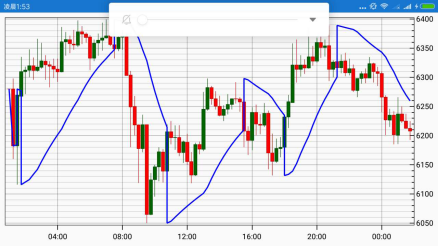
至此,一個能實時拉取 K 線、遠程計算 SAR 並動態繪製的高頻交易原型就完成了。編譯後的 APK 文件可點擊下載。
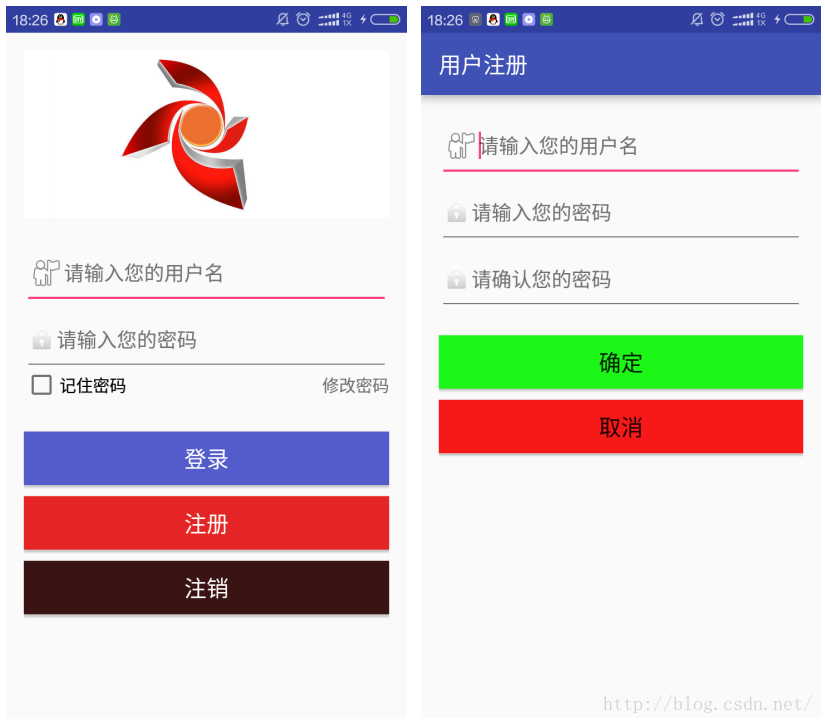 Android 登入註冊介面開發與使用者資訊管理完整實作詳解
剛開始學 Android 時寫的第一個小專案,功能是登入、註冊、註銷、修改密碼、記住密碼這五個基本操作,涵蓋的知識點有三塊: 1. Button、TextView、Edi
 Android 應用源碼分享:仿微信 5.2 版面配置
本文分享一份仿微信 5.2 風格的版面配置範例,預設採 GBK 編碼,有興趣的朋友可以下載來研究一下,從中學習到類似的介面排版與互動設計思路。【點擊下載】
 Android 將指定 App 圖示集中到彈出視窗
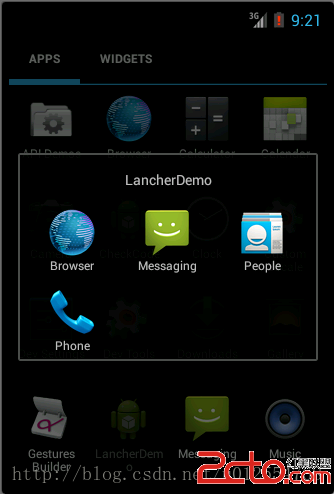
有些啟動器或工具型 App 會希望只顯示部分應用程式圖示,並以彈出視窗呈現。這可以透過 PackageManager 查詢已安裝應用,再自行過濾需要的套件名稱來完成。版面
 Android layout_weight 權重機制深度解析
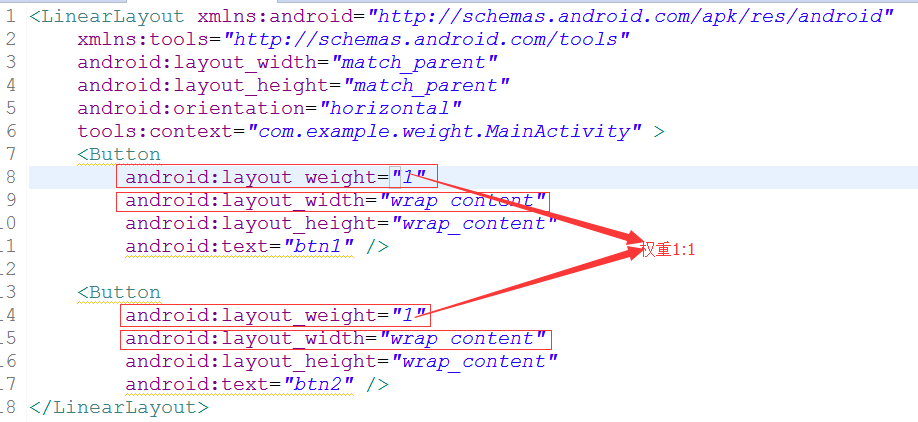
layout_weight 是 LinearLayout 中常用的布局屬性,用於按比例分配剩餘空間。很多開發者只把它理解為「比例」,但實際上,它的效果會受到子 View