

編輯:關於 Android 程式設計
搜尋框在輸入時即時提示候選字,靠的就是 AutoCompleteTextView;若要一次輸入多筆(例如寄信收件人),則用 MultiAutoCompleteTextView。這裡還牽涉到一個關鍵概念——Tokenizer(分詞器),它決定「從哪裡開始算是一個待補全的詞」。
先看成果:
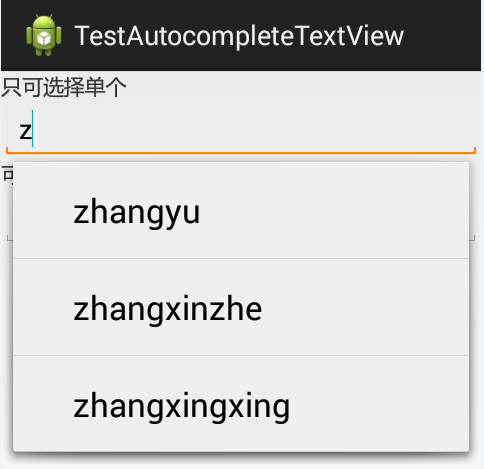
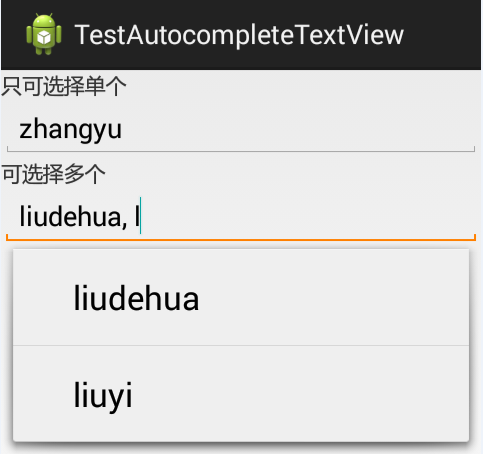
package com.joan.testautocomletetextview; import android.R.array; import android.os.Bundle; import android.app.Activity; import android.content.res.Resources; import android.view.Menu; import android.widget.ArrayAdapter; import android.widget.AutoCompleteTextView; import android.widget.MultiAutoCompleteTextView; import android.widget.MultiAutoCompleteTextView.Tokenizer; public class MainActivity extends Activity { AutoCompleteTextView actv; MultiAutoCompleteTextView mactv; @Override protected void onCreate(Bundle savedInstanceState) { super.onCreate(savedInstanceState); setContentView(R.layout.activity_main); actv = (AutoCompleteTextView) findViewById(R.id.actv); mactv = (MultiAutoCompleteTextView) findViewById(R.id.mactv); // 取到Strings.xml中定義的數組 String[] names = this.getResources().getStringArray(R.array.names); // 適配器 // 第三個參數是數據源 // 第二個參數是樣式資源的id ArrayAdapter<String> adapter = new ArrayAdapter<String>(this, android.R.layout.simple_expandable_list_item_1, names); // =============只能選擇單個的自動補全===================== actv.setAdapter(adapter); // =============可選擇多個的自動補全===================== // Tokenizer分詞器,分解器 // MultiAutoCompleteTextView.CommaTokenizer();這個簡易的分解器可用於對由逗號和若干空格分割的列表進行分解. Tokenizer t = new MultiAutoCompleteTextView.CommaTokenizer(); mactv.setAdapter(adapter); mactv.setTokenizer(t); } }
<?xml version="1.0" encoding="utf-8"?> <resources> <string name="app_name">TestAutocompleteTextView</string> <string name="action_settings">Settings</string> <string name="hello_world">Hello world!</string> <!--定義一個數組 --> <string-array name="names"> <item >zhangyu</item> <item >zhangxinzhe</item> <item >zhangxingxing</item> <item >liudehua</item> <item >liuyi</item> </string-array> </resources>
<LinearLayout xmlns:android="https://schemas.android.com/apk/res/android" xmlns:tools="https://schemas.android.com/tools" android:layout_width="match_parent" android:layout_height="match_parent" android:orientation="vertical" > <TextView android:layout_width="wrap_content" android:layout_height="wrap_content" android:text="只可選擇單個" /> <!--AutoCompleteTextView 自動補全,只能選擇一個值 android:completionThreshold="1" 輸入第一個字後自動補全 --> <AutoCompleteTextView android:id="@+id/actv" android:layout_width="match_parent" android:layout_height="wrap_content" android:hint="請輸入搜索的名字" android:completionThreshold="1" /> <TextView android:layout_width="wrap_content" android:layout_height="wrap_content" android:text="可選擇多個" /> <!--MultiAutoCompleteTextView 可以選擇多個值 --> <MultiAutoCompleteTextView android:id="@+id/mactv" android:layout_width="match_parent" android:layout_height="wrap_content" android:hint="請輸入搜索的名字" android:completionThreshold="1" /> </LinearLayout>
幾個實務重點:completionThreshold="1" 表示輸入一個字就開始提示,設為 2 則需輸入兩個字,能大幅減少高頻字的噪音提示。而 CommaTokenizer 的作用正是告訴 MultiAutoCompleteTextView「遇到逗號就算一個詞結束」,因此使用者可以在同一個輸入框中連續輸入多個人名,每輸入一段逗號後再打下一個就會重新觸發補全。若要搭配自訂樣式的提示清單,則需自行撰寫 Adapter 並提供自訂的 dropdown 版面。
 Android 文字環繞圖片:計算可容納字數與分段排版
文字環繞圖片的效果,關鍵在於計算圖片佔據的高度,再推算右側與下方 TextView 可容納的字數。實作時可先透過 ViewTreeObserver 取得圖片實際寬高,再以
 百度神卡怎麼獲取?百度神卡獲得方法
近來互聯網大廠紛紛推出自家流量卡:騰訊的大王卡/小王卡、支付寶的螞蟻大寶卡/小寶卡、滴滴的王卡等等。雖然都有使用限制,但比起傳統運營商的套餐,無論是資費還是靈活度都友好不
 Android 靈活佈局:用 XML 檔取代拖拉排版
一開始接觸 Android 時,我只會用拖拉的方式排版,既死板又難看。後來才發現,原來它和 JSP 一樣,可以靈活地使用 XML 檔來定義佈局,效果立刻大為改善。 話不多
 深入解析 Android 的 MVC 設計模式實戰
轉眼間,我與 Android 開發已相伴走過了兩年時光。這段日子裡,我基本把 Android 的基礎知識摸了个透。可越往深處鑽研,越感到吃力——一方面自以為 Androi