

編輯:關於 Android 程式設計
Service 是 Android 四大元件之一,也是最容易被誤解的一個——很多人直覺地把它當成「背景執行緒」,事實上兩者完全不同。本文把 Service 的分類、與 Thread 的差異、生命週期,以及 startService / bindService 的用法完整梳理一次。
本地服務(Local):依附在主進程上,因此不需要 IPC,也不用寫 AIDL,bindService 特別方便,資源佔用也較少。缺點是主進程被回收後服務隨之終止。音樂播放服務是最典型的例子。
遠端服務(Remote):運行於獨立進程,進程名為「套件名 + android:process 指定的字串」。因為是獨立進程,其他進程被回收時它仍能存活,適合提供跨進程服務;代價是佔用資源較多,且必須透過 AIDL 溝通。這類服務多見於系統層級。
前台服務:會在通知列顯示持續性通知,服務結束時通知也一併消失,使用者能清楚感知服務狀態,例如音樂播放。
背景服務:預設型態,不出現在通知列,服務結束時使用者看不到任何提示,適合天氣更新、日曆同步這類不需打擾使用者的工作。
startService 啟動:適合單向執行背景任務,不做溝通,以 stopService 停止。
bindService 啟動:適合需要與服務雙向溝通的場景,以 unbindService 解除綁定。
兩者併用:同時啟動又綁定,停止時必須 stopService 與 unbindService 都呼叫,服務才會真正結束。
這是面試與閱讀源碼時最常見的混淆點,釐清如下:
Thread 是程式執行的最小單位,也是 CPU 調度的基本單位,用來跑非同步運算。
Service 是 Android 的一種元件機制。Local Service 的 onCreate、onStart 等回呼都跑在主進程的 main 執行緒上;Remote Service 則跑在獨立進程的 main 執行緒上。也就是說,Service 本身不具備執行緒能力,若要在 Service 中做耗時工作,一樣得自己開 Thread 或改用 JobIntentService / WorkManager。
那為什麼不直接用 Thread?關鍵在於「生命週期歸屬」。Thread 的存活與 Activity 無關:Activity finish 之後,若 Thread 沒自行結束,它仍會繼續跑,但此時你已經失去對它的參照,也無法從另一個 Activity 去控制同一個 Thread。
Service 正好解決這個問題。系統對同一 Service 只會維持一個實例,任何持有 Context 的地方都能用 startService、stopService、bindService、unbindService 去控制它,也可以在 Service 中註冊 BroadcastReceiver,由外部發送廣播來指揮它。這些都是裸 Thread 做不到的。
一句話總結:Service 比較像一個「可被多方控制的消息服務端」,而不是執行緒。
核心回呼只有四個:onCreate、onStart(2.0 之後為 onStartCommand)、onBind、onDestroy。
1. 被啟動的服務:以 startService 啟動後,無論是否有 Activity 綁定,服務都會持續在背景運行。重複啟動時 onCreate 只會呼叫一次,onStart 則依啟動次數被呼叫多次,且系統永遠只維護一個實例——所以只需一次 stopService 即可終止。
2. 被綁定的服務:以 bindService 綁定時,不論呼叫幾次,onCreate 只執行一次,onStart 完全不會被觸發。連線建立後服務持續運行,直到呼叫 unbindService,或發起綁定的 Context 消失(例如 Activity finish),系統才會停止服務並回呼 onDestroy。
3. 又被啟動又被綁定的服務:onCreate 依然只呼叫一次,onStart 依啟動次數呼叫。此時呼叫 unbindService 不會停止服務,必須再呼叫 stopService 或 stopSelf 才行。
4. 服務停止時:onDestroy 被呼叫,應在此釋放資源,例如停止在 Service 中建立的執行緒、解除註冊廣播接收器等。
1. 呼叫 bindService 之後,一定要在某處對應地呼叫 unbindService(雖然 Activity finish 時會自動解除並停止服務,但不應依賴此行為)。
2. 使用 startService 啟動後,無論是否 ALSO 綁定,都必須以 stopService 收尾。
3. 兩者併用時,unbindService 與 stopService 必須同時呼叫才會真正終止服務;不論呼叫順序,只做其中一半服務都不會結束。
4. 螢幕旋轉時 Activity 會重建,先前以 bindService 建立的連線因 Context 消失而中斷,服務行為依上述規則處理。
5. SDK 2.0 之後,onStart 已被 onStartCommand 取代(舊方法仍可用但不再建議)。
無論 Local 或 Remote,都別忘了在 AndroidManifest.xml 註冊 Service。基本骨架如下:
public class LocalService1 extends Service {

    /** onBind 為抽象方法必須實作,回傳 null 表示不允許外部綁定 */
    @Override
    public IBinder onBind(Intent intent) {
        return null;
    }

    @Override
    public void onCreate() {
        super.onCreate();
    }

    @Override
    public int onStartCommand(Intent intent, int flags, int startId) {
        return super.onStartCommand(intent, flags, startId);
    }

    @Override
    public void onDestroy() {
        super.onDestroy();
    }
}
啟動與停止的呼叫端:
startService(new Intent(this, LocalService1.class));
// ...
stopService(new Intent(this, LocalService1.class));
Local Service 的綁定相當單純:在 Service 中繼承 Binder(它已實作 IBinder),提供取得 Service 實例與自訂方法的能力,再由 onBind 回傳。
public class LocalService extends Service {

    public class SimpleBinder extends Binder {
        /** 取得 Service 實例 */
        public LocalService getService() {
            return LocalService.this;
        }
        public int add(int a, int b) {
            return a + b;
        }
    }

    public SimpleBinder sBinder;

    @Override
    public void onCreate() {
        super.onCreate();
        sBinder = new SimpleBinder();
    }

    @Override
    public IBinder onBind(Intent intent) {
        return sBinder;
    }
}
Activity 端透過 ServiceConnection 接收連線建立與中斷的回呼:
public class Main extends Activity {
    private ServiceConnection sc;
    private boolean isBind;

    @Override
    public void onCreate(Bundle savedInstanceState) {
        super.onCreate(savedInstanceState);
        setContentView(R.layout.main);

        sc = new ServiceConnection() {
            @Override
            public void onServiceDisconnected(ComponentName name) { }

            @Override
            public void onServiceConnected(ComponentName name, IBinder service) {
                LocalService.SimpleBinder sBinder = (LocalService.SimpleBinder) service;
                Log.v("SERVICE_TEST", "3 + 5 = " + sBinder.add(3, 5));
                Log.v("SERVICE_TEST", sBinder.getService().toString());
            }
        };

        findViewById(R.id.btnBind).setOnClickListener(new OnClickListener() {
            @Override
            public void onClick(View v) {
                bindService(new Intent(Main.this, LocalService.class),
                            sc, Context.BIND_AUTO_CREATE);
                isBind = true;
            }
        });

        findViewById(R.id.btnUnbind).setOnClickListener(new OnClickListener() {
            @Override
            public void onClick(View v) {
                if (isBind) {
                    unbindService(sc);
                    isBind = false;
                }
            }
        });
    }
}
bindService 有三個參數:用來標識服務的 Intent、實作 ServiceConnection 的物件,以及旗標。常用旗標為 BIND_AUTO_CREATE;unbindService 則傳入先前那個 ServiceConnection 物件。要注意重複 unbindService 同一個連線會拋出例外,因此程式中用一個 boolean 記錄狀態是實務上的好習慣。

至於 Remote 服務的綁定,因為涉及跨進程,需要透過 AIDL 定義介面,細節可另立專文說明。
另外提醒:若 onBind 回傳 null,bindService 仍會啟動 Service,但 onServiceConnected 不會被呼叫,而你依然必須呼叫 unbindService 才能讓服務停止。
SDK 2.0 之後使用 startForeground / stopForeground,舊版本則是 setForeground。若要同時相容舊版本,可用反射呼叫新方法:
public class ForegroundService extends Service {
    private static final Class[] mStartForegroundSignature =
            new Class[] { int.class, Notification.class };
    private static final Class[] mStopForegroundSignature =
            new Class[] { boolean.class };

    private NotificationManager mNM;
    private Method mStartForeground;
    private Method mStopForeground;
    private Object[] mStartForegroundArgs = new Object[2];
    private Object[] mStopForegroundArgs  = new Object[1];

    @Override
    public IBinder onBind(Intent intent) { return null; }

    @Override
    public void onCreate() {
        super.onCreate();
        mNM = (NotificationManager) getSystemService(Context.NOTIFICATION_SERVICE);
        try {
            mStartForeground = ForegroundService.class
                    .getMethod("startForeground", mStartForegroundSignature);
            mStopForeground = ForegroundService.class
                    .getMethod("stopForeground", mStopForegroundSignature);
        } catch (NoSuchMethodException e) {
            mStartForeground = mStopForeground = null;
        }

        // 前台服務的通知會自動帶上 FLAG_ONGOING_EVENT,不需自行設定
        Notification notification =
                new Notification(R.drawable.icon, "Foreground Service Started.",
                                 System.currentTimeMillis());
        PendingIntent contentIntent = PendingIntent.getActivity(
                this, 0, new Intent(this, Main.class), 0);
        notification.setLatestEventInfo(this, "Foreground Service",
                "Foreground Service Started.", contentIntent);

        // 注意:id 為 0 時通知不會顯示
        startForegroundCompat(1, notification);
    }

    @Override
    public void onDestroy() {
        super.onDestroy();
        stopForegroundCompat(1);
    }

    private void startForegroundCompat(int id, Notification n) {
        if (mStartForeground != null) {
            mStartForegroundArgs[0] = id;
            mStartForegroundArgs[1] = n;
            try {
                mStartForeground.invoke(this, mStartForegroundArgs);
            } catch (Exception e) {
                e.printStackTrace();
            }
            return;
        }
        setForeground(true);
        mNM.notify(id, n);
    }

    private void stopForegroundCompat(int id) {
        if (mStopForeground != null) {
            mStopForegroundArgs[0] = Boolean.TRUE;
            try {
                mStopForeground.invoke(this, mStopForegroundArgs);
            } catch (Exception e) {
                e.printStackTrace();
            }
            return;
        }
        // 先 cancel 再 setForeground(false),避免在取消前台狀態的瞬間被回收,
        // 導致通知永遠留在通知欄
        mNM.cancel(id);
        setForeground(false);
    }
}
若只是要長期在背景跑一項任務,startService 就夠了。
若需要與執行中的 Service 取得聯繫,有兩條路:一是廣播,二是 bindService。廣播在溝通頻繁時容易造成效能負擔,且 BroadcastReceiver 的 onReceive 執行時間很短(甚至逾時後續程式碼不會執行完),因此更推薦 bindService——這時你其實就同時在用 startService 與 bindService,這在 Activity 中更新 Service 運行狀態時非常實用。
另外,如果你的服務只是對外公開一組遠端介面供用戶端呼叫,可以只用 bindService,讓服務在第一次綁定時才建立實例,能省下不少資源;Remote Service 的效果會更明顯。當然,首次建立會有額外時間成本,這點要納入考量。
android:name:服務類別名稱。
android:label:服務顯示名稱,不設定則預設為類別名。
android:icon:服務圖示。
android:permission:宣告存取此服務所需的權限。
android:process:指定服務運行於另一個進程,值會附加在套件名之後作為進程名。
android:enabled:是否允許系統啟動此服務,預設為 true。
android:exported:是否允許其他應用程式控制或連線此服務,預設為 false。
掌握「Service 不是執行緒、而是可被多方控制的元件」這個核心觀念,再搭配生命週期規則去判斷該用 startService 還是 bindService,多數情境都能做出正確選擇。
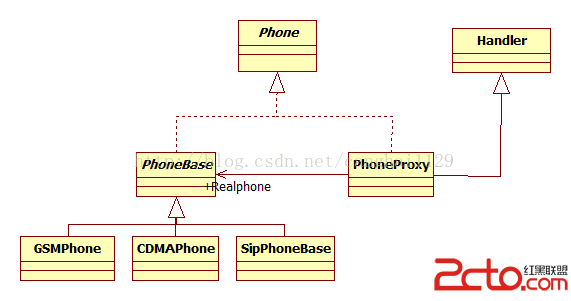 Android 與設計模式——代理(Proxy)模式
閻宏博士在《JAVA 與模式》一書的開篇,對代理(Proxy)模式下了這樣的定義: 代理模式屬於對象的結構型模式。它為某個對象提供一個代理對象,並由代理對象來控制對原對象
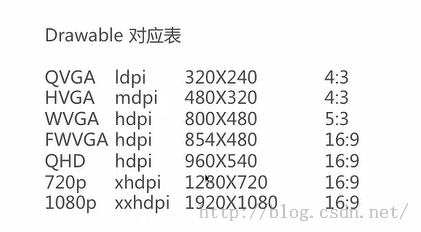 Android .9 圖(Nine-patch)完全上手:讓背景圖怎麼拉都不變形
做 Android UI 的人都遇過同一個場景:設計師給的圖在設計稿上很漂亮,放進 App 一拉伸、一換解析度,圓角被壓扁、邊框變粗、文字還歪一邊。與其為每種解析度各做一
 Android 自定義 View:單行上下滾動公告
在許多 App 首頁,公告欄會以單行方式持續上下輪播。看似簡單,其實需要處理文字切換、動畫位移與定時更新。 實作思路 可以自訂一個 LinearLayout,內部放置兩
 監聽 ScrollView 滾動實現懸浮吸頂效果:重現美團、大眾點評的購買欄
行動裝置幾乎成了每個人的隨身配備,而決定一個 App 好不好的,除了功能本身,使用者體驗與介面細節往往才是關鍵。最近在美團與大眾點評上看到一個很貼心的設計:往下滑動時,「