

編輯:關於 Android 程式設計
AIDL(Android Interface Definition Language)是一種描述 Android 內部進程通訊(IPC)介面的語言,讓我們能定義跨進程的方法呼叫。當一個應用的 Service 運行在獨立進程中時,AIDL 便是實現雙方通訊的標準方案。
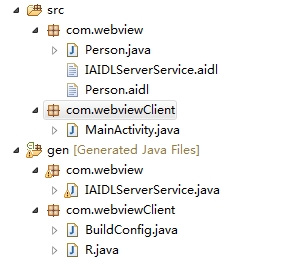
IPC(Interprocess Communication)即進程間通訊。AIDL 的語法類似 Java,但有幾個關鍵限制:它可以引用其他 aidl 檔中定義的介面與類別,卻不能直接引用自訂 Java 類;若要傳遞自訂物件,必須為該類別也定義一個對應的 aidl 檔,且該類別需實作 Parcelable 介面,並與 aidl 檔放在相同套件下。Android 內建 aidl 編譯器,定義好 aidl 檔後會自動在 gen 目錄生成對應的 Java 檔。
本範例定義了兩個 aidl 檔,其中 Person 實作了 Parcelable:
// Person.aidl
parcelable Person;

// IAIDLServerService.aidl
package com.webview;
import com.webview.Person; // 引用上面的 Person.aidl

interface IAIDLServerService {
    String sayHello();
    Person getPerson();
}編寫一個 Service 來實作 aidl 介面中自動生成的抽象內部類 Stub(它繼承自 Binder 並實作了我們定義的介面)。Stub 意為「存根」,運行於服務端進程。而 onBind() 方法會回傳一個 IBinder 物件給客戶端:
public class AIDLServerService extends Service {
    @Override
    public IBinder onBind(Intent intent) {
        return binder;
    }
    private IAIDLServerService.Stub binder = new Stub() {
        @Override
        public String sayHello() throws RemoteException {
            return "Hello AIDL";
        }
        @Override
        public Person getPerson() throws RemoteException {
            Person person = new Person();
            person.setName("Livingstone");
            person.setAge(22);
            return person;
        }
    };
}將 Service 註冊進清單檔,並透過 android:process=":remote" 讓它運行於獨立進程:
<service android:name="com.webview.AIDLServerService"
    android:process=":remote">
    <intent-filter>
        <action android:name="com.webview.IAIDLServerService"></action>
    </intent-filter>
</service>客戶端需保留一份相同的 aidl 介面描述檔。透過 bindService 綁定服務,並在 ServiceConnection 中把回傳的 IBinder 轉為介面物件。此後對該物件方法的呼叫,實際上都是在服務端進程中執行的:
public class MainActivity extends Activity {
    private Button btn;
    private IAIDLServerService aidlService = null;
    private ServiceConnection conn = new ServiceConnection() {
        @Override
        public void onServiceDisconnected(ComponentName name) {
            aidlService = null;
        }
        @Override
        public void onServiceConnected(ComponentName name, IBinder service) {
            aidlService = IAIDLServerService.Stub.asInterface(service);
            try {
                aidlService.doFunction(); // 執行介面定義的方法(實際在服務端執行)
            } catch (RemoteException e) {
                e.printStackTrace();
            }
        }
    };
    @Override
    protected void onCreate(Bundle savedInstanceState) {
        super.onCreate(savedInstanceState);
        setContentView(R.layout.activity_main);
        btn = (Button) findViewById(R.id.button);
        btn.setOnClickListener(new OnClickListener() {
            @Override
            public void onClick(View v) {
                Intent service = new Intent("com.webview.IAIDLServerService");
                bindService(service, conn, BIND_AUTO_CREATE); // 綁定服務
            }
        });
    }
}
透過 AIDL,你能讓運行在不同進程中的元件如同本地呼叫般順暢通訊,這是 Android 跨進程通訊最正統而強大的方式。
 Android 6.0 動態權限管理:危險權限與適配做法
前言 Android 6.0 之後,應用程式不再是在安裝時一次取得所有權限,而是改為執行中的動態授權。這個變更讓使用者對隱私資料有更高控制權,也讓開發者必須在執行階段處理
 Android 開發系列(二十三):打造帶圖示的自定義 Toast 提示框
Toast 是 Android 中最常見的輕量提示元件,但預設樣式只是一行純文字。若想讓提示更具辨識度,可以放進圖示,甚至完全自定義版面。 實作起來並不難,核心只有兩步:
 msm8909 Android 5.1.1 打開調試串口
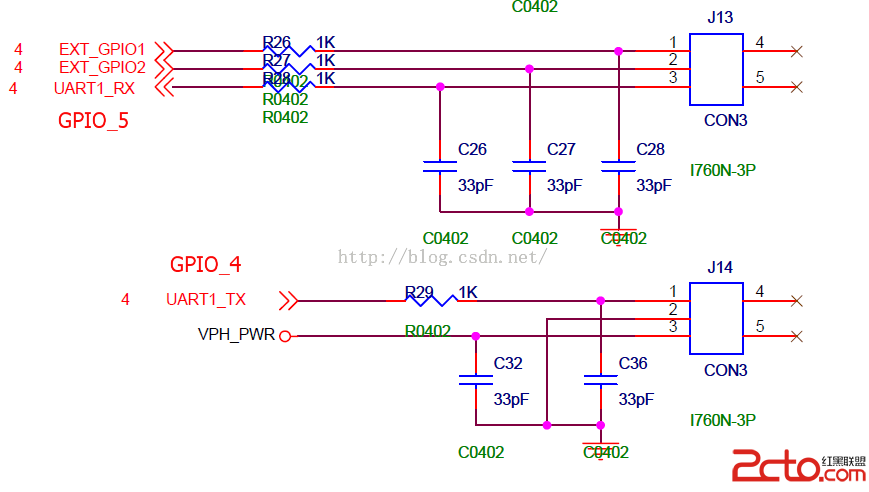
本文記錄在 msm8909 平台上開啟 Android 5.1.1 調試串口的方法。不同主板版本使用的 UART 與 GPIO 不同,需要修改的代碼也不同。公共配置內核需
 仿 QQ 空間相冊橫向滑動展示多圖:MyHorizontalScrollView 實作
動手客製化吧 版面配置檔:activity_main.xml 版面配置檔:activity_index_gallery_item.xml