

編輯:關於 Android 程式設計
行動裝置不直接連線資料庫,而是透過後端 API 以 JSON 交換資料——這是 Android 與 MySQL 溝通最典型的架構。本文示範讀取方向的完整流程:發送 HTTP 請求 → 取得 JSON 字串 → 解析成 Java 物件。
parseJsonMulti() 負責把伺服器回傳的字串解析成可用資料。這裡有個實務上的小技巧:先用 indexOf("[") 把字串開頭的雜訊切掉,避免因為伺服器回傳了 BOM 或額外訊息導致解析失敗。
private void parseJsonMulti(String strResult) {
    try {
        Log.v("strResult11", "strResult11=" + strResult);
        int index = strResult.indexOf("[");
        if (index > 0) strResult = strResult.substring(index, strResult.length());
        Log.v("strResult22", "strResult22=" + strResult);

        wifiMapData = new JSONArray(strResult);
        Log.v("wifiMapDataLength", "" + wifiMapData.length());

        for (int i = 0; i < wifiMapData.length(); i++) {
            JSONObject jsonObject = wifiMapData.getJSONObject(i);
            int id = Integer.parseInt(jsonObject.getString("id"));
            String mac_address = jsonObject.getString("mac_address"); // wifi 的 mac 地址
            String wifi_name = jsonObject.getString("wifi_name");     // ssid

            if (!jsonObject.isNull("lat") && !jsonObject.isNull("lon")) {
                lat = Double.valueOf(jsonObject.getString("lat"));// 緯度
                lon = Double.valueOf(jsonObject.getString("lon"));// 經度
            }
            String location_name = jsonObject.getString("location_name");
            String wifi_adds = jsonObject.getString("wifi_adds");    // 具體到多少路多少號
            String area = jsonObject.getString("area");              // 哪個行政區
            String location_type = jsonObject.getString("location_type");
            String ap_free = jsonObject.getString("ap_free");        // ap 是否免費
            String category = jsonObject.getString("category");
            String password = jsonObject.getString("password");
            String capabilities = jsonObject.getString("capabilities");
            String user_score = jsonObject.getString("user_score");
            String NW_score = jsonObject.getString("NW_score");
        }
    } catch (JSONException e) {
        System.out.println("Jsons parse error !");
        e.printStackTrace();
    }
}
這裡刻意對 lat、lon 做了 isNull() 檢查——因為這兩個欄位在資料庫中很可能為 NULL,直接 getString() 會拿到字串 "null" 進而導致 NumberFormatException。這類防禦性寫法在解析外部資料時是基本禮儀。
private String connServerForResult(String strUrl) {
    HttpGet httpRequest = new HttpGet(strUrl);
    String strResult = "";
    try {
        HttpClient httpClient = new DefaultHttpClient();
        HttpResponse httpResponse = httpClient.execute(httpRequest);
        if (httpResponse.getStatusLine().getStatusCode() == HttpStatus.SC_OK) {
            strResult = EntityUtils.toString(httpResponse.getEntity());
        }
    } catch (ClientProtocolException e) {
        Toast.makeText(Setting.this, "protocol error", Toast.LENGTH_SHORT).show();
        e.printStackTrace();
    } catch (IOException e) {
        Toast.makeText(Setting.this, "IO error", Toast.LENGTH_SHORT).show();
        e.printStackTrace();
    }
    return strResult;
}
String strUrl1 = "https://192.168.1.2/call_for_wifiMapData.php";
// 獲得返回的 Json 字符串
String strResult1 = connServerForResult(strUrl1);
Log.v("strResult1", strResult1);
parseJsonMulti(strResult1);
只有三行,記得把網址換成你自己的 PHP 檔案路徑。
<?php
$jsonArrayString = $_POST["jsonArrayString"];
$jsonString = $_POST["jsonString"];
$objArray = json_decode($jsonArrayString, true);
$obj = json_decode($jsonString);

$lon = (float)$obj->lon;
$lat = (float)$obj->lat;
$distance = (float)$obj->distance;

if ($lat == null || $lat == 0) {
    $lat = 39.990132;
    $lon = 116.332224;
    $distance = 100000;
}

// 將 wifi 表中與點 (lat, lon) 距離小於 distance 的點打包回來
$con = mysql_connect("localhost", "root", null);
if (!$con) {
    die('Could not connect: ' . mysql_error());
}
mysql_select_db("a0722152915", $con);
mysql_query("set names 'utf8'");

$sqlfind = "select * from `wifi`";
$resultFind = mysql_query($sqlfind, $con);
$length = mysql_num_rows($resultFind);
$arr = array();
$j = 0;
for ($i = 0; $i < $length; $i++) {
    $row = mysql_fetch_array($resultFind);
    $arr[$j]['id'] = $row['id'];
    $arr[$j]['mac_address'] = $row['mac_address'];
    $arr[$j]['wifi_name'] = $row['wifi_name'];
    $arr[$j]['lat'] = $row['gps_lat'];
    $arr[$j]['lon'] = $row['gps_lon'];
    $arr[$j]['location_name'] = $row['location_name'];
    $arr[$j]['wifi_adds'] = $row['wifi_adds'];
    $arr[$j]['area'] = $row['area'];
    $arr[$j]['location_type'] = $row['location_type'];
    $arr[$j]['ap_free'] = $row['ap_free'];
    $arr[$j]['category'] = $row['category'];
    $arr[$j]['password'] = $row['password'];
    $arr[$j]['capabilities'] = $row['capabilities'];
    $arr[$j]['user_score'] = $row['user_score'];
    $arr[$j]['NW_score'] = $row['NW_score'];
    $j++;
}
echo json_encode($arr);
?>
Android 4.0 以上:主執行緒不能進行網路操作,必須把請求放到背景執行緒,或是以 StrictMode 放寬政策(僅供除錯,正式專案不建議)。寫入方向的說明請參考姊妹篇。
字元編碼:PHP 端務必下達 set names 'utf8',否則中文欄位會在傳輸過程中變成亂碼。Android 端解析時也建議以 UTF-8 解碼。
必須坦白說明:範例中的 DefaultHttpClient、HttpGet 已在 Android 6.0 被移除,PHP 的 mysql_* 系列函式也在 PHP 7 正式退休。這份程式碼的價值在於說明資料流動的骨架,而非可直接複用的實作。在真實專案中請改用:
把「請求 → 解析 → 對應到模型」這條主線理解清楚,換成任何框架都只是語法差異而已。
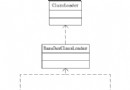 Android 動態加載 Dex 機制解析
動態加載 Dex 是 Android 中常見的進階技術,常用於外掛化、熱修復與模組化。其核心概念,是在應用執行時載入額外的 dex 或 jar,並透過類別載入器取得其中的
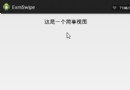 Android 下拉刷新 SwipeRefreshLayout 使用指南:ListView 與 RecyclerView
SwipeRefreshLayout 的定位 SwipeRefreshLayout 是 Android Support Library 提供的下拉刷新布局。使用者向下滑動
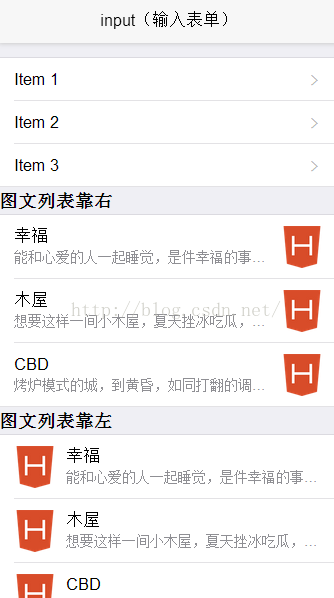 MUI組件詳解(三):列表、遮罩蒙版、數字輸入框、側滑導航與彈出菜單
本篇聚焦MUI的五個常用組件:列表、遮罩蒙版、數字輸入框、側滑導航和彈出菜單,逐一說明其結構與用法。 一、List(列表) 列表是最常用的UI控件之一。MUI封裝的列表很
 不靠 IDE:用命令列建立並執行 Android 應用
本文示範如何在不依賴 IDE 的情況下,建立第一個 Android 應用,並在裝置上執行可調試版本。流程適合想理解 Android 建置基礎的人。事前準備開始前,請先下載