

編輯:關於 Android 程式設計
要一次學會 25 個地圖功能,最有效率的做法就是把它們放進同一個專案裡——這樣只需申請一把密鑰,也不必每個範例都重頭建專案。本文帶你把專案骨架搭好,從資源、SDK 初始化到範例清單一次到位。
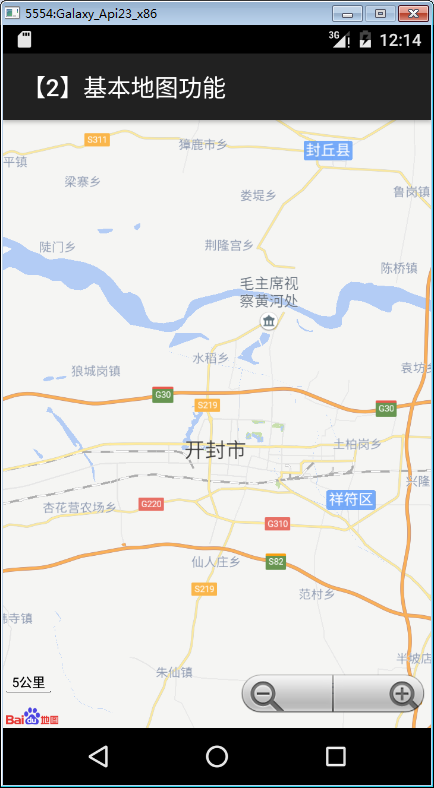
本章共 25 個範例,在 x86 模擬器上的運行效果如下:
把官方範例資料夾中對應的檔案拖進專案,並確認【生成操作】屬性都設為「AndroidResource」,包含:
• drawable-hdpi:圖示等位圖資源。
• layout:版面配置檔,後續各節會逐步往這裡加檔,方便你辨認每個範例對應哪個版面。
• raw:原始資源檔。
• values:字串與樣式等資源。
在 layout 資料夾下加入此檔,用一個 TextureMapView 填滿整個畫面:
<LinearLayout xmlns:android="https://schemas.android.com/apk/res/android" android:layout_width="fill_parent" android:layout_height="fill_parent" android:orientation="vertical"> <com.baidu.mapapi.map.TextureMapView android:id="@+id/bmapView" android:layout_width="fill_parent" android:layout_height="fill_parent" android:clickable="true" /> </LinearLayout>
在專案根目錄加入此檔,取得 TextureMapView 並同樣把生命週期轉呼給它:
using Android.App; using Android.Content.PM; using Android.OS; using Com.Baidu.Mapapi.Map; namespace BdMapV371Demos { [Activity(Label = "BdMapV371Demos", MainLauncher = false, ConfigurationChanges = ConfigChanges.Orientation, ScreenOrientation = ScreenOrientation.Sensor, Icon = "@drawable/icon")] public class HelloBaiduMap : Activity { private TextureMapView mMapView; protected override void OnCreate(Bundle bundle) { base.OnCreate(bundle); SetContentView(Resource.Layout.HelloBdMap); mMapView = FindViewById<TextureMapView>(Resource.Id.bmapView); } protected override void OnPause() { base.OnPause(); mMapView.OnPause(); } protected override void OnResume() { base.OnResume(); mMapView.OnResume(); } protected override void OnDestroy() { base.OnDestroy(); mMapView.OnDestroy(); } } }
這個版面由上方的資訊文字、分隔線與下方 ListView 組成,用來列出所有範例:
<LinearLayout xmlns:android="https://schemas.android.com/apk/res/android" android:layout_width="fill_parent" android:layout_height="wrap_content" android:orientation="vertical"> <TextView android:id="@+id/text_Info" android:layout_width="fill_parent" android:layout_height="wrap_content" android:textSize="14sp" /> <View android:layout_width="fill_parent" android:layout_height="1dip" android:background="?android:attr/listDivider" /> <ListView android:id="@+id/listView" android:layout_width="fill_parent" android:layout_height="wrap_content" /> </LinearLayout>
這是最關鍵的一步:在使用 SDK 任何功能之前,必須先在 Application 的 OnCreate 中呼叫 SDKInitializer.Initialize 完成初始化:
using System; using Android.App; using Android.Runtime; using Com.Baidu.Mapapi; namespace BdMapV371Demos { [Application] public class DemoApplication : Application { public DemoApplication(IntPtr javaReference, JniHandleOwnership transfer) : base(javaReference, transfer) { } public override void OnCreate() { base.OnCreate(); // 在使用 SDK 各組件之前初始化 context 信息 SDKInitializer.Initialize(ApplicationContext); } } }
這個廣播接收器用來監聽 SDK 的 key 驗證與網路異常狀態,並即時在畫面上提示:
using Android.Content; using Android.Graphics; using Android.Util; using Android.Widget; using Com.Baidu.Mapapi; namespace BdMapV371Demos { /// <summary> /// 廣播監聽類,監聽 SDK key 驗證以及網絡異常廣播 /// </summary> [BroadcastReceiver] public class SDKReceiver : BroadcastReceiver { private static readonly string LTAG = nameof(MainActivity); private MainActivity bMapApiDemoMain; public SDKReceiver() { } public SDKReceiver(MainActivity bMapApiDemoMain) : base() { this.bMapApiDemoMain = bMapApiDemoMain; } public override void OnReceive(Context context, Intent intent) { string s = intent.Action; Log.Debug(LTAG, "action: " + s); TextView text = bMapApiDemoMain.FindViewById<TextView>(Resource.Id.text_Info); text.SetTextColor(Color.Red); switch(s) { case SDKInitializer.SdkBroadtcastActionStringPermissionCheckError: text.Text = "key 驗證出錯! 請在 AndroidManifest.xml 文件中檢查 key 設置"; break; case SDKInitializer.SdkBroadtcastActionStringPermissionCheckOk: text.Text += ",key驗證成功!"; text.SetTextColor(Color.Yellow); break; case SDKInitializer.SdkBroadcastActionStringNetworkError: text.Text = "網絡出錯"; break; } } } }
這裡集中定義了 25 個範例的標題與說明字串。改用資源檔而非硬編碼,是 Android 專案中被推薦的做法:
<resources> <string name="app_name">BdMapV371Demos</string> <string name="demo_name_hello">【1】Hello BaiduMap</string> <string name="demo_title_hello">Demo01--Hello BaiduMap</string> <string name="demo_desc_hello">用TextureMapView渲染地圖</string> <string name="demo_name_basemap">【2】基本地圖功能</string> <string name="demo_title_basemap">Demo02--基本地圖功能</string> <string name="demo_desc_basemap">創建一張百度地圖並管理地圖的生命周期</string> <string name="demo_name_map_fragment">【3】基於MapFragment的基本地圖</string> <string name="demo_name_layers">【4】圖層展示</string> <string name="demo_name_multimap">【5】多地圖展示</string> <string name="demo_name_control">【6】地圖操作功能</string> <string name="demo_name_ui">【7】UI控制功能</string> <string name="demo_name_location">【8】定位圖層展示</string> <string name="demo_name_overlay">【9】覆蓋物功能</string> <string name="demo_name_heatmap">【10】熱力圖功能</string> <string name="demo_name_geocode">【11】地理編碼功能</string> <string name="demo_name_poi">【12】POI搜索功能</string> <string name="demo_name_route">【13】路徑規劃功能</string> <string name="demo_name_bus">【14】公交線路查詢功能</string> <string name="demo_name_share">【15】短串分享</string> <string name="demo_name_offline">【16】離線地圖功能</string> <string name="demo_name_radar">【17】周邊雷達功能</string> <string name="demo_name_geometry">【18】自定義繪制功能</string> <string name="demo_name_panorama_hello">【19】全景圖 Hello World</string> <string name="demo_name_panorama">【20】全景圖功能</string> <string name="demo_name_favorite">【21】興趣點收藏功能</string> <string name="demo_name_cloud">【22】LBS雲檢索功能</string> <string name="demo_name_tileoverlay">【23】瓦片圖功能</string> <string name="demo_name_opengl">【24】OpenGL繪制功能</string> <string name="demo_name_open_baidumap">【25】調啟百度地圖</string> </resources>
這是整個專案的大腦。它定義了作為地圖中心點的座標(河南大學)、註冊 SDK 廣播監聽、用 DemoListAdapter 把 25 個範例填進 ListView,並處理點擊跳轉:
using Android.App; using Android.Content; using Android.Views; using Android.Widget; using Android.OS; using Android.Graphics; using Android.Content.PM; using Com.Baidu.Mapapi; using Com.Baidu.Mapapi.Model; using BdMapV371Demos.SrcSdkDemos; namespace BdMapV371Demos { [Activity(Label = "BdMapV371Demos", MainLauncher = true, ConfigurationChanges = ConfigChanges.Orientation, ScreenOrientation = ScreenOrientation.Sensor, Icon = "@drawable/icon")] public class MainActivity : Activity { private SDKReceiver sdkReceiver; public static readonly LatLng HeNanUniversity = new LatLng(34.824635, 114.315745); protected override void OnCreate(Bundle bundle) { base.OnCreate(bundle); SetContentView(Resource.Layout.Main); TextView text = FindViewById<TextView>(Resource.Id.text_Info); text.SetTextColor(Color.Red); text.Text = "百度地圖Android SDK v" + VersionInfo.ApiVersion; ListView mListView = FindViewById<ListView>(Resource.Id.listView); mListView.Adapter = new DemoListAdapter(this); IntentFilter intentFilter = new IntentFilter(); intentFilter.AddAction(SDKInitializer.SdkBroadtcastActionStringPermissionCheckOk); intentFilter.AddAction(SDKInitializer.SdkBroadtcastActionStringPermissionCheckError); intentFilter.AddAction(SDKInitializer.SdkBroadcastActionStringNetworkError); sdkReceiver = new SDKReceiver(this); RegisterReceiver(sdkReceiver, intentFilter); mListView.ItemClick += (sender, args) => { int index = args.Position; Intent intent = new Intent(this, demos[index].demoClass.GetType()); StartActivity(intent); }; } private static readonly DemoInfo<Activity>[] demos = { new DemoInfo<Activity>(Resource.String.demo_title_hello, Resource.String.demo_desc_hello, new Demo01HelloBaiduMap()), new DemoInfo<Activity>(Resource.String.demo_title_basemap, Resource.String.demo_desc_basemap, new Demo02BaseMap()), new DemoInfo<Activity>(Resource.String.demo_title_map_fragment, Resource.String.demo_desc_map_fragment, new Demo03MapFragment()), new DemoInfo<Activity>(Resource.String.demo_title_layers, Resource.String.demo_desc_layers, new Demo04Layers()), new DemoInfo<Activity>(Resource.String.demo_title_multimap, Resource.String.demo_desc_multimap, new Demo05MutiMapView()), /* ……其餘 20 個範例依此類推…… */ }; protected override void OnDestroy() { UnregisterReceiver(sdkReceiver); base.OnDestroy(); } } }
按 <F5> 調試運行,在主畫面點【Hello BaiduMap】觀察效果。
特別提醒:本章後續所有範例都是在這個專案上「持續修改」完成的,而非每個範例各建一個專案。這麼做的好處是只需一把密鑰就能跑遍全部 25 個範例,省去重複申請的麻煩。務必先確認這個範例在你的模擬器上跑起來沒問題,再繼續往後學習。
 RecyclerView 下拉刷新與上拉加載:兩種方案完整實現
RecyclerView 已經問世多年,大量項目從 ListView 遷了過去。但遷完之后有個問題立刻浮現:下拉刷新和上拉加載該怎麼辦?ListView 時代我們習慣自己
 Android 記事本專案(11):加入資料庫持久化
前面十節已經完成了記事本的大部分功能:拍照、加圖片、錄音、繪圖、手寫。底部選單還有一個「更多」等日後擴充。 但有一個根本問題還沒解決——寫完的記事關掉 App 之後就消失
 從代碼托管到自動化運維:Coding.net 架構演進解析
對於一個線上服務而言,架構設計直接決定了系統能否穩定運行、能否承載增長,以及能否在壓力來臨前保持可用。評價一套架構,通常可以從三個核心維度入手:穩定性、擴展性與性能。
 Unity 使用 Protobuf 匯入 Excel 表格資料:完整導表流程
在 Unity 專案中,表格資料常需從 Excel 轉成遊戲可讀格式。相較於傳統序列化方式,Protobuf 可用於資料存儲與網路協議,具通用性。本文整理以 xls_de