

編輯:關於 Android 程式設計
JSON 是一種輕量級的資料交換格式,可讀性佳、易於撰寫,幾乎所有主流語言都支援,因而成為跨平台傳遞資料的熱門選擇。本文從 JSON 與 XML 的比較談起,再帶你逐一拆解 Android 內建的 org.json 套件,最後用一個完整範例收尾。
兩者的資料可讀性相當、解析手段都豐富,但 JSON 的資料體積更小、與 JavaScript 互動更方便、速度也遠快於 XML;代價是它對資料的描述性略遜於 XML。
Android 的 JSON 相關類別都在 org.json 套件下:
• JSONObject:代表一個 JSON 物件,是最基本的單位,以 Key/Value 成對存在,對外以標準字串呈現。
• JSONStringer:JSON 文字建構器,能嚴格按照語法規則建立 JSON,避免格式錯誤導致異常。
• JSONArray:代表一組有序數值,以中括號包裹、逗號分隔,支援 get/opt/put 等方法。
• JSONTokener:JSON 解析類。
• JSONException:JSON 相關的異常。
try { JSONObject person = new JSONObject(); JSONArray phone = new JSONArray(); phone.put("12345678").put("87654321"); person.put("phone", phone); person.put("name", "yuanzhifei89"); person.put("age", 100); JSONObject address = new JSONObject(); address.put("country", "china"); address.put("province", "jiangsu"); person.put("address", address); person.put("married", false); } catch (JSONException ex) { throw new RuntimeException(ex); }
getType 在無法轉換或沒有值時會拋出 JSONException;optType 則是轉換失敗時回傳預設值,不會拋異常:
try { phone.getLong(0); person.getLong("name"); // 會拋異常,因為名字無法轉為 long phone.optLong(0); // 內建默認值 phone.optLong(0, 1000); // 使用者提供的默認值 person.optLong("name"); person.optLong("name", 1000); // 不拋異常,而是回傳 1000 } catch (JSONException ex) { }
注意 object/endObject、array/endArray 必須成對使用:
try { JSONStringer jsonText = new JSONStringer(); jsonText.object(); jsonText.key("phone"); jsonText.array(); jsonText.value("12345678").value("87654321"); jsonText.endArray(); jsonText.key("name"); jsonText.value("yuanzhifei89"); jsonText.key("age"); jsonText.value(100); jsonText.key("address"); jsonText.object(); jsonText.key("country"); jsonText.value("china"); jsonText.key("province"); jsonText.value("jiangsu"); jsonText.endObject(); jsonText.key("married"); jsonText.value(false); jsonText.endObject(); } catch (JSONException ex) { throw new RuntimeException(ex); }
把 JSON 文字解析成物件,只需 nextValue 一個方法即可:
private static final String JSON = "{" + " \"phone\" : [\"12345678\", \"87654321\"]," + " \"name\" : \"yuanzhifei89\"," + " \"age\" : 100," + " \"address\" : { \"country\" : \"china\", \"province\" : \"jiangsu\" }," + " \"married\" : false," + "}"; try { JSONTokener jsonParser = new JSONTokener(JSON); JSONObject person = (JSONObject) jsonParser.nextValue(); person.getJSONArray("phone"); person.getString("name"); person.getInt("age"); person.getJSONObject("address"); person.getBoolean("married"); } catch (JSONException ex) { }
JSONTokener 還有 next、nextClean、nextString、nextTo、back、skipPast、skipTo 等方法,可用來逐字巡覽 JSON 文字。
HttpPost request = new HttpPost(url); JSONObject param = new JSONObject(); param.put("name", "rarnu"); param.put("password", "123456"); StringEntity se = new StringEntity(param.toString()); request.setEntity(se); HttpResponse httpResponse = new DefaultHttpClient().execute(request); String retSrc = EntityUtils.toString(httpResponse.getEntity()); JSONObject result = new JSONObject(retSrc); String token = result.get("token");
以下範例示範如何從伺服器取得 JSON,並分別解析單筆歌手資料與多筆歌手清單:
public class JsonActivity extends Activity { private TextView tvJson; private Button btnJson; private Button btnJsonMulti; @Override public void onCreate(Bundle savedInstanceState) { super.onCreate(savedInstanceState); setContentView(R.layout.main); tvJson = (TextView) this.findViewById(R.id.tvJson); btnJson = (Button) this.findViewById(R.id.btnJson); btnJsonMulti = (Button) this.findViewById(R.id.btnJsonMulti); btnJson.setOnClickListener(new View.OnClickListener() { @Override public void onClick(View v) { String strUrl = ServerPageUtil.getStrUrl(UrlsOfServer.JSON_SINGER); String strResult = connServerForResult(strUrl); parseJson(strResult); } }); btnJsonMulti.setOnClickListener(new View.OnClickListener() { @Override public void onClick(View v) { String strUrl = ServerPageUtil.getStrUrl(UrlsOfServer.JSON_SINGERS); String strResult = connServerForResult(strUrl); parseJsonMulti(strResult); } }); } private String connServerForResult(String strUrl) { HttpGet httpRequest = new HttpGet(strUrl); String strResult = ""; try { HttpClient httpClient = new DefaultHttpClient(); HttpResponse httpResponse = httpClient.execute(httpRequest); if (httpResponse.getStatusLine().getStatusCode() == HttpStatus.SC_OK) { strResult = EntityUtils.toString(httpResponse.getEntity()); } } catch (ClientProtocolException e) { tvJson.setText("protocol error"); e.printStackTrace(); } catch (IOException e) { tvJson.setText("IO error"); e.printStackTrace(); } return strResult; } private void parseJson(String strResult) { try { JSONObject jsonObj = new JSONObject(strResult).getJSONObject("singer"); int id = jsonObj.getInt("id"); String name = jsonObj.getString("name"); String gender = jsonObj.getString("gender"); tvJson.setText("ID號"+id + ", 姓名:" + name + ",性別:" + gender); } catch (JSONException e) { e.printStackTrace(); } } private void parseJsonMulti(String strResult) { try { JSONArray jsonObjs = new JSONObject(strResult).getJSONArray("singers"); String s = ""; for(int i = 0; i < jsonObjs.length() ; i++){ JSONObject jsonObj = ((JSONObject)jsonObjs.opt(i)).getJSONObject("singer"); int id = jsonObj.getInt("id"); String name = jsonObj.getString("name"); String gender = jsonObj.getString("gender"); s += "ID號"+id + ", 姓名:" + name + ",性別:" + gender+ "\n" ; } tvJson.setText(s); } catch (JSONException e) { e.printStackTrace(); } } }
掌握 JSONObject、JSONArray 與 JSONTokener 這三個核心類別,你就能應付絕大多數的 JSON 解析場景了。
 仿電商 App 商品詳情頁:標題列隨滾動吸頂的懸浮效果
1、效果預覽 這個效果的用戶體驗確實相當酷炫,今天就來拆解它的實作方式。 2、先拆解結構 整個頁面可以分成四塊: • 懸浮內容 floatView &#
 Android 中獲取控件寬高與屏幕寬高的多種方法
一、獲取屏幕寬高 1. Android 界面結構簡介 要獲取屏幕寬高,不妨先了解 Android 界面的構成。它由三部分組成:狀態欄、標題欄、內容區域。 (1)狀態欄
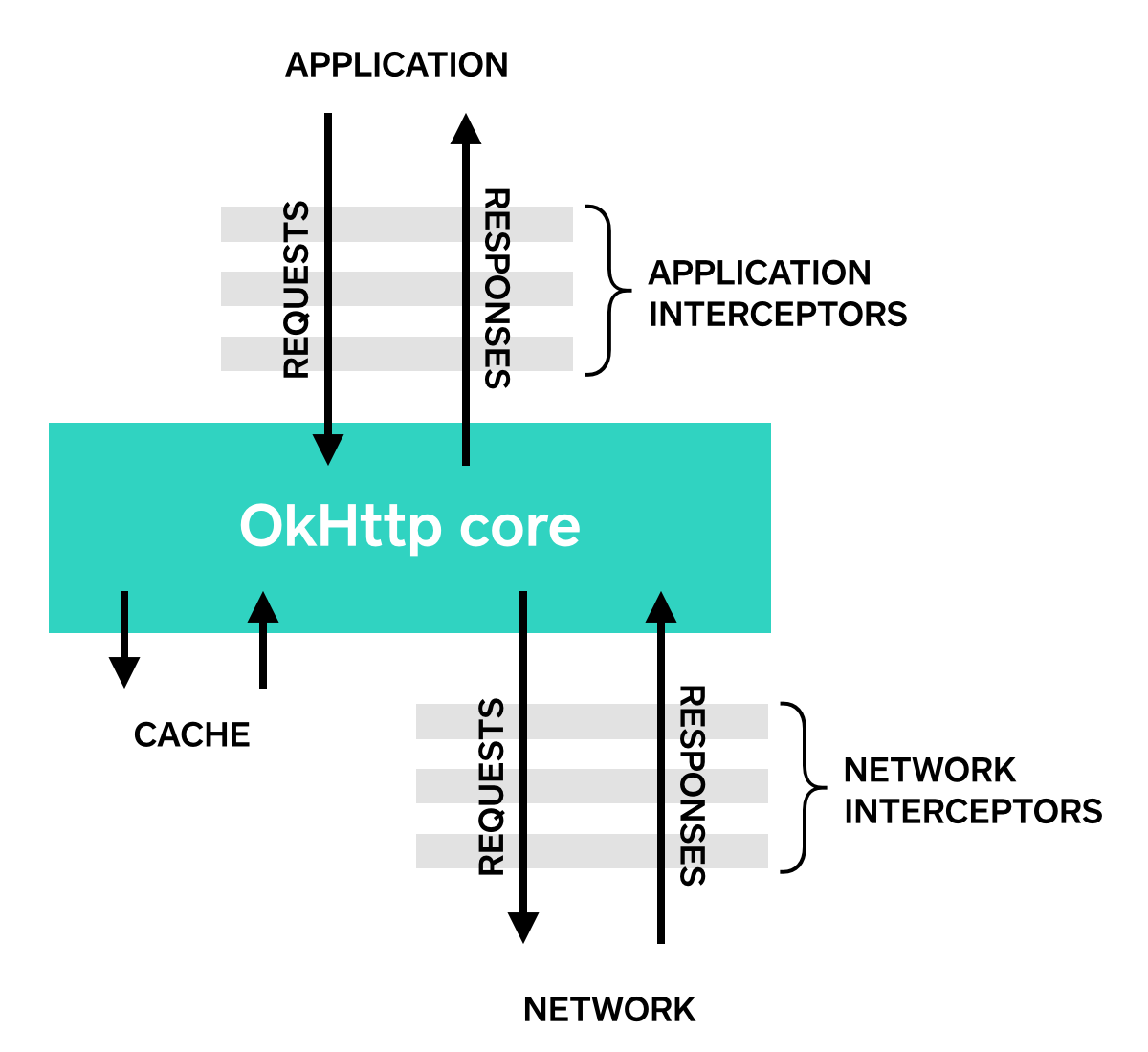 Android OkHttp 的 HTTP 攔截器 Interceptor 用法示例
OkHttp(GitHub:https://github.com/square/okhttp)的 Interceptor 正如其名「攔截器」,會攔截你的 Request
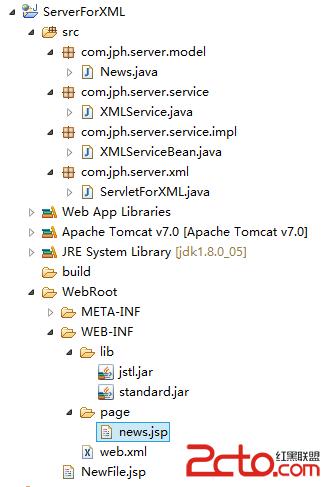 Android 網絡編程:獲取並解析網絡上的 XML
要在 App 中取得網絡上的 XML,同樣需要伺服器端配合。本文以「最新資訊列表」為例,走一遍伺服器產生 XML、客戶端抓取並解析的完整流程。 一、建立伺服器端 專案結構