

編輯:關於 Android 程式設計
LinearLayout 是最常被使用的 ViewGroup 之一,觀念清楚之後,多數簡單畫面都能快速搞定。以下把開發時最常碰到的屬性整理成一份對照表。
<LinearLayout android:layout_width="match_parent" android:layout_height="match_parent" android:orientation="vertical"> </LinearLayout>
垂直排列的寫法:
<LinearLayout android:layout_width="match_parent" android:layout_height="match_parent" android:orientation="vertical" > <Button android:layout_width="wrap_content" android:layout_height="wrap_content" android:text="Button 1" /> <Button android:layout_width="wrap_content" android:layout_height="wrap_content" android:text="Button 2" /> </LinearLayout>
水平排列只要把 orientation 改為 horizontal 即可。
<LinearLayout android:layout_width="match_parent" android:layout_height="match_parent" android:orientation="vertical" android:gravity="left"> </LinearLayout>
gravity 決定「容器內容物」的擺放方向,常用值有:
水平置中與垂直置中的範例:
<LinearLayout android:layout_width="match_parent" android:layout_height="match_parent" android:orientation="vertical" android:gravity="center_vertical"> <Button android:layout_width="wrap_content" android:layout_height="wrap_content" android:text="Button 1" /> </LinearLayout> <LinearLayout android:layout_width="match_parent" android:layout_height="match_parent" android:orientation="vertical" android:gravity="center_horizontal"> <Button android:layout_width="wrap_content" android:layout_height="wrap_content" android:text="Button 1" /> </LinearLayout> <LinearLayout android:layout_width="match_parent" android:layout_height="match_parent" android:orientation="vertical" android:gravity="center"> <Button android:layout_width="wrap_content" android:layout_height="wrap_content" android:text="Button 1" /> </LinearLayout>
gravity 可以用「|」串接多個值,做出對角或雙軸置中的效果:
<LinearLayout android:layout_width="match_parent" android:layout_height="match_parent" android:orientation="vertical" android:gravity="top|right"> <Button android:layout_width="wrap_content" android:layout_height="wrap_content" android:text="Button 1" /> </LinearLayout> <LinearLayout android:layout_width="match_parent" android:layout_height="match_parent" android:orientation="vertical" android:gravity="bottom|left"> <Button android:layout_width="wrap_content" android:layout_height="wrap_content" android:text="Button 1" /> </LinearLayout> <LinearLayout android:layout_width="match_parent" android:layout_height="match_parent" android:orientation="vertical" android:gravity="center_vertical|center_horizontal"> <Button android:layout_width="wrap_content" android:layout_height="wrap_content" android:text="Button 1" /> </LinearLayout>
<LinearLayout android:layout_width="match_parent" android:layout_height="match_parent" android:orientation="horizontal"> <Button android:layout_width="wrap_content" android:layout_height="wrap_content" android:text="Button 1" android:layout_weight="1"/> </LinearLayout>
等比例分配——三顆按鈕比重都是 1,寬度就相同:
<LinearLayout android:layout_width="match_parent" android:layout_height="match_parent" android:orientation="horizontal"> <Button android:layout_width="wrap_content" android:layout_height="wrap_content" android:text="Button 1" android:layout_weight="1"/> <Button android:layout_width="wrap_content" android:layout_height="wrap_content" android:text="Button 2" android:layout_weight="1"/> <Button android:layout_width="wrap_content" android:layout_height="wrap_content" android:text="Button 3" android:layout_weight="1"/> </LinearLayout>
非等比例分配——比重相加為 1,正好對應 100%:
<LinearLayout android:layout_width="match_parent" android:layout_height="match_parent" android:orientation="horizontal"> <Button android:layout_width="wrap_content" android:layout_height="wrap_content" android:text="Button 1" android:layout_weight=".10"/> <Button android:layout_width="wrap_content" android:layout_height="wrap_content" android:text="Button 2" android:layout_weight=".20"/> <Button android:layout_width="wrap_content" android:layout_height="wrap_content" android:text="Button 3" android:layout_weight=".70"/> </LinearLayout>
這裡的 .10、.20、.70 分別代表 0.1、0.2、0.7,合計剛好 1,也就是 10%、20%、70% 的配置。
寫 layout_weight 時,建議把該子元件的 layout_width 設為 0dp(而非 wrap_content),可以避免多餘的量測與奇怪的佔位問題。另外,層數過深的 LinearLayout 嵌套會拖慢渲染效能,畫面複雜時值得評估改用 ConstraintLayout。
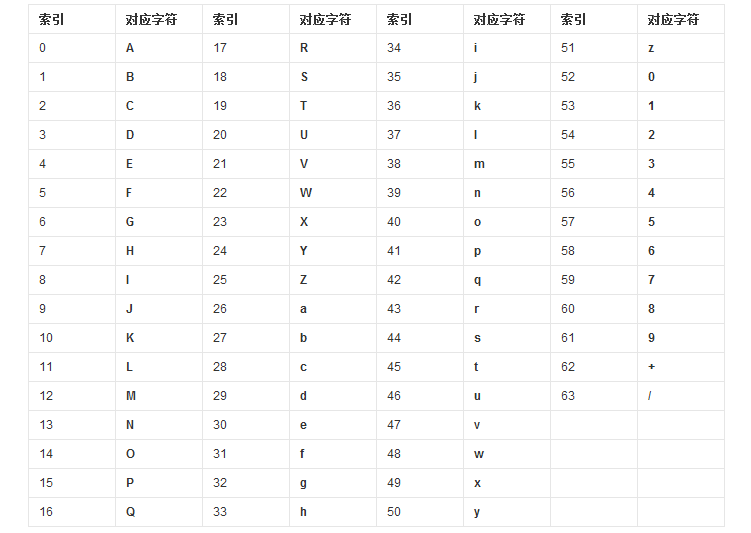 Android Base64 編碼解碼詳解:原理、用途與 API 參數
做過數據加密的應該都有印象:無論用哪種加密算法,最終都會對密文的二進制數據做一次 Base64 編碼。它常被當作「二次加密」,但嚴格來說 Base64 並不是加密算法,而
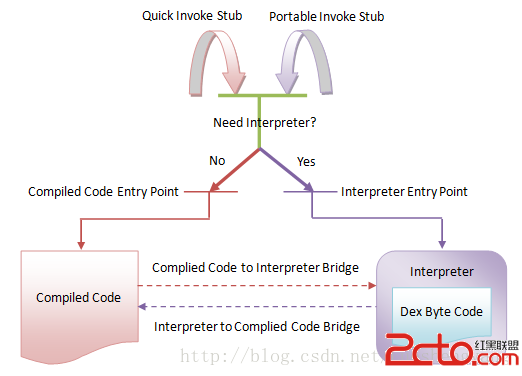 Android ART Hook 技術方案:從 ArtMethod 執行流程到實作
0x1 起點 從 Android 5.0 起,ART 取代 Dalvik 成為默認運行時,其重要性不言而喻。目前網上關於 Dalvik Hook 的文章很多,但 ART
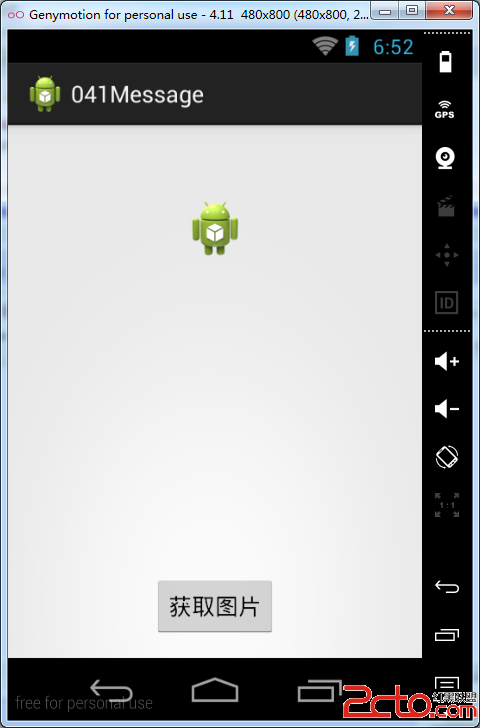 從零開始學 Android:Message 訊息機制與範例
Message 是什麼Message 是 Android 訊息機制中的資料載體,常用於在子執行緒與主執行緒之間傳遞資訊。它可設定 what 表示操作類型,obj 攜作物件
 Android 元件:Fragment 實作入門
Fragment 依附於 Activity 存在,但本身又相對獨立,可以把它理解為 Activity 裡的子 Activity。它最常被用在平板開發上:一個 Activi