

編輯:關於 Android 程式設計
寫手機應用時經常會遇到「文字轉語音」(Text to Speech)的需求:開車時朗讀收到的短信、導航語音提示、把界面上的重要信息用語音強調一遍。
問題是 Android 自帶的 Pico TTS 並不支持中文。要想既能讀中文又能讀英文,只能引入第三方支持中文的語音包。
本文以百度 2016 年 2 月 29 日發布的「離在線融合語音合成 SDK_Android 2.2.3 版」為例,用 C#(Xamarin)演示接入過程。選擇它的原因很直接:官方聲明該開發包永久免費。地址是 https://yuyin.baidu.com/tts/ 。
如果之前已申請過其他服務的授權,再開通 TTS 會簡單很多。
進入 https://yuyin.baidu.com/tts/ 首頁:
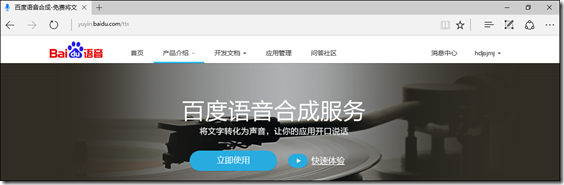
單擊【立即使用】,進入「開通語音合成服務」頁面:
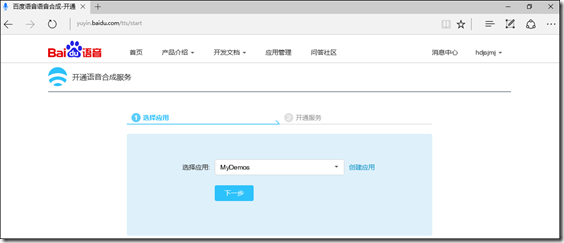
在下拉框中選擇已申請的應用,單擊【下一步】並按提示開通離線服務即可。
先從首頁的【相關下載】獲取開發包,然後:
1)把 com.baidu.tts_2.2.3.20160229_359d952_release.jar 和 galaxy-v2.0.jar 放入 Jars 目錄,並將二者的【生成操作】屬性都設為 EmbeddedJar:
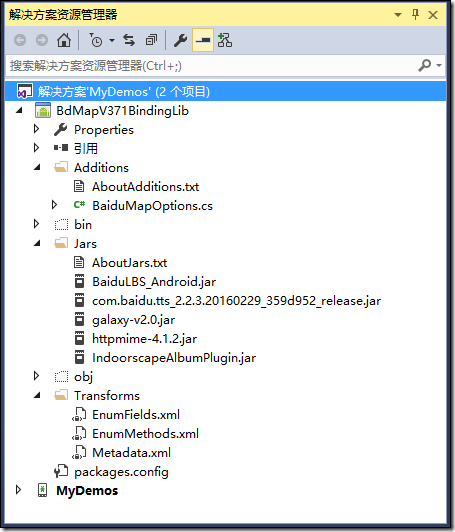
2)在 Metadata.xml 中加入以下語句,排除一個無法綁定的接口:
<remove-node path="/api/package[@name='com.baidu.tts.aop']/interface[@name='IProxyFactory']/method[@name='createProxied' and count(parameter)=0]" />
3)重新生成項目,此時應該無錯誤。
這三步就完成了 jar 到 C# 的綁定轉換。
把 TTS 相關的 4 個 .so 文件放進項目的 x86 目錄,並將【生成操作】設為 AndroidNativeLibrary:
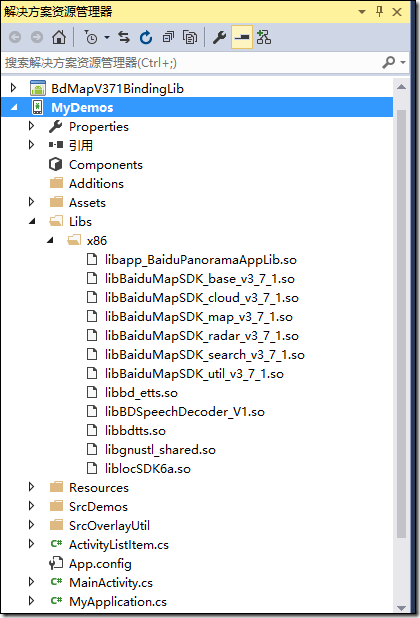
把 .dat 文件複製到 sd 卡的 BaiduTTS 目錄下。也可以先放進 Assets,再用代碼複製過去;為簡化演示這裡手工複製。
完成這四步,之後在項目任何位置都能調用百度 TTS 做語音朗讀。
單擊【閱讀】會用女聲朗讀文本框內容;單擊【批量閱讀】則依次朗讀隊列中的多段文字,便於對比不同中英文短句的效果。
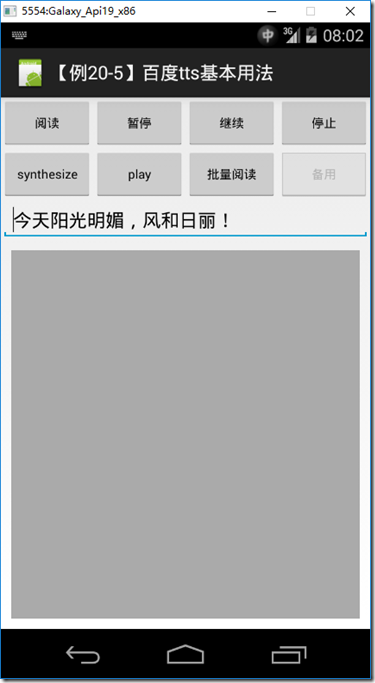
<?xml version="1.0" encoding="utf-8"?> <LinearLayout xmlns:android="https://schemas.android.com/apk/res/android" android:layout_width="match_parent" android:layout_height="match_parent" android:orientation="vertical"> <LinearLayout android:layout_width="fill_parent" android:layout_height="50dp" android:orientation="horizontal" android:weightSum="4"> <Button android:id="@+id/speak" android:layout_width="fill_parent" android:layout_height="fill_parent" android:layout_weight="1" android:lines="2" android:text="閱讀" android:textSize="12dp" /> <Button android:id="@+id/pause" android:layout_width="fill_parent" android:layout_height="fill_parent" android:layout_weight="1" android:lines="2" android:text="暫停" android:textSize="12dp" /> <Button android:id="@+id/resume" android:layout_width="fill_parent" android:layout_height="fill_parent" android:layout_weight="1" android:lines="2" android:text="繼續" android:textSize="12dp" /> <Button android:id="@+id/stop" android:layout_width="fill_parent" android:layout_height="fill_parent" android:layout_weight="1" android:lines="2" android:text="停止" android:textSize="12dp" /> </LinearLayout> <LinearLayout android:layout_width="fill_parent" android:layout_height="50dp" android:orientation="horizontal" android:weightSum="4"> <Button android:id="@+id/synthesize" android:layout_width="fill_parent" android:layout_height="fill_parent" android:layout_weight="1" android:lines="2" android:text="synthesize" android:textSize="12dp" /> <Button android:id="@+id/play" android:layout_width="fill_parent" android:layout_height="fill_parent" android:layout_weight="1" android:lines="2" android:text="play" android:textSize="12dp" /> <Button android:id="@+id/batchSpeak" android:layout_width="fill_parent" android:layout_height="fill_parent" android:layout_weight="1" android:lines="2" android:text="批量閱讀" android:textSize="12dp" /> <Button android:id="@+id/nextActivity" android:layout_width="fill_parent" android:layout_height="fill_parent" android:layout_weight="1" android:lines="2" android:enabled="false" android:text="備用" android:textSize="12dp" /> </LinearLayout> <EditText android:id="@+id/input" android:layout_width="fill_parent" android:layout_height="wrap_content" android:hint="input" /> <TextView android:id="@+id/showText" android:layout_width="fill_parent" android:layout_height="fill_parent" android:layout_margin="10dp" android:background="@android:color/darker_gray" android:minLines="3" android:scrollbars="vertical" /> </LinearLayout>
using System; using System.Collections.Generic; using System.Linq; using System.Text; using Android.App; using Android.OS; using Android.Widget; using Com.Baidu.Tts.Client; using Com.Baidu.Tts.Answer.Auth; namespace MyDemos.SrcDemos { [Activity(Label = "【例20-5】百度tts基本用法")] public class ch2005MainActivity : Activity, ISpeechSynthesizerListener { private EditText mInput; private TextView mShowText; private SpeechSynthesizer mSpeechSynthesizer; /// <summary> /// sd卡上保存百度tts文件的路徑 /// </summary> private string mSampleDirPath; private const string SpeechFemaleModelName = "bd_etts_speech_female.dat"; private const string SpeechMaleModelName = "bd_etts_speech_male.dat"; private const string TextModelName = "bd_etts_text.dat"; private const string EnglishSpeechFemaleModelName = "bd_etts_speech_female_en.dat"; private const string EnglishSpeechMaleModelName = "bd_etts_speech_male_en.dat"; private const string EnglishTextModelName = "bd_etts_text_en.dat"; protected override void OnCreate(Bundle savedInstanceState) { base.OnCreate(savedInstanceState); SetContentView(Resource.Layout.ch2005Main); mSampleDirPath = Android.OS.Environment.ExternalStorageDirectory.Path + "/baiduTTS"; Console.WriteLine("mSampleDirPath=" + mSampleDirPath); initialView(); initialTts(); } private void initialTts() { mSpeechSynthesizer = SpeechSynthesizer.Instance; mSpeechSynthesizer.SetContext(this); mSpeechSynthesizer.SetSpeechSynthesizerListener(this); // 文本模型文件路徑 (離線引擎使用) mSpeechSynthesizer.SetParam(SpeechSynthesizer.ParamTtsTextModelFile, mSampleDirPath + "/" + TextModelName); // 聲學模型文件路徑 (離線引擎使用) mSpeechSynthesizer.SetParam(SpeechSynthesizer.ParamTtsSpeechModelFile, mSampleDirPath + "/" + SpeechFemaleModelName); // 請替換為語音開發者平台上注冊應用得到的App ID (離線授權) //mSpeechSynthesizer.SetAppId("your_app_id"); mSpeechSynthesizer.SetAppId(ch.TtsAppID); // 請替換為語音開發者平台注冊應用得到的apikey和secretkey (在線授權) //this.mSpeechSynthesizer.SetApiKey("your_api_key", "your_secret_key"); this.mSpeechSynthesizer.SetApiKey(ch.TtsApiKey, ch.TtsSecretKey); // 發音人(在線引擎),可用參數為0,1,2,3。。。(服務器端會動態增加,各值含義參考文檔,以文檔說明為准。0--普通女聲,1--普通男聲,2--特別男聲,3--情感男聲。。。) mSpeechSynthesizer.SetParam(SpeechSynthesizer.ParamSpeaker, "0"); // 設置Mix模式的合成策略 mSpeechSynthesizer.SetParam(SpeechSynthesizer.ParamMixMode, SpeechSynthesizer.MixModeDefault); // 授權檢測接口(可以不使用,只是驗證授權是否成功) AuthInfo authInfo = this.mSpeechSynthesizer.Auth(TtsMode.Mix); if (authInfo.IsSuccess) { Console.WriteLine("授權檢測--授權成功(auth success)。"); } else { string errorMsg = authInfo.TtsError.DetailMessage; Console.WriteLine("授權檢測--授權失敗(auth failed),errorMsg=" + errorMsg); } // 初始化tts mSpeechSynthesizer.InitTts(TtsMode.Mix); // 加載離線英文資源(提供離線英文合成功能) int result = mSpeechSynthesizer.LoadEnglishModel( mSampleDirPath + "/" + EnglishTextModelName, mSampleDirPath + "/" + EnglishSpeechFemaleModelName); } private void initialView() { mInput = FindViewById<EditText>(Resource.Id.input); mInput.Text = "今天陽光明媚,風和日麗!"; mShowText = FindViewById<TextView>(Resource.Id.showText); var speak = FindViewById<Button>(Resource.Id.speak); speak.Click += delegate { string text = this.mInput.Text; int result = this.mSpeechSynthesizer.Speak(text); if (result < 0) { System.Diagnostics.Debug.WriteLine("出錯了,錯誤碼:{0},請檢查百度tts文檔中對應錯誤碼的含義。", result); } }; var pause = FindViewById<Button>(Resource.Id.pause); pause.Click += delegate { mSpeechSynthesizer.Pause(); }; var resume = FindViewById<Button>(Resource.Id.resume); resume.Click += delegate { mSpeechSynthesizer.Resume(); }; var stop = FindViewById<Button>(Resource.Id.stop); stop.Click += delegate { mSpeechSynthesizer.Stop(); }; var synthesize = FindViewById<Button>(Resource.Id.synthesize); synthesize.Click += delegate { string text = this.mInput.Text; int result = this.mSpeechSynthesizer.Synthesize(text); if (result < 0) { System.Diagnostics.Debug.WriteLine("error,please look up error code in doc or URL:https://yuyin.baidu.com/docs/tts/122 "); } }; var play = FindViewById<Button>(Resource.Id.play); play.Click += delegate { }; var batchSpeak = FindViewById<Button>(Resource.Id.batchSpeak); batchSpeak.Click += delegate { List<SpeechSynthesizeBag> bags = new List<SpeechSynthesizeBag>(); bags.Add(GetSpeechSynthesizeBag("123456", "0")); bags.Add(GetSpeechSynthesizeBag("你好", "1")); bags.Add(GetSpeechSynthesizeBag("使用百度語音合成SDK", "2")); bags.Add(GetSpeechSynthesizeBag("hello", "3")); bags.Add(GetSpeechSynthesizeBag("這是一個demo工程", "4")); int result = this.mSpeechSynthesizer.BatchSpeak(bags); if (result < 0) { System.Diagnostics.Debug.WriteLine("error({0}),please look up error code in doc or URL:https://yuyin.baidu.com/docs/tts/122 ", result); } }; } protected override void OnDestroy() { base.OnDestroy(); } private SpeechSynthesizeBag GetSpeechSynthesizeBag(string text, string utteranceId) { SpeechSynthesizeBag speechSynthesizeBag = new SpeechSynthesizeBag(); speechSynthesizeBag.SetText(text); speechSynthesizeBag.UtteranceId = utteranceId; return speechSynthesizeBag; } public void OnError(string utteranceId, SpeechError error) { Console.WriteLine("onError error=" + error.Description + "--utteranceId=" + utteranceId); } public void OnSpeechFinish(string utteranceId) { Console.WriteLine("onSpeechFinish utteranceId=" + utteranceId); } public void OnSpeechProgressChanged(string p0, int p1) { //Console.WriteLine("onSpeechProgressChanged"); } public void OnSpeechStart(string utteranceId) { Console.WriteLine("onSpeechStart utteranceId=" + utteranceId); } public void OnSynthesizeDataArrived(string utteranceId, byte[] data, int progress) { Console.WriteLine("onSynthesizeDataArrived"); } public void OnSynthesizeFinish(string utteranceId) { Console.WriteLine("onSpeechFinish utteranceId=" + utteranceId); } public void OnSynthesizeStart(string utteranceId) { Console.WriteLine("onSynthesizeStart utteranceId=" + utteranceId); } } }
離在線融合的價值。SetParam 裡配置 MixMode,並同時提供離線模型路徑與在線 API Key,SDK 會在網絡可用時走服務器合成(音質更好、發音人更多),網絡不佳時自動回退到本地模型,可用性明顯高於純離線或純在線方案。
資源不放內部存儲。示例把 .dat 模型放在外部存儲,因為模型文件體積可觀,放內部存儲會讓 APK 體積失控。新版本 Android 需要注意分區存儲與存儲權限的變化,改放應用私有目錄是更穩妥的選擇。
Listener 必須實例化並保持引用。Activity 實現 ISpeechSynthesizerListener 的各個回調(OnSpeechStart、OnSpeechProgressChanged、OnSynthesizeDataArrived 等)是了解合成狀態的唯一途徑,其中 OnError 一定要認真處理,否則出問題時無從排查。
別忘了銷毀。示例的 OnDestroy 是空的,實戰中應該調用 mSpeechSynthesizer.Stop() 並執行相應的 release 邏輯,否則 Activity 銷毀後語音仍在播放,既耗電又干擾用戶。
批量朗讀的用法。BatchSpeak 接收 SpeechSynthesizeBag 列表,每項用 UtteranceId 標識,適合朗讀通知列表、搜索結果這類條目化內容;單段文本則用 Speak 更直接。二者的區別在於隊列管理是否由 SDK 代勞。
 TextView 寬度填滿時 Drawable 無法居中?自定義繪製解法
當 TextView 寬度設為 match_parent 或 weight,又搭配 gravity center 時,DrawableLeft 等圖示可能無法與文字一起置
 自定義 Dialog:一套元件搞定單按鈕、雙按鈕、三按鈕風格對話框
Android 提供的元件不少,但直接用系統預設樣式,總覺得和自家 App 的調性對不上。專案裡最常見的莫過於彈出對話框,按按鈕數量大致可分為一顆、兩顆、三顆三類(當然你
 Android AutoLayout:寫布局直接抄設計稿,堪稱適配終結者
一、屏幕適配,為什麼這麼難 適配大概是 Android 開發者共同的痛。Google 給了不少官方建議,可真要照著做把設備適配得乾乾淨淨,難度依然不低。作者此前寫過幾篇相
 百度地圖 SDK v3.0.0 實戰(二):定位與方向感測器整合
在上一篇 Blog 中,我們成功地把地圖導入專案。本篇則要為地圖加上兩個實用功能:第一是定位;第二是與方向感測器結合,透過旋轉手機來確認道路方向。有了這兩個功能,地圖就能