

編輯:關於 Android 程式設計
今天要分享一個實用的小元件:檔案選擇器。功能就是讓使用者浏覽 SD 卡,選中檔案或資料夾後把路徑回傳給呼叫方,類似 C# 裡的 OpenFileDialog。實作難度不高,主要是幫大家省下重造輪子的時間。
網上流傳較廣的成品大多功能齊全但可讀性一般,本文在其基礎上做了調整,讓結構更清楚、效率更好,並補上兩個實用增強:
1. 監聽 Back 鍵,讓使用者能返回上一層目錄,而不是直接離開。
2. 針對檔案類型(檔案 vs 資料夾、目標類型 vs 其他類型)做分流處理。
File 類。浏覽目錄、判斷是檔案還是資料夾、過濾隱藏檔,全部仰賴 Java 的 java.io.File。listFiles() 取得子項陣列,isDirectory() 與 isHidden() 則用於分類。
startActivityForResult / onActivityResult。選擇器通常以 Activity 形式獨立開啟,選完之後透過 setResult() 搭配 Intent 額外資訊把路徑送回來,呼叫方在 onActivityResult() 接收。
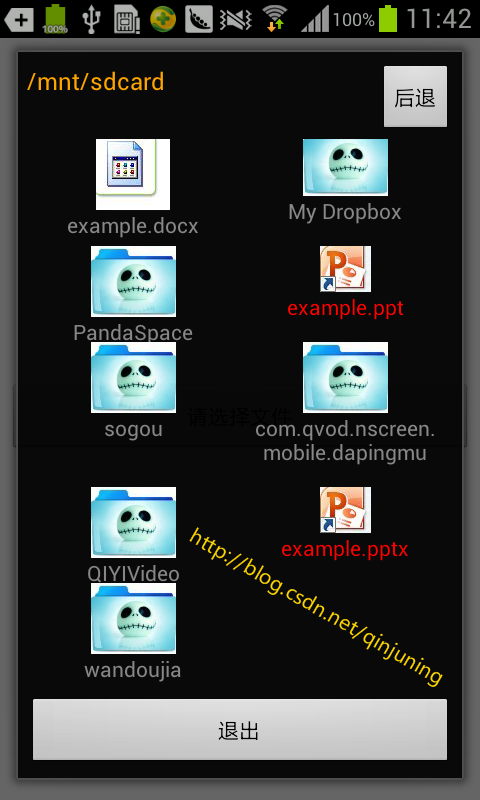
public class CopyOfFileChooserActivity extends Activity {

    private String mSdcardRootPath;   // SD 卡根路徑
    private String mLastFilePath;     // 當前顯示的路徑
    private ArrayList<FileInfo> mFileLists;
    private FileChooserAdapter mAdatper;

    private void setGridViewAdapter(String filePath) {
        updateFileItems(filePath);
        mAdatper = new FileChooserAdapter(this, mFileLists);
        mGridView.setAdapter(mAdatper);
    }

    // 依路徑更新資料,並通知 Adapter 刷新
    private void updateFileItems(String filePath) {
        mLastFilePath = filePath;
        mTvPath.setText(mLastFilePath);

        if (mFileLists == null) {
            mFileLists = new ArrayList<FileInfo>();
        }
        if (!mFileLists.isEmpty()) {
            mFileLists.clear();
        }

        File[] files = folderScan(filePath);
        if (files == null) {
            return;
        }

        for (int i = 0; i < files.length; i++) {
            if (files[i].isHidden()) {
                continue;   // 不顯示隱藏檔案
            }
            String fileAbsolutePath = files[i].getAbsolutePath();
            String fileName = files[i].getName();
            boolean isDirectory = files[i].isDirectory();

            FileInfo fileInfo = new FileInfo(fileAbsolutePath, fileName, isDirectory);
            mFileLists.add(fileInfo);
        }

        // 首次進入時 mAdatper 尚未初始化
        if (mAdatper != null) {
            mAdatper.notifyDataSetChanged();
        }
    }

    // 取得當前路徑下的所有檔案
    private File[] folderScan(String path) {
        File file = new File(path);
        return file.listFiles();
    }

    private AdapterView.OnItemClickListener mItemClickListener = new OnItemClickListener() {
        public void onItemClick(AdapterView<?> adapterView, View view, int position, long id) {
            FileInfo fileInfo = (FileInfo)
                    (((FileChooserAdapter) adapterView.getAdapter()).getItem(position));

            if (fileInfo.isDirectory()) {
                // 點擊項為資料夾,進入並顯示其內容
                updateFileItems(fileInfo.getFilePath());
            } else if (fileInfo.isPPTFile()) {
                // 是目標檔案,把路徑回傳給呼叫方
                Intent intent = new Intent();
                intent.putExtra(EXTRA_FILE_CHOOSER, fileInfo.getFilePath());
                setResult(RESULT_OK, intent);
                finish();
            } else {
                // 其他類型檔案
                toast(getText(R.string.open_file_error_format));
            }
        }
    };

    public boolean onKeyDown(int keyCode, KeyEvent event) {
        if (event.getAction() == KeyEvent.ACTION_DOWN
                && event.getKeyCode() == KeyEvent.KEYCODE_BACK) {
            backProcess();
            return true;
        }
        return super.onKeyDown(keyCode, event);
    }

    // 返回上一層目錄
    public void backProcess() {
        if (!mLastFilePath.equals(mSdcardRootPath)) {
            File thisFile = new File(mLastFilePath);
            String parentFilePath = thisFile.getParent();
            updateFileItems(parentFilePath);
        } else {
            // 已在根路徑,直接結束
            setResult(RESULT_CANCELED);
            finish();
        }
    }
}
介面比較樸素,大家可以依需求在此基礎上擴充。目錄選擇器的邏輯基本相同,只是把「選檔案」改成「選資料夾」。
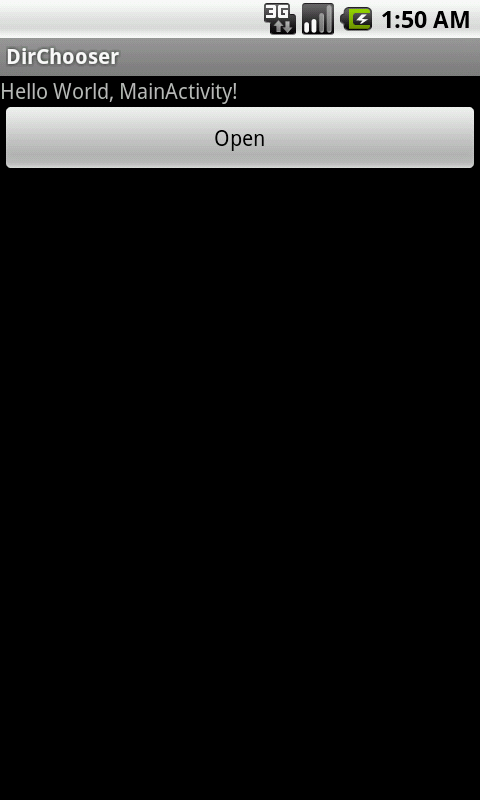
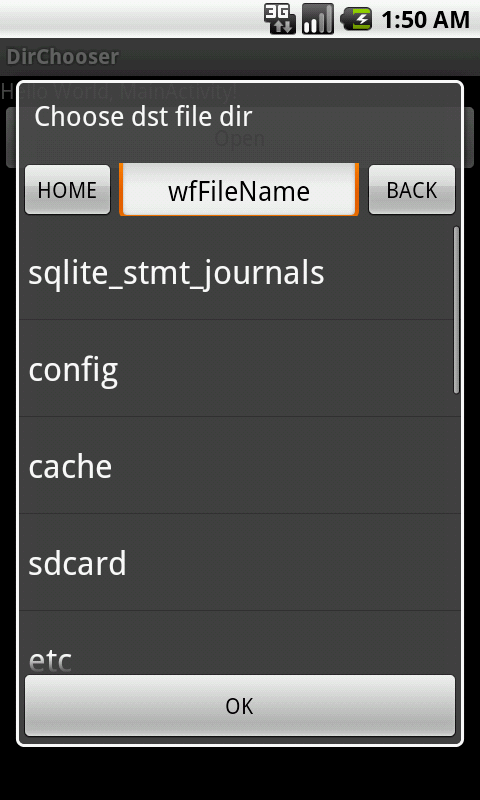
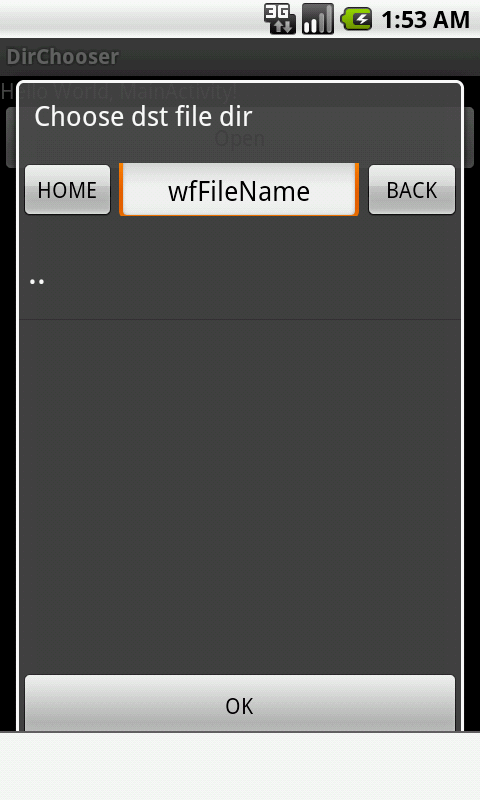
chooserdialog.xml
<?xml version="1.0" encoding="utf-8"?>
<LinearLayout xmlns:android="https://schemas.android.com/apk/res/android"
    android:orientation="vertical"
    android:layout_width="fill_parent"
    android:layout_height="fill_parent" >

    <LinearLayout
        android:orientation="horizontal"
        android:layout_width="fill_parent"
        android:layout_height="40dip">

        <Button
            android:layout_width="40dip"
            android:layout_height="40dip"
            android:text="HOME"
            android:id="@+id/btn_home"
            android:layout_gravity="left"
            android:layout_weight="1" />

        <LinearLayout
            android:layout_width="140dip"
            android:layout_height="35dip"
            android:id="@+id/dir_layout"
            android:gravity="center"
            android:layout_weight="1">
        </LinearLayout>

        <Button
            android:layout_width="40dip"
            android:layout_height="40dip"
            android:text="BACK"
            android:id="@+id/btn_back"
            android:layout_gravity="right"
            android:layout_weight="1" />
    </LinearLayout>

    <ListView
        android:layout_width="fill_parent"
        android:layout_height="300dip"
        android:id="@+id/list_dir" />

    <Button
        android:layout_width="fill_parent"
        android:layout_height="wrap_content"
        android:id="@+id/btn_ok"
        android:text="OK" />
</LinearLayout>
DirChooserDialog.java
package hkp.dirchooser;

import java.io.File;
import java.util.ArrayList;
import java.util.List;

import android.app.Dialog;
import android.content.Context;
import android.os.Bundle;
import android.os.Environment;
import android.os.Handler;
import android.view.Gravity;
import android.view.View;
import android.widget.AdapterView;
import android.widget.AdapterView.OnItemClickListener;
import android.widget.ArrayAdapter;
import android.widget.Button;
import android.widget.EditText;
import android.widget.LinearLayout;
import android.widget.ListView;
import android.widget.TextView;
import android.widget.Toast;

public class DirChooserDialog extends Dialog implements android.view.View.OnClickListener {

    private ListView list;
    ArrayAdapter<String> Adapter;
    ArrayList<String> arr = new ArrayList<String>();
    Context context;
    private String path;
    private TextView title;
    private EditText et;
    private Button home, back, ok;
    private LinearLayout titleView;

    private int type = 1;
    private String[] fileType = null;

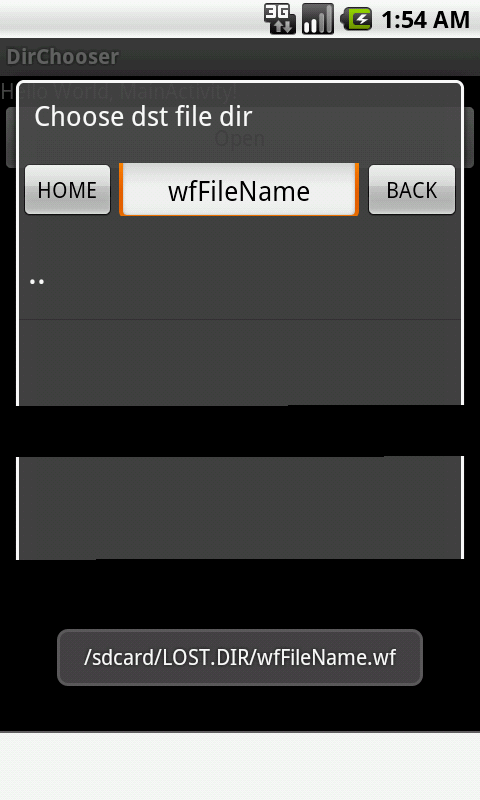
    public final static int TypeOpen = 1;   // 選擇目錄
    public final static int TypeSave = 2;   // 儲存到目錄

    /**
     * @param type     1 = 開啟目錄型對話框,2 = 儲存檔案到目錄型對話框
     * @param fileType 要過濾的檔案類型,null 表示只選目錄
     * @param resultPath 點 OK 後回傳的結果(目錄或目錄 + 檔名)
     */
    public DirChooserDialog(Context context, int type, String[] fileType, String resultPath) {
        super(context);
        this.context = context;
        this.type = type;
        this.fileType = fileType;
        this.path = resultPath;
    }

    @Override
    protected void onCreate(Bundle savedInstanceState) {
        super.onCreate(savedInstanceState);
        setContentView(R.layout.chooserdialog);

        path = getRootDir();
        arr = (ArrayList<String>) getDirs(path);
        Adapter = new ArrayAdapter<String>(context, android.R.layout.simple_list_item_1, arr);

        list = (ListView) findViewById(R.id.list_dir);
        list.setAdapter(Adapter);
        list.setOnItemClickListener(lvLis);

        home = (Button) findViewById(R.id.btn_home);
        home.setOnClickListener(this);
        back = (Button) findViewById(R.id.btn_back);
        back.setOnClickListener(this);
        ok = (Button) findViewById(R.id.btn_ok);
        ok.setOnClickListener(this);

        titleView = (LinearLayout) findViewById(R.id.dir_layout);
        if (type == TypeOpen) {
            title = new TextView(context);
            titleView.addView(title);
            title.setText(path);
        } else if (type == TypeSave) {
            et = new EditText(context);
            et.setWidth(240);
            et.setHeight(70);
            et.setGravity(Gravity.CENTER);
            et.setPadding(0, 2, 0, 0);
            titleView.addView(et);
            et.setText("wfFileName");
        }
    }

    // 動態更新 ListView
    Runnable add = new Runnable() {
        @Override
        public void run() {
            arr.clear();
            List<String> temp = getDirs(path);
            for (int i = 0; i < temp.size(); i++) {
                arr.add(temp.get(i));
            }
            Adapter.notifyDataSetChanged();
        }
    };

    private OnItemClickListener lvLis = new OnItemClickListener() {
        @Override
        public void onItemClick(AdapterView<?> arg0, View arg1, int arg2, long arg3) {
            String temp = (String) arg0.getItemAtPosition(arg2);
            if (temp.equals("..")) {
                path = getSubDir(path);
            } else if (path.equals("/")) {
                path = path + temp;
            } else {
                path = path + "/" + temp;
            }
            if (type == TypeOpen) {
                title.setText(path);
            }
            Handler handler = new Handler();
            handler.post(add);
        }
    };

    // 列出指定路徑下的子目錄(以及符合條件的檔案)
    private List<String> getDirs(String ipath) {
        List<String> file = new ArrayList<String>();
        File[] myFile = new File(ipath).listFiles();

        if (myFile == null) {
            file.add("..");
        } else {
            for (File f : myFile) {
                // 過濾目錄
                if (f.isDirectory()) {
                    String tempf = f.toString();
                    int pos = tempf.lastIndexOf("/");
                    String subTemp = tempf.substring(pos + 1, tempf.length());
                    file.add(subTemp);
                }
                // 依指定類型過濾檔案
                if (f.isFile() && fileType != null) {
                    for (int i = 0; i < fileType.length; i++) {
                        int typeStrLen = fileType[i].length();
                        String fileName = f.getPath()
                                .substring(f.getPath().length() - typeStrLen);
                        if (fileName.toLowerCase().equals(fileType[i])) {
                            file.add(f.toString()
                                    .substring(path.length() + 1, f.toString().length()));
                        }
                    }
                }
            }
        }
        if (file.size() == 0) {
            file.add("..");
        }
        return file;
    }

    @Override
    public void onClick(View v) {
        if (v.getId() == home.getId()) {
            path = getRootDir();
            if (type == TypeOpen) {
                title.setText(path);
            }
            Handler handler = new Handler();
            handler.post(add);
        } else if (v.getId() == back.getId()) {
            path = getSubDir(path);
            if (type == TypeOpen) {
                title.setText(path);
            }
            Handler handler = new Handler();
            handler.post(add);
        } else if (v.getId() == ok.getId()) {
            dismiss();
            if (type == TypeSave) {
                path = path + "/" + et.getEditableText().toString() + ".wf";
            }
            Toast.makeText(context, path, Toast.LENGTH_SHORT).show();
        }
    }

    private String getSDPath() {
        File sdDir = null;
        boolean sdCardExist = Environment.getExternalStorageState()
                .equals(android.os.Environment.MEDIA_MOUNTED);
        if (sdCardExist) {
            sdDir = Environment.getExternalStorageDirectory();
        }
        if (sdDir == null) {
            return null;
        }
        return sdDir.toString();
    }

    private String getRootDir() {
        String root = "/";
        path = getSDPath();
        if (path == null) {
            path = "/";
        }
        return root;
    }

    // 取得上一層目錄
    private String getSubDir(String path) {
        String subpath = null;
        int pos = path.lastIndexOf("/");
        if (pos == path.length()) {
            path = path.substring(0, path.length() - 1);
            pos = path.lastIndexOf("/");
        }
        subpath = path.substring(0, pos);
        if (pos == 0) {
            subpath = path;
        }
        return subpath;
    }
}
呼叫方式
package hkp.dirchooser;

import android.app.Activity;
import android.os.Bundle;
import android.view.View;
import android.view.View.OnClickListener;
import android.widget.Button;

public class MainActivity extends Activity {

    @Override
    public void onCreate(Bundle savedInstanceState) {
        super.onCreate(savedInstanceState);
        setContentView(R.layout.main);

        Button btn = (Button) findViewById(R.id.btn_open);
        btn.setOnClickListener(new OnClickListener() {
            @Override
            public void onClick(View v) {
                String path = null;
                String[] fileType = {"dst"};   // 要過濾的檔案類型
                DirChooserDialog dlg =
                        new DirChooserDialog(MainActivity.this, 2, fileType, path);
                dlg.setTitle("Choose dst file dir");
                dlg.show();
            }
        });
    }
}
權限不能少。Android 6.0 之後讀取外部儲存空間需要 READ_EXTERNAL_STORAGE 執行期權限,而且 TargetSdk 30 以上還面臨 Scoped Storage 的限制。若要在 Android 11+ 浏覽任意目錄,得改用 ACTION_OPEN_DOCUMENT_TREE 這類系統文件挑選器,或直接申請 MANAGE_EXTERNAL_STORAGE。
目錄讀取會失敗。listFiles() 在無權限或路徑不存在時會回傳 null,範例已有部分處理,但 UI 層最好給出明確提示而不是白畫面。
大目錄會卡。直接在主執行緒呼叫 listFiles() 並逐筆加入清單,遇到裝了上萬檔案的目錄會明顯卡頓。建議移到背景執行緒,或至少加上分頁載入。
路徑拼接要小心。用字串相加組路徑容易產生 // 或缺少分隔符的問題,改用 new File(parent, child) 會安全得多。
以上就是檔案與目錄選擇器的完整實作,需要的朋友可以依自己的專案結構調整使用。
 Android 桌面懸浮窗進階實作:還原 QQ 手機管家的小火箭加速動畫
只要是 QQ 手機管家的老使用者,對那個「小火箭加速」應該都不陌生:把懸浮窗拖成一支小火箭,移到螢幕下方的發射台放手,火箭就呼嘯著衝出畫面。本文就在先前「模仿 360 手
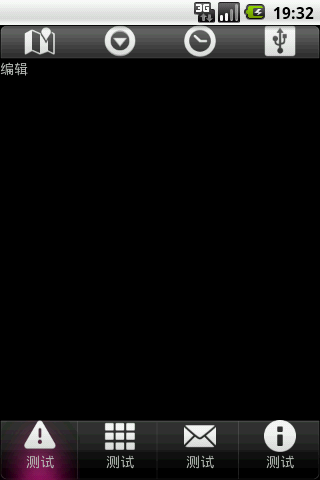 用版面配置做出頂部與底部工具列
很多 App 的介面結構是「上方一排圖示工具列、中間是內容區、下方一排操作按鈕」。這個效果完全不需要自訂 View,純靠 RelativeLayout 的定位屬性就能完成
 Android 實作:手機安全衛士(16)——打造多樣化的複雜 ListView
1 介紹 延續昨天的內容,今天我們繼續完善應用列表。應用可分為系統應用與使用者應用,安裝位置則分為手機內部儲存與 sdcard。因此,我們在 ListView 中加入一個
 Android 游戏实战:打飞机游戏怪物(敌机)类实现(四)
分析:依据敌机类型区分敌机的运动逻辑与绘制方式。 一、Enemy 敌机类 敌机类通过 type 标识区分不同种类,并为每种敌机赋予各自的移动速度与 AI 逻辑: