

編輯:關於 Android 程式設計
SDK 雖然提供了 ProgressDialog,但實際開發時常會遇到兩個問題:外觀與 App 整體設計語言不搭,而且可客製的幅度有限。這時候就得自己動手做一個。
翻開 ProgressDialog 的源碼可以發現,它繼承自 AlertDialog,內部結構其實就是一個 ProgressBar 加上兩個 TextView(分別顯示數值與百分比)。既然結構這麼單純,只要沿著同樣的思路改寫,就能得到一個外觀完全自訂的版本。
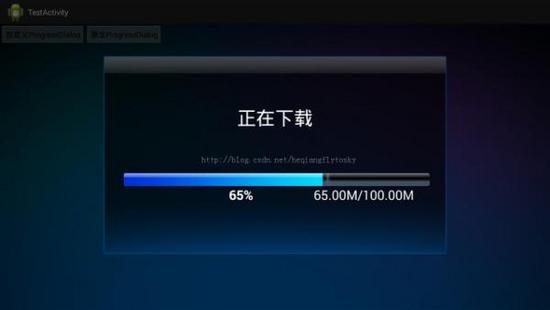
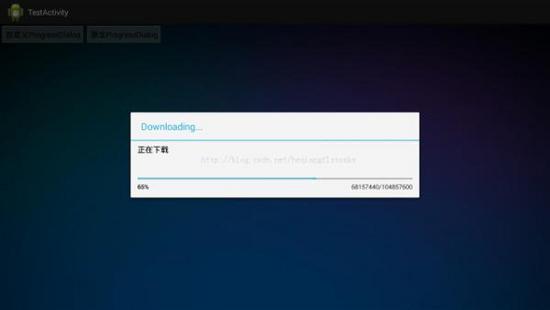
<FrameLayout xmlns:android="https://schemas.android.com/apk/res/android"
    xmlns:tools="https://schemas.android.com/tools"
    android:layout_width="wrap_content"
    android:layout_height="wrap_content">

    <LinearLayout
        android:layout_width="798px"
        android:layout_height="460px"
        android:orientation="vertical"
        android:background="@drawable/common_progress_dialog_background">

        <TextView
            android:id="@+id/progress_message"
            android:layout_width="wrap_content"
            android:layout_height="wrap_content"
            android:textSize="44px"
            android:layout_marginTop="113px"
            android:layout_gravity="center_horizontal"
            android:textColor="#ffffff" />

        <ProgressBar
            android:id="@+id/progress"
            android:layout_width="712px"
            android:layout_height="30px"
            android:layout_marginTop="100px"
            android:layout_marginLeft="47px"
            android:layout_centerHorizontal="true"
            android:progressDrawable="@drawable/common_progressdialog_progressbar_background" />

        <LinearLayout
            android:layout_width="wrap_content"
            android:layout_height="wrap_content"
            android:orientation="horizontal">

            <TextView
                android:id="@+id/progress_percent"
                android:layout_width="80px"
                android:layout_height="wrap_content"
                android:textSize="30px"
                android:layout_marginLeft="280px"
                android:gravity="center_horizontal"
                android:textColor="#ffffff" />

            <TextView
                android:id="@+id/progress_number"
                android:layout_width="250px"
                android:layout_height="wrap_content"
                android:layout_marginLeft="120px"
                android:textSize="30px"
                android:gravity="center_horizontal"
                android:textColor="#ffffff" />
        </LinearLayout>
    </LinearLayout>
</FrameLayout>
<?xml version="1.0" encoding="UTF-8"?>
<layer-list xmlns:android="https://schemas.android.com/apk/res/android">
    <item android:id="@android:id/background"
          android:drawable="@drawable/common_progress_dialog_progressbar3" />
    <item android:id="@android:id/progress"
          android:drawable="@drawable/common_progress_dialog_progressbar2" />
</layer-list>
package com.johnny.testactivity;

import java.text.NumberFormat;
import android.app.AlertDialog;
import android.content.Context;
import android.os.Bundle;
import android.os.Handler;
import android.os.Message;
import android.text.Spannable;
import android.text.SpannableString;
import android.text.style.StyleSpan;
import android.widget.ProgressBar;
import android.widget.TextView;

public class CommonProgressDialog extends AlertDialog {

    private ProgressBar mProgress;
    private TextView mProgressNumber;
    private TextView mProgressPercent;
    private TextView mProgressMessage;
    private Handler mViewUpdateHandler;

    private int mMax;
    private CharSequence mMessage;
    private boolean mHasStarted;
    private int mProgressVal;
    private String mProgressNumberFormat;
    private NumberFormat mProgressPercentFormat;

    public CommonProgressDialog(Context context) {
        super(context);
        initFormats();
    }

    @Override
    protected void onCreate(Bundle savedInstanceState) {
        super.onCreate(savedInstanceState);
        setContentView(R.layout.common_progress_dialog);

        mProgress        = (ProgressBar) findViewById(R.id.progress);
        mProgressNumber  = (TextView) findViewById(R.id.progress_number);
        mProgressPercent = (TextView) findViewById(R.id.progress_percent);
        mProgressMessage = (TextView) findViewById(R.id.progress_message);

        // 進度變動時更新數值與百分比文字
        mViewUpdateHandler = new Handler() {
            @Override
            public void handleMessage(Message msg) {
                super.handleMessage(msg);
                int progress = mProgress.getProgress();
                int max = mProgress.getMax();
                double dProgress = (double) progress / (double) (1024 * 1024);
                double dMax = (double) max / (double) (1024 * 1024);

                if (mProgressNumberFormat != null) {
                    mProgressNumber.setText(
                            String.format(mProgressNumberFormat, dProgress, dMax));
                } else {
                    mProgressNumber.setText("");
                }

                if (mProgressPercentFormat != null) {
                    double percent = (double) progress / (double) max;
                    SpannableString tmp =
                            new SpannableString(mProgressPercentFormat.format(percent));
                    tmp.setSpan(new StyleSpan(android.graphics.Typeface.BOLD),
                            0, tmp.length(), Spannable.SPAN_EXCLUSIVE_EXCLUSIVE);
                    mProgressPercent.setText(tmp);
                } else {
                    mProgressPercent.setText("");
                }
            }
        };

        onProgressChanged();

        if (mMessage != null) setMessage(mMessage);
        if (mMax > 0) setMax(mMax);
        if (mProgressVal > 0) setProgress(mProgressVal);
    }

    private void initFormats() {
        mProgressNumberFormat = "%1.2fM/%2.2fM";
        mProgressPercentFormat = NumberFormat.getPercentInstance();
        mProgressPercentFormat.setMaximumFractionDigits(0);
    }

    private void onProgressChanged() {
        mViewUpdateHandler.sendEmptyMessage(0);
    }

    public int getMax() {
        return mProgress != null ? mProgress.getMax() : mMax;
    }

    public void setMax(int max) {
        if (mProgress != null) {
            mProgress.setMax(max);
            onProgressChanged();
        } else {
            mMax = max;
        }
    }

    public void setIndeterminate(boolean indeterminate) {
        if (mProgress != null) {
            mProgress.setIndeterminate(indeterminate);
        }
    }

    public void setProgress(int value) {
        if (mHasStarted) {
            mProgress.setProgress(value);
            onProgressChanged();
        } else {
            mProgressVal = value;
        }
    }

    @Override
    public void setMessage(CharSequence message) {
        if (mProgressMessage != null) {
            mProgressMessage.setText(message);
        } else {
            mMessage = message;
        }
    }

    @Override
    protected void onStart() {
        super.onStart();
        mHasStarted = true;
    }

    @Override
    protected void onStop() {
        super.onStop();
        mHasStarted = false;
    }
}
private void showDialog() {
    mDialog = new CommonProgressDialog(this);
    mDialog.setMessage("正在下載");
    mDialog.setProgressStyle(ProgressDialog.STYLE_HORIZONTAL);
    mDialog.setOnCancelListener(new OnCancelListener() {
        @Override
        public void onCancel(DialogInterface dialog) {
            // 這裡可放取消下載的處理
        }
    });
    mDialog.show();
    mDialog.setMax(100 * 1024 * 1024);
    mDialog.setProgress(65 * 1024 * 1024);
}
這個實作有幾個值得借鏡的地方:mHasStarted 旗標確保在 Dialog 尚未顯示前設定的進度會先被暫存,等 onStart() 之後再套用;onProgressChanged() 統一透過 Handler 更新文字,讓 UI 操作集中在單一 thread;而百分比用 SpannableString 加上粗體樣式,則是讓數字更醒目的常見技巧。若要在新專案沿用,建議把它改寫成 DialogFragment,並把像素單位一律換成 dp 或 sp,以適配不同螢幕密度。
 Android 列表對話框用法解析
列表對話框概念 列表對話框適合用來讓使用者從一組選項中做選擇。通常會搭配字串陣列資源使用。 定義字串陣列 <resources> <string
 自定義半圓滾動菜單控件:位置修正與滑動回調實踐
前言本文整理自一個半圓形滾動菜單自定義控件的實作思路。相比單純讓菜單跟手轉動,這個控件更著重兩個細節:滑動結束後的位置自動修正,以及滑到中央項目時觸發回調,方便外部業務做
 Android 仿微信:ViewPager 搭配頂部與底部菜單欄
本文實作一個仿微信風格的主介面:上方標題欄、中間可左右滑動的 ViewPager、下方四個 Tab 按鈕。用 ViewPager 承載內容,每一頁對應一個 XML;手指左
 崩潰自救指南:把例外資訊回報給開發者並重新啟動 App
再仔細測試,App 上線後仍會在使用者五花八門的機型與操作下遇到意料之外的崩潰。與其等負評出現,不如讓 App 自己在崩潰時把堆疊資訊收集起來,引導使用者寄回給開發者。本