

編輯:關於 Android 程式設計
實務上常需要把 Activity 設成全螢幕。做法大致分兩大類:在程式碼中設定,或在 Manifest 中以主題設定。本文把常見的三種寫法完整整理,並說明各自的注意事項。
public void onCreate(Bundle savedInstanceState) { super.onCreate(savedInstanceState); //取消標題 requestWindowFeature(Window.FEATURE_NO_TITLE); //取消狀態欄 getWindow().setFlags(WindowManager.LayoutParams.FLAG_FULLSCREEN, WindowManager.LayoutParams.FLAG_FULLSCREEN); setContentView(R.layout.main); }
關鍵:這兩段設定必須放在 setContentView() 之前。介面一旦渲染完成再設全螢幕,就會出錯。
① 在 res/values 建立 theme.xml:
<?xml version="1.0" encoding="utf-8"?> <resources> <!-- name 是Style的名稱,parent 繼承那個父類樣式 --> <style name="theme_fullScreen" parent="android:Theme.Black"> <item name="android:windowNoTitle">true</item> <!-- 設置無標題 --> <item name="android:windowFullscreen">?android:windowNoTitle</item> <!-- 是否填充慢屏幕,引用android:windowNoTitle 的值 ?android:windowNoTitle,取決於android:windowNoTitle的值--> </style> </resources>
② 在 Manifest 中掛給對應 Activity:
<activity android:name=".login.LoginActivity" android:theme="@style/theme_fullScreen"/>
<?xml version="1.0" encoding="utf-8"?> <manifest xmlns:android="https://schemas.android.com/apk/res/android" package="com.andyidea" android:versionCode="1" android:versionName="1.0"> <uses-sdk android:minSdkVersion="8" /> <application android:icon="@drawable/icon" android:label="@string/app_name"> <activity android:name=".login.LoginActivity" android:theme="@android :style/Theme.NoTitleBar.Fullscreen" android:label="@string/app_name"> <intent-filter> <action android:name="android.intent.action.MAIN" /> <category android:name="android.intent.category.LAUNCHER" /> </intent-filter> </activity> </application> </manifest>
如果只想去掉標題欄、保留狀態欄,也可以在 res/values 下自訂一個 style,或者掛到整個 application 上:
<?xml version="1.0" encoding="UTF-8" ?> <resources> <style name="theme_notitle"> <item name="android:windowNoTitle">true</item> </style> </resources>
<application android:icon="@drawable/icon" android:label="@string/app_name" android:theme="@style/theme_notitle">
只需要單一 Activity 全螢幕、又不想動太多檔案,用方式三最快。若多個頁面都要全螢幕,方式二的自訂 Style 最整潔——改一處即可全域生效,也方便後續調整(例如加上沉浸式狀態欄的 windowTranslucentStatus)。方式一則適合需要「依條件動態決定是否全螢幕」的情境,例如播放器中隨使用者操作進出全螢幕。
三種方式背後的原理是同一件事:都是在視窗生成前把 no-title 與 fullscreen 這兩個旗標設定好,只是設定的時機與位置不同。理解這一點,就不必死背寫法了。
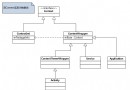 Android Context 到底是什麼?一次講清楚它的由來、數量與關係
什麼是 Context? 一個 Context 意味著一個「場景」,而場景就是我們與軟體互動的過程。當你使用微信時,場景包含聊天介面、通訊錄、朋友圈,以及背後支撐它們的那
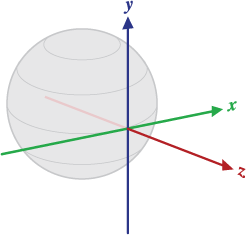 Android 位移傳感器全面解析
Android 平台提供了一系列傳感器,讓你能監測設備的運動。其中加速度計和陀螺儀總是基於硬件,而重力、線性加速度、旋轉矢量這三種傳感器則既可用硬件也可用軟件實現。例如,
 Android Fragment 通訊:Activity、Fragment 與 Fragment 之間
Fragment 之間的溝通,是 Android 開發中很常見的需求。最簡單的情況是 Activity 與 Fragment 傳值,進階一點則是 Fragment 與 F
 Android 動畫知識要點整理(12):幀動畫、視圖動畫與屬性動畫全解
動畫的分類 Android 的動畫體系可以分成三大類:幀動畫、視圖動畫(也叫補間動畫)和屬性動畫。前兩者常被合稱為補間動畫,而屬性動畫從 Android 3.0(API