

編輯:關於 Android 程式設計
線性佈局(LinearLayout)是 Android 中最基礎也最常用的佈局之一,它能讓子元素以垂直或水平的方式排成一列(不設定方向時預設按垂直方向排列)。透過合理的嵌套與 layout_weight,就能輕鬆構建出各種複雜的介面。本文就來詳細解析它的用法。
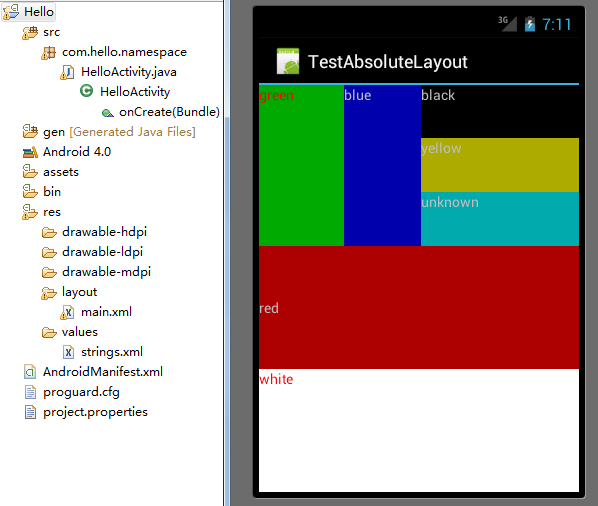
下面是一個示範 main.xml:
<?xml version="1.0" encoding="utf-8"?> <LinearLayout xmlns:android="https://schemas.android.com/apk/res/android" android:layout_width="fill_parent" android:layout_height="fill_parent" android:orientation="vertical" > <LinearLayout android:orientation="horizontal" android:layout_width="fill_parent" android:layout_height="wrap_content" android:baselineAligned="false" android:layout_weight="1" > <LinearLayout android:orientation="horizontal" android:layout_width="wrap_content" android:layout_height="fill_parent" android:layout_weight="1"> <TextView android:text="@string/color_green" android:textColor="#ff0000" android:background="#00aa00" android:layout_width="wrap_content" android:layout_height="fill_parent" android:layout_weight="1"/> <TextView android:text="@string/color_blue" android:background="#0000aa" android:layout_width="wrap_content" android:layout_height="fill_parent" android:layout_weight="1"/> </LinearLayout> <LinearLayout android:orientation="vertical" android:layout_width="wrap_content" android:layout_height="fill_parent" android:layout_weight="1"> <TextView android:text="@string/color_black" android:background="#000000" android:layout_width="fill_parent" android:layout_height="wrap_content" android:layout_weight="1"/> <TextView android:text="@string/color_yellow" android:background="#aaaa00" android:layout_width="fill_parent" android:layout_height="wrap_content" android:layout_weight="1"/> <TextView android:text="@string/color_unknown" android:background="#00aaaa" android:layout_width="fill_parent" android:layout_height="wrap_content" android:layout_weight="1"/> </LinearLayout> </LinearLayout> <LinearLayout android:orientation="vertical" android:layout_width="fill_parent" android:layout_height="wrap_content" android:layout_weight="2"> <TextView android:text="@string/color_red" android:gravity="fill_vertical" android:background="#aa0000" android:layout_width="fill_parent" android:layout_height="wrap_content" android:layout_weight="2"/> <TextView android:text="@string/color_white" android:textColor="#ff0000" android:background="#ffffff" android:layout_width="fill_parent" android:layout_height="wrap_content" android:layout_weight="2"/> </LinearLayout> </LinearLayout>
string.xml
<?xml version="1.0" encoding="utf-8"?> <resources> <string name="hello">Hello World, TestAbsoluteLayoutActivity!</string> <string name="app_name">TestAbsoluteLayout</string> <string name= "color_red">red</string> <string name= "color_green">green</string> <string name= "color_blue">blue</string> <string name= "color_white">white</string> <string name= "color_black">black</string> <string name= "color_yellow">yellow</string> <string name= "color_unknown">unknown</string> </resources>
效果圖如下:
常用的屬性有三個:
android:orientation:設定佈局的方向(vertical 或 horizontal);
android:gravity:用來控制組件的對齊方式;
layout_weight:控制各個組件在佈局中的相對大小比例。
其中 layout_weight 是 LinearLayout 的精髓——它會按權重比例分配剩餘空間,是實現等分、按比例佈局的核心工具。掌握這三個屬性,你就能應付絕大多數線性佈局的需求。
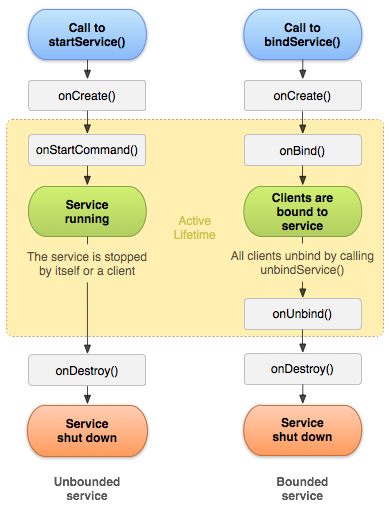 深入解析 Android Service:啟動、綁定與生命週期全攻略
在 Android 的四大組件之中,Service 扮演著「幕後推手」的角色。它是一個不具備使用者介面的應用元件,專門負責在背景執行長時間的操作。當某個應用元件啟動了 S
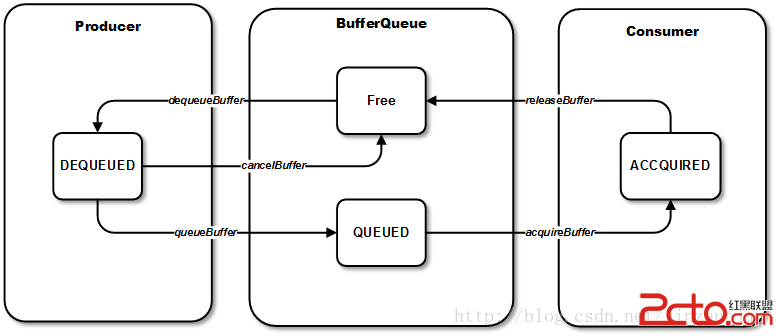 Android GraphicBuffer 同步機制之 Fence 深入解析
Fence 是一種同步機制,在 Android 裡主要用於圖形系統中 GraphicBuffer 的同步。相較於已有的同步機制,它的特點在於處理跨硬件的場景,尤其是 CP
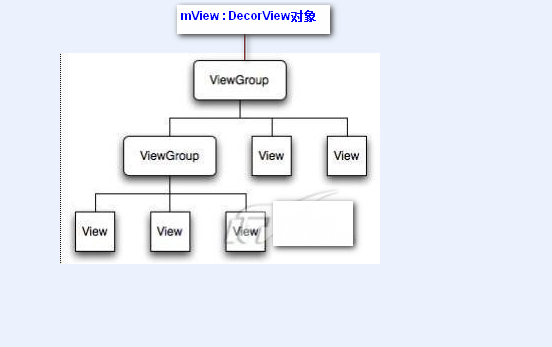 自定義控件_day01——onLayout 與子 View 的位置計算
自定義 View 其實就三個步驟: 1. 測量——onMeasure():決定 View 的大小2. 布局——onLayout():決定 View 在 ViewGroup
 用百度地圖 Android SDK 做「發送位置」功能:仿微信互動實作
接觸百度地圖開發平台半個月,這兩天試著模仿微信「發送位置給好友」的功能,對地圖操作的理解又上了一個台階。 實現過程中遇到幾個卡點,猜想別人也可能會踩到,特別整理出來。 問