

編輯:關於 Android 程式設計
在 Android 開發裡,圖片資料會以好幾種姿態出現:記憶體中的 Bitmap、可繪製的 Drawable、適合網路傳輸與資料庫儲存的 byte[],以及串流形式的 InputStream。這四者之間的轉換幾乎每個專案都會遇到,與其到處寫臨時程式碼,不如收攏成一個工具類。
核心樞紐是 Bitmap。其他型別要互相轉換,基本上都先轉成 Bitmap 再轉出去:
ByteArrayOutputStream + compress(),以及 BitmapFactory.decodeByteArray()。ByteArrayInputStream。BitmapDrawable 包一層即可。
package com.soai.imdemo;

import java.io.ByteArrayInputStream;
import java.io.ByteArrayOutputStream;
import java.io.InputStream;

import android.graphics.Bitmap;
import android.graphics.BitmapFactory;
import android.graphics.Canvas;
import android.graphics.PixelFormat;
import android.graphics.drawable.BitmapDrawable;
import android.graphics.drawable.Drawable;

public class FormatTools {

    private static FormatTools tools = new FormatTools();

    public static FormatTools getInstance() {
        return tools;
    }

    /** byte[] 轉 InputStream */
    public InputStream Byte2InputStream(byte[] b) {
        return new ByteArrayInputStream(b);
    }

    /** InputStream 轉 byte[](正確寫法:直接收集位元組,不要經過 String) */
    public byte[] InputStream2Bytes(InputStream is) throws Exception {
        ByteArrayOutputStream baos = new ByteArrayOutputStream();
        byte[] buffer = new byte[1024];
        int readCount;
        while ((readCount = is.read(buffer, 0, buffer.length)) != -1) {
            baos.write(buffer, 0, readCount);
        }
        return baos.toByteArray();
    }

    /** Bitmap 轉 InputStream(JPEG,預設品質) */
    public InputStream Bitmap2InputStream(Bitmap bm) {
        return Bitmap2InputStream(bm, 100);
    }

    /** Bitmap 轉 InputStream(可指定格式與品質) */
    public InputStream Bitmap2InputStream(Bitmap bm, int quality) {
        ByteArrayOutputStream baos = new ByteArrayOutputStream();
        bm.compress(Bitmap.CompressFormat.PNG, quality, baos);
        return new ByteArrayInputStream(baos.toByteArray());
    }

    /** InputStream 轉 Bitmap */
    public Bitmap InputStream2Bitmap(InputStream is) {
        return BitmapFactory.decodeStream(is);
    }

    /** Drawable 轉 InputStream */
    public InputStream Drawable2InputStream(Drawable d) {
        return Bitmap2InputStream(drawable2Bitmap(d));
    }

    /** InputStream 轉 Drawable */
    public Drawable InputStream2Drawable(InputStream is) {
        return bitmap2Drawable(InputStream2Bitmap(is));
    }

    /** Drawable 轉 byte[] */
    public byte[] Drawable2Bytes(Drawable d) {
        return Bitmap2Bytes(drawable2Bitmap(d));
    }

    /** byte[] 轉 Drawable */
    public Drawable Bytes2Drawable(byte[] b) {
        return bitmap2Drawable(Bytes2Bitmap(b));
    }

    /** Bitmap 轉 byte[] */
    public byte[] Bitmap2Bytes(Bitmap bm) {
        ByteArrayOutputStream baos = new ByteArrayOutputStream();
        bm.compress(Bitmap.CompressFormat.PNG, 100, baos);
        return baos.toByteArray();
    }

    /** byte[] 轉 Bitmap */
    public Bitmap Bytes2Bitmap(byte[] b) {
        if (b != null && b.length != 0) {
            return BitmapFactory.decodeByteArray(b, 0, b.length);
        }
        return null;
    }

    /** Drawable 轉 Bitmap */
    public Bitmap drawable2Bitmap(Drawable drawable) {
        Bitmap bitmap = Bitmap.createBitmap(
                drawable.getIntrinsicWidth(),
                drawable.getIntrinsicHeight(),
                drawable.getOpacity() != PixelFormat.OPAQUE
                        ? Bitmap.Config.ARGB_8888
                        : Bitmap.Config.RGB_565);
        Canvas canvas = new Canvas(bitmap);
        drawable.setBounds(0, 0, drawable.getIntrinsicWidth(),
                drawable.getIntrinsicHeight());
        drawable.draw(canvas);
        return bitmap;
    }

    /** Bitmap 轉 Drawable */
    public Drawable bitmap2Drawable(Bitmap bitmap) {
        return new BitmapDrawable(bitmap);
    }
}
不要讓 byte[] 經過 String。 常見的錯誤寫法是把每次 read 到的內容 new String(...) 再用字串相加拼回去,最後 getBytes()。圖片是二進位資料,經過字元編碼解碼會被破壞,而且字串相加在迴圈中會產生大量暫存物件。正確做法就是上面那樣直接寫進 ByteArrayOutputStream。
記得關流。 InputStream 用完要 close,或改用 try-with-resources,避免檔案描述符洩漏。
注意記憶體。 compress() 與 decodeByteArray() 都是把整張圖放進記憶體,大圖容易觸發 OOM。若只是要縮圖,用 BitmapFactory.Options.inSampleSize 先降採樣,會比壓縮後再處理安全得多。
ARD_8888 與 RGB_565 的取捨。 上面用 getOpacity() 判斷是否透明來決定色彩配置,不透明的圖用 RGB_565 可省一半記憶體;需要保留 alpha 通道時才用 ARGB_8888。
 Android 透過 Socket 與伺服器通訊的完整實作(含 Demo)
Socket 是 Android 上歷史悠久、也相當可靠的通訊方式。它不像 HTTP 那樣有著「一问一答」的限制,伺服器可以主動推送資料給客戶端,因此非常適合即時通訊、長
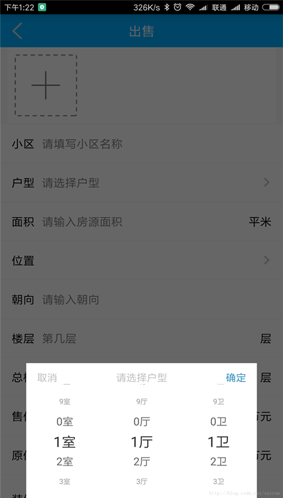 Android 自定義滾動選擇器(Picker)完整實例代碼
本文分享一個自定義滾動選擇器的完整實現,先看看效果:它的核心思路是:用一個自定義 View,把數據列表循環排列,通過手指滑動改變偏移量,再用拋物線函數計算每個選項的字號與
 Android 零起步學習筆記(九):LayoutParams 與常用佈局屬性全整理
控制元件的位置與大小,是 Android UI 開發最基礎也最容易出錯的一環。本文整理兩條路徑——在 XML 中宣告屬性,以及在 Java 程式碼中動態設定 Layout
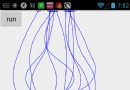 Android 路徑動畫:用 PathMeasure 讓物件沿曲線飛行
前言 專案裡要做一個類似「發送表情從螢幕下方飄出」的效果,本質上就是路徑動畫:先畫出一條路徑,再讓物件沿著這條路徑移動。 要解決的問題其實只有兩個:怎麼畫出路徑?以及怎麼