

編輯:關於 Android 程式設計
在Android系統中,SMS簡訊其實是保存在SQLite資料庫裡的,但基於系統的安全機制,其他程式無法直接存取。本文示範如何讀取手機內的簡訊,先存入自訂的SQLite資料庫,再從資料庫中提取並顯示,整個流程完整可運行。
我們會建立一個名為 SmsHander 的內部類別,負責資料庫的建立、寫入、查詢與關閉,並在Activity中將資料以表格形式呈現。
SMS短信SQLite存取代碼:
package com.homer.sms; import java.sql.Date; import java.text.SimpleDateFormat; import org.loon.wsi.R; import android.app.Activity; import android.content.Context; import android.database.Cursor; import android.database.sqlite.SQLiteDatabase; import android.graphics.Color; import android.net.Uri; import android.os.Bundle; import android.util.Log; import android.widget.TableLayout; import android.widget.TableRow; import android.widget.TableRow.LayoutParams; import android.widget.TextView; /** * 讀取手機短信, 先保存到SQLite數據,然後再讀取數據庫顯示 * * @author sunboy_2050 * @since https://blog.csdn.net/sunboy_2050 * @date 2012.03.06 */ public class smsRead4 extends Activity { TableLayout tableLayout; int index = 0; @Override public void onCreate(Bundle savedInstanceState) { super.onCreate(savedInstanceState); setContentView(R.layout.main); tableLayout = (TableLayout) findViewById(R.id.tableLayout); showSMS(); } private void showSMS() { SmsHander smsHander = new SmsHander(this); smsHander.createSMSDatabase(); // 創建SQLite數據庫 smsHander.insertSMSToDatabase(); // 讀取手機短信,插入SQLite數據庫 Cursor cursor = smsHander.querySMSInDatabase(100); // 獲取前100條短信(日期排序) cursor.moveToPosition(-1); while (cursor.moveToNext()) { String strAddress = cursor.getString(cursor.getColumnIndex("address")); String strDate = cursor.getString(cursor.getColumnIndex("date")); String strBody = cursor.getString(cursor.getColumnIndex("body")); SimpleDateFormat dateFormat = new SimpleDateFormat("yyyy-MM-dd HH:mm:ss"); Date date = new Date(Long.parseLong(strDate)); strDate = dateFormat.format(date); String smsTitle = strAddress + "\t\t" + strDate; String smsBody = strBody + "\n"; Log.i("tableRow", smsTitle + smsBody); // title Row TableRow trTitle = new TableRow(this); trTitle.setLayoutParams(new LayoutParams(LayoutParams.WRAP_CONTENT, LayoutParams.WRAP_CONTENT)); TextView tvTitle = new TextView(this); tvTitle.setText(smsTitle); tvTitle.getPaint().setFakeBoldText(true); // 加粗字體 tvTitle.setTextColor(Color.RED); tvTitle.setLayoutParams(new LayoutParams(LayoutParams.WRAP_CONTENT, LayoutParams.WRAP_CONTENT)); trTitle.addView(tvTitle); tableLayout.addView(trTitle, new TableLayout.LayoutParams(LayoutParams.FILL_PARENT, LayoutParams.WRAP_CONTENT)); // body Row TableRow trBody = new TableRow(this); trBody.setLayoutParams(new LayoutParams(LayoutParams.WRAP_CONTENT, LayoutParams.WRAP_CONTENT)); TextView tvBody = new TextView(this); tvBody.setText(smsBody); tvBody.setLayoutParams(new LayoutParams(LayoutParams.WRAP_CONTENT, LayoutParams.WRAP_CONTENT)); trBody.addView(tvBody); tableLayout.addView(trBody, new TableLayout.LayoutParams(LayoutParams.FILL_PARENT, LayoutParams.WRAP_CONTENT)); } if (!cursor.isClosed()) { cursor.close(); cursor = null; } smsHander.closeSMSDatabase(); index = 0; } public class SmsHander { SQLiteDatabase db; Context context; public SmsHander(Context context) { this.context = context; } public void createSMSDatabase() { String sql = "create table if not exists sms(" + "_id integer primary key autoincrement," + "address varchar(255)," + "person varchar(255)," + "body varchar(1024)," + "date varchar(255)," + "type integer)"; db = SQLiteDatabase.openOrCreateDatabase(context.getFilesDir().toString() + "/data.db3", null); // 創建數據庫 db.execSQL(sql); } // 獲取手機短信 private Cursor getSMSInPhone() { Uri SMS_CONTENT = Uri.parse("content://sms/"); String[] projection = new String[] { "_id", "address", "person", "body", "date", "type" }; Cursor cursor = context.getContentResolver().query(SMS_CONTENT, projection, null, null, "date desc"); // 獲取手機短信 while (cursor.moveToNext()) { System.out.println("--sms-- : " + cursor.getString(cursor.getColumnIndex("body"))); } return cursor; } // 保存手機短信到 SQLite 數據庫 public void insertSMSToDatabase() { Long lastTime; Cursor dbCount = db.rawQuery("select count(*) from sms", null); dbCount.moveToFirst(); if (dbCount.getInt(0) > 0) { Cursor dbcur = db.rawQuery("select * from sms order by date desc limit 1", null); dbcur.moveToFirst(); lastTime = Long.parseLong(dbcur.getString(dbcur.getColumnIndex("date"))); } else { lastTime = new Long(0); } dbCount.close(); dbCount = null; Cursor cur = getSMSInPhone(); // 獲取短信(游標) db.beginTransaction(); // 開始事務處理 if (cur.moveToFirst()) { String address; String person; String body; String date; int type; int iAddress = cur.getColumnIndex("address"); int iPerson = cur.getColumnIndex("person"); int iBody = cur.getColumnIndex("body"); int iDate = cur.getColumnIndex("date"); int iType = cur.getColumnIndex("type"); do { address = cur.getString(iAddress); person = cur.getString(iPerson); body = cur.getString(iBody); date = cur.getString(iDate); type = cur.getInt(iType); if (Long.parseLong(date) > lastTime) { String sql = "insert into sms values(null, ?, ?, ?, ?, ?)"; Object[] bindArgs = new Object[] { address, person, body, date, type }; db.execSQL(sql, bindArgs); } else { break; } } while (cur.moveToNext()); cur.close(); cur = null; db.setTransactionSuccessful(); // 設置事務處理成功,不設置會自動回滾不提交 db.endTransaction(); // 結束事務處理 } } // 獲取 SQLite 數據庫中的全部短信 public Cursor querySMSFromDatabase() { String sql = "select * from sms order by date desc"; return db.rawQuery(sql, null); } // 獲取 SQLite 數據庫中的最新 size 條短信 public Cursor querySMSInDatabase(int size) { String sql; Cursor dbCount = db.rawQuery("select count(*) from sms", null); dbCount.moveToFirst(); if (size < dbCount.getInt(0)) { // 不足 size 條短信,則取前 size 條 sql = "select * from sms order by date desc limit " + size; } else { sql = "select * from sms order by date desc"; } dbCount.close(); dbCount = null; return db.rawQuery(sql, null); } // 獲取 SQLite數據庫的前 second秒短信 public Cursor getSMSInDatabaseFrom(long second) { long time = System.currentTimeMillis() / 1000 - second; String sql = "select * from sms order by date desc where date > " + time; return db.rawQuery(sql, null); } // 關閉數據庫 public void closeSMSDatabase() { if (db != null && db.isOpen()) { db.close(); db = null; } } } }
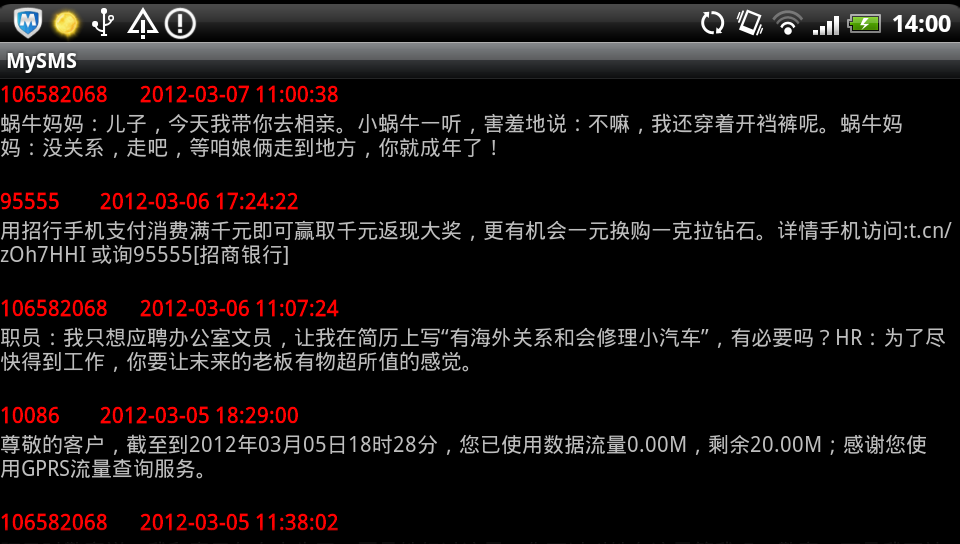
程式執行後,簡訊會以「發件人+時間」為標題、內容為本文的表格形式逐筆列出。運行結果如下:
完整範例程式碼可至本站下載。透過這個範例,你將能掌握ContentResolver讀取系統簡訊,以及SQLite資料庫增量寫入與查詢的實務技巧。
 魅藍 metal 裝卡教學:雙卡與 TF 卡安裝方式
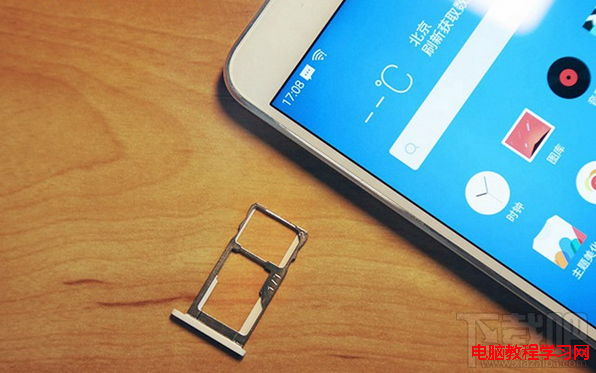
魅藍 metal 採用與或卡托設計,支援雙卡雙待。安裝 SIM 卡前,需先以卡針取出卡托。卡槽說明靠近機身內側為 SIM1,僅支援 Nano SIM;靠近外側為 SIM2
 用 HttpClient 實作手機號碼歸屬地查詢:Android 網路請求完整範例
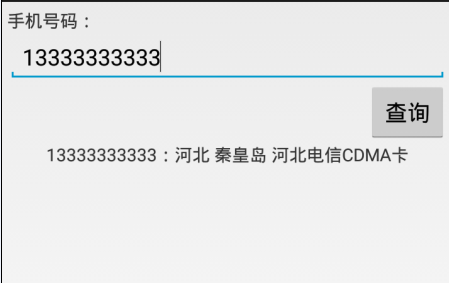
資料來源 https://webservice.webxml.com.cn/WebServices/MobileCodeWS.asmx 該服務除了 HTTP GET/PO
 Android LayoutInflater 深入解析:inflate 三個參數的差異
常見誤解 許多開發者會以為 inflate(resource, null)、inflate(resource, root, false) 與 inflate(resour
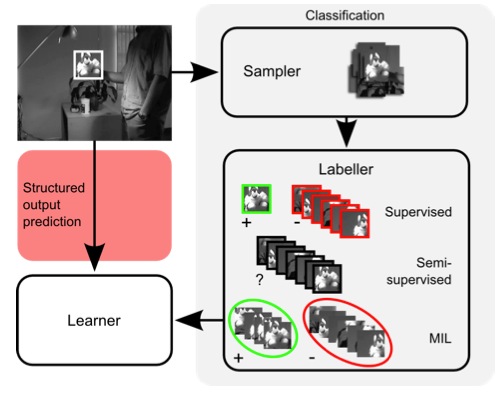 運動目標跟蹤(九):Struck 結構化輸出跟蹤原理詳解
《Struck: Structured Output Tracking with Kernels》由 Sam Hare、Amir Saffari、Philip H. S.