

編輯:關於 Android 程式設計
做遊戲或直式閱讀器時,常需要把畫面方向固定住,同時把系統的標題欄與狀態列藏起來換取更大顯示空間。以下把常見做法整理成對照表。
最簡單的方式是在 AndroidManifest.xml 的 Activity 節點加上 android:screenOrientation="portrait"。要留意的是 portrait 是「直向」,landscape 才是「橫向」,這兩個字面上的誤會很常見。
requestWindowFeature(Window.FEATURE_NO_TITLE);,注意必須寫在 setContentView() 之前,否則會拋出例外。android:theme="@android:style/Theme.NoTitleBar"。程式碼寫法為:
getWindow().setFlags(WindowManager.LayoutParams.FLAG_FULLSCREEN, WindowManager.LayoutParams.FLAG_FULLSCREEN);
 <manifest xmlns:android="https://schemas.android.com/apk/res/android"
package="com.example.android.jetboy"
android:versionCode="1"
android:versionName="1.0.0">

<application
android:icon="@drawable/icon"
android:label="@string/app_name"
android:theme="@android:style/Theme.NoTitleBar">

<activity
android:name=".JetBoy"
android:label="@string/app_name"
android:screenOrientation="portrait" >
<intent-filter>
<action android:name="android.intent.action.MAIN" />
<category android:name="android.intent.category.LAUNCHER" />
</intent-filter>
</activity>

</application>

<uses-sdk android:minSdkVersion="4"></uses-sdk>

<!--
<uses-library android:name="android.test.runner" />
<instrumentation android:name="android.test.InstrumentationTestRunner"
android:targetPackage="com.example.android.jetboy"
android:functionalTest="true"
android:label="Jetboy Test All Runner"/>
<uses-permission android:name="android.permission.RUN_INSTRUMENTATION"/>
-->
</manifest>
Android 4.4 之後,全螢幕建議改用 View.setSystemUiVisibility() 搭配 SYSTEM_UI_FLAG_FULLSCREEN 等旗標,並監聽 onWindowFocusChanged() 隨時恢復,才能相容瀏覽器列自動隱藏等新式行為。
 Android 實作:一步一步打造視訊播放用戶端 App(一)
我完成了一個完整的視訊用戶端 App,現在把它分享出來,供初學者學習參考(大神就不用看了,內容偏入門),大家互相交流。專案時間有限,只能時不時更新,大致講解如何一步步實作
 Android 小遊戲 2048 重構筆記:自定義方塊、手勢操作與存檔設計
2048 是一個規則簡單、容易上手的小遊戲,但若要在 Android 上做出流暢且可維護的版本,仍需要仔細安排方塊、手勢、分數與存檔邏輯。本文以重構後的版本為例,整理其設
 自訂 View 打造漸層渲染曲線圖的實作拆解
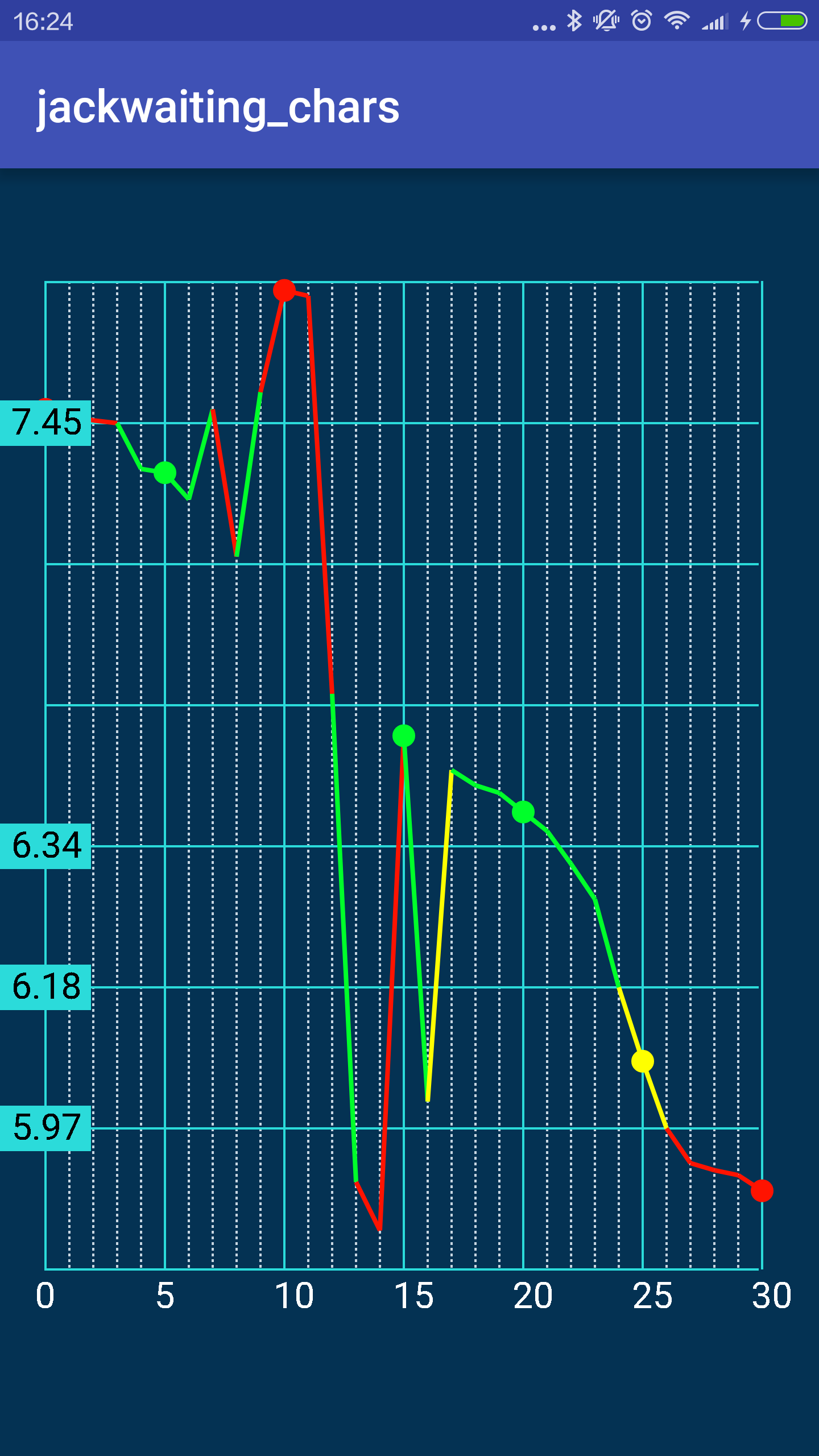
需求是什麼 先看修改測試資料之後,原本的 View 長這樣: 而我們真正想要的效果,是讓曲線依數值落在不同區間時呈現不同顏色:縱座標 7.45 以上與 5.97 以下為
 Android 開發中使用 VectorDrawable 向量圖
什麼是向量圖 向量圖以幾何方式描述圖形,放大後不易失真,適合圖示、標誌與簡單插畫。Android 從 5.0 開始支援 VectorDrawable,讓開發者能用 XML