

編輯:關於 Android 程式設計
這個範例示範如何以靜態方式註冊廣播接收器,並把接收到的廣播頻度寫入資料庫,即時呈現在畫面上。整個流程串起了 BroadcastReceiver、ContentProvider、ContentObserver 與 Handler 四個元件。
ACTION_NAME(廣播名稱)、LAST_TIME(最近一次發生時間)、COUNT(總共記錄到的次數)。ActionDBObserver 中監聽資料庫變化,並用 Handler 機制把最新狀況顯示到 TextView 上。 package lab.sodino.broadcastaction;
import lab.sodino.util.DatabaseOpenHelper;
import lab.sodino.util.SodinoOut;
import android.app.Activity;
import android.content.ContentResolver;
import android.database.ContentObserver;
import android.database.Cursor;
import android.os.Bundle;
import android.os.Handler;
import android.os.Message;
import android.view.View;
import android.view.ViewGroup.LayoutParams;
import android.widget.Button;
import android.widget.LinearLayout;
import android.widget.ScrollView;
import android.widget.TextView;
/**
* 本例子將記錄可靜態注冊的廣播被監聽到的頻度。
* 1. 建立一表 {ACTION_NAME 廣播名稱, LAST_TIME 最近一次發生時間, COUNT 總共記錄到的次數}
* 2. 在 ActionReceiver 中監聽廣播,並記錄。
* 3. 在 DBContentProvider 中更新數據庫記錄
* 4. 在 BroadcastActionRecordAct.ActionDBObserver 中監聽數據庫的變化,
* 並使用 Handler 機制將最新情況顯示在 txtInfo 上。
* 5. DatabaseOpenHelper 將實現基本的數據庫操作。
*
* @author Sodino
*/
public class BroadcastActionRecordAct extends Activity implements Button.OnClickListener {
private TextView txtInfo;
private DatabaseOpenHelper dbHelper;
private Button btnRefresh;
/** clear 功能未完善。 */
private Button btnClear;
private Handler handler = new Handler() {
public void handleMessage(Message msg) {
String info = (String) msg.obj;
txtInfo.setText(info);
}
};
@Override
public void onCreate(Bundle savedInstanceState) {
super.onCreate(savedInstanceState);
LayoutParams lpPC = new LayoutParams(LayoutParams.FILL_PARENT, LayoutParams.WRAP_CONTENT);
LayoutParams lpCC = new LayoutParams(LayoutParams.WRAP_CONTENT, LayoutParams.WRAP_CONTENT);
btnRefresh = new Button(this);
btnRefresh.setLayoutParams(lpCC);
btnRefresh.setText("Refresh");
btnRefresh.setOnClickListener(this);
btnClear = new Button(this);
btnClear.setLayoutParams(lpCC);
btnClear.setText("ClearTable");
btnClear.setOnClickListener(this);
LinearLayout subLayout = new LinearLayout(this);
subLayout.setLayoutParams(lpPC);
subLayout.setOrientation(LinearLayout.HORIZONTAL);
subLayout.addView(btnRefresh);
subLayout.addView(btnClear);
txtInfo = new TextView(this);
txtInfo.setLayoutParams(lpPC);
txtInfo.setTextColor(0xff0000ff);
txtInfo.setBackgroundColor(0xffffffff);
txtInfo.setText("Starting...");
txtInfo.setTextSize(15);
ScrollView scrollView = new ScrollView(this);
scrollView.setLayoutParams(lpPC);
scrollView.addView(txtInfo);
LinearLayout mainLayout = new LinearLayout(this);
mainLayout.setLayoutParams(lpPC);
mainLayout.setOrientation(LinearLayout.VERTICAL);
mainLayout.addView(subLayout);
mainLayout.addView(scrollView);
setContentView(mainLayout);
dbHelper = new DatabaseOpenHelper(this);
ContentResolver contentResolver = getContentResolver();
contentResolver.registerContentObserver(DBContentProvider.CONTENT_URI, false, new ActionDBObserver(handler));
}
public void onClick(View view) {
if (view == btnRefresh) {
refreshRecord();
} else if (view == btnClear) {
clearRecord();
}
}
public void refreshRecord() {
dbHelper.openReadableDatabase();
String info = dbHelper.getAllOrderedList(DatabaseOpenHelper.DESC);
dbHelper.close();
if (info != null) {
txtInfo.setText(info);
} else {
txtInfo.setText("<NULL/>");
}
dbHelper.close();
}
public void clearRecord() {
dbHelper.openWritableDatabase();
dbHelper.clearRecord();
dbHelper.close();
}
private class ActionDBObserver extends ContentObserver {
private Handler handler;
public ActionDBObserver(Handler handler) {
super(handler);
this.handler = handler;
}
public void onChange(boolean selfChange) {
super.onChange(selfChange);
String[] projection = { "ACTION_NAME", "LAST_TIME", "COUNT" };
String sortOrder = "COUNT DESC";
Cursor cursor = managedQuery(DBContentProvider.CONTENT_URI, projection, null, null, sortOrder);
String info = "";
String line = "";
int actionIdx = 0;
int timeIdx = 1;
int countIdx = 2;
while (cursor.moveToNext()) {
line += cursor.getString(actionIdx) + " ";
line += cursor.getString(timeIdx) + " ";
line += cursor.getString(countIdx) + "/n";
info += line;
line = "";
}
Message msg = new Message();
msg.obj = info;
handler.sendMessage(msg);
cursor.close();
SodinoOut.out("Database does changed!!!");
}
public boolean deliverSelfNotifications() {
return super.deliverSelfNotifications();
}
}
}
關鍵在於 Android 的單執行緒模型:UI 元件只能在主執行緒更新,而廣播回呼與資料庫查詢往往不在主執行緒上。用 ContentObserver 偵測資料變化、再用 Handler 把結果拋回主執行緒,就是標準且安全的解法。
 仿電商 App 商品詳情頁:標題列隨滾動吸頂的懸浮效果
1、效果預覽 這個效果的用戶體驗確實相當酷炫,今天就來拆解它的實作方式。 2、先拆解結構 整個頁面可以分成四塊: • 懸浮內容 floatView &#
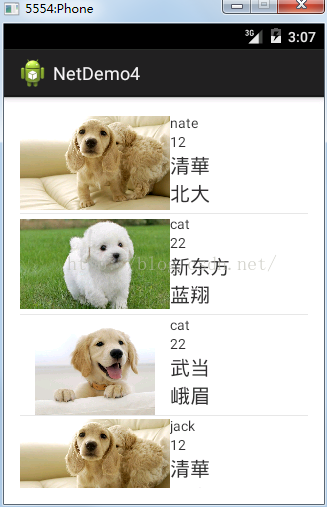 Android 網路資料處理:JSON 生成、解析與 ListView 圖片顯示
在 Android 應用中,常需要從伺服器取得 JSON 資料,再解析成物件並顯示在畫面上。本文以一個 ListView 範例,說明 JSON 字串生成、網路下載、解析、
 Android 文件監控 FileObserver 深度解析
在之前的《Linux 文件系統 Inotify 機制》中,我們介紹了 Linux 對文件變更的監控過程。Android 在此基礎上封裝了一個 FileObserver 類
 Android 系統升級的完整過程:從 PDK 到 OTA 漫長旅程
使用者按下「下載並安裝」的那一刻,感覺像是一瞬間的事。但實際上,一個 Android 版本要走到你的手机上,得經過一條相當漫長、參與者眾多的供應鏈。HTC 曾在官方軟體更