

編輯:關於 Android 程式設計
推送通知、資料同步、定位服務等模組,往往需要知道「使用者現在有沒有在看我的 App」,以決定要不要跳提示或暫停背景作業。判斷方式有兩種常見思路。
當 Activity 進入 onStop() 時,代表畫面已經不可見。此時去查自己的進程是否還在「前台」等級,就能判斷是暫時被別的 Activity 蓋住,還是真的退到背景了。
 @Override
protected void onStop() {
if (!isAppOnForeground()) {
Debug.i("dwy", "enter background");
mIsBackground = true;
} else {
Debug.i("dwy", "foreground");
mIsBackground = false;
}
super.onStop();
}

/**
* Judge is App in background when onStop() get called.
*/
public boolean isAppOnForeground() {
// Returns a list of application processes that are running on the device
ActivityManager activityManager = (ActivityManager) getApplicationContext()
.getSystemService(Context.ACTIVITY_SERVICE);

String packageName = getApplicationContext().getPackageName();

List<ActivityManager.RunningAppProcessInfo> appProcesses =
activityManager.getRunningAppProcesses();

if (appProcesses == null) return false;

for (ActivityManager.RunningAppProcessInfo appProcess : appProcesses) {
// The name of the process that this object is associated with.
if (appProcess.processName.equals(packageName)
&& appProcess.importance == ActivityManager.RunningAppProcessInfo.IMPORTANCE_FOREGROUND) {
return true;
}
}
return false;
}
另一條路是查出目前跑在最前面的 Task 屬於哪個 package,若與自己的 package 名稱不同,就代表 App 已退到背景。
 /**
* 需要權限:android.permission.GET_TASKS
*
* @param context
* @return
*/
public boolean isApplicationBroughtToBackground(Context context) {
ActivityManager am = (ActivityManager) context.getSystemService(Context.ACTIVITY_SERVICE);
List<RunningTaskInfo> tasks = am.getRunningTasks(1);

if (tasks != null && !tasks.isEmpty()) {
ComponentName topActivity = tasks.get(0).topActivity;
Debug.i(TAG, "topActivity:" + topActivity.flattenToString());
if (!topActivity.getPackageName().equals(context.getPackageName())) {
return true;
}
}
return false;
}
做法一只需要一般權限,且判斷的是「自己的進程等級」,語意最貼近「App 是否在前景」,是較推薦的方式。做法二需要 GET_TASKS 權限,而這在 Android 5.0 之後已被列為受限/私有 API,新專案不建議使用。若只是想在 App 內共享一個「目前是否可見」的狀態,更簡單的方式是自行維護一個計數器,在每個 Activity 的 onStart() 加一、onStop() 減一。
 OpenGL ES 2.0 系列(八):紋理貼圖——把圖片貼到三角形上
前面幾篇我們用 OpenGL ES 2.0 畫過各種規則形體,也介紹了 GLSL。但真實的 OpenGL 應用與遊戲,畫面裡從來不是只有方圓三角——是無數不規則的模型,每
 LitePal建立資料表關聯:一對一、多對一與多對多
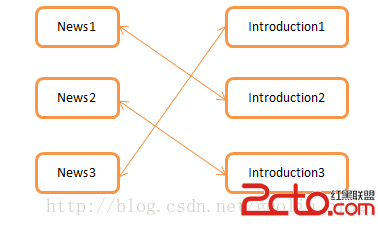
LitePal能讓開發者以物件導向方式描述資料表關聯,不必手動處理複雜SQL。三種關聯一對一通常以單一物件引用表示;多對一會在「多」的一方加入集合;多對多則需要中間表,L
 Android 揭秘(9):Init 進程的啟動與運行過程
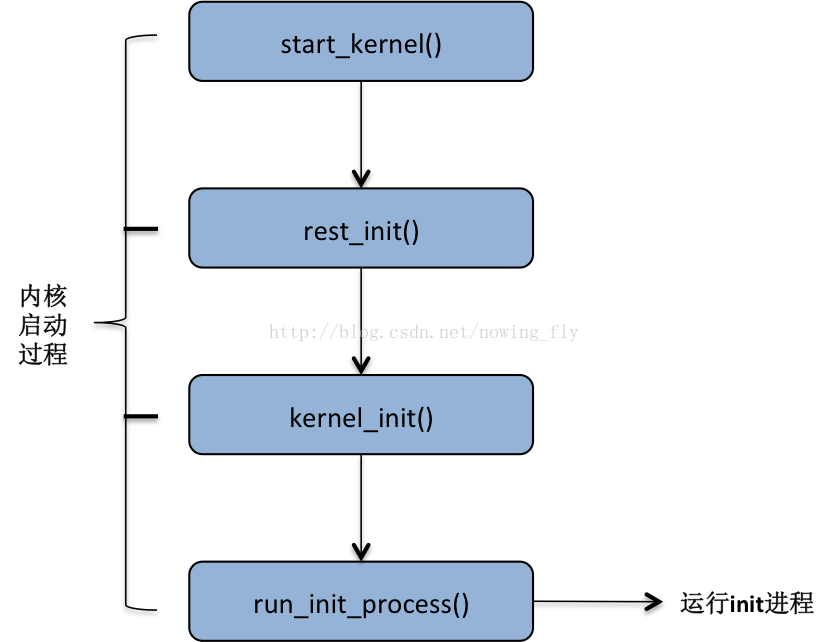
眾所周知,Linux 中所有進程都由 init 進程創建並運行起來。開機時,Linux 先加載內核啟動,隨後在使用者空間中拉起 init 進程,再由 init 依序啟動系
 Android 實習札記(6):ViewPager 從入門到自定義 Tab
上一節我們用 Fragment 拼了一個簡單的底部導航欄,結尾提到要結合 ViewPager 做引導界面。說到 ViewPager,很多人應該都用過,但如果只會複製粘貼、