

編輯:關於 Android 程式設計
本篇是 Menu 系列的第三篇,將接續前面尚未談完的內容,重點介紹 PopupMenu(彈出式菜單)的用法。
彈出式菜單是一種固定在特定 View 上的菜單模型,主要適用於以下三種情境:
為特定內容提供溢出風格(overflow-style)的操作選單。
提供其他部位的命令,例如 Add 按鈕可以透過彈出菜單提供多種不同的新增方式。
提供類似 Spinner 的下拉式菜單,但不保留持久的選擇狀態。
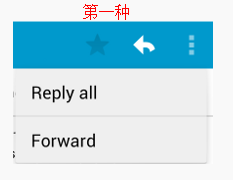
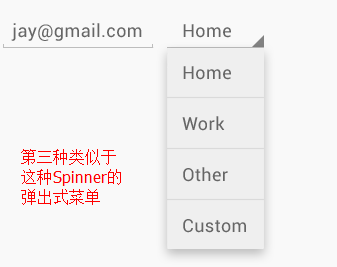
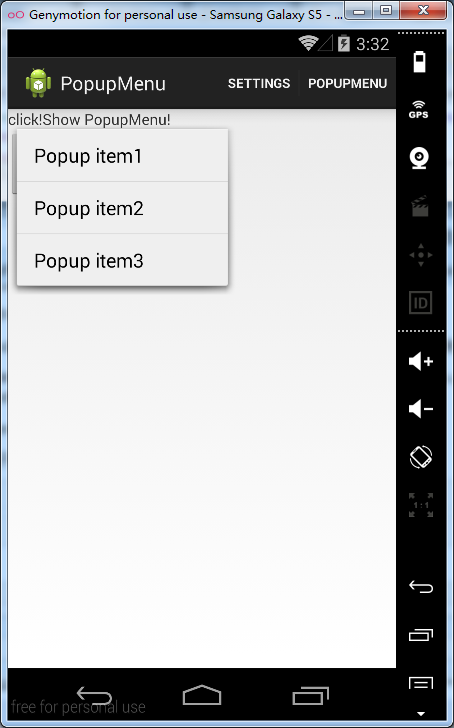
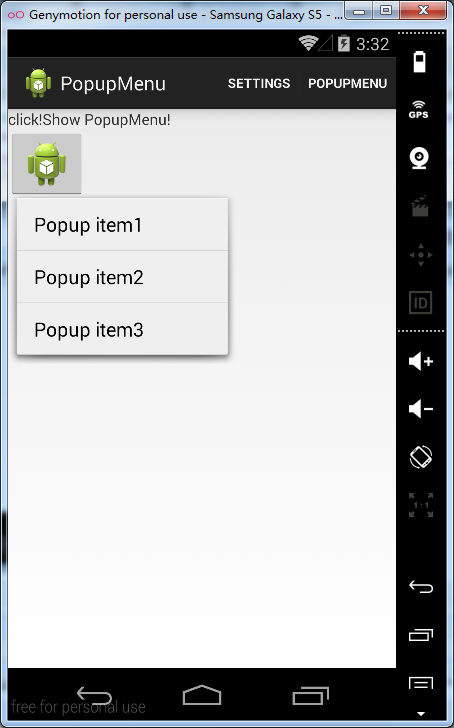
如果你已經在 XML 中定義好菜單資源,那麼只要三個步驟就能顯示出來:
1. 用 PopupMenu 的建構子將菜單實例化,需要傳入應用的 Context 以及菜單要附著的 View。
2. 使用 MenuInflater 將菜單資源填充到 Menu 物件中,這個 Menu 物件由 PopupMenu.getMenu 回傳(API 14 以上可直接用 PopupMenu.inflater 取代)。
3. 呼叫 PopupMenu.show()。
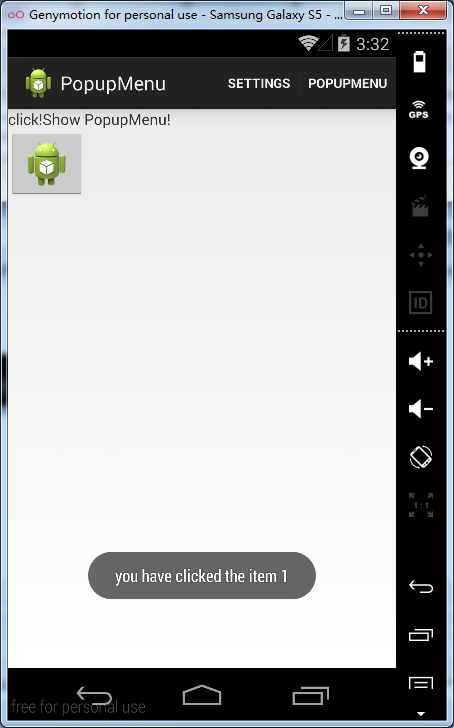
以下透過一個範例來理解 PopupMenu 的實際使用:
public void showPopup(View v){ PopupMenu popup = new PopupMenu(this,v); MenuInflater inflater = popup.getMenuInflater(); inflater.inflate(R.menu.popup, popup.getMenu()); popup.setOnMenuItemClickListener(this); popup.show(); } @Override public boolean onMenuItemClick(MenuItem arg0) { switch (arg0.getItemId()) { case R.id.item1: Toast.makeText(this, "you have clicked the item 1", Toast.LENGTH_LONG).show(); break; case R.id.item2: Toast.makeText(this, "you have clicked the item 2", Toast.LENGTH_LONG).show(); break; case R.id.item3: Toast.makeText(this, "you have clicked the item 3", Toast.LENGTH_LONG).show(); break; default: break; } return false; }
<LinearLayout xmlns:android="https://schemas.android.com/apk/res/android" xmlns:tools="https://schemas.android.com/tools" android:layout_width="match_parent" android:layout_height="match_parent" android:orientation="vertical" > <TextView android:layout_width="wrap_content" android:layout_height="wrap_content" android:text="@string/clickMe" android:onClick="showPopup" android:clickable="true"/> <ImageButton android:layout_width="wrap_content" android:layout_height="wrap_content" android:src="@drawable/ic_launcher" android:clickable="true" android:onClick="showPopup" /> </LinearLayout>
 Android HttpURLConnection 抛出 NetworkOnMainThreadException 的原因與解法
HttpURLConnection 抛出異常的成因 在使用 HttpURLConnection 進行網路請求時,常會遇到程式崩潰並抛出 NetworkOnMainThre
 PHP 郵件發送實戰:用 PHPMailer 實現郵箱驗證碼
註冊流程中的郵箱驗證碼,是幾乎每個網站都需要的功能。PHP 自帶的 mail() 函數看似方便,實際上因為缺乏 SPF、DKIM 等配置,絕大多數郵件都會被歸入垃圾箱。真
 Android 高手進階教程(二十二):圖像特效處理大集合
大家好,這一節要和大家分享幾個 Android 圖像特效處理的小技巧,包括圓角、倒影、圖片縮放,以及 Drawable 與 Bitmap 之間的相互轉換等實用手法。 廢話
 Android Binder 驅動工作原理提綱:一篇讀懂跨進程通信的本質
近期翻了不少 Android 內核分析書籍、技術文章與原始碼,自認對 Binder 的工作機制算是理順了。但這份理解是用大量時間和精力換來的,多數人未必願意付同樣的成本。