

編輯:關於 Android 程式設計
Gallery 是 Android 裡相當好用的看图控件,能大幅減少開發看图功能的工作量,而且效果本身就頗為美觀。本文的實例有一個重點:用反射機制動態讀取資源中的圖片,而不是把每張圖的 ID 硬寫在程式碼裡。
程式執行效果:

main.xml:
<?xml version="1.0" encoding="utf-8"?> <LinearLayout xmlns:android="https://schemas.android.com/apk/res/android" android:orientation="vertical" android:layout_width="fill_parent" android:layout_height="fill_parent" > <Gallery android:id="@+id/gallery" android:layout_height="fill_parent" android:layout_width="fill_parent"></Gallery> </LinearLayout>
Java 程式碼:
package com.testImageView; import java.lang.reflect.Field; import java.util.ArrayList; import android.app.Activity; import android.content.Context; import android.graphics.Bitmap; import android.graphics.BitmapFactory; import android.os.Bundle; import android.view.View; import android.view.ViewGroup; import android.widget.AdapterView; import android.widget.BaseAdapter; import android.widget.Gallery; import android.widget.ImageView; import android.widget.AdapterView.OnItemClickListener; public class testImageView extends Activity { private Gallery mGallery; @Override public void onCreate(Bundle savedInstanceState) { super.onCreate(savedInstanceState); setContentView(R.layout.main); mGallery = (Gallery)findViewById(R.id.gallery); try { mGallery.setAdapter(new ImageAdapter(this)); } catch (IllegalArgumentException e) { e.printStackTrace(); } catch (IllegalAccessException e) { e.printStackTrace(); } mGallery.setOnItemClickListener(new OnItemClickListener() { public void onItemClick(AdapterView parent, View v, int position, long id) { testImageView.this.setTitle(String.valueOf(position)); } }); } /* * ImageAdapter 負責控制Gallery的數據源與操作 */ private class ImageAdapter extends BaseAdapter{ private Context mContext; private ArrayList<Integer> imgList=new ArrayList<Integer>(); private ArrayList<Object> imgSizes=new ArrayList<Object>(); public ImageAdapter(Context c) throws IllegalArgumentException, IllegalAccessException{ mContext = c; //用反射機制來獲取資源中的圖片ID和尺寸 Field[] fields = R.drawable.class.getDeclaredFields(); for (Field field : fields) { if (!"icon".equals(field.getName()))//除了icon之外的圖片 { int index=field.getInt(R.drawable.class); imgList.add(index);//保存圖片ID int size[]=new int[2]; Bitmap bmImg=BitmapFactory.decodeResource(getResources(),index); size[0]=bmImg.getWidth();size[1]=bmImg.getHeight(); imgSizes.add(size);//保存圖片大小 } } } @Override public int getCount() { return imgList.size(); } @Override public Object getItem(int position) { return position; } @Override public long getItemId(int position) { return position; } @Override public View getView(int position, View convertView, ViewGroup parent) { ImageView i = new ImageView (mContext); i.setImageResource(imgList.get(position).intValue());//從imgList取得圖片ID i.setScaleType(ImageView.ScaleType.FIT_XY); int size[]= new int[2]; size=(int[]) imgSizes.get(position);//從imgSizes取得圖片大小 i.setLayoutParams(new Gallery.LayoutParams(size[0], size[1])); return i; } }; }
反射這一招看起來只是少寫幾行,實際上在圖片數量會變動的專案裡非常實用:往 drawable 目錄丟圖就能自動出現,不必回頭改 Adapter。要注意的是這裡把「排除 icon」寫死了,正式專案中通常會改用命名規範或資源 ID 陣列來過濾,避免誤抓。
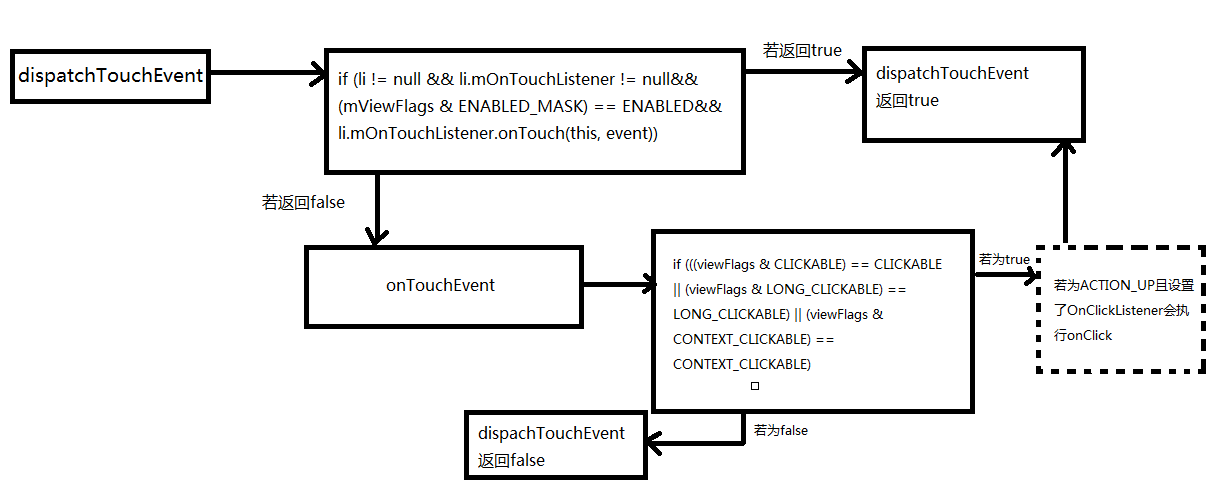 深入 Android onTouch 事件傳遞機制:從 dispatchTouchEvent 源碼說起
onTouch 是什麼 onTouch 是整個 Android 事件體系的基礎,onClick、onLongClick 這些我們更熟悉的事件,都是建立在它之上的。 它描述
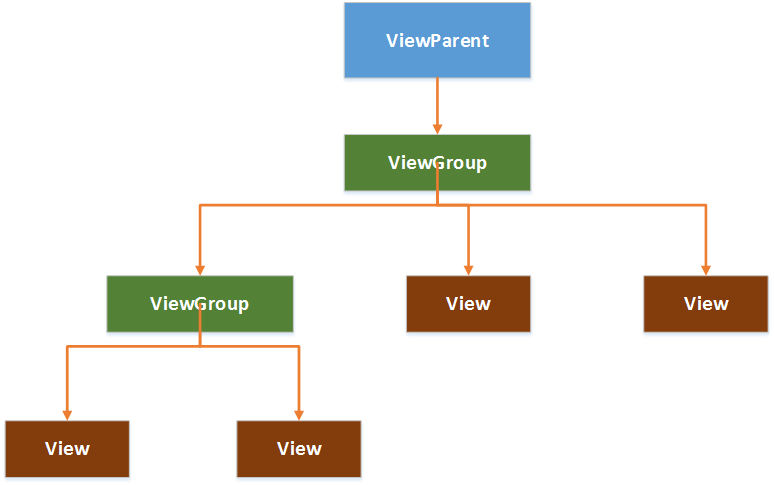 Android View 與 ViewGroup 架構解析:測量、排版與繪製
Android 的視圖控制項大致分為兩類:ViewGroup 與 View。ViewGroup 作為父容器,包含並管理子 View;兩者共同構成一棵「控制項樹」,每個 V
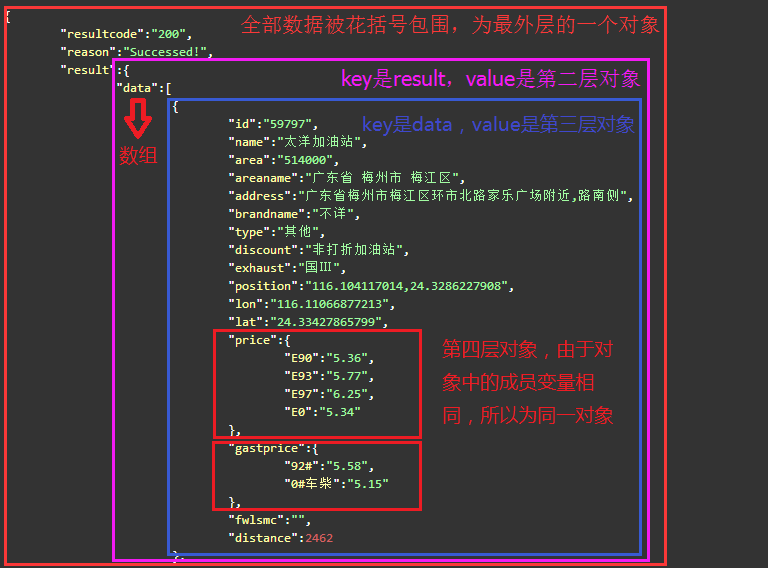 Android 基礎全攻略:JSON 資料的解析與封裝一站式掌握
本文涵蓋以下內容:JSON 是什麼、JSONObject 的解析與存儲、JSONObject 的解析與存儲(抽象)、JSONArray 的解析與存儲,以及模擬周邊加油站
 打造 RecyclerView 的萬能分割線
RecyclerView 是 Android 5.0 Material Design 中的核心組件之一。相比 ListView,它通過更低耦合的方式複用 ViewHold