

編輯:關於 Android 程式設計
本文介紹 Android 的 Tab 控件。Tab 能起到分頁效果,讓單個螢幕容納更豐富的內容,但相對地也會增加開發的複雜度,建議在有真正需要時才使用。
Android 的 Tab 控件用起來有點古怪——它的結構必須嚴格按照下面的順序與命名來組裝:
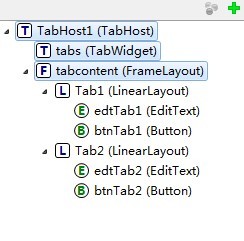
TabHost → TabWidget(必須命名為 tabs)→ FrameLayout(必須命名為 tabcontent)
這三層缺一不可,而且 id 必須使用系統預定義的那幾個,否則執行時會直接出錯。
先看執行截圖:
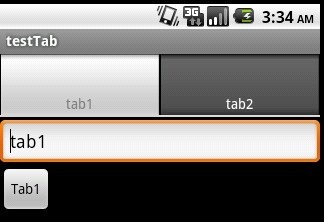
main.xml:
<?xml version="1.0" encoding="utf-8"?> <TabHost android:layout_width="fill_parent" android:layout_height="fill_parent" xmlns:android="https://schemas.android.com/apk/res/android" android:id="@android:id/TabHost1"> <TabWidget android:id="@android:id/tabs" android:layout_height="wrap_content" android:layout_width="fill_parent"> </TabWidget> <FrameLayout android:id="@android:id/tabcontent" android:paddingTop="65px" android:layout_width="fill_parent" android:layout_height="fill_parent"> <LinearLayout android:layout_height="wrap_content" android:id="@+id/Tab1" android:orientation="vertical" android:layout_width="fill_parent"> <EditText android:layout_height="wrap_content" android:id="@+id/edtTab1" android:layout_width="fill_parent"></EditText> <Button android:layout_width="wrap_content" android:layout_height="wrap_content" android:id="@+id/btnTab1" android:text="Tab1"></Button> </LinearLayout> <LinearLayout android:layout_height="wrap_content" android:id="@+id/Tab2" android:layout_width="fill_parent" android:orientation="horizontal"> <EditText android:layout_height="wrap_content" android:id="@+id/edtTab2" android:layout_width="wrap_content" android:layout_weight="300"></EditText> <Button android:layout_width="wrap_content" android:layout_height="wrap_content" android:id="@+id/btnTab2" android:text="Tab2"></Button></LinearLayout> </FrameLayout> </TabHost>
Java 程式碼:
package com.testTab; import android.app.TabActivity; import android.os.Bundle; import android.view.View; import android.widget.Button; import android.widget.EditText; import android.widget.TabHost; import android.widget.TabHost.TabSpec; public class testTab extends TabActivity {//基於TabActivity構建 Button btnTab1,btnTab2; EditText edtTab1,edtTab2; @Override public void onCreate(Bundle savedInstanceState) { super.onCreate(savedInstanceState); setContentView(R.layout.main); TabHost tabs = getTabHost(); //設置Tab1 TabSpec tab1 = tabs.newTabSpec("tab1"); tab1.setIndicator("tab1"); // 設置tab1的名稱 tab1.setContent(R.id.Tab1); // 關聯控件 tabs.addTab(tab1); // 添加tab1 btnTab1=(Button)this.findViewById(R.id.btnTab1); edtTab1=(EditText)this.findViewById(R.id.edtTab1); btnTab1.setOnClickListener(new ClickEvent()); //設置Tab2 TabSpec tab2 = tabs.newTabSpec("tab2"); tab2.setIndicator("tab2"); tab2.setContent(R.id.Tab2); tabs.addTab(tab2); btnTab2=(Button)this.findViewById(R.id.btnTab2); edtTab2=(EditText)this.findViewById(R.id.edtTab2); btnTab2.setOnClickListener(new ClickEvent()); tabs.setCurrentTab(0); } class ClickEvent implements View.OnClickListener { @Override public void onClick(View v) { if(v==btnTab1) { edtTab1.setText("tab1"); } else if(v==btnTab2) { edtTab2.setText("tab2"); } } } }
使用 TabHost 時要記住兩點:Activity 必須繼承 TabActivity,取 TabHost 要用 getTabHost() 而不是 findViewById;每個分頁透過 TabSpec 描述,再用 setContent() 關聯到 FrameLayout 裡對應的 Layout id。如果每個分頁需要獨立成 Activity,那就該改用上一篇的 ActivityGroup 方案了。
 Android 開發筆記:統計分析 SDK 集成指南
用戶畫像 對程序員來說,用戶畫像就是用戶的屬性和行為;通俗地說,用戶畫像包括了個人信息、興趣愛好、日常行為等有血有肉的客戶實體。用戶畫像是精準營銷的產物,企業透過收集用戶
 用 Apktool 反編譯 APK:完整還原圖片與佈局資源
看到別人家的 App 介面做得清爽漂亮,總會好奇背後到底是怎麼排出來的。其實 Android 的 APK 本質上就是一個壓縮包,換個副檔名就能窺見內部結構;但真正能讀懂的
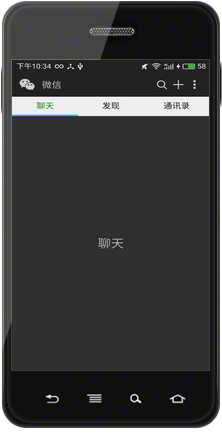 高仿微信 5.2.1 主介面:ViewPager、Fragment 與未讀紅點
這篇文章以模仿微信 5.2.1 主介面為例,說明如何製作自訂標題欄、分頁切換、滑動指示條與未讀訊息紅點。雖然是入門級 Demo,但涵蓋了 ViewPager、Fragme
 Android 打開相機與相冊獲取圖片示例
權限需要 INTERNET、WRITE_EXTERNAL_STORAGE、READ_EXTERNAL_STORAGE 與 MOUNT_UNMOUNT_FILESYSTEM