

編輯:關於 Android 程式設計
對程序員來說,用戶畫像就是用戶的屬性和行為;通俗地說,用戶畫像包括了個人信息、興趣愛好、日常行為等有血有肉的客戶實體。用戶畫像是精準營銷的產物,企業透過收集用戶行為,分析出用戶的特徵與偏好,進而挖掘潛在的商業價值,實現企業效益的最大化。
用戶畫像的一個具體應用是電商 app 的「猜你喜歡」欄目:電商平台透過對用戶購買過的商品進行統計,分析用戶日常生活用的是什麼物品;還可對用戶的搜尋行為、瀏覽行為進行統計,從中分析用戶感興趣或考慮購買的商品。電商平台得到包含日常生活、興趣愛好、購買意向在內的用戶畫像後,自然就能有針對性地推薦合適的商品,從而擴大銷量、增加營業額。
下圖是用戶畫像的一個具體例子。
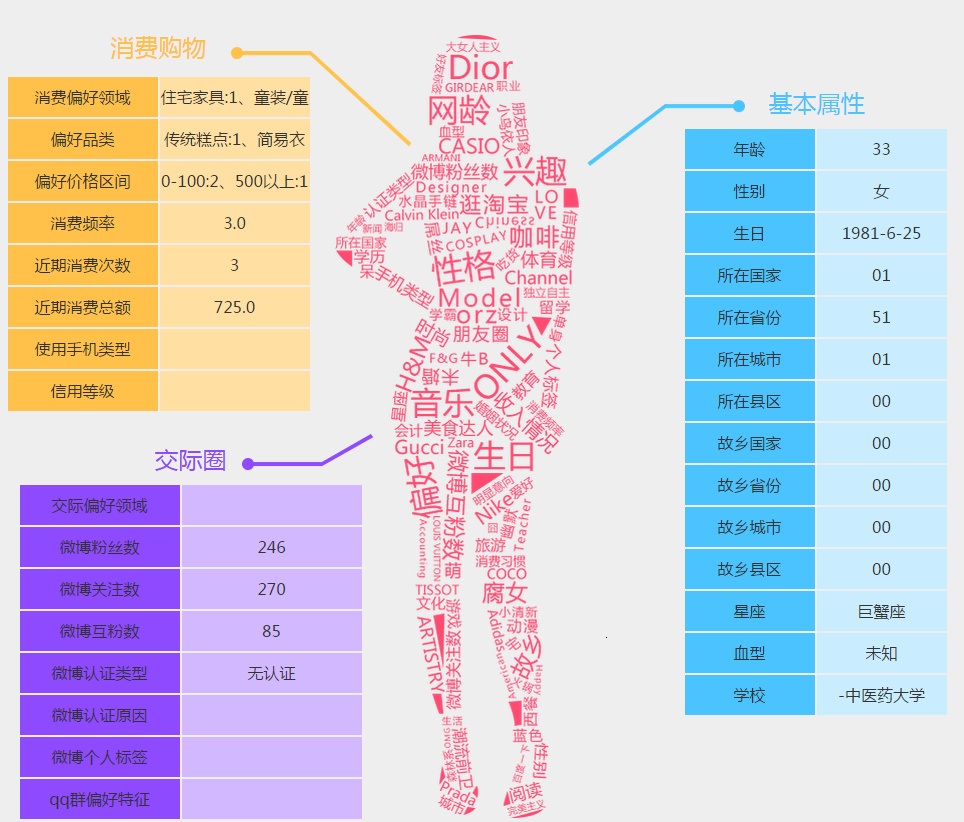
app 進行統計分析,主要有兩方面的內容:
一、用戶行為統計,包括:
1、用戶打開和關閉頁面,以及在頁面的停留時長;
2、用戶點擊行為的分佈與頻率;
3、用戶輸入的文字和圖片,如搜尋時的關鍵詞、二維碼的掃描信息、分享的圖文內容等等;
4、用戶對多媒體信息的接受程度,如聽音樂的時長、看視頻的時長等等。
二、運行情況分析,包括:
1、app 的啟動時間;
2、app 崩潰的日誌信息;
3、app 殺死進程。
1、在 libs 目錄加入下面 sdk 包:
umeng-analytics-v6.0.1.jar
utdid4all-1.0.4.jar
2、在 AndroidManifest.xml 中補充權限定義,以及 meta-data 參數定義,包括 UMENG_APPKEY、UMENG_CHANNEL 等等,其中 UMENG_APPKEY 需要到友盟網站上註冊申請;
3、程式碼裡先設置采集參數,然後開始采集行為事件。
友盟統計分析主要用到 MobclickAgent 類。下面是與設置有關的方法說明:
setDebugMode:設置是否開啟調試模式。true 為開啟,false 為關閉。
setSessionContinueMillis:設置 session 的持續時間,單位毫秒。
startWithConfigure:設置友盟的統計分析配置。參數是 UMAnalyticsConfig 對象,包含 appkey、渠道號、是否啟用崩潰采集等信息。
openActivityDurationTrack:設置是否開啟默認的 Activity 頁面統計方式。
setAutoLocation:設置是否自動定位。
注意,友盟 sdk 的發送策略不在程式碼中設置,要在友盟後台管理頁面中設置。具體步驟為:點擊應用名稱 → 設置 → 發送策略,目前有兩種:啟動時發送(默認)、按間隔發送。友盟 sdk 的老版本還提供了實時發送與僅在 wifi 下發送兩種策略,但新版本取消了,原因如下:
1、實時發送會存在大量冗余字段的重複發送現象,造成終端用戶不必要的流量消耗;
2、僅在 wifi 下發送,數據的延遲會非常嚴重,造成數據統計結果的失真。
下面是 MobclickAgent 類與事件有關的方法說明:
onPageStart:頁面啟動事件。
onPageEnd:頁面結束事件。
onResume:恢復統計。
onPause:暫停統計。
onEvent:普通事件,一般是點擊事件。
onEventValue:複雜事件,比如音樂播放事件。
onSocialEvent:社會化分享事件。
onProfileSignIn:登入事件。
onProfileSignOff:註銷事件。
onKillProcess:殺死進程事件。
下面是友盟統計分析的程式碼例子:
import java.util.ArrayList; import java.util.HashMap; import java.util.List; import java.util.Map; import android.app.Activity; import android.app.AlertDialog; import android.content.Context; import android.content.DialogInterface; import android.content.Intent; import android.os.Bundle; import android.view.KeyEvent; import android.view.View; import com.example.exmanalysis.umeng.analytics.FragmentStack; import com.example.exmanalysis.umeng.analytics.FragmentTabs; import com.example.exmanalysis.umeng.analytics.WebviewAnalytic; import com.umeng.analytics.MobclickAgent; import com.umeng.analytics.MobclickAgent.EScenarioType; import com.umeng.analytics.social.UMPlatformData; import com.umeng.analytics.social.UMPlatformData.GENDER; import com.umeng.analytics.social.UMPlatformData.UMedia; public class UmengActivity extends Activity { private final static String TAG = "UmengActivity"; private Context mContext; @Override public void onCreate(Bundle savedInstanceState) { super.onCreate(savedInstanceState); setContentView(R.layout.activity_umeng); mContext = this; MobclickAgent.setDebugMode(true); // SDK在統計Fragment時,需要關閉Activity自帶的頁面統計, // 然後在每個頁面中重新集成頁面統計的代碼(包括調用了 onResume 和 onPause 的Activity)。 MobclickAgent.openActivityDurationTrack(false); // MobclickAgent.setAutoLocation(true); // MobclickAgent.setSessionContinueMillis(1000); // MobclickAgent.startWithConfigure( // new UMAnalyticsConfig(mContext, "4f83c5d852701564c0000011", "Umeng", EScenarioType.E_UM_NORMAL)); MobclickAgent.setScenarioType(mContext, EScenarioType.E_UM_NORMAL); } @Override public void onResume() { super.onResume(); MobclickAgent.onPageStart(TAG); MobclickAgent.onResume(mContext); } @Override public void onPause() { super.onPause(); MobclickAgent.onPageEnd(TAG); MobclickAgent.onPause(mContext); } public void onButtonClick(View view) { int id = view.getId(); switch (id) { case R.id.umeng_example_analytics_event_cc: List keyPath = new ArrayList(); keyPath.add("one"); keyPath.add("two"); keyPath.add("tree"); MobclickAgent.onEvent(mContext, keyPath, 20, "label"); break; case R.id.umeng_example_analytics_event: MobclickAgent.onEvent(mContext, "click"); MobclickAgent.onEvent(mContext, "click", "button"); break; case R.id.umeng_example_analytics_ekv: Map map_ekv = new HashMap(); map_ekv.put("type", "popular"); map_ekv.put("artist", "JJLin"); MobclickAgent.onEvent(mContext, "music", map_ekv); break; case R.id.umeng_example_analytics_duration: Map map_value = new HashMap(); map_value.put("type", "popular"); map_value.put("artist", "JJLin"); MobclickAgent.onEventValue(this, "music", map_value, 12000); break; case R.id.umeng_example_analytics_make_crash: "123".substring(10); break; case R.id.umeng_example_analytics_js_analytic: startActivity(new Intent(this, WebviewAnalytic.class)); break; case R.id.umeng_example_analytics_fragment_stack: startActivity(new Intent(this, FragmentStack.class)); break; case R.id.umeng_example_analytics_fragment_tabs: startActivity(new Intent(this, FragmentTabs.class)); break; case R.id.umeng_example_analytics_social: UMPlatformData platform = new UMPlatformData(UMedia.SINA_WEIBO, "user_id"); platform.setGender(GENDER.MALE); // optional platform.setWeiboId("weiboId"); // optional MobclickAgent.onSocialEvent(this, platform); break; case R.id.umeng_example_analytics_signin: MobclickAgent.onProfileSignIn("example_id"); break; case R.id.umeng_example_analytics_signoff: MobclickAgent.onProfileSignOff(); break; } } @Override public boolean onKeyDown(int keyCode, KeyEvent event) { if (keyCode == KeyEvent.KEYCODE_BACK) { Hook(); return true; } return super.onKeyDown(keyCode, event); } // /對於好多應用,會在程序中殺死 進程,這樣會導致我們統計不到此時Activity結束的信息, // /對於這種情況需要調用 'MobclickAgent.onKillProcess( Context )' // /方法,保存一些頁面調用的數據。正常的應用是不需要調用此方法的。 private void Hook() { AlertDialog.Builder builder = new AlertDialog.Builder(mContext); builder.setPositiveButton("退出應用", new DialogInterface.OnClickListener() { public void onClick(DialogInterface dialog, int whichButton) { MobclickAgent.onKillProcess(mContext); int pid = android.os.Process.myPid(); android.os.Process.killProcess(pid); } }); builder.setNeutralButton("後退一下", new DialogInterface.OnClickListener() { public void onClick(DialogInterface dialog, int whichButton) { finish(); } }); builder.setNegativeButton("點錯了", new DialogInterface.OnClickListener() { public void onClick(DialogInterface dialog, int whichButton) { } }); builder.show(); } }
1、在 libs 目錄加入下面 sdk 包:
libcrash_analysis.so
user_profile_mtj_1.5.jar
2、在 AndroidManifest.xml 中補充權限定義,以及 meta-data 參數定義,包括 BaiduMobAd_STAT_ID、BaiduMobAd_CHANNEL 等等,其中 BaiduMobAd_STAT_ID 需要到百度網站上註冊申請;
3、程式碼裡先設置采集參數,然後開始采集行為事件。
百度統計分析主要用到 StatService 類。下面是與設置有關的方法說明:
setDebugOn:設置是否開啟調試模式。
setSessionTimeOut:設置 session 的超時時間,單位秒。
setAppKey:設置 appkey。建議在 AndroidManifest.xml 中填寫。
setAppChannel:設置應用的渠道。
setOn:打開崩潰錯誤收集。默認是關閉的。
setLogSenderDelayed:設置啟動時日誌發送的延時,單位秒。
setSendLogStrategy:設置日誌發送的策略。SendStrategyEnum.APP_START 表示應用啟動時發送,SendStrategyEnum.ONCE_A_DAY 表示每天發送一次,SendStrategyEnum.SET_TIME_INTERVAL 表示固定時間間隔發送。
下面是與事件有關的方法說明:
onPageStart:頁面啟動事件。
onPageEnd:頁面結束事件。
onResume:恢復統計。
onPause:暫停統計。
onEvent:普通事件,一般是點擊事件。
onEventDuration:持續一段時間的事件。
onEventStart:事件開始。
onEventEnd:事件結束。
下面是百度統計分析的程式碼例子:
import android.app.Activity; import android.content.Intent; import android.os.Build; import android.os.Bundle; import android.util.Log; import android.view.View; import android.view.View.OnClickListener; import android.widget.Button; import android.widget.TextView; import com.baidu.mobstat.NativeCrashHandler; import com.baidu.mobstat.SendStrategyEnum; import com.baidu.mobstat.StatService; import com.example.exmanalysis.baidu.AnotherDemoActivity1; import com.example.exmanalysis.baidu.Conf; import com.example.exmanalysis.baidu.DemoActivity2; import com.example.exmanalysis.baidu.DemoActivity3; import com.example.exmanalysis.baidu.WebViewActivity; import com.example.exmanalysis.baidu.appfragment.AppFragmentDemoActivity; import com.example.exmanalysis.baidu.supportv4fragment.MainFragmentActivity; public class BaiduActivity extends Activity { private Button btnPrev; private Button btnNext; private Button btnWebview; private Button btnException; private Button btnNativeException; private Button btnSetTV; private Button btnEvent; private Button btnEventDuration; private Button btnEventStart; private Button btnEventEnd; private Button btnFragmentPage; private Button btnAppFragmentPage; @Override public void onCreate(Bundle savedInstanceState) { super.onCreate(savedInstanceState); setContentView(R.layout.baidu_activity); boolean isWear = getPackageManager().hasSystemFeature("android.hardware.type.watch"); Log.e("TEST", "isWear: " + isWear); Log.e("TEAT", "manufacturer: " + Build.MANUFACTURER); // 設置AppKey // StatService.setAppKey("a9e2ad84a2"); // appkey必須在mtj網站上注冊生成,該設置建議在AndroidManifest.xml中填寫,代碼設置容易丟失 /* * 設置渠道的推薦方法。該方法同setAppChannel(String), 如果第三個參數設置為true(防止渠道代碼設置會丟失的情況),將會保存該渠道,每次設置都會更新保存的渠道, * 如果之前的版本使用了該函數設置渠道,而後來的版本需要AndroidManifest.xml設置渠道,那麼需要將第二個參數設置為空字符串,並且第三個參數設置為false即可。 * appChannel是應用的發布渠道,不需要在mtj網站上注冊,直接填寫就可以 該參數也可以設置在AndroidManifest.xml中 */ // StatService.setAppChannel(this, "RepleceWithYourChannel", true); // 測試時,可以使用1秒鐘session過期,這樣不斷的間隔1S啟動退出會產生大量日志。 StatService.setSessionTimeOut(30); // setOn也可以在AndroidManifest.xml文件中填寫,BaiduMobAd_EXCEPTION_LOG,打開崩潰錯誤收集,默認是關閉的 StatService.setOn(this, StatService.EXCEPTION_LOG); /* * 設置啟動時日志發送延時的秒數 單位為秒,大小為0s到30s之間 注:請在StatService.setSendLogStrategy之前調用,否則設置不起作用 * * 如果設置的是發送策略是啟動時發送,那麼這個參數就會在發送前檢查您設置的這個參數,表示延遲多少S發送。 這個參數的設置暫時只支持代碼加入, * 在您的首個啟動的Activity中的onCreate函數中使用就可以。 */ StatService.setLogSenderDelayed(0); /* * 用於設置日志發送策略 嵌入位置:Activity的onCreate()函數中 * * 調用方式:StatService.setSendLogStrategy(this,SendStrategyEnum. SET_TIME_INTERVAL, 1, false); 第二個參數可選: * SendStrategyEnum.APP_START SendStrategyEnum.ONCE_A_DAY SendStrategyEnum.SET_TIME_INTERVAL 第三個參數: * 這個參數在第二個參數選擇SendStrategyEnum.SET_TIME_INTERVAL時生效、 取值。為1-24之間的整數,即1<=rtime_interval<=24,以小時為單位 第四個參數: * 表示是否僅支持wifi下日志發送,若為true,表示僅在wifi環境下發送日志;若為false,表示可以在任何聯網環境下發送日志 */ StatService.setSendLogStrategy(this, SendStrategyEnum.SET_TIME_INTERVAL, 1, false); // 調試百度統計SDK的Log開關,可以在Eclipse中看到sdk打印的日志,發布時去除調用,或者設置為false StatService.setDebugOn(true); String sdkVersion = StatService.getSdkVersion(); TextView sdkVersionTxtv = (TextView) findViewById(R.id.tv_sdk_version); if (sdkVersion != null) { sdkVersionTxtv.setText("sdk version is: " + sdkVersion); } btnPrev = (Button) findViewById(R.id.layout1_btn1); btnNext = (Button) findViewById(R.id.layout1_btn2); btnWebview = (Button) findViewById(R.id.layout1_btn_web_view); btnException = (Button) findViewById(R.id.layout1_btn_excep); btnNativeException = (Button) findViewById(R.id.layout1_btn_native_excep); btnNativeException.setOnClickListener(new OnClickListener() { @Override public void onClick(View v) { NativeCrashHandler.doNativeCrash(); } }); btnSetTV = (Button) findViewById(R.id.layout1_btn_set_TV); btnSetTV.setOnClickListener(new OnClickListener() { @Override public void onClick(View v) { StatService.setForTv(BaiduActivity.this, true); } }); btnEvent = (Button) findViewById(R.id.layout1_btn_event); btnEventDuration = (Button) findViewById(R.id.layout1_btn_event_duration); btnEventStart = (Button) findViewById(R.id.layout1_btn_event_start); btnEventEnd = (Button) findViewById(R.id.layout1_btn_event_end); btnFragmentPage = (Button) findViewById(R.id.layout1_fragment); btnAppFragmentPage = (Button) findViewById(R.id.layout1_app_fragment); findViewById(R.id.btn_another_process).setOnClickListener(new View.OnClickListener() { @Override public void onClick(View v) { Intent intent = new Intent(BaiduActivity.this, AnotherDemoActivity1.class); startActivity(intent); } }); btnPrev.setOnClickListener(new OnClickListener() { public void onClick(View v) { Intent intent = new Intent(); intent.setClass(BaiduActivity.this, DemoActivity3.class); BaiduActivity.this.startActivity(intent); } }); btnNext.setOnClickListener(new OnClickListener() { public void onClick(View v) { Intent intent = new Intent(); intent.setClass(BaiduActivity.this, DemoActivity2.class); BaiduActivity.this.startActivity(intent); } }); btnWebview.setOnClickListener(new OnClickListener() { @Override public void onClick(View v) { Intent intent = new Intent(); intent.setClass(BaiduActivity.this, WebViewActivity.class); startActivity(intent); } }); btnException.setOnClickListener(new OnClickListener() { @Override public void onClick(View v) { Thread t = new Thread() { @Override public void run() { if (!MyApplication.SHIELD_EXCEPTION) { Log.w(Conf.TAG, 10 / 0 + ""); } } }; t.start(); } }); btnEvent.setOnClickListener(new OnClickListener() { @Override public void onClick(View v) { StatService.onEvent(BaiduActivity.this.getApplicationContext(), "registered id", "pass", 1); } }); /** * 自定義事件的第一種方法,寫入某個事件的持續時長 */ btnEventDuration.setOnClickListener(new OnClickListener() { @Override public void onClick(View v) { // 事件id("registered id")的事件pass,其時長持續100毫秒 StatService.onEventDuration(BaiduActivity.this, "registered id", "pass", 100); } }); /* * 自定義事件的第二種方法,自己定義該事件的起始時間和結束時間 */ btnEventStart.setOnClickListener(new OnClickListener() { @Override public void onClick(View v) { // 事件id("registered id")的事件pass,其時長持續10毫秒 StatService.onEventStart(BaiduActivity.this, "registered id", "pass"); // 必須和onEventEnd共用才行 } }); /* * 自定義事件的第二種方法,自己定義該事件的起始時間和結束時間 */ btnEventEnd.setOnClickListener(new OnClickListener() { @Override public void onClick(View v) { // 事件id("registered id")的事件pass,其時長持續10毫秒 StatService.onEventEnd(BaiduActivity.this, "registered id", "pass"); // 必須和onEventStart共用才行 } }); btnFragmentPage.setOnClickListener(new OnClickListener() { @Override public void onClick(View v) { Intent in = new Intent(); in.setClass(BaiduActivity.this, MainFragmentActivity.class); startActivity(in); } }); btnAppFragmentPage.setOnClickListener(new OnClickListener() { @Override public void onClick(View v) { if (Build.VERSION.SDK_INT >= Build.VERSION_CODES.HONEYCOMB) { Intent in = new Intent(); in.setClass(BaiduActivity.this, AppFragmentDemoActivity.class); startActivity(in); } } }); } public void onResume() { super.onResume(); //頁面起始(每個Activity中都需要添加,如果有繼承的父Activity中已經添加了該調用,那麼子Activity中務必不能添加) //不能與StatService.onPageStart一級onPageEnd函數交叉使用 StatService.onResume(this); } public void onPause() { super.onPause(); //頁面結束(每個Activity中都需要添加,如果有繼承的父Activity中已經添加了該調用,那麼子Activity中務必不能添加) //不能與StatService.onPageStart一級onPageEnd函數交叉使用 StatService.onPause(this); } }
1、在 libs 目錄加入下面 sdk 包:
libMtaNativeCrash.so
mid-sdk-2.3.jar
mta-android-stat-sdk-2.2.0_20160504.jar
2、在 AndroidManifest.xml 中補充權限定義,以及 meta-data 參數定義,包括 TA_APPKEY、InstallChannel 等等,其中 TA_APPKEY 需要到騰訊網站上註冊申請;
3、程式碼裡先設置采集參數,然後開始采集行為事件。
騰訊統計分析的參數設置用的是 StatConfig 類,主要方法說明如下:
setDebugEnable:設置是否開啟調試模式。
setSessionTimoutMillis:設置 session 的超時時間,單位秒。
setAppKey:設置 appkey。建議在 AndroidManifest.xml 中填寫。
setInstallChannel:設置安裝的渠道。
setAutoExceptionCaught:設置是否自動采集崩潰信息(即 app 未處理的異常)。
setStatSendStrategy:設置日誌發送的策略。StatReportStrategy.PERIOD 表示按時間間隔發送,INSTANT 表示實時發送,ONLY_WIFI 表示只在 wifi 網絡下發送,BATCH 表示批量發送,APP_LAUNCH 表示應用啟動時發送。
setEnableSmartReporting:設置是否允許在 WIFI 網絡下實時上報。
setSendPeriodMinutes:設置日誌發送的時間間隔,單位分鐘。
setMaxStoreEventCount:設置緩存中的事件最大數目。
騰訊統計分析的事件跟蹤用的是 StatService 類,主要方法說明如下:
startStatService:開始統計服務。若集成的是普通 app 則無需呼叫;若提供出來的是第三方 sdk,由於 jar 包不包含 AndroidManifest.xml,因此必須在程式碼中呼叫該方法。
onResume:恢復統計。
onPause:暫停統計。
addActionListener:監聽前後台狀態。
trackCustomEvent:跟蹤自定義事件。
trackCustomBeginEvent:跟蹤自定義事件開始。
trackCustomEndEvent:跟蹤自定義事件結束。
trackCustomKVEvent:跟蹤自定義的 key-value 事件。
trackCustomBeginKVEvent:跟蹤自定義 key-value 事件開始。
trackCustomEndKVEvent:跟蹤自定義 key-value 事件結束。
reportError:上報錯誤信息。
reportException:上報異常信息。
下面是騰訊統計分析的程式碼例子:
import java.util.HashMap; import java.util.Map; import java.util.Properties; import android.app.Activity; import android.app.ActivityManager; import android.content.Context; import android.os.Bundle; import android.os.Environment; import android.os.MemoryFile; import android.util.Log; import android.view.View; import android.widget.Button; import com.tencent.stat.StatAppMonitor; import com.tencent.stat.StatConfig; import com.tencent.stat.StatNativeCrashReport; import com.tencent.stat.StatService; import com.tencent.stat.StatServiceImpl; public class TencentActivity extends Activity { private final static String TAG = "TencentActivity"; private Context ctx = null; private Button btn_customevent_args_count = null; private Button btn_customevent_kv_count = null; private Button btn_customevent_args_duration_begin = null; private Button btn_customevent_args_duration_end = null; private Button btn_customevent_kv_duration_begin = null; private Button btn_customevent_kv_duration_end = null; private Button btn_report_error = null; private Button btn_report_exception = null; private Button btn_catch_unhandled_exception = null; private Button btn_init_nativeCrash = null; private Button btn_catch_native_crash = null; private Button btn_monitor_events = null; public void onActivityOpen() { // 你的函數 Properties prop = new Properties(); prop.setProperty("aty", "搶票活動"); // 活動頁面 prop.setProperty("gid", "潛在付費用戶"); // 用戶組名稱 prop.setProperty("attr", "1"); // 用戶屬性(年齡、性別等) prop.setProperty("act_type", "1"); // 行為類型(最近30天啟動過、最近30天使用時長超過、最近30天是否有過升級行為等) prop.setProperty("act_val", "10"); // 行為取值 StatService.trackCustomKVEvent(this, "mta_tag_activity_open", prop); } public void onActivityClick2() { // 你的函數 Properties prop = new Properties(); prop.setProperty("aty", "搶票活動"); // 活動頁面 prop.setProperty("btn", "報名"); // 按鈕 prop.setProperty("gid", "潛在付費用戶"); // 用戶組名稱 prop.setProperty("attr ", "1"); // 用戶屬性(年齡、性別等) prop.setProperty("act_type ", "1"); // 行為類型(最近30天啟動過、最近30天使用時長超過、最近30天是否有過升級行為等) prop.setProperty("act_val ", "10"); // 行為取值 StatService.trackCustomKVEvent(this, "mta_tag_activity_click", prop); } public void onUserPay() { // 你的函數 Properties prop = new Properties(); prop.setProperty("scene", "通關"); // 付費場景 prop.setProperty("amount", "350"); // 付費金額 prop.setProperty("way", "手機支付"); // 付費方式(可選擇上報) StatService.trackCustomKVEvent(null, "mta_tag_user_pay", prop); } MemoryFile memoryFile = null; private View.OnClickListener l = new View.OnClickListener() { @Override public void onClick(View v) { Log.d(TAG, "ctx==" + ctx); int id = v.getId(); switch (id) { case R.id.btn_customevent_args_count: StatService.trackCustomEvent(ctx, "trackCustomEvent", "args"); StatService.trackCustomEvent(ctx, "id1", "args"); StatService.trackCustomEvent(ctx, "id2", ""); StatService.trackCustomEvent(ctx, "trackCustomEvent", null); StatServiceImpl.trackBackground(getApplicationContext(), 10, null); break; case R.id.btn_customevent_kv_count: Properties prop = new Properties(); prop.setProperty("key", "value"); prop.setProperty("key2", "value2"); StatService.trackCustomKVEvent(ctx, "trackCustomKVEvent", prop); prop = new Properties(); prop.setProperty("a", "b"); StatService.trackCustomKVEvent(ctx, "4", prop); StatService.trackCustomKVEvent(ctx, "trackCustomKVEvent", prop); prop = new Properties(); prop.setProperty("num", "3434"); StatService.trackCustomKVEvent(ctx, "trackCustomKVEvent", prop); break; case R.id.btn_customevent_args_duration_begin: StatService.trackCustomBeginEvent(ctx, "trackCustomEvent", "loadConfigFile"); break; case R.id.btn_customevent_args_duration_end: StatService.trackCustomEndEvent(ctx, "trackCustomEvent", "loadConfigFile"); break; case R.id.btn_customevent_kv_duration_begin: Properties properties = new Properties(); properties.setProperty("load", "config"); StatService.trackCustomBeginKVEvent(ctx, "trackCustomEvent", properties); break; case R.id.btn_customevent_kv_duration_end: properties = new Properties(); properties.setProperty("load", "config"); StatService.trackCustomEndKVEvent(ctx, "trackCustomEvent", properties); break; case R.id.btn_report_error: StatService.reportError(ctx, "I hate error."); StatService.commitEvents(getApplicationContext(), -1); break; case R.id.btn_report_exception: try { String myNull = null; int length = myNull.length(); } catch (NullPointerException ex) { StatService.reportException(ctx, ex); } break; case R.id.btn_monitor_events: // 新建監控接口對象 StatAppMonitor monitor = new StatAppMonitor("ping:www.qq.com"); // 接口開始執行 String ip = "www.qq.com"; Runtime run = Runtime.getRuntime(); java.lang.Process proc = null; try { String str = "ping -c 3 -i 0.2 -W 1 " + ip; long starttime = System.currentTimeMillis(); proc = run.exec(str); int retCode = proc.waitFor(); long difftime = System.currentTimeMillis() - starttime; // 設置接口耗時 monitor.setMillisecondsConsume(difftime); // 設置接口返回碼 monitor.setReturnCode(retCode); // 設置請求包大小,若有的話 monitor.setReqSize(1000); // 設置響應包大小,若有的話 monitor.setRespSize(2000); // 設置抽樣率,默認為1,表示100%。如果是50%,則填2(100/50),如果是25%,則填4(100/25),以此類推。 // monitor.setSampling(2); if (retCode == 0) { Log.d(TAG, "ping連接成功"); // 標記為成功 monitor.setResultType(StatAppMonitor.SUCCESS_RESULT_TYPE); } else { Log.d(TAG, "ping測試失敗"); // 標記為邏輯失敗,可能由網絡未連接等原因引起的,但對於業務來說不是致命的,是可容忍的 monitor.setResultType(StatAppMonitor.LOGIC_FAILURE_RESULT_TYPE); } } catch (Exception e) { Log.d(TAG, e.getMessage()); // 接口調用出現異常,致命的,標識為失敗 monitor.setResultType(StatAppMonitor.FAILURE_RESULT_TYPE); } finally { proc.destroy(); } // 上報接口監控的信息 StatService.reportAppMonitorStat(ctx, monitor); Map map = new HashMap(); map.put("www.qq.com", 80); map.put("pingma.qq.com", 80); StatService.testSpeed(ctx, map); break; case R.id.btn_catch_unhandled_exception: int i = 1 / 0; break; case R.id.btn_init_nativeCrash: String tombfilepath = Environment.getExternalStorageDirectory() .getAbsolutePath() + "/my"; StatConfig.initNativeCrashReport(ctx, null); break; case R.id.btn_catch_native_crash: StatNativeCrashReport.doNativeCrashTest(); break; default: break; } } }; String getCurProcessName(Context context) { int pid = android.os.Process.myPid(); ActivityManager mActivityManager = (ActivityManager) context .getSystemService(Context.ACTIVITY_SERVICE); for (ActivityManager.RunningAppProcessInfo appProcess : mActivityManager .getRunningAppProcesses()) { if (appProcess.pid == pid) { return appProcess.processName; } } return null; } @Override protected void onCreate(Bundle savedInstanceState) { super.onCreate(savedInstanceState); setContentView(R.layout.activity_tencent); ctx = this; // 高級功能:在線配置更新 // String onOrOff = StatConfig.getCustomProperty("switch", "off"); // Log.d(TAG, "switch" + onOrOff); // if(onOrOff.equalsIgnoreCase("on")){ // // 打開某項功能 // }else{ // // 禁用某項功能 // } // String appid = "互聯的appid"; // String appkey = "Aqc" + appid; // StatConfig.setAutoExceptionCaught(false); // 禁止捕獲app未處理的異常 // StatConfig.setEnableSmartReporting(true); // 禁止WIFI網絡實時上報 // StatConfig.setSendPeriodMinutes(24 * 60); // PERIOD間隔周期,24小時 // StatConfig.setStatSendStrategy(StatReportStrategy.PERIOD); // // PERIOD上報策略 // try { // StatService.startStatService(this, appkey, // com.tencent.stat.common.StatConstants.VERSION); // } catch (MtaSDkException e) { // Log.e("DEBUG", "MTA init Failed."); // } initActivity(); } private void initActivity() { setTitle("常用統計分析"); btn_customevent_args_count = (Button) findViewById(R.id.btn_customevent_args_count); btn_customevent_kv_count = (Button) findViewById(R.id.btn_customevent_kv_count); btn_customevent_args_duration_begin = (Button) findViewById(R.id.btn_customevent_args_duration_begin); btn_customevent_args_duration_end = (Button) findViewById(R.id.btn_customevent_args_duration_end); btn_customevent_kv_duration_begin = (Button) findViewById(R.id.btn_customevent_kv_duration_begin); btn_customevent_kv_duration_end = (Button) findViewById(R.id.btn_customevent_kv_duration_end); btn_report_error = (Button) findViewById(R.id.btn_report_error); btn_report_exception = (Button) findViewById(R.id.btn_report_exception); btn_catch_unhandled_exception = (Button) findViewById(R.id.btn_catch_unhandled_exception); btn_catch_native_crash = (Button) findViewById(R.id.btn_catch_native_crash); btn_init_nativeCrash = (Button) findViewById(R.id.btn_init_nativeCrash); btn_monitor_events = (Button) findViewById(R.id.btn_monitor_events); btn_customevent_args_count.setOnClickListener(l); btn_customevent_kv_count.setOnClickListener(l); btn_customevent_args_duration_begin.setOnClickListener(l); btn_customevent_args_duration_end.setOnClickListener(l); btn_customevent_kv_duration_begin.setOnClickListener(l); btn_customevent_kv_duration_end.setOnClickListener(l); btn_report_error.setOnClickListener(l); btn_report_exception.setOnClickListener(l); btn_catch_unhandled_exception.setOnClickListener(l); btn_init_nativeCrash.setOnClickListener(l); btn_catch_native_crash.setOnClickListener(l); btn_monitor_events.setOnClickListener(l); } @Override protected void onResume() { super.onResume(); StatService.onResume(this); } @Override protected void onPause() { super.onPause(); StatService.onPause(this); } }
 每位 Android 開發者都該知道的系統架構與開發庫
Android 的架構從設計之初就鼓勵元件重用:你可以發布自己的 Activity、Service,也能存取其他應用程式的資料,並透過開發者自訂的安全限制加以管理。以下整
 兩步打造華麗引導頁:RxJava 加持的首次啟動引導流程
前言在上一篇《基於 RxJava 實現酷炫啟動頁》中,我們用 RxJava 做了一個帶縮放動畫的啟動頁。這次要在此基礎上加一個能力:首次使用 App 時展示功能引導頁。實
 自定義 SwitchButton:圓角背景、文字與滑塊動畫自己畫
專案需要一個外觀特殊的開關,系統預設的 SwitchButton 不合用,於是就自己畫了一顆。成品如下: 拆解成四件事 1. 畫圓角矩形當背景2. 畫 ON/OFF 文
 國行華為手錶多少錢?Huawei Watch 各版本售價對比
一直以來,花粉們都很期待華為智能手錶國行版的發布。今天下午隨著 Mate8 一同亮相,華為 Watch 國行版終於登場。那麼國行華為手錶到底多少錢、有幾個版本、各版本又有