

編輯:關於 Android 程式設計
基站與 WIFI 定位的原理一旦想通,自己實作其實不難;真正的挑戰在於「怎麼把兩者縫合起來」。這篇文章示範一個以 Handler 消息泵為核心的調度設計,讓基站定位與 WIFI 定位互補,並在基站變化時自動觸發重新定位。
基站定位有兩種常見做法:一是用附近三個基站做三角定位,基站位置固定,透過訊號在三者間的中轉時間差反推座標;二是取得最近基站的一組資訊——基站 id、location area code、mobile country code、mobile network code 與訊號強度——送到定位服務比對。誤差通常在數十到數百公尺。訊號強度這個欄位極為關鍵,網路上許多手動定位的方法誤差過大,多半就是漏了它。
WIFI 定位則是拿熱點的 SSID 與訊號強度去查位置資料庫,不需要真正連上該熱點。城鎮地區 WIFI 無所不在,即使手機不是 GSM 制式(定位服務的基站庫對 CDMA 收錄較少),也能靠 WIFI 補足。
問題出在時序:有些使用者預設關閉 WIFI,透過 API 開啟硬體並完成一次掃描需要時間;而基站資訊隨時都在變。若兩者各跑各的,很容易出現「WIFI 還沒掃完,基站資料已經過期」的情況。
Android 提供的解法是 Handler 與 Looper。它們一般用於跨線程傳遞資料,但在單線程中使用時,就變成一個先進先出的消息泵。用這個消息泵來編排時序,兩種定位方式就能天衣無縫地銜接。
這個類負責向 TelephonyManager 索取基站資料,並同時支援 GSM 與 CDMA。它註冊了 LISTEN_CELL_LOCATION 與 LISTEN_SIGNAL_STRENGTH,一旦狀態變動就把 cached 資料標記為失效。
public class CellInfoManager {

    private int asu, bid, cid, lac, lat, lng, mcc, mnc, nid, sid;
    private boolean isCdma, isGsm, valid;
    private TelephonyManager tel;
    private final PhoneStateListener listener;

    public CellInfoManager(Context paramContext) {
        this.listener = new CellInfoListener(this);
        tel = (TelephonyManager) paramContext.getSystemService(Context.TELEPHONY_SERVICE);
        tel.listen(this.listener,
                PhoneStateListener.LISTEN_CELL_LOCATION
                | PhoneStateListener.LISTEN_SIGNAL_STRENGTH);
    }

    /** ASU 換算為 dBm */
    public static int dBm(int i) {
        if (i >= 0 && i <= 31) {
            return i * 2 + -113;
        }
        return 0;
    }

    /** 取得所有可見基站,回傳 [cid, asu, cid, asu, ...] 的交錯陣列 */
    public int[] dumpCells() {
        if (cid() == 0) {
            return new int[0];
        }
        List<NeighboringCellInfo> lsCellInfo = this.tel.getNeighboringCellInfo();
        if (lsCellInfo == null || lsCellInfo.size() == 0) {
            return new int[] { cid() };
        }
        int[] arrayOfInt1 = new int[lsCellInfo.size() * 2 + 2];
        int m = 1;
        arrayOfInt1[0] = cid();
        arrayOfInt1[m] = asu();

        Iterator<NeighboringCellInfo> iter = lsCellInfo.iterator();
        while (iter.hasNext()) {
            NeighboringCellInfo info = iter.next();
            int i2 = info.getCid();
            if (i2 <= 0 || i2 == 65535) continue;      // 過濾無效基站
            arrayOfInt1[m] = i2;
            m++;
            arrayOfInt1[m] = info.getRssi();           // 訊號強度不可省略
            m++;
        }
        int[] result = new int[m];
        System.arraycopy(arrayOfInt1, 0, result, 0, m);
        return result;
    }

    /** 打包成定位服務認得的 cell_towers 格式 */
    public JSONArray cellTowers() {
        JSONArray jsonarray = new JSONArray();
        int[] aryCell = dumpCells();
        int lat = lac();
        int mcc = mcc();
        int mnc = mnc();

        if (aryCell == null || aryCell.length < 2) {
            aryCell = new int[] { cid, -60 };
        }
        for (int i = 0; i < aryCell.length; i += 2) {
            try {
                JSONObject jsonobject = new JSONObject();
                jsonobject.put("cell_id", aryCell[i]);
                jsonobject.put("location_area_code", lat);
                jsonobject.put("mobile_country_code", mcc);
                jsonobject.put("mobile_network_code", mnc);
                jsonobject.put("signal_strength", dBm(i + 1));
                jsonobject.put("age", 0);
                jsonarray.put(jsonobject);
            } catch (Exception ex) {
                Log.e("CellInfoManager", ex.getMessage());
            }
        }
        if (isCdma()) jsonarray = new JSONArray();     // CDMA 走另一套欄位
        return jsonarray;
    }

    /** 依基站品質打一個分數,用來挑選最佳時機 */
    public float score() {
        if (isCdma()) return 1065353216f;              // 正無窮,CDMA 優先
        if (!isGsm()) return 1065353216f;
        int[] aryCells = dumpCells();
        float f1 = 0f;
        for (int i = 0; i < aryCells.length; i++) {
            if (aryCells[i] < 0 || aryCells[i] > 31) {
                f1 += 0.5F;                            // 訊號越弱,分數越低
            } else {
                f1 += 1.0F;
            }
        }
        return f1;
    }

    /** 更新並快取各項基站欄位,GSM 與 CDMA 分別處理 */
    public void update() {
        this.isGsm = false;
        this.isCdma = false;
        this.cid = 0;
        this.lac = 0;
        this.mcc = 0;
        this.mnc = 0;

        CellLocation cellLocation = this.tel.getCellLocation();
        int nPhoneType = this.tel.getPhoneType();

        if (nPhoneType == 1 && cellLocation instanceof GsmCellLocation) {
            this.isGsm = true;
            GsmCellLocation gsm = (GsmCellLocation) cellLocation;
            int nGSMCID = gsm.getCid();
            if (nGSMCID > 0 && nGSMCID != 65535) {
                this.cid = nGSMCID;
                this.lac = gsm.getLac();
            }
        }
        try {
            String str = this.tel.getNetworkOperator();
            if (str.length() == 5 || str.length() == 6) {
                this.mcc = Integer.parseInt(str.substring(0, 3));
                this.mnc = Integer.parseInt(str.substring(3, str.length()));
            }
            if (this.tel.getPhoneType() == 2) {
                // CDMA 欄位需以反射取得
                this.valid = true;
                Class<?> cls = cellLocation.getClass();
                Class<?>[] aryClass = new Class[0];
                Object[] aryDummy = new Object[0];
                this.bid = ((Integer) cls.getMethod("getBaseStationId", aryClass)
                        .invoke(cellLocation, aryDummy)).intValue();
                this.sid = ((Integer) cls.getMethod("getSystemId", aryClass)
                        .invoke(cellLocation, aryDummy)).intValue();
                this.nid = ((Integer) cls.getMethod("getNetworkId", aryClass)
                        .invoke(cellLocation, aryDummy)).intValue();
                this.lat = ((Integer) cls.getMethod("getBaseStationLatitude", aryClass)
                        .invoke(cellLocation, aryDummy)).intValue();
                this.lng = ((Integer) cls.getMethod("getBaseStationLongitude", aryClass)
                        .invoke(cellLocation, aryDummy)).intValue();
                this.isCdma = true;
            }
        } catch (Exception ex) {
            Log.e("CellInfoManager", ex.getMessage());
        }
    }

    class CellInfoListener extends PhoneStateListener {
        public void onCellLocationChanged(CellLocation paramCellLocation) {
            CellInfoManager.this.valid = false;        // 位置變了,快取作廢
        }
        public void onSignalStrengthChanged(int paramInt) {
            CellInfoManager.this.asu = paramInt;
        }
    }
}
其中 GSM 相關的 gsmInfo() 會另外輸出 operator、mcc、mnc、lac 與 cells 清單,CDMA 的 cdmaInfo() 則輸出 bid、sid、nid、lat、lng,兩者依電 ├──網制式擇一使用。score() 的巧思在於給 CDMA 一個無限大的分數,讓調度器自動偏好它。
public class WifiInfoManager {

    private WifiManager wifiManager;

    public WifiInfoManager(Context paramContext) {
        this.wifiManager = (WifiManager) paramContext.getSystemService(Context.WIFI_SERVICE);
    }

    /** 把目前連線中的熱點與所有掃描結果合併成一份清單 */
    public List<WifiInfo> dump() {
        if (!this.wifiManager.isWifiEnabled()) {
            return new ArrayList<WifiInfo>();
        }
        android.net.wifi.WifiInfo wifiConnection = this.wifiManager.getConnectionInfo();
        WifiInfo currentWIFI = null;
        if (wifiConnection != null) {
            currentWIFI = new WifiInfo(wifiConnection.getBSSID(),
                    wifiConnection.getRssi(), wifiConnection.getSSID());
        }
        ArrayList<WifiInfo> lsAllWIFI = new ArrayList<WifiInfo>();
        if (currentWIFI != null) {
            lsAllWIFI.add(currentWIFI);
        }
        for (ScanResult result : this.wifiManager.getScanResults()) {
            WifiInfo scanWIFI = new WifiInfo(result);
            if (!scanWIFI.equals(currentWIFI)) {
                lsAllWIFI.add(scanWIFI);              // 去重複
            }
        }
        return lsAllWIFI;
    }

    public JSONArray wifiTowers() {
        JSONArray jsonArray = new JSONArray();
        try {
            Iterator<WifiInfo> it = dump().iterator();
            while (it.hasNext()) {
                jsonArray.put(it.next().wifi_tower());
            }
        } catch (Exception localException) {
            Log.e("location", localException.getMessage());
        }
        return jsonArray;
    }

    public class WifiInfo implements Comparable<WifiInfo> {
        public final String bssid;
        public final int dBm;
        public final String ssid;

        public WifiInfo(ScanResult scanresult) {
            bssid = scanresult.BSSID;
            dBm = scanresult.level;
            ssid = scanresult.SSID;
        }

        public WifiInfo(String s, int i, String s1) {
            bssid = s;
            dBm = i;
            ssid = s1;
        }

        /** 依訊號強度排序 */
        public int compareTo(WifiInfo wifiinfo) {
            return wifiinfo.dBm - dBm;
        }

        /** 同 BSSID 且同強度視為同一個熱點 */
        public boolean equals(Object obj) {
            if (obj == this) return true;
            if (obj instanceof WifiInfo) {
                WifiInfo wifiinfo = (WifiInfo) obj;
                return (wifiinfo.dBm == dBm) && wifiinfo.bssid.equals(bssid);
            }
            return false;
        }

        public int hashCode() {
            return dBm ^ bssid.hashCode();
        }

        /** 打包成定位服務的 wifi_towers 格式,signal_strength 務必帶上 */
        public JSONObject wifi_tower() {
            JSONObject jsonobject = new JSONObject();
            try {
                jsonobject.put("mac_address", bssid);
                jsonobject.put("signal_strength", dBm);
                jsonobject.put("ssid", ssid);
                jsonobject.put("age", 0);
            } catch (Exception ex) { }
            return jsonobject;
        }
    }
}
這個抽象類別用一個自訂 Handler 編排整支流程,共有五個訊息:
public abstract class CellLocationManager {

    public static int CHECK_INTERVAL = 15000;      // 重新定位的檢查間隔
    public static boolean ENABLE_WIFI = true;

    private static final int STATE_IDLE       = 0;
    private static final int STATE_READY      = 1;
    private static final int STATE_COLLECTING = 2;
    private static final int STATE_SENDING    = 3;

    private static final int MESSAGE_INITIALIZE      = 1;
    private static final int MESSAGE_COLLECTING_CELL = 2;
    private static final int MESSAGE_COLLECTING_WIFI = 5;
    private static final int MESSAGE_BEFORE_FINISH   = 10;

    /** 定位成功後的回呼,由呼叫端實作 */
    public abstract void onLocationChanged();
}
觸發一次定位的流程是這樣的:
public void requestUpdate() {
    if (state != STATE_READY) {
        return;
    }
    boolean bStartScanSuccessful = false;
    CellLocation.requestLocationUpdate();
    state = STATE_COLLECTING;
    looper.sendEmptyMessage(MESSAGE_INITIALIZE);

    if (wifiManager.wifiManager().isWifiEnabled()) {
        bStartScanSuccessful = wifiManager.wifiManager().startScan();
        waiting4WifiEnable = false;
    } else {
        startScanTimestamp = System.currentTimeMillis();
        if (!ENABLE_WIFI || !wifiManager.wifiManager().setWifiEnabled(true)) {
            // 開不了 WIFI,就直接靠基站
            int nDelay = bStartScanSuccessful ? 0 : 8000;
            looper.sendEmptyMessageDelayed(MESSAGE_COLLECTING_WIFI, nDelay);
        } else {
            waiting4WifiEnable = true;      // 等廣播通知 WIFI 已啟用
        }
    }
}
消息泵的分派邏輯是整套設計的精華:
private class MyLooper extends Handler {

    private float fCellScore;
    private JSONArray objCellTowersJson;

    public void handleMessage(Message paramMessage) {
        if (CellLocationManager.this.looper != this) return;

        switch (paramMessage.what) {

            case MESSAGE_INITIALIZE:
                this.objCellTowersJson = null;
                this.fCellScore = 1.401298E-045F;      // float 最小值
                // 接著故意落穿到下一個 case,立刻開始收集基站

            case MESSAGE_COLLECTING_CELL:
                if (CellLocationManager.this.state != STATE_COLLECTING) break;
                JSONArray objCellTowers = cellInfoManager.cellTowers();
                float fCellScore = cellInfoManager.score();
                if (objCellTowers != null && fCellScore > this.fCellScore) {
                    // 只保留品質最好的那一份基站快照
                    this.objCellTowersJson = objCellTowers;
                    this.fCellScore = fCellScore;
                }
                this.sendEmptyMessageDelayed(MESSAGE_COLLECTING_CELL, 600L);
                break;

            case MESSAGE_COLLECTING_WIFI:
                if (CellLocationManager.this.state != STATE_COLLECTING) break;
                this.removeMessages(MESSAGE_COLLECTING_CELL);
                this.removeMessages(MESSAGE_BEFORE_FINISH);
                CellLocationManager.this.state = STATE_SENDING;

                if (task != null) task.cancel(true);
                int[] aryCell = cellInfoManager.isGsm()
                        ? cellInfoManager.dumpCells() : null;
                int nBid = cellInfoManager.bid();
                task = new Task(aryCell, nBid);

                // 基站與 WIFI 兩份資料一起送出
                JSONArray[] aryJsonArray = new JSONArray[2];
                aryJsonArray[0] = this.objCellTowersJson;
                aryJsonArray[1] = wifiManager.wifiTowers();
                task.execute(aryJsonArray);
                break;

            case MESSAGE_BEFORE_FINISH:
                if (CellLocationManager.this.state != STATE_READY
                        || CellLocationManager.this.paused) break;
                // 若基站已變動,立刻重定位;否則排入下一輪檢查
                if (flag) {
                    requestUpdate();
                } else {
                    this.sendEmptyMessageDelayed(MESSAGE_BEFORE_FINISH,
                            CellLocationManager.CHECK_INTERVAL);
                }
                break;
        }
    }
}
MESSAGE_BEFORE_FINISH 中的 flag 判定邏輯分兩路:GSM 會比對前後兩次的基站清單,主基站(第一個 cid)變了就重定位,否則計算新增與消失的基站數量,若變動幅度超過交集數量就重定位;CDMA 則直接比對 bid。這套啟發式避免了「使用者站在原地不動,卻每 15 秒敲一次定位服務」的浪費。
class Task extends UserTask<JSONArray, Void, Void> {

    int accuracy, bid;
    int[] cells;
    double lat, lng;
    long time;

    public Void doInBackground(JSONArray[] paramArrayOfJSONArray) {
        try {
            JSONObject jsonObject = new JSONObject();
            jsonObject.put("version", "1.1.0");
            jsonObject.put("host", "maps.google.com");
            jsonObject.put("address_language", "zh_CN");
            jsonObject.put("request_address", true);
            jsonObject.put("radio_type", "gsm");
            jsonObject.put("carrier", "HTC");
            jsonObject.put("cell_towers", paramArrayOfJSONArray[0]);
            jsonObject.put("wifi_towers", paramArrayOfJSONArray[1]);

            DefaultHttpClient client = new DefaultHttpClient();
            HttpPost post = new HttpPost("https://www.google.com/loc/json");
            post.setEntity(new StringEntity(jsonObject.toString()));
            HttpResponse objResponse = client.execute(post);

            int nStateCode = objResponse.getStatusLine().getStatusCode();
            HttpEntity httpEntity = objResponse.getEntity();
            byte[] arrayOfByte = null;
            if (nStateCode / 100 == 2) {
                arrayOfByte = EntityUtils.toByteArray(httpEntity);
            }
            httpEntity.consumeContent();

            JSONObject json = new JSONObject(new String(arrayOfByte, "UTF-8"));
            this.lat = json.getJSONObject("location").getDouble("latitude");
            this.lng = json.getJSONObject("location").getDouble("longitude");
            this.accuracy = json.getJSONObject("location").getInt("accuracy");
        } catch (Exception localException) {
            return null;
        }
        return null;
    }

    public void onPostExecute(Void paramVoid) {
        if (CellLocationManager.this.state != STATE_SENDING
                || CellLocationManager.this.task != this) return;
        if (this.lat != 0.0D && this.lng != 0.0D) {
            CellLocationManager.this.timestamp = this.time;
            CellLocationManager.this.latitude = this.lat;
            CellLocationManager.this.longitude = this.lng;
            CellLocationManager.this.accuracy = this.accuracy;
            CellLocationManager.this.aryGsmCells = this.cells;
            CellLocationManager.this.bid = this.bid;
            CellLocationManager.this.state = STATE_READY;
            CellLocationManager.this.looper.sendEmptyMessageDelayed(
                    MESSAGE_BEFORE_FINISH, CellLocationManager.CHECK_INTERVAL);
            CellLocationManager.this.onLocationChanged();
        } else {
            // 失敗就短暫退避後再試
            CellLocationManager.this.task = null;
            CellLocationManager.this.state = STATE_READY;
            CellLocationManager.this.looper.sendEmptyMessageDelayed(
                    MESSAGE_BEFORE_FINISH, 5000L);
        }
    }
}
整個調度能否成立,關鍵就在這個廣播接收器:WIFI 從關閉到啟用中、再到掃描完成,都是非同步事件,只能靠廣播通知。
private class CellLocationManagerBroadcastReceiver extends BroadcastReceiver {
    @Override
    public void onReceive(Context arg0, Intent intent) {
        if (CellLocationManager.this.state != STATE_COLLECTING) return;
        String s = intent.getAction();

        if (WifiManager.SCAN_RESULTS_AVAILABLE_ACTION.equals(s)) {
            CellLocationManager.this.looper.removeMessages(MESSAGE_COLLECTING_WIFI);
            long lInterval = System.currentTimeMillis()
                    - CellLocationManager.this.startScanTimestamp;
            // 掃描還沒跑滿 4 秒就再等等,讓結果更完整
            if (lInterval > 4000L) {
                CellLocationManager.this.looper.sendEmptyMessageDelayed(
                        MESSAGE_COLLECTING_WIFI, 4000L);
            } else {
                CellLocationManager.this.looper.sendEmptyMessage(MESSAGE_COLLECTING_WIFI);
            }
        } else if (WifiManager.WIFI_STATE_CHANGED_ACTION.equals(s)
                && CellLocationManager.this.waiting4WifiEnable) {
            int wifiState = intent.getIntExtra(WifiManager.EXTRA_WIFI_STATE, 4);
            if (wifiState == WifiManager.WIFI_STATE_ENABLING) {
                CellLocationManager.this.wifiManager.wifiManager().startScan();
                CellLocationManager.this.disableWifiAfterScan = true;
                CellLocationManager.this.debug("WIFI ENABLED");
            }
        }
    }
}
CellInfoManager cellManager = new CellInfoManager(this);
WifiInfoManager wifiManager = new WifiInfoManager(this);

CellLocationManager locationManager = new CellLocationManager(this, cellManager, wifiManager) {
    @Override
    public void onLocationChanged() {
        txtAutoNaviInfo.setText(this.latitude() + "-" + this.longitude());
        this.stop();
    }
};
locationManager.start();
若還想同時使用 GPS,可以與 FourSquare 提供的 BestLocationListener 結合,把 CellLocationManager 掛進它的 register 方法中,讓它作為一個額外的定位來源參與評選:
public void register(LocationManager locationManager, boolean gps, Context context) {
    long updateMinTime = SLOW_LOCATION_UPDATE_MIN_TIME;
    long updateMinDistance = SLOW_LOCATION_UPDATE_MIN_DISTANCE;
    if (gps) {
        updateMinTime = LOCATION_UPDATE_MIN_TIME;
        updateMinDistance = LOCATION_UPDATE_MIN_DISTANCE;
    }
    List<String> providers = locationManager.getProviders(true);
    for (int i = 0; i < providers.size(); i++) {
        String providerName = providers.get(i);
        if (locationManager.isProviderEnabled(providerName)) {
            updateLocation(locationManager.getLastKnownLocation(providerName));
        }
        // 只有明確允許時才向 GPS 註冊
        if (gps || !LocationManager.GPS_PROVIDER.equals(providerName)) {
            locationManager.requestLocationUpdates(
                    providerName, updateMinTime, updateMinDistance, this);
        }
    }

    if (cellLocationManager == null) {
        cellLocationManager = new CellLocationManager(context,
                new CellInfoManager(context), new WifiInfoManager(context)) {
            @Override
            public void onLocationChanged() {
                if ((latitude() == 0.0D) || (longitude() == 0.0D)) return;
                Location result = new Location("CellLocationManager");
                result.setLatitude(latitude());
                result.setLongitude(longitude());
                result.setAccuracy(accuracy());
                onBestLocationChanged(result);
                this.stop();
            }
        };
    }
    cellLocationManager.start();
}
值得學習的是它的三個想法:用 score() 在時間軸上挑出品質最好的基站快照、用消息泵把非同步的 WIFI 狀態事件編排進流程、用基站變動幅度決定要不要重新請求。這三點即使換了平台也依然適用。
但程式本身有幾處明顯的時代痕跡。getNeighboringCellInfo() 在 Android 4.2 之後被標記為 deprecated,Android 10 起更會因權限而回傳空清單,如今應改用 TelephonyManager.getAllCellInfo() 並搭配 ACCESS_FINE_LOCATION。PhoneStateListener 的相關方法也已更名為 TelephonyCallback。定位端點 https://www.google.com/loc/json 早已停止服務,且為明文 HTTP。此外 WifiManager.setWifiEnabled() 從 Android 10 起對一般 App 返回 false,無法再自行開啟 WIFI;startScan() 也受限於頻率與權限。若要在今日的專案中使用這套思路,請把網路層與定位服務換成現行的合法方案(例如 Google Play 服務的 Fused 定位或各家地圖 SDK),並保留它「以品質分數挑最佳時機、以變動幅度決定是否重算」的調度精神。
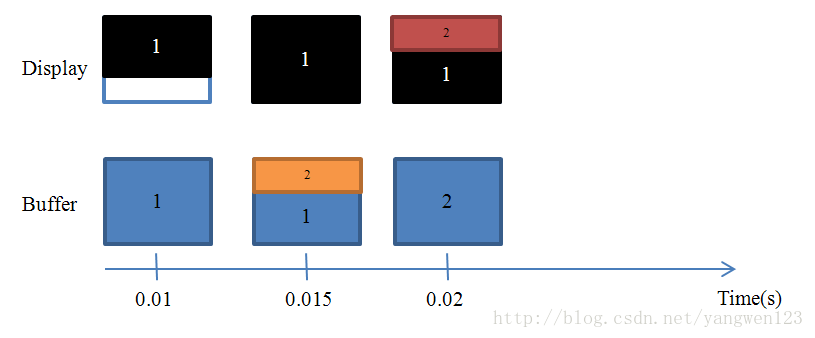 深入解析 Android 顯示機制:從 VSync 到三重緩衝
前言 本文整理自對多份資料與原始碼的研讀,歸納出 Android 顯示系統的核心概念。由於理解有限,難免有疏漏之處,也歡迎各方指正交流。 顯示系統的基礎知識 基本構成
 Android 用 SurfaceView 畫出流暢的觸摸軌跡
要在螢幕上留下手指滑過的痕跡,最省事的方式莫過於 Path 搭配 quadTo()。本文用 SurfaceView 搭配獨立繪圖執行緒,示範如何畫出一條平滑的曲線,同時把
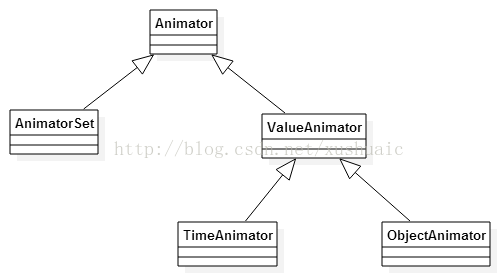 Android 動畫系統之屬性動畫(Property Animation)完全解析
為什麼需要屬性動畫 Android 3.0 引入的屬性動畫系統,是對早期 View Animation(補間動畫)體系的一次徹底升級,主要體現在四個方面: 彌補了 Vi
 自訂 Android View 實作:打造可重複使用的 MenuItemView 設定列
在設定頁或選單頁中,常會出現大量重複的列表樣式。若每次都重寫版面,維護成本很高。本文介紹如何自訂 MenuItemView,將常見的設定列封裝成可重複使用的 View。