

編輯:關於 Android 程式設計
本文示範如何運用 Android 的 Gallery 元件,做出可以左右滑動切換的相簿效果,操作手感相當接近 iPhone 的圖片瀏覽。

<?xml version="1.0" encoding="utf-8"?>
<LinearLayout xmlns:android="https://schemas.android.com/apk/res/android"
    android:orientation="vertical"
    android:layout_width="fill_parent"
    android:layout_height="fill_parent" >

    <TextView
        android:layout_width="fill_parent"
        android:layout_height="wrap_content"
        android:text="@string/hello" />

    <Gallery
        android:id="@+id/gallery"
        android:layout_width="fill_parent"
        android:layout_height="fill_parent" />
</LinearLayout>Gallery 需要透過 Adapter 來填充內容,因此我們從 BaseAdapter 派生一個 ImageAdapter,把要顯示的圖片資源逐一載入:
public class ImageAdapter extends BaseAdapter {
    private Context context;
    private int[] MyImageIDs = {
        R.drawable.icon, R.drawable.carlogo_52design_09,
        R.drawable.carlogo_52design_13, R.drawable.carlogo_52design_19,
        R.drawable.carlogo_52design_24, R.drawable.carlogo_52design_27,
        R.drawable.carlogo_52design_29, R.drawable.carlogo_52design_31,
        R.drawable.carlogo_52design_34, R.drawable.carlogo_52design_36 };

    public ImageAdapter(Context context) {
        this.context = context;
    }

    @Override
    public int getCount() {
        return MyImageIDs.length;
    }

    @Override
    public Object getItem(int arg0) {
        return arg0;
    }

    @Override
    public long getItemId(int position) {
        return position;
    }

    @Override
    public View getView(int position, View convertView, ViewGroup parent) {
        ImageView i = new ImageView(this.context);
        i.setImageResource(this.MyImageIDs[position]);
        i.setScaleType(ImageView.ScaleType.FIT_XY);
        i.setLayoutParams(new Gallery.LayoutParams(120, 120));
        return i;
    }
}
在 getView() 中,我們為每個位置建立一個 ImageView,設定圖片、縮放模式與尺寸,Gallery 便會自動處理滑動與對齊的細節。最後別忘了在 Activity 裡建立 Gallery 實例、套用這個 Adapter,就能得到流暢的左右滑動體驗。
 Android 表情功能完整方案:從 SpannableString 原理到表情面板與自動化腳本
表情功能在聊天、社群類 App 裡幾乎是必需品。它看起來簡單,實際牽涉到文字渲染、正則匹配、自定義鍵盤面板、光標操作等一連串細節。本文把整個方案拆成五個部分講清楚: 原
 如何預置 Android 手機 APK:四種情境完整教學
預置 APK 依需求可分為以下四種情境: 1. 如何將「帶源碼」的 APK 預置進系統? 2. 如何將「無源碼」的 APK 預置進系統? 3. 如何預置 APK 使得使用
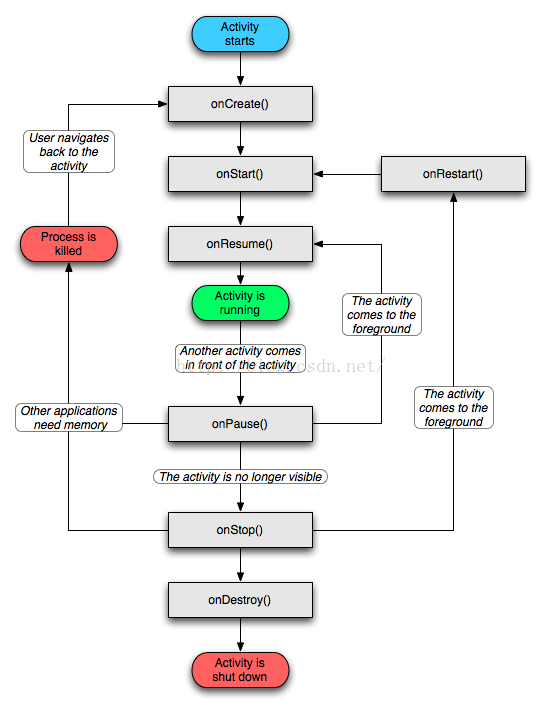 Android 開發核心知識:Activity 生命週期全解析
啟動或結束一個 Activity,都離不開它的生命週期。Android 開發者依據生命週期中各回呼方法的觸發時機處理對應的業務邏輯,以保證用戶與頁面之間能正常、良好地交互
 Android 入門教程 8.3.14:Paint 的列舉常數與 ShadowLayer 陰影效果
本節引言 早在 8.3.1 介紹三個繪圖工具類時,我們就已經碰過 Paint.Style、Paint.Cap、Paint.Join 這幾個東西。它們都是 Paint 內部