

編輯:關於 Android 程式設計
讀檔是 Android 開發的常規操作,但「怎麼讀」會直接影響效能與可讀性。以下整理三種常見寫法,分別適用於快速驗證、一般情境與長期運行的正式應用。
import java.io.FileInputStream;

void readFileOnLine() {
    String strFileName = "Filename.txt";
    FileInputStream fis = openFileInput(strFileName);
    StringBuffer sBuffer = new StringBuffer();
    DataInputStream dataIO = new DataInputStream(fis);
    String strLine = null;
    while ((strLine = dataIO.readLine()) != null) {
        sBuffer.append(strLine + "\n");
    }
    dataIO.close();
    fis.close();
}
程式碼最短,但 DataInputStream.readLine() 已被標記為不建議使用(deprecated):它無法正確處理編碼,遇到 UTF-8 中文容易亂碼。適合臨時測試,不建議用在正式專案。
這是較通用的寫法,加上檔案存在性與例外處理:
public static String ReadTxtFile(String strFilePath) {
    String content = "";   // 檔案內容
    File file = new File(strFilePath);

    if (file.isDirectory()) {
        Log.d("TestFile", "The File doesn't not exist.");
        return content;
    }

    try {
        InputStream instream = new FileInputStream(file);
        if (instream != null) {
            InputStreamReader inputreader = new InputStreamReader(instream);
            BufferedReader buffreader = new BufferedReader(inputreader);
            String line;
            // 逐行讀取
            while ((line = buffreader.readLine()) != null) {
                content += line + "\n";
            }
            instream.close();
        }
    } catch (java.io.FileNotFoundException e) {
        Log.d("TestFile", "The File doesn't not exist.");
    } catch (IOException e) {
        Log.d("TestFile", e.getMessage());
    }
    return content;
}
這裡有兩個可以改進的地方:字串累加 content += line 每次都會產生新的 String 物件,檔案一大就會造成記憶體抖動,改用 StringBuilder 會好很多;另外串流關閉建議放在 finally 區塊或改用 try-with-resources,避免例外時資源洩漏。
若是需要長時間執行、且檔案內容有固定格式的 App(例如本文的體重紀錄範例),建議把每一行解析成物件,並用檔案修改時間做快取,避免無效重讀。
class WeightRecord {
    String timestamp;
    float weight;

    public WeightRecord(String timestamp, float weight) {
        this.timestamp = timestamp;
        this.weight = weight;
    }
}
private WeightRecord[] readLog() throws Exception {
    ArrayList<WeightRecord> result = new ArrayList<WeightRecord>();
    File root = Environment.getExternalStorageDirectory();
    if (root == null)
        throw new Exception("external storage dir not found");

    File weightLogFile = new File(root, WeightService.LOGFILEPATH);
    if (!weightLogFile.exists())
        throw new Exception("logfile '" + weightLogFile + "' not found");
    if (!weightLogFile.canRead())
        throw new Exception("logfile '" + weightLogFile + "' not readable");

    // 以修改時間做快取,檔案沒變就直接回傳上次結果
    long modtime = weightLogFile.lastModified();
    if (modtime == lastRecordFileModtime)
        return lastLog;
    lastRecordFileModtime = modtime;

    FileReader reader = new FileReader(weightLogFile);
    BufferedReader in = new BufferedReader(reader);
    long currentTime = -1;

    String line = in.readLine();
    while (line != null) {
        WeightRecord rec = parseLine(line);
        if (rec == null) {
            Log.e(TAG, "could not parse line: '" + line + "'");
        } else if (Long.parseLong(rec.timestamp) < currentTime) {
            Log.e(TAG, "ignoring '" + line + "' since it's older than prev log line");
        } else {
            Log.i(TAG, "line=" + rec);
            result.add(rec);
            currentTime = Long.parseLong(rec.timestamp);
        }
        line = in.readLine();
    }
    in.close();

    lastLog = (WeightRecord[]) result.toArray(new WeightRecord[result.size()]);
    return lastLog;
}

// 解析每一行,格式為「時間戳;數值」
private WeightRecord parseLine(String line) {
    if (line == null) return null;
    String[] split = line.split("[;]");
    if (split.length < 2) return null;
    if (split[0].equals("Date")) return null;   // 跳過表頭
    try {
        String timestamp = split[0];
        float weight = Float.parseFloat(split[1]);
        return new WeightRecord(timestamp, weight);
    } catch (Exception e) {
        Log.e(TAG, "Invalid format in line '" + line + "'");
        return null;
    }
}
public boolean logWeight(Intent batteryChangeIntent) {
    Log.i(TAG, "logBattery");
    if (batteryChangeIntent == null) return false;

    try {
        FileWriter out = null;
        if (mWeightLogFile != null) {
            try {
                out = new FileWriter(mWeightLogFile, true);
            } catch (Exception e) { }
        }

        if (out == null) {
            File root = Environment.getExternalStorageDirectory();
            if (root == null)
                throw new Exception("external storage dir not found");

            mWeightLogFile = new File(root, WeightService.LOGFILEPATH);
            boolean fileExists = mWeightLogFile.exists();

            if (!fileExists) {
                if (!mWeightLogFile.getParentFile().mkdirs()) {
                    Toast.makeText(this, "create file failed", Toast.LENGTH_SHORT).show();
                }
                mWeightLogFile.createNewFile();
            }
            if (!mWeightLogFile.exists())
                throw new Exception("creation of file '" + mWeightLogFile + "' failed");
            if (!mWeightLogFile.canWrite())
                throw new Exception("file '" + mWeightLogFile + "' is not writable");

            out = new FileWriter(mWeightLogFile, true);
            if (!fileExists) {
                out.write(createHeadLine());
                out.write('\n');
            }
        }

        String extras = createBatteryInfoLine(batteryChangeIntent);
        out.write(extras);
        out.write('\n');
        out.flush();
        out.close();
        return true;
    } catch (Exception e) {
        Log.e(TAG, e.getMessage(), e);
        return false;
    }
}
臨時測試用第一種即可;一般文字檔用第二種並記得改用 StringBuilder;需要長期穩定運行的正式應用走第三種,加上快取與格式驗證,並記得檔案 I/O 屬耗時操作,應放在背景執行緒執行。另外,Android 10(API 29)起分區儲存已成預設,直接寫入 Environment.getExternalStorageDirectory() 會受限,建議改用 App 專用目錄 getExternalFilesDir() 或 MediaStore API。
 Fresco SimpleDraweeView 使用指南
Fresco 簡介 Fresco 是 Facebook 開源的圖片加載框架,SimpleDraweeView 是其常用檢視。它能處理占位圖、進度圖、失敗圖、重試圖、圓角、
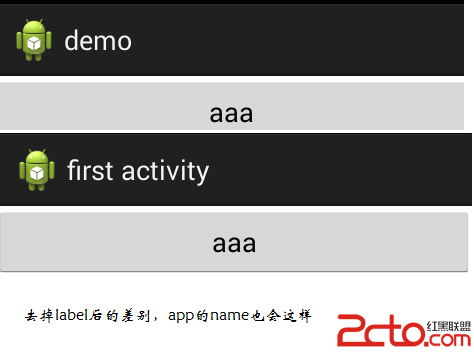 Activity 入門實踐:從第一個按鈕到選單的完整流程
照著《第一行代碼 Android》的脈絡走一遍 Activity 的基本用法,過程有點像當年敲 Java 的 Hello World——步驟簡單,但幾個容易踩的小坑值得記
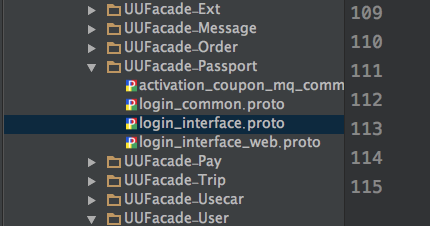 App 產品研發(九):網絡傳輸協議的選擇與實踐
上一篇談的是 App 的數據統計,大致分為導入第三方服務與自行實作兩條路。一般情況下第三方服務已能滿足絕大多數需求,只有對數據敏感度要求較高的產品,自建統計才是更好的選擇
 Android單點觸控實現圖片的平移、縮放與旋轉
大家對多點縮放、平移圖片應該很熟悉了,大部分大圖浏覽都具備此功能,有些app還支持旋轉,比如QQ的大圖浏覽就能旋轉圖片。眾所周知,對圖片進行縮放、平移、旋轉等操作可以使用