

編輯:關於 Android 程式設計
把圖片存進資料庫,是 Android 開發中偶爾會遇到的需求——例如桌布/桌面啟動器需要保存一堆 App 圖示,又不希望每次啟動都重新從 PackageManager 拿 Drawable。做法是把圖片壓縮成位元組,以 BLOB 型別寫進 SQLite,讀出來時再還原成 Drawable。
這個示例分三步:建立資料庫、寫入圖片、讀出圖片。
繼承 SQLiteOpenHelper,在 onCreate() 中建立資料表。圖片欄位宣告為 BINARY(SQLite 中與 BLOB 同義):
public class DBService extends SQLiteOpenHelper {

    private final static int VERSION = 1;
    private final static String DATABASE_NAME = "uniteqlauncher.db";

    public DBService(Context context) {
        this(context, DATABASE_NAME, null, VERSION);
    }

    public DBService(Context context, String name, CursorFactory factory, int version) {
        super(context, name, factory, version);
    }

    @Override
    public void onCreate(SQLiteDatabase db) {
        String sql = "CREATE TABLE [launcher]("
                + "[_id] INTEGER PRIMARY KEY AUTOINCREMENT,"
                + "[photo] BINARY)";      // 保存為 binary 格式
        db.execSQL(sql);
    }

    @Override
    public void onUpgrade(SQLiteDatabase db, int oldVersion, int newVersion) {
        if (newVersion > oldVersion) {
            db.execSQL("DROP TABLE IF EXISTS [launcher]");
        } else {
            return;
        }
        onCreate(db);
    }
}
核心流程是:把 Drawable 轉成 Bitmap、用 compress() 壓縮到 ByteArrayOutputStream、取出位元組陣列,最後用參數化 SQL 寫入。
public void savePhoto(Drawable appIcon, Context mContext) {

    LayoutInflater inflater = (LayoutInflater) mContext
            .getSystemService(Context.LAYOUT_INFLATER_SERVICE);
    View v = inflater.inflate(R.layout.app_view, null);
    ImageView iv = (ImageView) v.findViewById(R.id.appicon);
    iv.setImageDrawable(appIcon);

    String INSERT_SQL = "INSERT INTO launcher(photo) values(?)";
    SQLiteDatabase db = mDBService.getWritableDatabase();

    try {
        ByteArrayOutputStream baos = new ByteArrayOutputStream();

        // 壓縮為 PNG 格式,100 表示與原圖相同品質
        ((BitmapDrawable) iv.getDrawable()).getBitmap()
                .compress(Bitmap.CompressFormat.PNG, 100, baos);

        Object[] args = new Object[] { baos.toByteArray() };
        db.execSQL(INSERT_SQL, args);

        baos.close();
        db.close();
    } catch (Exception e) {
        e.printStackTrace();
    }
}
public void getPhoto() {

    String SELECT_SQL = "SELECT photo FROM launcher";
    ImageView appIcon = (ImageView) v.findViewById(R.id.appicon);
    byte[] photo = null;

    mDBService = new DBService(getContext());
    SQLiteDatabase db = mDBService.getReadableDatabase();

    Cursor mCursor = db.rawQuery(SELECT_SQL, null);

    if (mCursor != null) {
        if (mCursor.moveToFirst()) {        // 只取一筆
            photo = mCursor.getBlob(mCursor.getColumnIndex("photo"));
        }
    }

    if (mCursor != null) {
        mCursor.close();
    }
    db.close();

    ByteArrayInputStream bais = null;
    if (photo != null) {
        bais = new ByteArrayInputStream(photo);
        appIcon.setImageDrawable(Drawable.createFromStream(bais, "photo"));
    }
    // appIcon 顯示的就是先前存進資料庫的圖片
}
1. Cursor 一定要關,而且要放在 finally
範例中 mCursor.close() 寫在 if 外面看似安全,但若 getBlob() 中途拋例外就會被跳過。Cursor 持有的是資料庫游標資源,洩漏會累積到 WindowManager 或 SQLiteCursor 洩漏警告,最終導致崩潰。請用 try-with-resources 或 finally 確保關閉。
2. PNG 的 quality 參數無效
compress(PNG, 100, baos) 中的 100 對 PNG 沒有作用——PNG 是無失真壓縮格式,Android 會忽略 quality 參數。只有 JPEG 與 WEBP 才會理會它。若你希望縮小資料量,就該改用 JPEG 並降低 quality,或者先把 Bitmap 縮放(Bitmap.createScaledBitmap())再壓縮。
3. 資料庫不是存圖片的最佳去處
這點值得認真想。BLOB 會讓資料庫檔案快速膨脹,而 SQLite 在處理大型 BLOB 時效能不佳,每次查詢即使只要一欄也會拖動大量資料。更常見且效能更好的做法是:圖片存成檔案放在 getFilesDir() 或 getCacheDir() 底下,資料庫只存檔案路徑字串。這樣資料庫輕量、查詢快,圖片也能善用系統的檔案快取機制。
如果確實有理由必須放進資料庫(例如需要交易一致性、或資料必須隨 DB 一起備份),那麼建議:把查詢加上 where _id = ? 條件只取單筆,而不是像範例那樣把整張表的第一筆撈出來;同時考慮把圖片拆到獨立的表,避免影響主表的查詢效能。
4. 用 execSQL 做插入時,參數要用 getattr 對應
範例用 Object[] args 搭配 execSQL() 是可行的,但更直覺、也更不容易出錯的寫法是 SQLiteDatabase.insert():
ContentValues values = new ContentValues();
values.put("photo", baos.toByteArray());
long rowId = db.insert("launcher", null, values);
這樣不必自己拼 SQL 字串,也天然避免了 SQL injection 的風險。查詢則建議改用 db.query() 搭配 selectionArgs,同樣是參數化的安全寫法。
5. 讀取時記得釋放 intermediate stream
ByteArrayInputStream 雖然不佔系統資源,但養成關閉習慣不會吃虧。另外 Drawable.createFromStream() 回傳 null 也是可能情況(例如資料損毀),使用結果前最好做個 null 檢查。
 Android 多執行緒開發中 Handler 的實際用法詳解
簡單來說,Handler 就像是一座橋樑,負責在主執行緒與其他工作執行緒之間傳遞並更新資料。它通常宣告在主執行緒中,透過它我們可以直接調度執行緒的執行邏輯。下面透過幾個實
 Android 學習筆記(十二)——使用 Intent 傳遞資料的幾種方式
使用 Intent 傳遞資料的幾種方式 除了從 Activity 返回資料,我們也常常需要把資料傳遞給 Activity。對此,可以使用 Intent 物件將資料傳遞
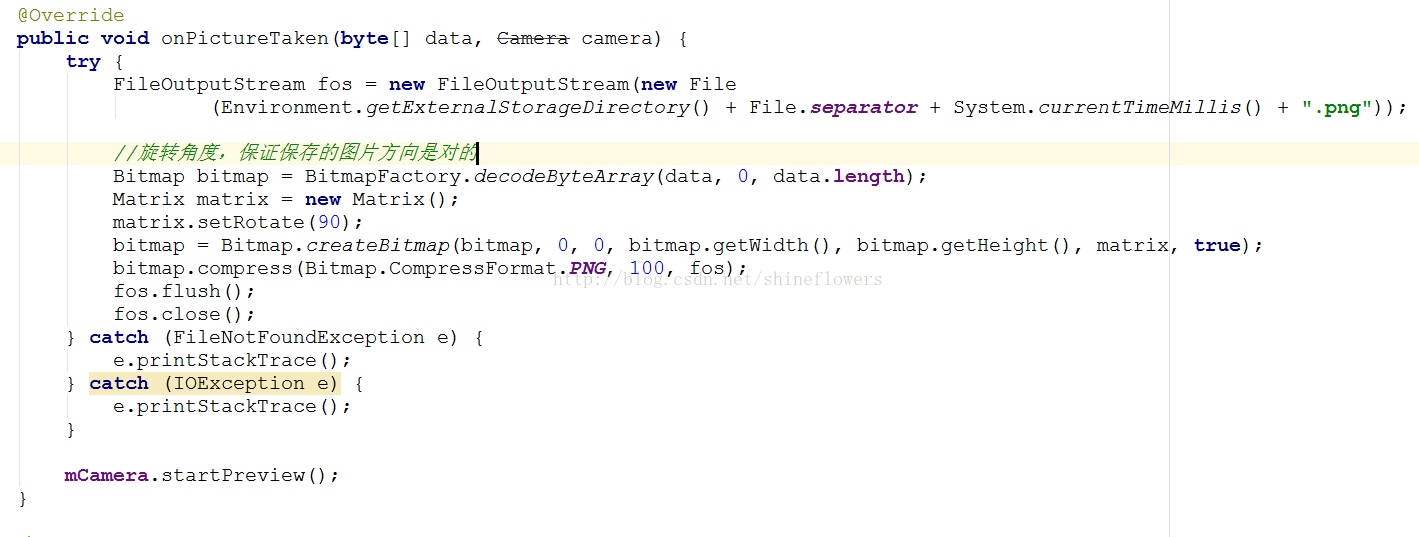 Android 自訂相機實作倒數計時拍照功能
本篇教學為大家介紹如何自訂 Android 相機,並實作倒數計時拍照功能。 首先,自訂拍照會用到 SurfaceView 控制項來顯示照片的預覽區域,以下是版面檔 act
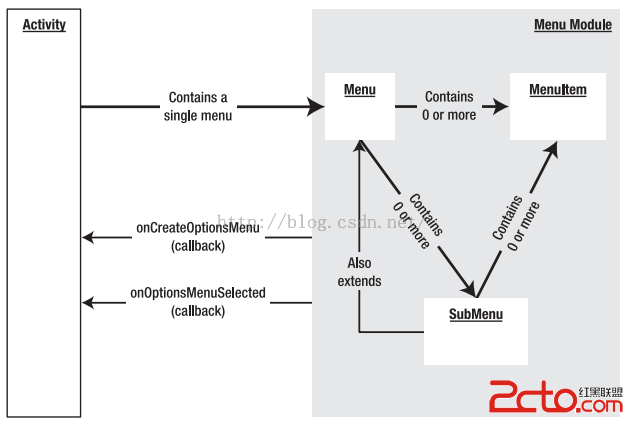 Android 菜單詳解:OptionMenu、ContextMenu 與 SubMenu
菜單的概念如今已十分普及。Windows、Mac、桌面版 Linux、Java Swing 等都有可視化菜單。本文系統梳理 Android 平台的三類菜單及其使用方式。