

編輯:關於 Android 程式設計
研究懸浮窗時突發奇想:能不能像手機 QQ 那樣,把應用圖標常駐在狀態欄,並在有新消息時切換成另一個圖標?
做完之後發現,這一切就是 Notification 機制。
NotificationManager nm = (NotificationManager) getSystemService(Context.NOTIFICATION_SERVICE);
Notification n = new Notification(resId, "Floats Start!", System.currentTimeMillis());

// 放入通知欄的「正在運行」分組
n.flags |= Notification.FLAG_ONGOING_EVENT;
// 點擊「清除通知」時不被移除,常與上一條搭配使用
n.flags |= Notification.FLAG_NO_CLEAR;

PendingIntent pi = PendingIntent.getActivity(this, 0, getIntent(), 0);
n.contentIntent = pi;
n.setLatestEventInfo(this, "FloatsWindow", "start!", pi);
nm.notify(NOTIFICATION_ID_ICON, n);
不需要 cancel 這個通知,只要用不同的 resId 再次 notify 同一個 ID,圖標就會被替換。
public class MainActivity extends Activity {

    private static WindowManager mWindowMgr = null;
    private WindowManager.LayoutParams mWindowMgrParams = null;
    private static FloatsWindowView mFloatsWindowView = null;
    private final static int NOTIFICATION_ID_ICON = 0x10000;

    @Override
    protected void onCreate(Bundle savedInstanceState) {
        super.onCreate(savedInstanceState);
        setContentView(R.layout.activity_main);
    }

    @Override
    protected void onStop() {
        super.onStop();
        deleteIconToStatusbar();
    }

    /* 主界面獲得焦點時移除懸浮層並換上「運行中」圖標,
     * 失去焦點時掛上懸浮層並換回默認圖標 */
    @Override
    public void onWindowFocusChanged(boolean hasFocus) {
        if (hasFocus) {
            if (mFloatsWindowView != null) {
                mWindowMgr.removeView(mFloatsWindowView);
                mFloatsWindowView = null;
            }
            addIconToStatusbar(R.drawable.a0);
        } else {
            getWindowLayout();
            addIconToStatusbar(R.drawable.ic_launcher);
        }
    }

    /*
     * 若未從狀態欄刪除 ICON 就再次調用 addIconToStatusbar,
     * 通知本身不會有任何變化;但只要換一個 resId,圖標就會更新。
     */
    private void addIconToStatusbar(int resId) {
        NotificationManager nm = (NotificationManager)
            getSystemService(Context.NOTIFICATION_SERVICE);
        Notification n = new Notification(resId, "Floats Start!",
            System.currentTimeMillis());
        n.flags |= Notification.FLAG_ONGOING_EVENT;
        n.flags |= Notification.FLAG_NO_CLEAR;

        PendingIntent pi = PendingIntent.getActivity(this, 0, getIntent(), 0);
        n.contentIntent = pi;
        n.setLatestEventInfo(this, "FloatsWindow", "start!", pi);
        nm.notify(NOTIFICATION_ID_ICON, n);
    }

    private void deleteIconToStatusbar() {
        NotificationManager nm = (NotificationManager)
            getSystemService(Context.NOTIFICATION_SERVICE);
        nm.cancel(NOTIFICATION_ID_ICON);
    }

    private void getWindowLayout() {
        if (mFloatsWindowView == null) {
            mWindowMgr = (WindowManager) getBaseContext()
                .getSystemService(Context.WINDOW_SERVICE);
            mWindowMgrParams = new WindowManager.LayoutParams();
            mWindowMgrParams.type = 2003;
            mWindowMgrParams.format = 1;
            mWindowMgrParams.flags = 40;
            mWindowMgrParams.gravity = Gravity.LEFT | Gravity.TOP;
            initParams();
            mFloatsWindowView = new FloatsWindowView(this);
            mWindowMgr.addView(mFloatsWindowView, mWindowMgrParams);
        }
    }
}
這樣一來,當應用的焦點狀態變化時,狀態欄上的圖標也會跟著切換,形成一種低成本的「應用仍在運行」提示。
需要提醒的是,示例中的 Notification 寫法(new Notification + setLatestEventInfo)在 API 11 之後已被廢棄,Android 8.0 起還強制要求指定 NotificationChannel。新項目應改用 Notification.Builder 並創建通道,否則通知根本不會顯示。
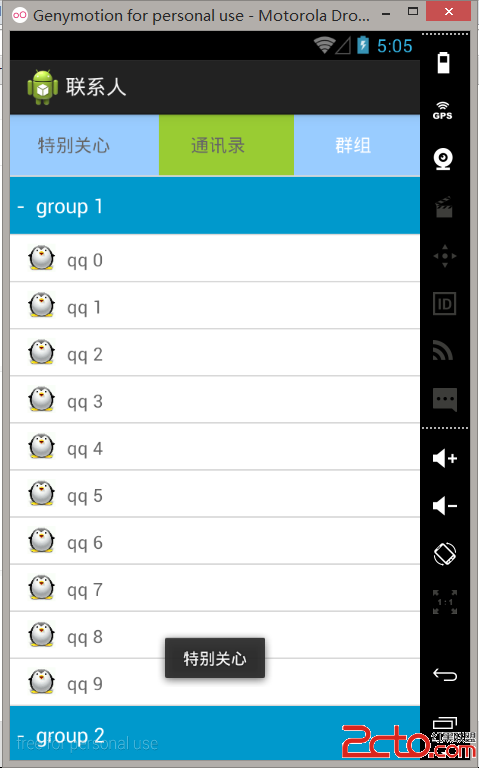 仿 QQ 好友列表:分組懸停、自定義 Header 與下拉刷新的結合
之前學習了 PullToRefresh 和 PinnedHeaderExpandableListView,但把它們結合起來卻頗為費勁,尤其是像 QQ 那樣的效果。它並非單
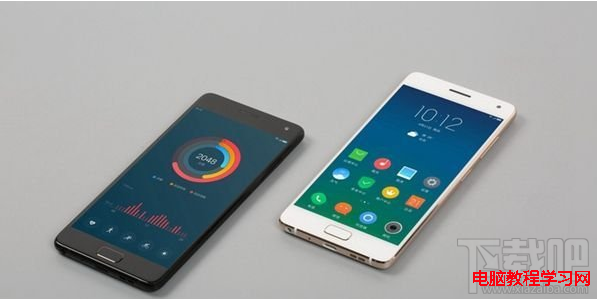 聯想 ZUK Z2 Pro 有 NFC 嗎?規格重點整理
ZUK Z2 Pro 是聯想旗下 ZUK 的旗艦機,規格相當完整,但許多網友關心它是否具備 NFC。 該機配備 5.2 吋 Super AMOLED 1080P 螢幕、
 安卓自定義控件系列:手把手教你寫組合控件
在安卓開發中,谷歌已經為我們提供了豐富的原生控件,基本能滿足日常開發需求。但某些項目裡,原生控件可能達不到產品所要求的炫酷效果或特定功能,這時我們就只能自己動手自定義控件
 《Android源碼設計模式解析與實戰》讀書筆記(十八):代理模式
第十八章、代理模式 代理模式也稱委託模式,是結構型設計模式之一,也是應用最廣泛的模式之一。 1. 定義 為其他物件提供一種代理,以控制對該物件的存取。 2. 使用場景 當