

編輯:關於 Android 程式設計
當使用者在 EditText 中輸入電話號碼、網址或 Email 時,我們希望能讓 Android 自動辨識這些內容:點擊電話號碼就撥打電話、點擊網址就開啟瀏覽器。Linkify 正是解決這個問題的利器。
<LinearLayout xmlns:android="https://schemas.android.com/apk/res/android"
    android:layout_width="match_parent"
    android:layout_height="match_parent"
    android:orientation="vertical" >
    <TextView
        android:id="@+id/tv"
        android:layout_width="match_parent"
        android:layout_height="wrap_content" />
    <EditText
        android:id="@+id/et"
        android:layout_width="match_parent"
        android:layout_height="wrap_content" />
    <TextView
        android:id="@+id/tv1"
        android:layout_width="fill_parent"
        android:layout_height="wrap_content" />
</LinearLayout>透過 Linkify.addLinks() 並搭配位元旗標,就能指定要辨識哪些類型的內容,讓 TextView 中的對應文字變成可點擊的連結:
public class MainActivity extends Activity {
    private TextView tv;
    private EditText et;
    @Override
    protected void onCreate(Bundle savedInstanceState) {
        super.onCreate(savedInstanceState);
        setContentView(R.layout.activity_main);
        tv = (TextView) findViewById(R.id.tv1);
        et = (EditText) findViewById(R.id.et);
        et.setOnKeyListener(new OnKeyListener() {
            @Override
            public boolean onKey(View v, int keyCode, KeyEvent event) {
                tv.setText(et.getText());
                // 判斷輸入的是 URL、EMAIL 還是 PHONE,並自動與系統功能連結
                Linkify.addLinks(tv, Linkify.WEB_URLS | Linkify.EMAIL_ADDRESSES | Linkify.PHONE_NUMBERS);
                return false;
            }
        });
    }
}如果是在靜態的 TextView 上啟用自動辨識,其實無需寫任何 Java 程式碼,只要在佈局中加上 android:autoLink 屬性即可:
<TextView
    android:id="@+id/tv1"
    android:layout_width="fill_parent"
    android:layout_height="wrap_content"
    android:autoLink="web|phone|email"
/>
無論是用程式碼的 Linkify 動態處理,還是用 autoLink 屬性靜態宣告,都能讓文字中的電話、網址與 Email 搖身一變成為可互動的連結。
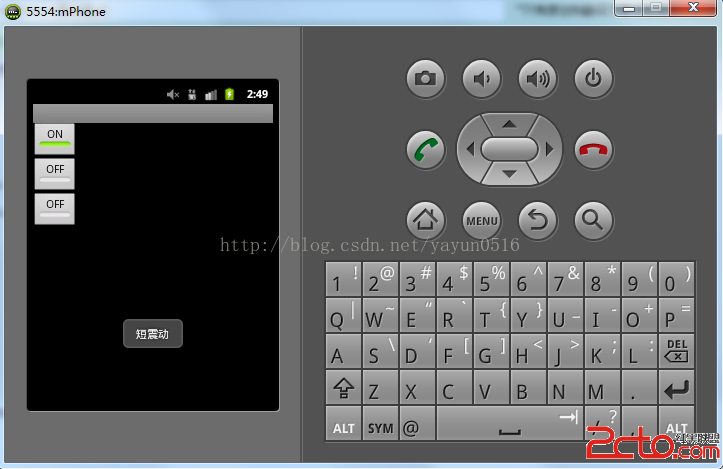 Android Vibrator 震動模式控制教學
Android 的 Vibrator 服務可以讓應用程式觸發手機震動,常用於提示、遊戲回饋或通知效果。使用時必須先在 AndroidManifest.xml 加入震動權限
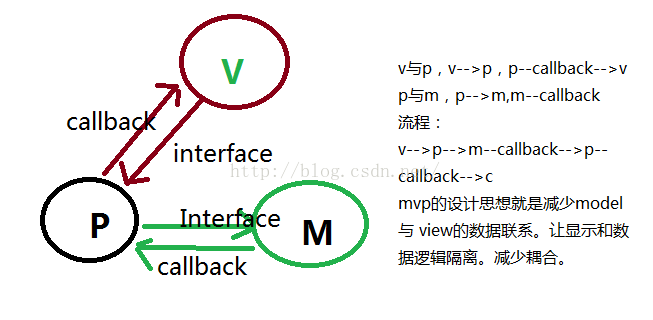 Android MVP 架構學習實例:從 MVC 到 MVP 的實踐
為什麼需要探討架構隨著行動開發的不斷演進,專案設計模式也越來越講究。良好的架構不僅能加快開發速度,也能讓後續維護與擴充變得更輕鬆。不過,並沒有一種萬能架構適合所有團隊與所
 DialogFragment 進階用法:用 getDialog() 動態操控對話框版面
先前寫過一篇繼承 DialogFragment 的入門筆記,這次往前推進一步:如何在 DialogFragment 內部取得 getDialog() 這個對話框句柄,進而
 Android Spinner 下拉選單效果:C# 與 Java 雙版本實作
Spinner 是 Android 提供的下拉式選擇器,用法概念上等同於桌面平台的下拉方塊。以下以「選擇城市」為例,示範 C# 與 Java 兩種寫法。 效果預覽