

編輯:關於 Android 程式設計
想讓子 View 依比例分配寬度或高度,可以善用 LinearLayout 的權重(weight)機制。做法是把 LinearLayout 的寬度或高度設為 fill_parent,再將子 View 的寬度或高度設為 0,最後為每個子 View 指定不同的權重,它們的大小就會依權值成比例。
本例採用橫向 LinearLayout,並將 android:layout_width 設為 match_parent 以使用整個螢幕寬度。對於幾個子 View,把它們的寬度都設為 0dip,再用 layout_weight 指定比例。本例中四個 TextView 使用了相同的權值,因此它們會擁有相同的寬度;而顯示文字較長的 TextView 則會自動換行增高。
<LinearLayout xmlns:android="https://schemas.android.com/apk/res/android"
    android:orientation="horizontal"
    android:layout_width="match_parent"
    android:layout_height="wrap_content">

    <TextView
        android:background="@drawable/red"
        android:layout_width="0dip"
        android:layout_height="match_parent"
        android:layout_weight="1"
        android:text="@string/linear_layout_7_small"/>

    <TextView
        android:background="@drawable/green"
        android:layout_width="0dip"
        android:layout_height="match_parent"
        android:layout_weight="1"
        android:text="@string/linear_layout_7_big"/>

    <TextView
        android:background="@drawable/blue"
        android:layout_width="0dip"
        android:layout_height="match_parent"
        android:layout_weight="1"
        android:text="@string/linear_layout_7_small" />

    <TextView
        android:background="@drawable/yellow"
        android:layout_width="0dip"
        android:layout_height="wrap_content"
        android:layout_weight="1"
        android:text="@string/linear_layout_7_wrap"/>

</LinearLayout>
關鍵觀念:只要把可撐開的那個維度設為 0dip 再搭配 layout_weight,就能讓版面依權重精準地按比例切分,這是實作等寬欄位或多欄比例配置最直覺的方式。
 Android 多種樣式的進度條實現大全
The mark of the immature man is that he wants to die nobly for a cause, while the mar
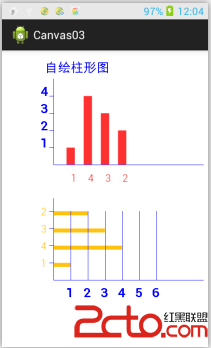 Android Canvas 練習(3):自繪柱狀圖(直向與橫向)
畫完報表與圓餅圖,接著做柱狀圖。柱狀圖的組成其實很樸素:線段加上方框。下面示範直向與橫向兩種版本,橫向那張順便把「同一組數據用兩種視角呈現」的做法一起交代。 pack
 從零開始的 Android 新專案 10:React Native 與 Redux 入門實解
這一篇我們來聊 React Native 與 Redux。不同於那些一上來就整段整段貼翻譯的教學,本文選擇從最小的例子切入:先讓你明白 React Native 到底是什
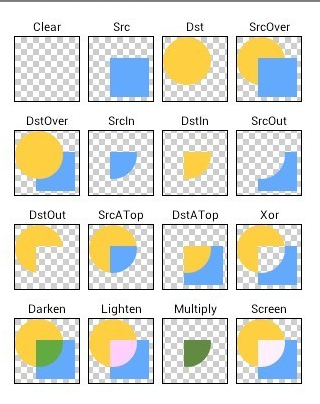 Android UI 繪圖篇(三):PorterDuffXfermode 與 Shader 渲染
本篇將重點介紹 PorterDuffXfermode 的圖形混合,以及 Shader 中的 BitmapShader 與 LinearGradient,幫助你掌握圓角圖片