

編輯:關於 Android 程式設計
想讓 App 裡的圖片支援雙指縮放和單指拖曳?其實只要自訂一個 ImageView 就能辦到。本文會帶你從零打造一個可多點觸控縮放、又能靈活拖動的圖片檢視元件,並示範如何在 XML 佈局中直接引用它。
核心思路是透過 Matrix 矩陣追蹤圖片的縮放比例與位移量,再搭配 MotionEvent 事件判斷手指數量:單指移動視為拖曳,雙指移動則視為縮放。同時我們還加入了邊界檢查,避免圖片被拖出可視範圍,並限制最大放大倍數為 4 倍。
 /**
 * 自訂的 ImageView 控制,可對圖片進行多點觸控縮放和拖動
 *
 * @author qiuwanyong
 */
public class MyImageView extends ImageView {
 /** 初始化狀態常量 */
 public static final int STATUS_INIT = 1;
 /** 圖片放大狀態常量 */
 public static final int STATUS_ZOOM_OUT = 2;
 /** 圖片縮小狀態常量 */
 public static final int STATUS_ZOOM_IN = 3;
 /** 圖片拖動狀態常量 */
 public static final int STATUS_MOVE = 4;
 /** 用於對圖片進行移動和縮放變換的矩陣 */
 private Matrix matrix = new Matrix();
 /** 待展示的Bitmap對象 */
 private Bitmap sourceBitmap;
 private int currentStatus;
 private int width;
 private int height;
 private float centerPointX;
 private float centerPointY;
 private float currentBitmapWidth;
 private float currentBitmapHeight;
 private float lastXMove = -1;
 private float lastYMove = -1;
 private float movedDistanceX;
 private float movedDistanceY;
 private float totalTranslateX;
 private float totalTranslateY;
 private float totalRatio;
 private float scaledRatio;
 private float initRatio;
 private double lastFingerDis;

 public MyImageView(Context context, AttributeSet attrs) {
  super(context, attrs);
  currentStatus = STATUS_INIT;
 }
 public void setImageBitmap(Bitmap bitmap) {
  sourceBitmap = bitmap;
  invalidate();
 }
 @Override protected void onLayout(boolean changed, int left, int top, int right, int bottom) {
  super.onLayout(changed, left, top, right, bottom);
  if (changed) {
   width = getWidth();
   height = getHeight();
  }
 }
 @SuppressLint("NewApi")
 @Override public boolean onTouchEvent(MotionEvent event) {
  if (initRatio == totalRatio) {
   getParent().requestDisallowInterceptTouchEvent(false);
  } else {
   getParent().requestDisallowInterceptTouchEvent(true);
  }
  switch (event.getActionMasked()) {
   case MotionEvent.ACTION_POINTER_DOWN:
    if (event.getPointerCount() == 2) {
     lastFingerDis = distanceBetweenFingers(event);
    }
    break;
   case MotionEvent.ACTION_CANCEL:
   case MotionEvent.ACTION_MOVE:
    if (event.getPointerCount() == 1) {
     float xMove = event.getX();
     float yMove = event.getY();
     if (lastXMove == -1 && lastYMove == -1) {
      lastXMove = xMove;
      lastYMove = yMove;
     }
     currentStatus = STATUS_MOVE;
     movedDistanceX = xMove - lastXMove;
     movedDistanceY = yMove - lastYMove;
     if (totalTranslateX + movedDistanceX > 0) {
      movedDistanceX = 0;
     } else if (width - (totalTranslateX + movedDistanceX) > currentBitmapWidth) {
      movedDistanceX = 0;
     }
     if (totalTranslateY + movedDistanceY > 0) {
      movedDistanceY = 0;
     } else if (height - (totalTranslateY + movedDistanceY) > currentBitmapHeight) {
      movedDistanceY = 0;
     }
     invalidate();
     lastXMove = xMove;
     lastYMove = yMove;
    } else if (event.getPointerCount() == 2) {
     centerPointBetweenFingers(event);
     double fingerDis = distanceBetweenFingers(event);
     if (fingerDis > lastFingerDis) {
      currentStatus = STATUS_ZOOM_OUT;
     } else {
      currentStatus = STATUS_ZOOM_IN;
     }
     if ((currentStatus == STATUS_ZOOM_OUT && totalRatio < 4 * initRatio) || (currentStatus == STATUS_ZOOM_IN && totalRatio > initRatio)) {
      scaledRatio = (float) (fingerDis / lastFingerDis);
      totalRatio = totalRatio * scaledRatio;
      if (totalRatio > 4 * initRatio) {
       totalRatio = 4 * initRatio;
      } else if (totalRatio < initRatio) {
       totalRatio = initRatio;
      }
      invalidate();
      lastFingerDis = fingerDis;
     }
    }
    break;
   case MotionEvent.ACTION_POINTER_UP:
   case MotionEvent.ACTION_UP:
    lastXMove = -1;
    lastYMove = -1;
    break;
   default:
    break;
  }
  return true;
 }
 @Override protected void onDraw(Canvas canvas) {
  super.onDraw(canvas);
  switch (currentStatus) {
   case STATUS_ZOOM_OUT:
   case STATUS_ZOOM_IN:
    zoom(canvas);
    break;
   case STATUS_MOVE:
    move(canvas);
    break;
   case STATUS_INIT:
    initBitmap(canvas);
   default:
    if (sourceBitmap != null) {
     canvas.drawBitmap(sourceBitmap, matrix, null);
    }
    break;
  }
 }
 private void zoom(Canvas canvas) {
  matrix.reset();
  matrix.postScale(totalRatio, totalRatio);
  float scaledWidth = sourceBitmap.getWidth() * totalRatio;
  float scaledHeight = sourceBitmap.getHeight() * totalRatio;
  float translateX = 0f;
  float translateY = 0f;
  if (currentBitmapWidth < width) {
   translateX = (width - scaledWidth) / 2f;
  } else {
   translateX = totalTranslateX * scaledRatio + centerPointX * (1 - scaledRatio);
   if (translateX > 0) {
    translateX = 0;
   } else if (width - translateX > scaledWidth) {
    translateX = width - scaledWidth;
   }
  }
  if (currentBitmapHeight < height) {
   translateY = (height - scaledHeight) / 2f;
  } else {
   translateY = totalTranslateY * scaledRatio + centerPointY * (1 - scaledRatio);
   if (translateY > 0) {
    translateY = 0;
   } else if (height - translateY > scaledHeight) {
    translateY = height - scaledHeight;
   }
  }
  matrix.postTranslate(translateX, translateY);
  totalTranslateX = translateX;
  totalTranslateY = translateY;
  currentBitmapWidth = scaledWidth;
  currentBitmapHeight = scaledHeight;
  canvas.drawBitmap(sourceBitmap, matrix, null);
 }
 private void move(Canvas canvas) {
  matrix.reset();
  float translateX = totalTranslateX + movedDistanceX;
  float translateY = totalTranslateY + movedDistanceY;
  matrix.postScale(totalRatio, totalRatio);
  matrix.postTranslate(translateX, translateY);
  totalTranslateX = translateX;
  totalTranslateY = translateY;
  canvas.drawBitmap(sourceBitmap, matrix, null);
 }
 private void initBitmap(Canvas canvas) {
  if (sourceBitmap != null) {
   matrix.reset();
   int bitmapWidth = sourceBitmap.getWidth();
   int bitmapHeight = sourceBitmap.getHeight();
   if (bitmapWidth > width || bitmapHeight > height) {
    if (bitmapWidth - width > bitmapHeight - height) {
     float ratio = width / (bitmapWidth * 1.0f);
     matrix.postScale(ratio, ratio);
     float translateY = (height - (bitmapHeight * ratio)) / 2f;
     matrix.postTranslate(0, translateY);
     totalTranslateY = translateY;
     totalRatio = initRatio = ratio;
    } else {
     float ratio = height / (bitmapHeight * 1.0f);
     matrix.postScale(ratio, ratio);
     float translateX = (width - (bitmapWidth * ratio)) / 2f;
     matrix.postTranslate(translateX, 0);
     totalTranslateX = translateX;
     totalRatio = initRatio = ratio;
    }
    currentBitmapWidth = bitmapWidth * initRatio;
    currentBitmapHeight = bitmapHeight * initRatio;
   } else {
    float translateX = (width - sourceBitmap.getWidth()) / 2f;
    float translateY = (height - sourceBitmap.getHeight()) / 2f;
    matrix.postTranslate(translateX, translateY);
    totalTranslateX = translateX;
    totalTranslateY = translateY;
    totalRatio = initRatio = 1f;
    currentBitmapWidth = bitmapWidth;
    currentBitmapHeight = bitmapHeight;
   }
   canvas.drawBitmap(sourceBitmap, matrix, null);
  }
 }
 @SuppressLint("NewApi")
 private double distanceBetweenFingers(MotionEvent event) {
  float disX = Math.abs(event.getX(0) - event.getX(1));
  float disY = Math.abs(event.getY(0) - event.getY(1));
  return Math.sqrt(disX * disX + disY * disY);
 }
 @SuppressLint("NewApi")
 private void centerPointBetweenFingers(MotionEvent event) {
  float xPoint0 = event.getX(0);
  float yPoint0 = event.getY(0);
  float xPoint1 = event.getX(1);
  float yPoint1 = event.getY(1);
  centerPointX = (xPoint0 + xPoint1) / 2;
  centerPointY = (yPoint0 + yPoint1) / 2;
 }
}
完成自訂元件後,就能像一般 View 一樣在 XML 佈局中引用它。這裡要特別提醒:務必將 scaleType 設為 matrix,否則 Matrix 變換不會生效。
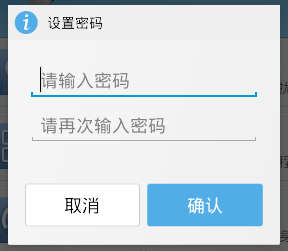 Android 自定義對話框:showSetPwdDialog 實作
樣式如下所示: 布局: layout dialog_set_pwd.xml <?xml version=. encoding=utf-?>
 ES 檔案瀏覽器遠端管理功能怎麼用
ES 檔案瀏覽器是 Android 上常見的檔案管理器。除了基本的檔案操作,它還能讓其他裝置透過 WiFi 遠端連進手機的檔案系統——不用拉線,電腦就能直接讀寫手機裡的東
 Android 進階:用手機麥克風打造類比信號示波器
前面大致介紹過 AudioRecord 與 AudioTrack 的用法,這次把它們和 SurfaceView 結合起來,做一台手機版的類比信號示波器。 物聯網這幾年很
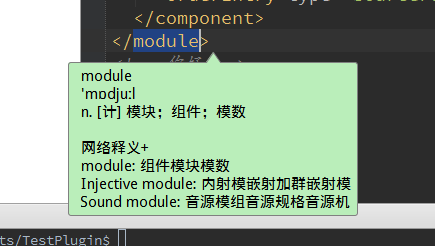 動手打造 IDEA / AndroidStudio 翻譯插件
先來看兩張成品效果圖: 一、事前準備 由於 AndroidStudio 本身不具備開發插件的功能,因此我們需要使用 IDEA 來進行開發。翻譯功能採用有道翻譯接口(需