

編輯:關於 Android 程式設計
在 Android 裡,sdcard 屬於外部儲存空間,是應用程式可讀寫的目錄,其他應用無權存取,通常用來存放一些安全性要求不高但體積較大的資料。
1. 權限問題
<uses-permission android:name="android.permission.WRITE_EXTERNAL_STORAGE">
2. 透過 Environment 取得 sdcard 路徑
Environment.getExternalStorageDirectory().getPath();
3. 使用前先判斷掛載狀態
if (!Environment.getExternalStorageState().equals(Environment.MEDIA_MOUNTED)) {
    Toast.makeText(mContext, "sdcard不存在或未掛載", Toast.LENGTH_SHORT).show();
    return;
}
4. 判斷剩餘空間是否足夠
File sdcard_file = Environment.getExternalStorageDirectory();
long usableSpace = sdcard_file.getUsableSpace();
String usableSpaceSize = Formatter.formatFileSize(this, usableSpace);
// 例如要下載 100M 的電影,空間不足則提示
if (usableSpace < 100 * 1024 * 1024) {
    Toast.makeText(mContext, "sdcard剩餘空間不足,剩餘:" + usableSpaceSize, 0).show();
    return;
}
下面用一個模擬登入頁的小範例,完整示範 sdcard 存取資料的過程。
① 布局檔
<LinearLayout xmlns:android="https://schemas.android.com/apk/res/android"
    android:layout_width="match_parent"
    android:layout_height="match_parent"
    android:orientation="vertical"
    android:padding="16dp">

    <EditText
        android:id="@+id/et_username"
        android:layout_width="match_parent"
        android:layout_height="wrap_content"
        android:hint="請輸入用戶名" />

    <EditText
        android:id="@+id/et_password"
        android:layout_width="match_parent"
        android:layout_height="wrap_content"
        android:layout_marginTop="15dp"
        android:layout_marginBottom="15dp"
        android:hint="請輸入密碼"
        android:inputType="textPassword" />

    <RelativeLayout
        android:layout_width="match_parent"
        android:layout_height="wrap_content">
        <CheckBox
            android:id="@+id/cb_rem"
            android:layout_width="wrap_content"
            android:layout_height="wrap_content"
            android:layout_centerVertical="true"
            android:text="記住密碼" />
        <Button
            android:id="@+id/btn_login"
            android:layout_width="wrap_content"
            android:layout_height="wrap_content"
            android:layout_alignParentRight="true"
            android:layout_centerVertical="true"
            android:text="登 錄" />
    </RelativeLayout>
</LinearLayout>
② MainActivity
public class MainActivity extends Activity implements OnClickListener {
    private EditText et_password, et_username;
    private CheckBox cb_rem;
    private Button btn_login;
    private Context mContext;

    @Override
    protected void onCreate(Bundle savedInstanceState) {
        super.onCreate(savedInstanceState);
        setContentView(R.layout.activity_main);
        mContext = this;
        et_password = (EditText) findViewById(R.id.et_password);
        et_username = (EditText) findViewById(R.id.et_username);
        cb_rem = (CheckBox) findViewById(R.id.cb_rem);
        btn_login = (Button) findViewById(R.id.btn_login);
        btn_login.setOnClickListener(this);

        // 再次進入時回顯已保存的資料
        Map<String, String> userInfo = UserInfoUtils.getUserInfo();
        if (userInfo != null) {
            et_username.setText(userInfo.get("username"));
            et_password.setText(userInfo.get("password"));
            cb_rem.setChecked(true);
        }
    }

    @Override
    public void onClick(View v) {
        switch (v.getId()) {
            case R.id.btn_login:
                String password = et_password.getText().toString().trim();
                String username = et_username.getText().toString().trim();
                boolean isChecked = cb_rem.isChecked();
                if (TextUtils.isEmpty(password) || TextUtils.isEmpty(username)) {
                    Toast.makeText(mContext, "用戶名密碼不能為空", 0).show();
                    return;
                }
                // 判斷可用空間
                File sdcard_file = Environment.getExternalStorageDirectory();
                long usableSpace = sdcard_file.getUsableSpace();
                if (usableSpace < 100 * 1024 * 1024) {
                    Toast.makeText(mContext, "sdcard剩餘空間不足", 0).show();
                    return;
                }
                if (isChecked) {
                    if (!Environment.getExternalStorageState().equals(Environment.MEDIA_MOUNTED)) {
                        Toast.makeText(mContext, "sdcard沒有掛載或不可用", 0).show();
                    }
                    boolean result = UserInfoUtils.saveUserInfo(username, password);
                    Toast.makeText(mContext, result ? "用戶名密碼保存成功" : "用戶名密碼保存失敗", 0).show();
                }
                break;
        }
    }
}
③ 讀寫 sdcard 的工具類
public class UserInfoUtils {
    // 保存用戶資訊到 sdcard
    public static boolean saveUserInfo(String username, String password) {
        try {
            String userInfo = username + "##" + password;
            String path = Environment.getExternalStorageDirectory().getPath();
            File file = new File(path, "userinfo.txt");
            FileOutputStream fos = new FileOutputStream(file);
            fos.write(userInfo.getBytes());
            fos.close();
            return true;
        } catch (Exception e) {
            e.printStackTrace();
        }
        return false;
    }

    // 從 sdcard 取出資料
    public static Map<String, String> getUserInfo() {
        try {
            String path = Environment.getExternalStorageDirectory().getPath();
            File file = new File(path, "userinfo.txt");
            FileInputStream fis = new FileInputStream(file);
            BufferedReader br = new BufferedReader(new InputStreamReader(fis));
            String readLine = br.readLine();
            String[] split = readLine.split("##");
            HashMap<String, String> map = new HashMap<String, String>();
            map.put("username", split[0]);
            map.put("password", split[1]);
            br.close();
            fis.close();
            return map;
        } catch (Exception e) {
            e.printStackTrace();
        }
        return null;
    }
}
④ 驗證效果
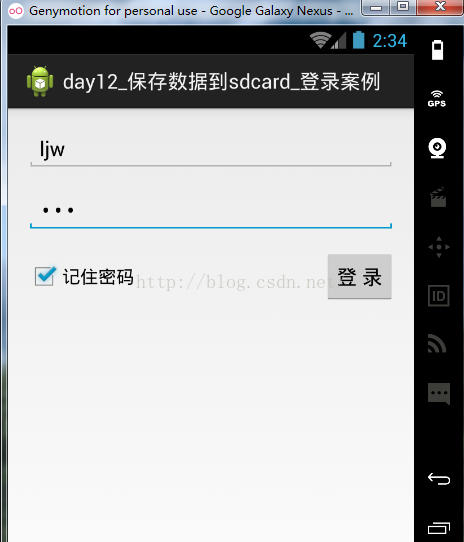
輸入用戶名與密碼、勾選「記住密碼」並點擊登入,退出後再次進入,若資料成功回顯,就代表往 sdcard 存取資料的功能已經跑通了。
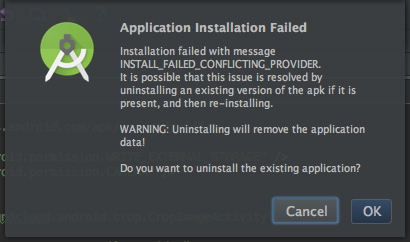 INSTALL_FAILED_CONFLICTING_PROVIDER 是怎麼發生的,以及怎麼根治
安裝時突然看到 INSTALL_FAILED_CONFLICTING_PROVIDER,而且錯誤訊息裡完全沒提是哪個元件出了問題——這種「毫無頭緒」的感覺最惱人。其實成
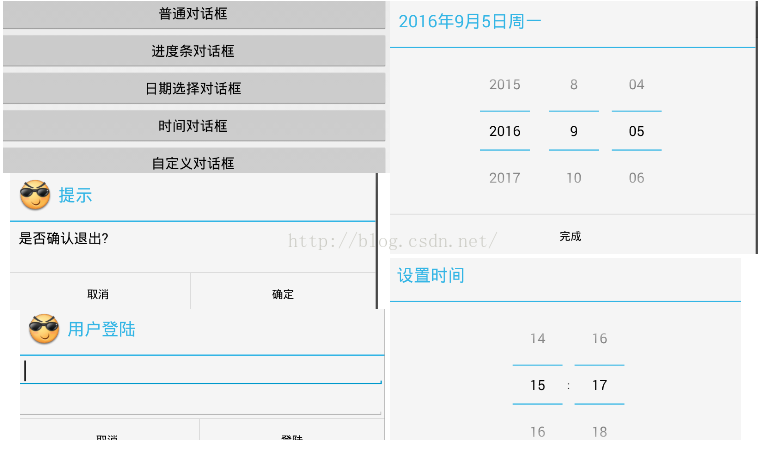 Android Dialog 對話框使用指南:AlertDialog、ProgressDialog 與自定義對話框
什麼是 Dialog Dialog 是在目前頁面上彈出的小視窗,用於提示訊息、接收輸入或顯示狀態。它通常要求使用者進行互動,例如確認、取消或選擇。 常見 Dialog 類
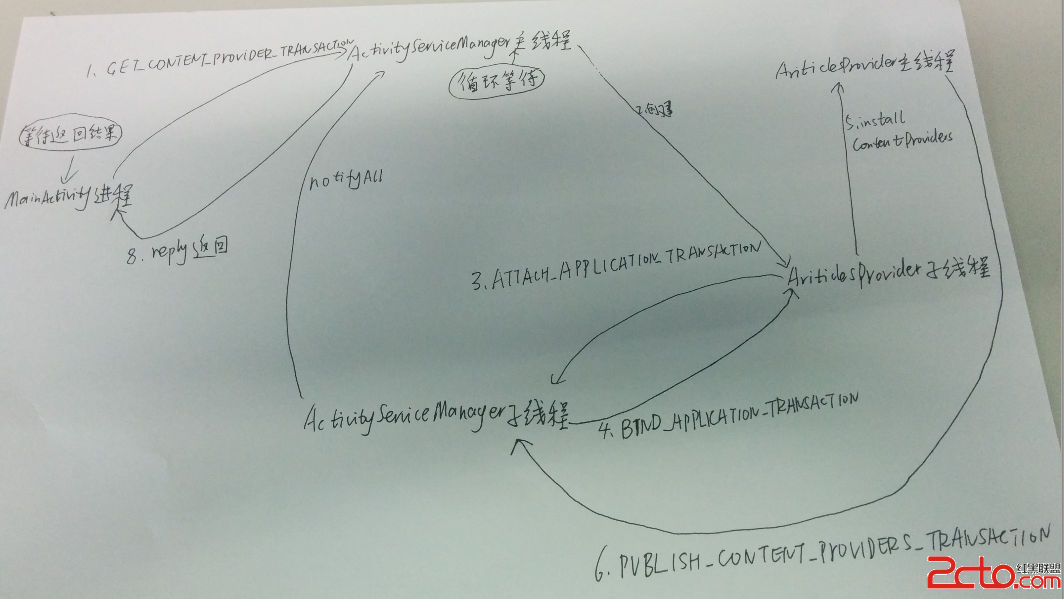 Android ContentProvider 啟動過程原始碼分析:跨進程的完整握手流程
本文參考〈Android 應用程序組件 Content Provider 的啟動過程源代碼分析〉與《Android 系統源代碼情景分析》(作者:羅升陽),把 Conten
 Android 6.0 短信監聽實戰:Runtime Permission 也不能少
任職的最後階段還是被抓去處理了一堆事情,好在今天是最後一天,幫著修完一個 BUG 就算圓滿收官。這段時間在做一個手機間通信的 Demo,其中一塊是短信監聽;正好牽扯到 A