

編輯:關於 Android 程式設計
本文內容基本都屬於 Android framework 層的源碼。這裡順帶推薦一個不錯的 GitHub 瀏覽器插件:OctoTree,它能讓你在 GitHub 看程式碼時,左側出現一個樹狀結構,就像在 IDE 裡一樣。當我們想了解一個專案的結構,或想跳到某個具體檔案時,會非常方便。
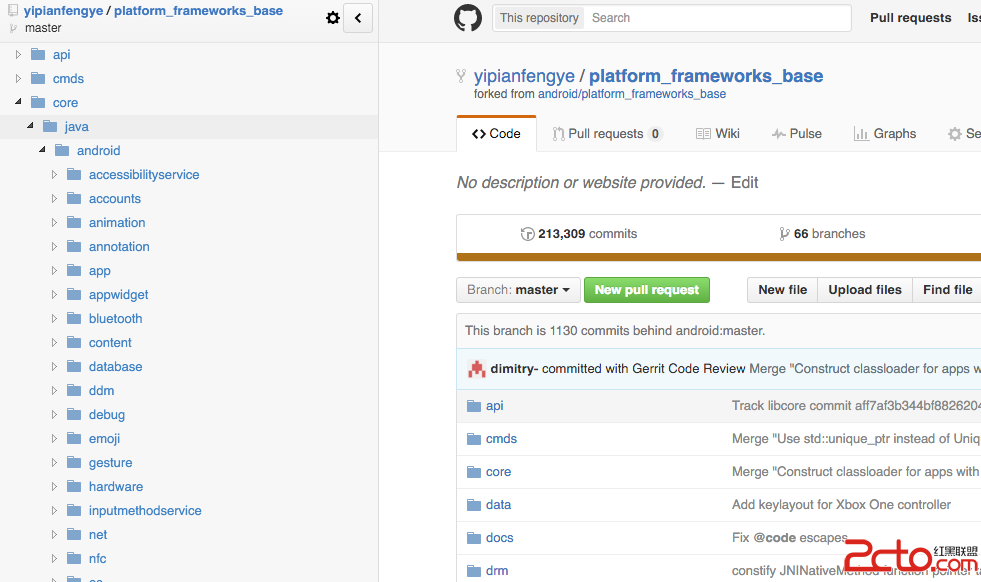
接下來我們來看 framework 中的 Log 類別。它的源碼定義如下:
public final class Log {
    /** println 方法的優先級常數;對應 Log.v */
    public static final int VERBOSE = 2;
    /** 對應 Log.d */
    public static final int DEBUG = 3;
    /** 對應 Log.i */
    public static final int INFO = 4;
    /** 對應 Log.w */
    public static final int WARN = 5;
    /** 對應 Log.e */
    public static final int ERROR = 6;
    /** 對應 Log.wtf */
    public static final int ASSERT = 7;

    private Log() {
    }

    public static int v(String tag, String msg) {
        return println(LOG_ID_MAIN, VERBOSE, tag, msg);
    }

    public static int v(String tag, String msg, Throwable tr) {
        return println(LOG_ID_MAIN, VERBOSE, tag, msg + '\n' + getStackTraceString(tr));
    }

    public static int d(String tag, String msg) {
        return println(LOG_ID_MAIN, DEBUG, tag, msg);
    }

    public static int i(String tag, String msg) {
        return println(LOG_ID_MAIN, INFO, tag, msg);
    }

    public static int w(String tag, String msg) {
        return println(LOG_ID_MAIN, WARN, tag, msg);
    }

    public static int e(String tag, String msg) {
        return println(LOG_ID_MAIN, ERROR, tag, msg);
    }

    /**
     * 取得可記錄的堆疊追蹤字串
     */
    public static String getStackTraceString(Throwable tr) {
        if (tr == null) {
            return "";
        }
        // 為了減少網路不可用等非錯誤情況下應用輸出的過多日誌
        Throwable t = tr;
        while (t != null) {
            if (t instanceof UnknownHostException) {
                return "";
            }
            t = t.getCause();
        }
        StringWriter sw = new StringWriter();
        PrintWriter pw = new PrintWriter(sw);
        tr.printStackTrace(pw);
        pw.flush();
        return sw.toString();
    }

    /** 低階日誌呼叫 */
    public static int println(int priority, String tag, String msg) {
        return println(LOG_ID_MAIN, priority, tag, msg);
    }

    public static final int LOG_ID_MAIN = 0;
    public static final int LOG_ID_RADIO = 1;
    public static final int LOG_ID_EVENTS = 2;
    public static final int LOG_ID_SYSTEM = 3;
    public static final int LOG_ID_CRASH = 4;

    @SuppressWarnings("unused")
    public static int println(int bufID, int priority, String tag, String msg) {
        return 0;
    }
}
從源碼可以發現,Log 是一個 final 類別,因此我們無法透過繼承 Log 類別的方式來實作自己的日誌工具類,一般做法是定義 Log 成員變數,進而封裝 Log 工具方法。
在 Log 類別中定義了六種日誌級別,分別是:VERBOSE、DEBUG、INFO、WARN、ERROR、ASSERT。不過我們平時常用的其實只有前五種,即 VERBOSE、DEBUG、INFO、WARN、ERROR。
透過查看源碼可以發現,Log 類別中所有的靜態日誌方法 Log.v()、Log.d()、Log.i()、Log.w()、Log.e() 等,底層都是呼叫 println 方法;而在 GitHub 源碼中 further 查看,其內部實際呼叫的是 println_native 方法,也就是透過 JNI 呼叫底層的 C++ 來輸出日誌。
至於底層 C++ 日誌輸出的具體實作,本文暫不展開。總結如下:
1. Log.java 是一個 final 類別,所以我們不能繼承它來實作自己的日誌框架,但可以透過關聯(保存 Log 成員變數)的方式實作自己的 Log 工具類。
2. Log.java 中定義了六種日誌級別,但通常我們只使用其中五種,分別對應 VERBOSE、DEBUG、INFO、WARN、ERROR,可依具體場景靈活運用。
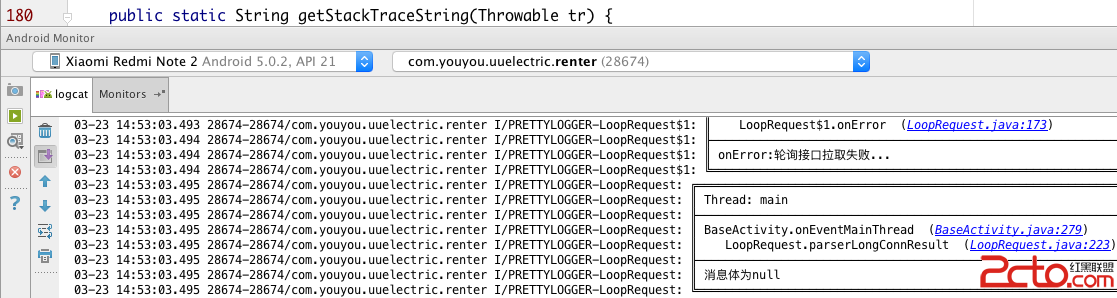
有些朋友對 Android 自帶的日誌框架不太滿意,主要是無法定位日誌輸出的位置。其實日誌可以個性化地展示相關資訊:
 Android ListView 圓角背景快速實作
若希望 ListView 呈現圓角或類似對話框的外觀,可以利用系統內建的 Drawable 資源作為背景,並將 cacheColorHint 設定為透明,避免捲動時出現不
 Android 實現高斯模糊效果並相容低版本的完整指南
一、效果預覽專案中需要用到高斯模糊效果。查閱了一些資料、權衡效能之後,最終選擇採用 Android 自帶的 RenderScript 函式庫來實作。網上關於用 Rende
 Android 自動化測試:Espresso 框架入門
單元測試與 UI 自動化測試能協助開發者在早期發現問題,減少人工回歸成本。Android 官方推薦的 Espresso 框架,提供語意化 API,適合驗證使用者操作與畫面
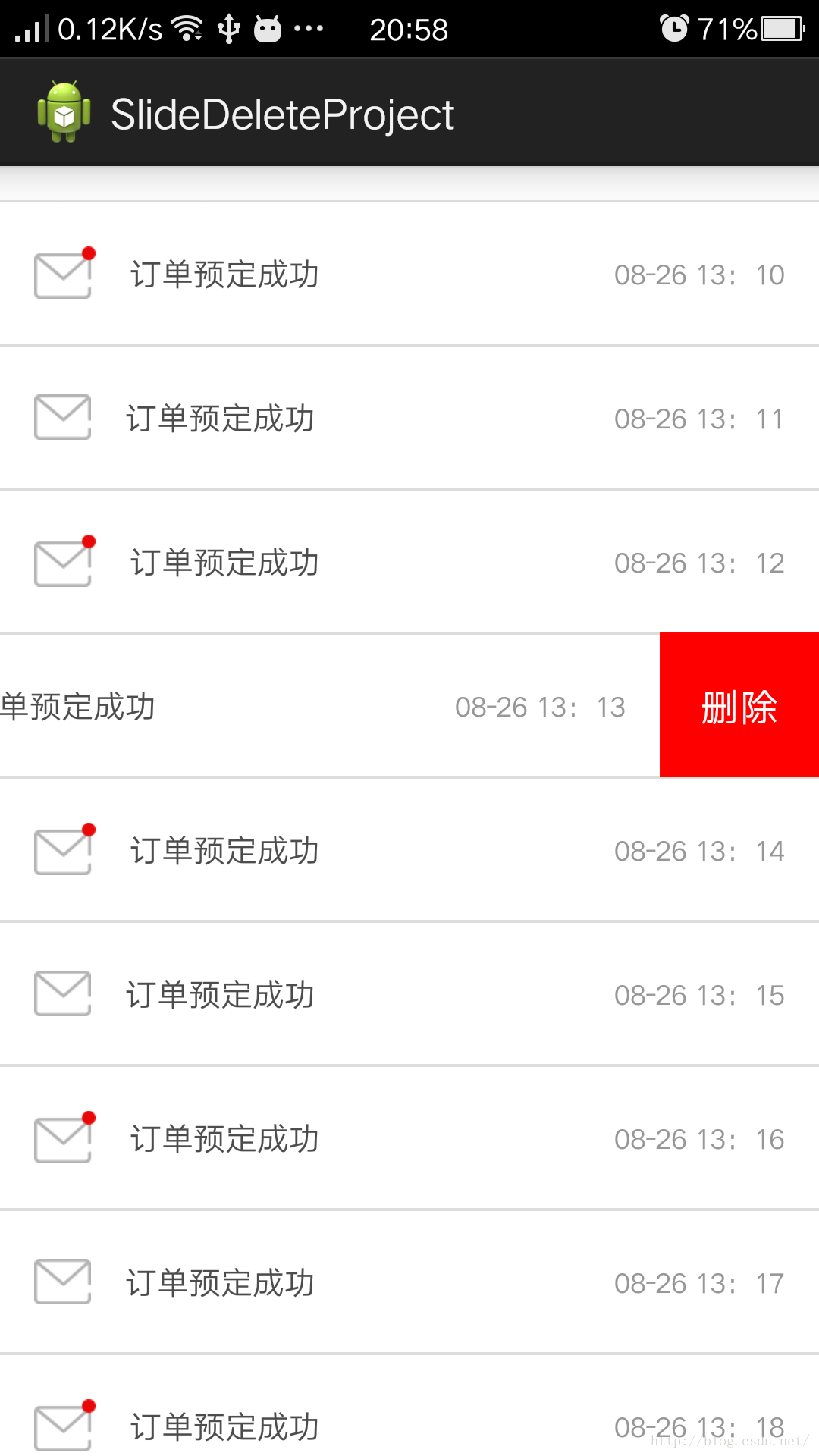 自定義 ListView 實作側滑刪除:SlideDeleteListView 與 ScrollView 手勢衝突的完整解法
側滑露出刪除按鈕,幾乎成了清單類應用的標準互動。看著簡單,真正動手卻常卡在兩處:手勢判定不夠乾淨,以及 ListView 被放進 ScrollView 之後各種「打架」。