

編輯:關於 Android 程式設計
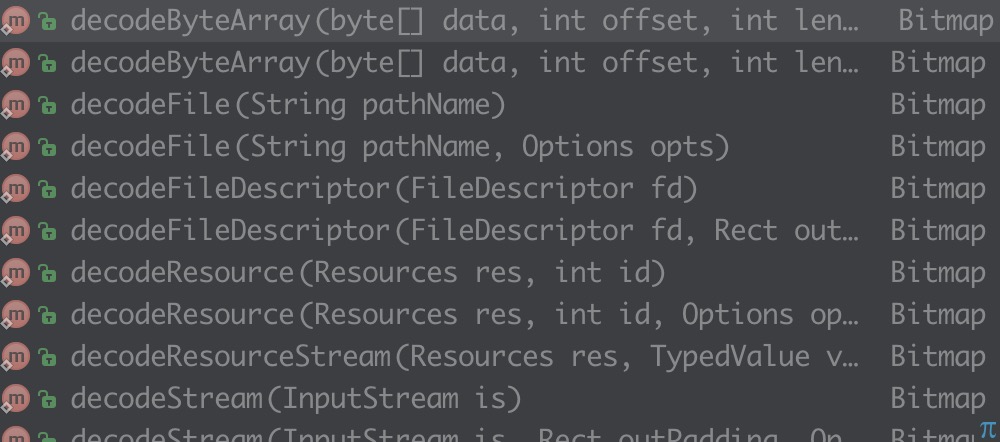
說到圖片,第一反應就是 Bitmap,那就先來認識一下 Bitmap。
Bitmap 是 Android 系統中圖像處理最重要的類之一。用它可以獲取圖像文件信息,進行圖像剪切、旋轉、縮放等操作,並可指定格式保存圖像文件。
Bitmap 實現於 android.graphics 包中。但 Bitmap 類的構造函數是私有的,外部並不能直接實例化,只能通過 JNI 實例化。這必然需要某個輔助類提供創建 Bitmap 的接口,而這個類通過 JNI 接口來實例化 Bitmap,它就是 BitmapFactory。
下面看看圖片縮放的核心代碼:
 public void scalePic(int reqWidth, int reqHeight) {
    BitmapFactory.Options options = new BitmapFactory.Options();
    options.inJustDecodeBounds = true;
    BitmapFactory.decodeResource(getResources(), R.mipmap.demo, options);
    options.inSampleSize = PhotoUtil.calculateInSampleSize(options, reqWidth, reqHeight);
    options.inJustDecodeBounds = false;
    bitmap = BitmapFactory.decodeResource(getResources(), R.mipmap.demo, options);
    postInvalidate();
}
 public static int calculateInSampleSize(BitmapFactory.Options options, int reqWidth, int reqHeight) {
    final int height = options.outHeight;
    final int width = options.outWidth;
    int inSampleSize = 1;
    if (height > reqHeight || width > reqWidth) {
        final int heightRatio = Math.round((float) height / (float) reqHeight);
        final int widthRatio = Math.round((float) width / (float) reqWidth);
        inSampleSize = heightRatio < widthRatio ? heightRatio : widthRatio;
    }
    return inSampleSize;
}
這裡主要通過屬性 inSampleSize 實現圖片縮小。當然這個方法並不是為了縮放而設計的,它的主要目的還是預防 OOM:當加載一張大小不確定的圖片時,要做一下限制,以防出現內存溢出。下面給出真正用於放大、縮小的代碼:
 public void scalePicByMatrix(float scaleWidth, float scaleHeight) {
    Matrix matrix = new Matrix();
    matrix.setScale(scaleWidth, scaleHeight);
    bitmap = Bitmap.createBitmap(bitmap, 0, 0, bitmap.getWidth(), bitmap.getHeight(), matrix, false);
    postInvalidate();
}
旋轉:
 public void rotatePic(int angle) {
    Matrix matrix = new Matrix();
    matrix.setRotate(angle);
    bitmap = Bitmap.createBitmap(bitmap, 0, 0, bitmap.getWidth(), bitmap.getHeight(), matrix, false);
    postInvalidate();
}
剪裁:
 public void cutPic(int reqWidth, int reqHeight) {
    if (bitmap.getWidth() > reqWidth && bitmap.getHeight() > reqHeight) {
        bitmap = Bitmap.createBitmap(bitmap, 0, 0, reqWidth, reqHeight);
    } else {
        bitmap = Bitmap.createBitmap(bitmap, 0, 0, bitmap.getWidth(), bitmap.getHeight());
    }
    postInvalidate();
}
圖片保存:
 public void savePic(String path) {
    File file = new File(path);
    FileOutputStream fileOutputStream = null;
    try {
        file.createNewFile();
        fileOutputStream = new FileOutputStream(file);
        bitmap.compress(Bitmap.CompressFormat.PNG, 100, fileOutputStream);
        fileOutputStream.flush();
    } catch (IOException e) {
        e.printStackTrace();
    } finally {
        try {
            if (fileOutputStream != null) {
                fileOutputStream.close();
            }
        } catch (IOException e) {
            e.printStackTrace();
        }
    }
}
以上只是其中一種實現方法,具體操作可根據實際應用場景靈活選擇。
 Android 中的 HTTP 通訊實戰:用 HttpClient 完成 GET、POST 與檔案上傳
在 Android 上存取 HTTP 服務,除了 java.net 這條路,Android SDK 還內建了 Apache 的 HttpClient。它對 HTTP 協定
 Activity 的創建和顯示以及源碼分析記錄
Tips:此源碼分析基於 Android 4.2。 先來看看一個 Activity 上的 UI 控件結構。 圖 1-1 Activity 中的 UI 組件結構 好了,現
 Android Graphics 專題(一):Canvas 基礎用法全解
作為 Android Graphics 專題的開篇,第一個要談的毫無疑問是 Android UI 技術的核心概念——Canvas。 Canvas 是 Android UI
 Android 自訂 View 實現側滑刪除效果(高仿 QQ)
效果圖:網上常見的做法是把兩個 View 拼接,右側預設不顯示,水平滑動時才把右側露出來。但新版 QQ 的體感明顯更好,於是筆者獻醜做了一個相似度很高的版本。涉及的知識點