

編輯:關於 Android 程式設計
日前在維護公司的一款 App 時遇到一個狀況:同一個 AlertDialog,在不同系統語言下長得完全不一樣。
系統語言為中文時:
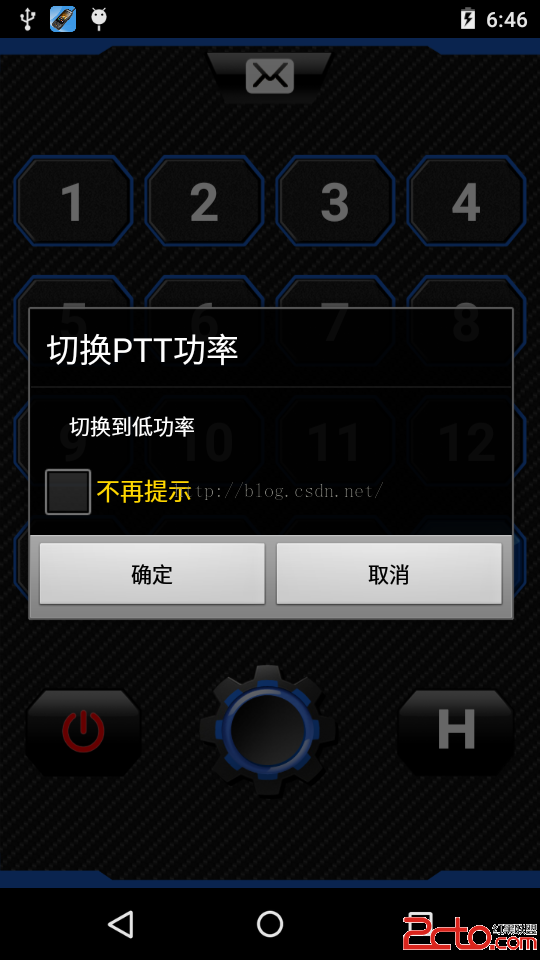
系統語言切換為 English 時:
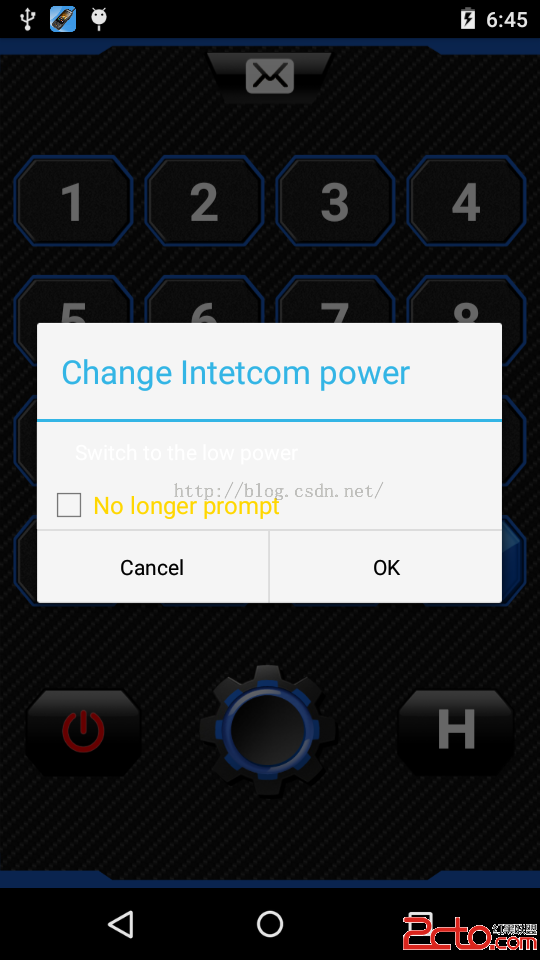
可以明顯看到,英文環境下對話框的白色文字幾乎看不見,背景也變成了白色。可見問題出在主題(Theme)上,需要顯式指定。
修改前的程式碼:
AlertDialog commedialog = new AlertDialog.Builder(WalkieTalkieActivity.this)
  .setTitle(title)
  .setView(vi_nolong)
  .setPositiveButton(getResources().getString(R.string.ok), new DialogInterface.OnClickListener() {
    public void onClick(DialogInterface dialog, int arg1) {
      int j = mSelectedGroupNum + 1;
      int power_last = mIntercomSharePrefs.getInt("CurrentPower_" + j, 0);
      if (power_last == 1) {
        mEditor.putInt("CurrentPower_" + j, 0).commit();
        mIntercom.setPowerLevel(0);
        btn_power.setBackgroundResource(R.drawable.power_high);
      } else if (power_last == 0) {
        mEditor.putInt("CurrentPower_" + j, 1).commit();
        mIntercom.setPowerLevel(1);
        btn_power.setBackgroundResource(R.drawable.power_low);
      }
      dialog.dismiss();
      ((ViewGroup) vi_nolong.getParent()).removeView(vi_nolong);
    }
  })
  .setNegativeButton(getResources().getString(R.string.cancel), new DialogInterface.OnClickListener() {
    public void onClick(DialogInterface dialog, int whichButton) {
      dialog.dismiss();
      ((ViewGroup) vi_nolong.getParent()).removeView(vi_nolong);
    }
  }).create();
commedialog.setCanceledOnTouchOutside(false);
commedialog.show();
問題就在於建立 Builder 時沒有指定主題:
AlertDialog commedialog = new AlertDialog.Builder(WalkieTalkieActivity.this)
Builder 有另一個帶 theme 參數的建構子,只要傳入即可:
AlertDialog commedialog = new AlertDialog.Builder(WalkieTalkieActivity.this, AlertDialog.THEME_HOLO_DARK)
完整程式碼:
AlertDialog commedialog = new AlertDialog.Builder(WalkieTalkieActivity.this, AlertDialog.THEME_HOLO_DARK)
  .setTitle(title)
  .setView(vi_nolong)
  .setPositiveButton(getResources().getString(R.string.ok), new DialogInterface.OnClickListener() {
    public void onClick(DialogInterface dialog, int arg1) {
      int j = mSelectedGroupNum + 1;
      int power_last = mIntercomSharePrefs.getInt("CurrentPower_" + j, 0);
      if (power_last == 1) {
        mEditor.putInt("CurrentPower_" + j, 0).commit();
        mIntercom.setPowerLevel(0);
        btn_power.setBackgroundResource(R.drawable.power_high);
      } else if (power_last == 0) {
        mEditor.putInt("CurrentPower_" + j, 1).commit();
        mIntercom.setPowerLevel(1);
        btn_power.setBackgroundResource(R.drawable.power_low);
      }
      dialog.dismiss();
      ((ViewGroup) vi_nolong.getParent()).removeView(vi_nolong);
    }
  })
  .setNegativeButton(getResources().getString(R.string.cancel), new DialogInterface.OnClickListener() {
    public void onClick(DialogInterface dialog, int whichButton) {
      dialog.dismiss();
      ((ViewGroup) vi_nolong.getParent()).removeView(vi_nolong);
    }
  }).create();
commedialog.setCanceledOnTouchOutside(false);
commedialog.show();
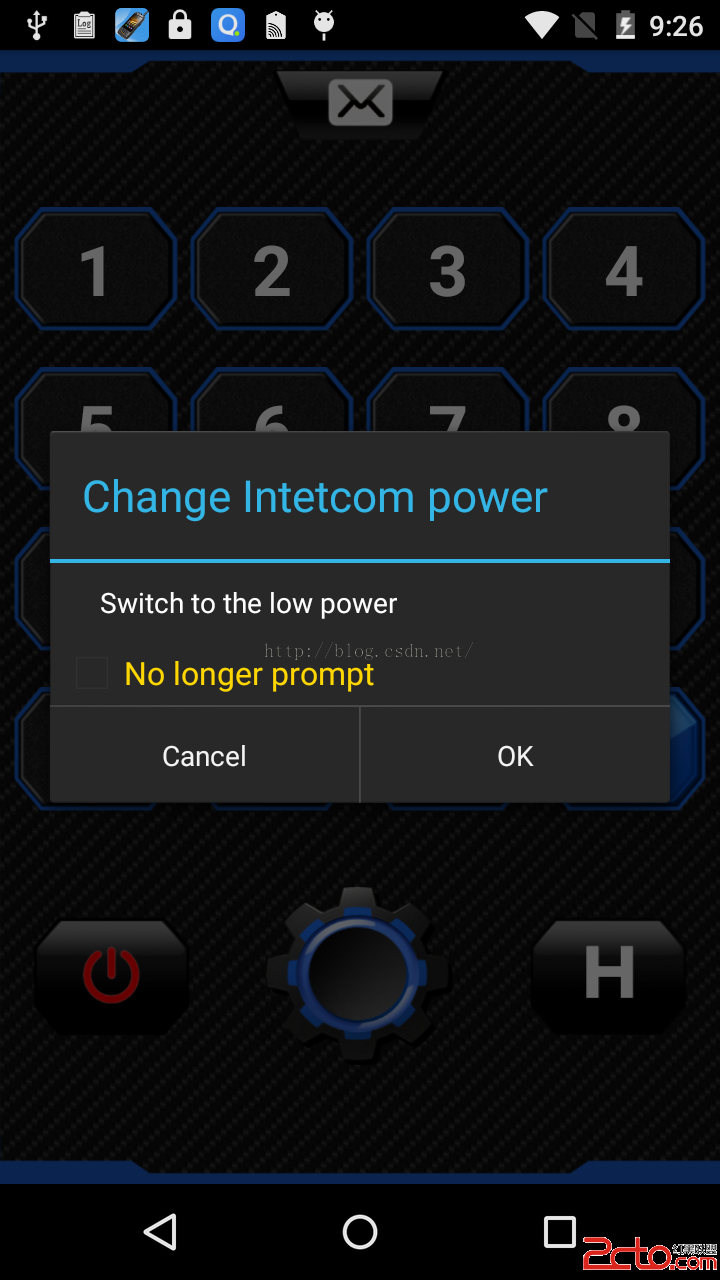
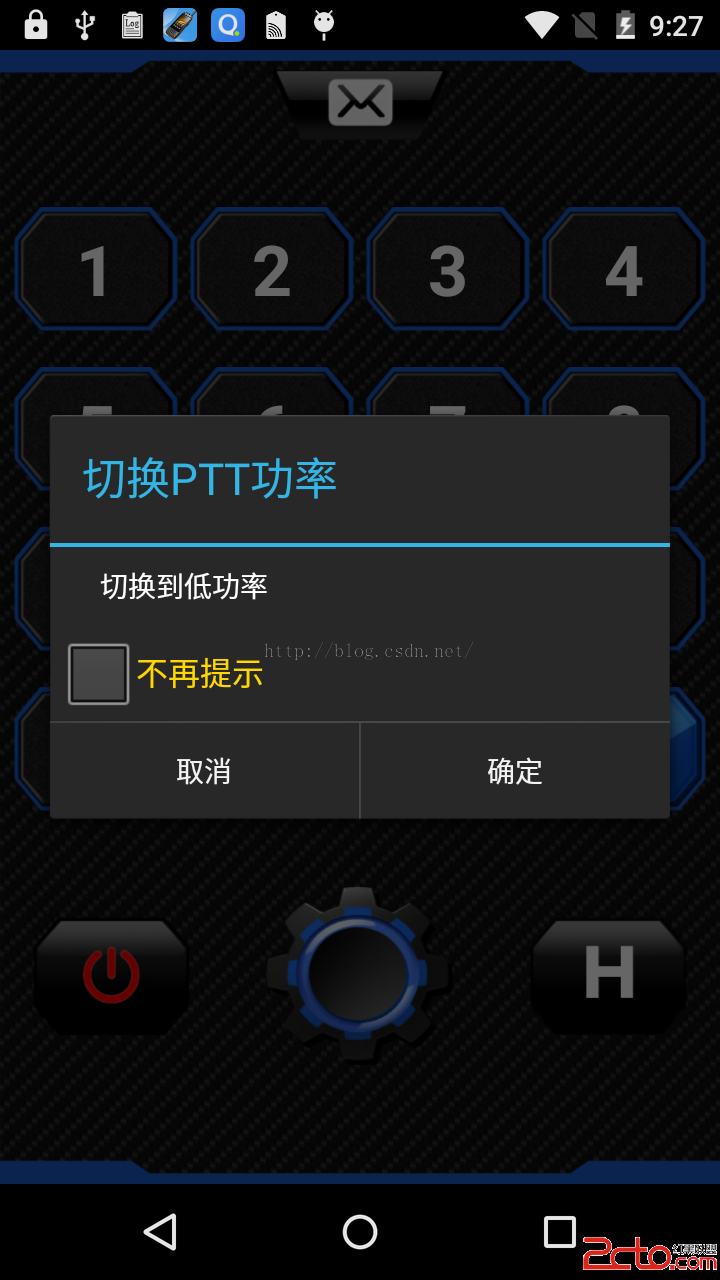
這樣就固定使用了黑底主題,無論系統語言為何,背景都維持黑色。
英文環境:
中文環境:
查看 AlertDialog.Builder 的建構子:
/** 使用 context 建立 builder 與其產出的 AlertDialog */
public Builder(Context context) {
  this(context, resolveDialogTheme(context, 0));
}

/** 使用 context 與 theme 建立 builder;theme 可傳 alertDialogTheme 屬性,
 *  或 THEME_TRADITIONAL、THEME_HOLO_DARK、THEME_HOLO_LIGHT 等常數 */
public Builder(Context context, int theme) {
  P = new AlertController.AlertParams(new ContextThemeWrapper(context, resolveDialogTheme(context, theme)));
  mTheme = theme;
}
接著看 resolveDialogTheme:
static int resolveDialogTheme(Context context, int resid) {
  if (resid == THEME_TRADITIONAL) {
    return com.android.internal.R.style.Theme_Dialog_Alert;
  } else if (resid == THEME_HOLO_DARK) {
    return com.android.internal.R.style.Theme_Holo_Dialog_Alert;
  } else if (resid == THEME_HOLO_LIGHT) {
    return com.android.internal.R.style.Theme_Holo_Light_Dialog_Alert;
  } else if (resid == THEME_DEVICE_DEFAULT_DARK) {
    return com.android.internal.R.style.Theme_DeviceDefault_Dialog_Alert;
  } else if (resid == THEME_DEVICE_DEFAULT_LIGHT) {
    return com.android.internal.R.style.Theme_DeviceDefault_Light_Dialog_Alert;
  } else if (resid >= 0x01000000) {
    return resid; // 已是資源 ID
  } else {
    TypedValue outValue = new TypedValue();
    context.getTheme().resolveAttribute(com.android.internal.R.attr.alertDialogTheme, outValue, true);
    return outValue.resourceId;
  }
}
各主題常數的定義:
public static final int THEME_TRADITIONAL = 1;           // Holo 之前的傳統主題
public static final int THEME_HOLO_DARK = 2;             // Holo 深色背景
public static final int THEME_HOLO_LIGHT = 3;            // Holo 淺色背景
public static final int THEME_DEVICE_DEFAULT_DARK = 4;   // 裝置預設深色
public static final int THEME_DEVICE_DEFAULT_LIGHT = 5;  // 裝置預設淺色
由此可見,當我們不指定主題時,系統會走 else 分支,去解析當前 Theme 中的 alertDialogTheme 屬性:
TypedValue outValue = new TypedValue();
context.getTheme().resolveAttribute(com.android.internal.R.attr.alertDialogTheme, outValue, true);
return outValue.resourceId;
而這個屬性的值會隨系統語言/地區設定而變化,這正是本文開頭那個「換個語言就換了配色」現象的根因。
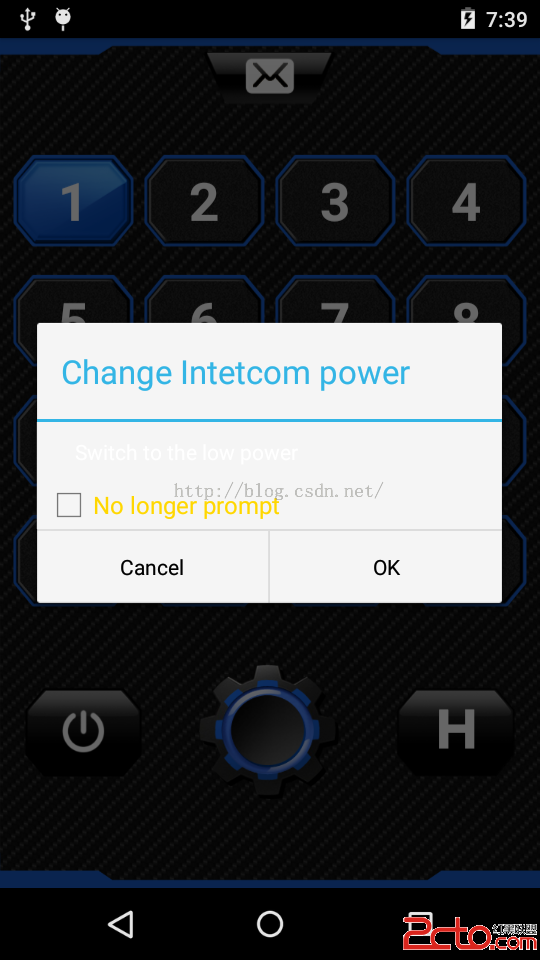
主題為 AlertDialog.THEME_HOLO_LIGHT:
AlertDialog commedialog = new AlertDialog.Builder(WalkieTalkieActivity.this, AlertDialog.THEME_HOLO_LIGHT)
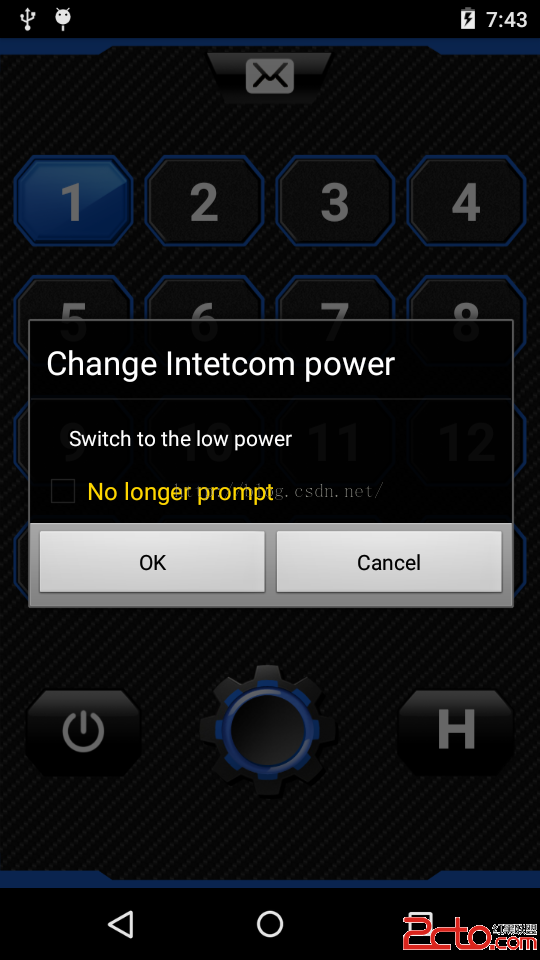
主題為 AlertDialog.THEME_TRADITIONAL:
AlertDialog commedialog = new AlertDialog.Builder(WalkieTalkieActivity.this, AlertDialog.THEME_TRADITIONAL)
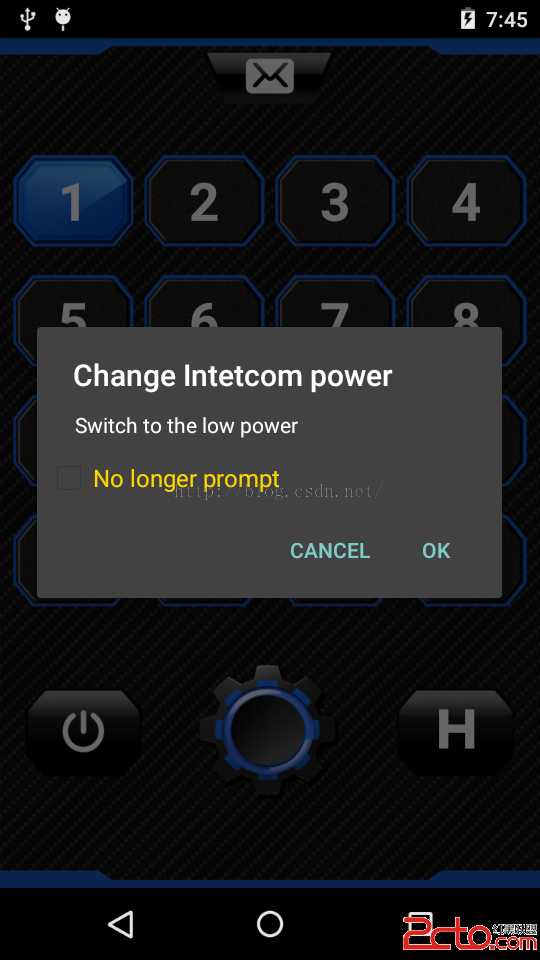
主題為 AlertDialog.THEME_DEVICE_DEFAULT_DARK:
AlertDialog commedialog = new AlertDialog.Builder(WalkieTalkieActivity.this, AlertDialog.THEME_DEVICE_DEFAULT_DARK)
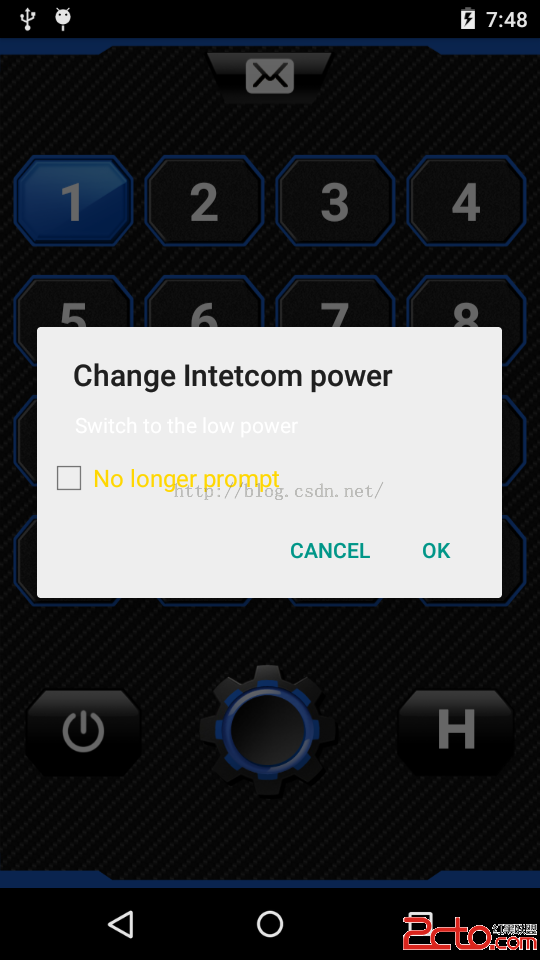
主題為 AlertDialog.THEME_DEVICE_DEFAULT_LIGHT:
AlertDialog commedialog = new AlertDialog.Builder(WalkieTalkieActivity.this, AlertDialog.THEME_DEVICE_DEFAULT_LIGHT)
 Android Binder 入門:透過 ServiceManager 與 transact 進行遠端通訊
Binder 是 Android 跨進程通信的核心機制之一。許多系統服務、輸入法框架與底層能力,都會透過 Binder 進行通訊。對應用開發者而言,理解 Binder 的
 Android 使用 NetworkInfo 判斷網路狀態時發生空指針的原因與解法
問題現象許多 Android 專案會使用 ConnectivityManager 與 NetworkInfo 判斷網路是否可用。常見寫法如下:public static
 Android 網絡開發實戰:Volley 入門與 Cloudant 通訊(一)
引言 網絡一直是我的知識盲點,前陣子我抽空系統學習了 Volley 這個網絡工具的使用,並進一步研讀了它的源碼,頗有心得,想在此分享。Android 平台上成熟的網絡庫並
 Android 自定義流式布局:View 繪制流程與實作解析
什麼是流式布局 流式布局常用於標籤、規格選擇、商品分類等場景。當子項寬度不一致時,容器會依序排列,一行放不下就換到下一行。與固定格線不同,它更適合內容長度不固定的情況。