

編輯:關於 Android 程式設計
iOS 系統內建的 JSON 解析速度本來就很快,這裡不談。今天要比的是 Android 上幾個常見的解析方案:系統自帶的 org.json、Google 的 Gson,以及阿里巴巴開源的 Fastjson。
Gson 上手極為簡單,把 JSON 字串與對應的 Bean 型別交給 fromJson 即可:
Gson gson = new Gson();
List<StatusObject> so = gson.fromJson(mJsonString,
        new TypeToken<List<StatusObject>>() { }.getType());
這裡有個前提:Bean 類別中的欄位名稱必須和 JSON 中的鍵完全一致,並且提供 get/set 方法(原因後面會說明)。標準的 Bean 長這樣:
import java.util.List;

public class Geo {
    private String type;
    private List<Float> coordinates;

    public Geo() {}

    public String getType() {
        return type;
    }

    public void setType(String type) {
        this.type = type;
    }

    public List<Float> getCoordinates() {
        return coordinates;
    }

    public void setCoordinates(List<Float> coordinates) {
        this.coordinates = coordinates;
    }
}
我曾經擔心巢狀結構會解析失敗,實測之後發現就算 Bean 裡再嵌其他 Bean,一樣能層層迭代賦值。
Fastjson 的用法與 Gson 幾乎一致,差別在底層實作,這裡不展開。
用 25 筆結構相當複雜的 JSON 資料做測試,結果如下:
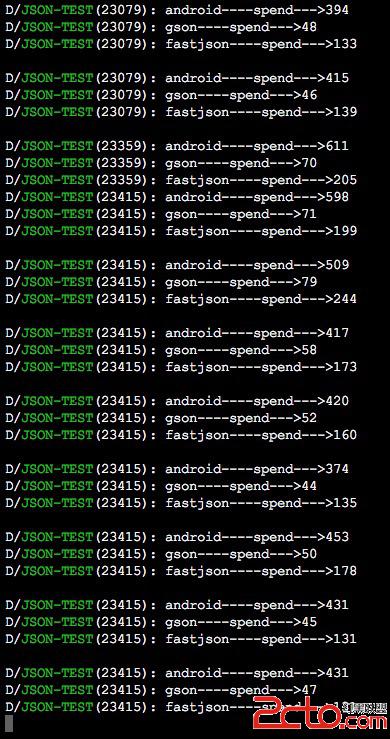
Gson 在這個測試中有明顯的優勢。往下看它的實作或許能找到原因。
關鍵類別是 JsonObject.java:
package com.google.gson;

import com.google.gson.internal.LinkedTreeMap;
import java.util.Map.Entry;
import java.util.Set;

public final class JsonObject extends JsonElement {
    private final LinkedTreeMap<String, JsonElement> members = new LinkedTreeMap<String, JsonElement>();

    JsonObject deepCopy() {
        JsonObject result = new JsonObject();
        for (Map.Entry<String, JsonElement> entry : this.members.entrySet()) {
            result.add(entry.getKey(), entry.getValue().deepCopy());
        }
        return result;
    }

    public void add(String property, JsonElement value) {
        if (value == null) {
            value = JsonNull.INSTANCE;
        }
        this.members.put(property, value);
    }

    public JsonElement remove(String property) {
        return this.members.remove(property);
    }

    public void addProperty(String property, String value) {
        add(property, createJsonElement(value));
    }

    public void addProperty(String property, Number value) {
        add(property, createJsonElement(value));
    }

    public void addProperty(String property, Boolean value) {
        add(property, createJsonElement(value));
    }

    public void addProperty(String property, Character value) {
        add(property, createJsonElement(value));
    }

    private JsonElement createJsonElement(Object value) {
        return value == null ? JsonNull.INSTANCE : new JsonPrimitive(value);
    }

    public Set<Map.Entry<String, JsonElement>> entrySet() {
        return this.members.entrySet();
    }

    public boolean has(String memberName) {
        return this.members.containsKey(memberName);
    }

    public JsonElement get(String memberName) {
        return this.members.get(memberName);
    }

    public JsonPrimitive getAsJsonPrimitive(String memberName) {
        return (JsonPrimitive) this.members.get(memberName);
    }

    public JsonArray getAsJsonArray(String memberName) {
        return (JsonArray) this.members.get(memberName);
    }

    public JsonObject getAsJsonObject(String memberName) {
        return (JsonObject) this.members.get(memberName);
    }

    public boolean equals(Object o) {
        return (o == this) || ((o instanceof JsonObject)
                && ((JsonObject) o).members.equals(this.members));
    }

    public int hashCode() {
        return this.members.hashCode();
    }
}
可以看到它用 LinkedTreeMap 快取值屬性與對應元素。這種以鍵值對形式維護的結構,查找時不必像逐欄位比對那樣來回掃描,自然比直接呼叫原生 API 找節點要快。
接著看賦值環節,在 ProtoTypeAdapter.java 中找到反序列化的實作:
@SuppressWarnings("unchecked")
@Override
public GeneratedMessage deserialize(JsonElement json, Type typeOfT,
        JsonDeserializationContext context) throws JsonParseException {
    try {
        JsonObject jsonObject = json.getAsJsonObject();
        Class<? extends GeneratedMessage> protoClass =
                (Class<? extends GeneratedMessage>) typeOfT;
        try {
            // 呼叫 ProtoClass.newBuilder()
            Object protoBuilder = getCachedMethod(protoClass, "newBuilder").invoke(null);
            Class<?> builderClass = protoBuilder.getClass();
            Descriptor protoDescriptor = (Descriptor) getCachedMethod(
                    protoClass, "getDescriptor").invoke(null);

            // 對所有可用欄位呼叫 setter
            for (FieldDescriptor fieldDescriptor : protoDescriptor.getFields()) {
                String name = fieldDescriptor.getName();
                if (jsonObject.has(name)) {
                    JsonElement jsonElement = jsonObject.get(name);
                    String fieldName = name + "_";
                    Field field = protoClass.getDeclaredField(fieldName);
                    Type fieldType = field.getGenericType();
                    Object fieldValue = context.deserialize(jsonElement, fieldType);
                    Method method = getCachedMethod(builderClass, "setField",
                            FieldDescriptor.class, Object.class);
                    method.invoke(protoBuilder, fieldDescriptor, fieldValue);
                }
            }

            // 呼叫 build 取得最終物件
            return (GeneratedMessage) getCachedMethod(builderClass, "build").invoke(protoBuilder);
        } catch (SecurityException e) {
            throw new JsonParseException(e);
        } catch (NoSuchMethodException e) {
            throw new JsonParseException(e);
        } catch (IllegalArgumentException e) {
            throw new JsonParseException(e);
        } catch (IllegalAccessException e) {
            throw new JsonParseException(e);
        } catch (InvocationTargetException e) {
            throw new JsonParseException(e);
        }
    } catch (Exception e) {
        throw new JsonParseException("Error while parsing proto: ", e);
    }
}
這裡透過反射呼叫 setter 來為變數賦值——這也正好解釋了為什麼前面強調 Bean 一定要寫 get/set 方法:沒有 setter,反射就無從下手。
單純從這組測試看,Gson 表現最好;不過實務上還要權衡其他因素:是否只想依賴系統 API 而不引入第三方套件、是否需要處理極端巢狀或超大 JSON、以及團隊對各套件的熟悉度。效能只是其中一項,維護性與可讀性同樣重要。
 Android 進階攻略(2):用方向傳感器實作一個計步器
上一節我們把 Android 常見的傳感器掃過一遍,這次直接進到實戰:做一個計步器 App。 由於商業因素的關係,我實際上線的版本暫時無法開源,所以文末會附上功能相近的
 InputMethodManager 記憶體洩漏分析與修復
在部分 Android 機型上,InputMethodManager 可能持有 Activity 的 DecorView,導致 Activity 無法被回收。若這個 Ac
 Android 歌詞漸變與播放進度效果實作
Android 歌詞漸變與進度效果 音樂播放頁常需要呈現歌詞漸變、掃光或播放進度。Android 可透過 LinearGradient、自定義 View、FontMetr
 Android 程序鎖實現(一):鎖屏界面與列表交互的搭建
一、寫在前面的話 日常用手機時,我們常希望有這麼一個能力:給某個應用單獨加鎖,打開時先驗證密碼才能進入主界面,這就是所謂的「程序鎖」。實現難度並不高。正好最近跟著一套教程