

編輯:關於 Android 程式設計
本文記錄如何在 Android 中接入微信分享,實現把網頁鏈接分享到微信好友與朋友圈。
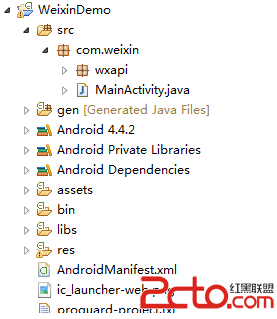
這裡有個容易踩坑的細節:包名必須寫成 com.weixin,且需要在 com.weixin.wxapi 下放置 WXEntryActivity,微信回調才能正常工作。
這個 Activity 負責接收微信的分享結果回調:
package com.weixin.wxapi;

import android.app.Activity;
import android.os.Bundle;
import com.tencent.mm.sdk.openapi.BaseReq;
import com.tencent.mm.sdk.openapi.BaseResp;
import com.tencent.mm.sdk.openapi.IWXAPI;
import com.tencent.mm.sdk.openapi.IWXAPIEventHandler;
import com.tencent.mm.sdk.openapi.WXAPIFactory;

public class WXEntryActivity extends Activity implements IWXAPIEventHandler {
    // IWXAPI 是第三方 app 與微信通訊的 openapi 接口
    private IWXAPI api;

    @Override
    protected void onCreate(Bundle savedInstanceState) {
        api = WXAPIFactory.createWXAPI(this, "wxf6a32cee6aa658e2", false);
        api.handleIntent(getIntent(), this);
        super.onCreate(savedInstanceState);
    }

    @Override
    public void onResp(BaseResp resp) {
        switch (resp.errCode) {
            case BaseResp.ErrCode.ERR_OK:          // 分享成功
                break;
            case BaseResp.ErrCode.ERR_USER_CANCEL: // 分享取消
                break;
            case BaseResp.ErrCode.ERR_AUTH_DENIED: // 分享拒絕
                break;
        }
    }

    @Override
    public void onReq(BaseReq arg0) { }
}在需要分享的地方調用封裝好的分享方法即可:
package com.weixin;

import android.app.Activity;
import android.graphics.Bitmap;
import android.graphics.drawable.BitmapDrawable;
import android.os.Bundle;
import com.tencent.mm.sdk.openapi.IWXAPI;
import com.tencent.mm.sdk.openapi.SendMessageToWX;
import com.tencent.mm.sdk.openapi.WXAPIFactory;
import com.tencent.mm.sdk.openapi.WXMediaMessage;
import com.tencent.mm.sdk.openapi.WXWebpageObject;

public class MainActivity extends Activity {
    private IWXAPI wxApi;

    @Override
    protected void onCreate(Bundle savedInstanceState) {
        super.onCreate(savedInstanceState);
        setContentView(R.layout.activity_main);
        // 實例化並註冊
        wxApi = WXAPIFactory.createWXAPI(this, "wxf6a32cee6aa658e2");
        wxApi.registerApp("wxf6a32cee6aa658e2");
        wechatShare(0); // 0:分享到微信好友
        // wechatShare(1); // 1:分享到微信朋友圈
    }

    /**
     * 微信分享(此處僅以分享網頁為例)
     * @param flag 0:微信好友,1:朋友圈
     */
    private void wechatShare(int flag) {
        WXWebpageObject webpage = new WXWebpageObject();
        webpage.webpageUrl = "這裡填寫鏈接 url";
        WXMediaMessage msg = new WXMediaMessage(webpage);
        msg.title = "這裡填寫標題";
        msg.description = "這裡填寫內容";
        // 替換為自己工程裡的圖片資源
        BitmapDrawable bmpDraw = (BitmapDrawable) getResources().getDrawable(R.drawable.share_logo);
        Bitmap thumb = bmpDraw.getBitmap();
        msg.setThumbImage(thumb);

        SendMessageToWX.Req req = new SendMessageToWX.Req();
        req.transaction = String.valueOf(System.currentTimeMillis());
        req.message = msg;
        req.scene = flag == 0 ? SendMessageToWX.Req.WXSceneSession
                              : SendMessageToWX.Req.WXSceneTimeline;
        wxApi.sendReq(req);
    }
}最後,別忘了在清單文件中聲明 Activity,尤其是 WXEntryActivity 需要設置 android:exported="true",並採用合適的主題:
<manifest xmlns:android="https://schemas.android.com/apk/res/android"
    package="com.weixin"
    android:versionCode="1"
    android:versionName="1.0">

    <uses-sdk
        android:minSdkVersion="8"
        android:targetSdkVersion="19" />

    <application
        android:allowBackup="true"
        android:icon="@drawable/ic_launcher"
        android:label="@string/app_name"
        android:theme="@style/AppTheme">

        <activity
            android:name="com.weixin.MainActivity"
            android:label="@string/app_name">
            <intent-filter>
                <action android:name="android.intent.action.MAIN" />
                <category android:name="android.intent.category.LAUNCHER" />
            </intent-filter>
        </activity>

        <activity
            android:name=".wxapi.WXEntryActivity"
            android:exported="true"
            android:screenOrientation="portrait"
            android:theme="@android:style/Theme.Translucent.NoTitleBar" />
    </application>
</manifest>
完成以上三步,就能把鏈接分別分享到微信好友與朋友圈了。實際接入時,記得把示例中的 AppID、鏈接、標題與縮略圖替換成你自己的內容。
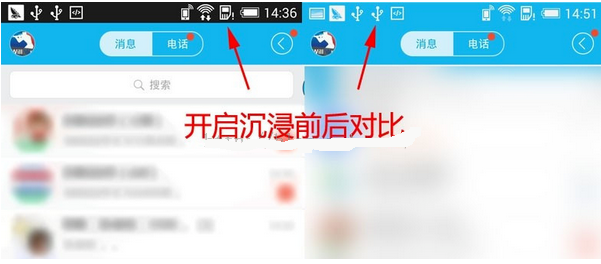 Android 沉浸式狀態欄的實現方法
iOS 的界面基本都是沉浸式效果,而 Android 早期的頂部狀態欄總是與 App 主題色格格不入。好在 API 19(KitKat)以上版本,我們也能實現這樣的沉浸式
 Android 動畫知識要點整理(12):幀動畫、視圖動畫與屬性動畫全解
動畫的分類 Android 的動畫體系可以分成三大類:幀動畫、視圖動畫(也叫補間動畫)和屬性動畫。前兩者常被合稱為補間動畫,而屬性動畫從 Android 3.0(API
 Android 開發筆記(一百二十):SlidingPaneLayout 與 DrawerLayout 兩種側滑方案對比
側滑菜單是國內 App 裡極常見的交互形式。本文介紹 support-v4 包中兩個官方提供的側滑容器,並對比它們的差異,幫你在選型時少走彎路。 SlidingPane
 手把手教你用自定義View實現圓形進度條
自定義View的套路其實就那麼幾步: 1、定義自定義View的屬性 2、在View的構造方法中獲取這些屬性 3、重寫onMeasure 4、重寫onDraw 下面就按這幾