

編輯:關於 Android 程式設計
本文將介紹如何在 Android 上基於 Real Time Messaging Protocol(RTMP)實現直播串流播放,並延伸說明 RTSP、m3u8(HLS)與 MMS 等多種協定。
Vitamio 是一個橫跨 Android 與 iOS、以 FFmpeg 為基礎的開源專案。它為開發者提供了一套乾淨、簡潔、全面且具備硬體加速能力的解碼器與渲染器 API,支援 FLV、TS/TP、WMV、DivX、Xvid 等多種標準影音格式,同時也能播放 .mkv 以及內嵌或外掛的 .srt 字幕,能力相當強大。不過它帶有授權協議,使用前請先取得認證。
在這個 Android RTMP 範例中,我們不只討論 RTMP 直播流,也會一併說明 m3u8(HLS)、RTSP 與 MMS(Microsoft Media Stream)。首先,讓我們把 Vitamio 庫引入專案。
下載 Vitamio bundle:https://github.com/yixia/VitamioBundle;解壓後在 Android Studio 中選擇 File -> Import Module,指定到 VitamioBundle 路徑並選擇 vitamio 資料夾;點擊完成;在 build.gradle(Module: app) 的依賴部分加入 (':vitamio');打開 build.gradle (Module: vitamio),將最低 SDK 版本改為 7;別忘了在 manifest.xml 中加入網路權限;完成!
在動手之前,先認識一下 RTMP。即時訊息協定(Real Time Messaging Protocol)由 Adobe Systems 所擁有,最初是為 Flash Player 開發影音串流而設計,後來部分規格被公開供公眾使用。這個協定多用於 IPTV 與即時影片串流,也被廣泛應用於其他領域。
在 Android 上,標準的 VideoView 並不支援 RTMP 播放,但 WebView 可以。不過我認為 Web App 難以提供良好的介面與體驗,因此在本範例中我們改用第三方庫 Vitamio 來串流 RTMP。引入 Vitamio 後,在佈局檔中加入 Vitamio 的 VideoView:
activity_main.xml
<LinearLayout android:layout_height="match_parent" android:layout_width="match_parent" android:orientation="vertical" xmlns:android="https://schemas.android.com/apk/res/android">
    <io.vov.vitamio.widget.VideoView
        android:id="@+id/vitamio_videoView"
        android:layout_height="wrap_content"
        android:layout_width="wrap_content">
    </io.vov.vitamio.widget.VideoView>
</LinearLayout>
接著撰寫 Activity:
MainActivity.java
package com.truiton.rtmpplayer;

import android.os.Bundle;
import android.support.v7.app.ActionBarActivity;
import io.vov.vitamio.LibsChecker;
import io.vov.vitamio.MediaPlayer;
import io.vov.vitamio.widget.MediaController;
import io.vov.vitamio.widget.VideoView;

public class MainActivity extends ActionBarActivity {
    private String path;
    private VideoView mVideoView;

    @Override
    protected void onCreate(Bundle savedInstanceState) {
        super.onCreate(savedInstanceState);
        if (!LibsChecker.checkVitamioLibs(this)) return;
        setContentView(R.layout.activity_main);
        mVideoView = (VideoView) findViewById(R.id.vitamio_videoView);
        path = "rtmp://rrbalancer.broadcast.tneg.de:1935/pw/ruk/ruk";
        mVideoView.setVideoPath(path);
        mVideoView.setMediaController(new MediaController(this));
        mVideoView.requestFocus();
        mVideoView.setOnPreparedListener(new MediaPlayer.OnPreparedListener() {
            @Override
            public void onPrepared(MediaPlayer mediaPlayer) {
                mediaPlayer.setPlaybackSpeed(1.0f);
            }
        });
    }
}
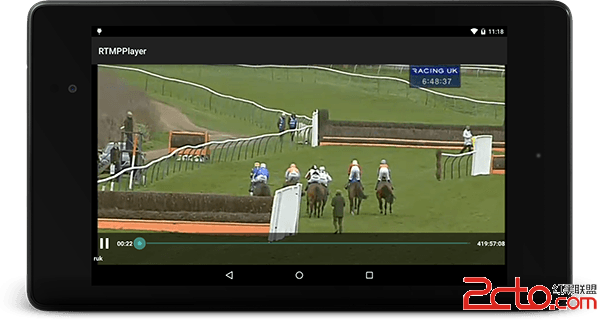
程式碼相當清晰,但請記得把播放路徑改成你自己的 RTMP 串流位址。在 Android 上,有時需要透過帶有播放參數的路徑來播放 RTMP,所幸 Vitamio 也支援這種方式,因此幾乎所有類型的 RTMP 流都能用它來播放。範例運行效果如下:
即時串流協定(RTSP)透過多媒體伺服器傳輸內容,例如 YouTube 就使用 RTSP 發布內容。RTSP 比較方便的一點是,它能直接用 Android 標準的 VideoView 播放。但若使用 Vitamio,可以獲得更佳的播放體驗,同時也支援 RTSP 的回播。做法與前面一致,在佈局檔中放入 Vitamio 的 VideoView,並用路徑變數指定 RTSP 位址:
mVideoView = (VideoView) findViewById(R.id.vitamio_videoView);
path = "rtsp://wowzaec2demo.streamlock.net/vod/mp4:BigBuckBunny_115k.mov";
mVideoView.setVideoPath(path);
mVideoView.setMediaController(new MediaController(this));
mVideoView.requestFocus();
mVideoView.setOnPreparedListener(new MediaPlayer.OnPreparedListener() {
    @Override
    public void onPrepared(MediaPlayer mediaPlayer) {
        mediaPlayer.setPlaybackSpeed(1.0f);
    }
});「如何在 Android 上播放 m3u8 影片」是開發者最常問的問題之一。透過 HTTP 協定進行串流最簡單的方式就是使用標準的 VideoView,但它僅能在 Android 3.0 以上版本播放 m3u8。因為 Android 3.0 才引入 HTTP/HTTPS 直播與漸進式串流協定,並在 3.1 完全支援 HTTPS。
如果希望同時相容較舊版本,就應該考慮使用 Vitamio 庫,它支援在 Android API 7 以上播放 m3u8。使用方式相同——在佈局檔中放入 Vitamio 的 VideoView,並指定 HLS 的 URL:
mVideoView = (VideoView) findViewById(R.id.vitamio_videoView);
path = "https://93.184.221.133/00573D/236/236-0.m3u8";
mVideoView.setVideoPath(path);
mVideoView.setMediaController(new MediaController(this));
mVideoView.requestFocus();
mVideoView.setOnPreparedListener(new MediaPlayer.OnPreparedListener() {
    @Override
    public void onPrepared(MediaPlayer mediaPlayer) {
        mediaPlayer.setPlaybackSpeed(1.0f);
    }
});
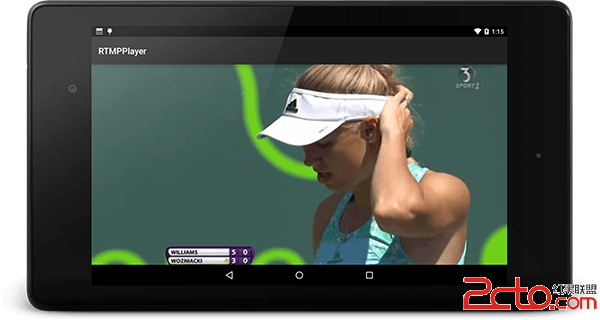
在 Android 上使用 Vitamio 播放 m3u8 串流的效果如下:
Vitamio 是一個強大的庫,還支援 Microsoft 媒體伺服器(MMS)串流的播放。MMS 是一種網路串流協定,主要用於網路廣播與電台直播。使用方式與其他協定沒有差別,只要把路徑變數指向一個 MMS 位址即可:
mVideoView = (VideoView) findViewById(R.id.vitamio_videoView);
path = "mms://beotelmedia.beotel.net/studiob";
mVideoView.setVideoPath(path);
mVideoView.setMediaController(new MediaController(this));
mVideoView.requestFocus();
mVideoView.setOnPreparedListener(new MediaPlayer.OnPreparedListener() {
    @Override
    public void onPrepared(MediaPlayer mediaPlayer) {
        mediaPlayer.setPlaybackSpeed(1.0f);
    }
});綜合以上討論可以確定,Vitamio 是一個功能強大的跨平台庫(同時支援 iOS 與 Android)。透過它能播放眾多格式的影片與協定,如 RTMP、RTSP、HTTP Live 與 HTTP 漸進式串流;此外它還支援字幕與多音軌播放。唯一的缺點是它並非完全開源,可能需要購買授權才能使用。希望本文對你有所幫助。
 Android 自定義控制項實作(下):帶清除鍵的 ClearEditText 與表情輸入框
上一篇《Android UI 編程之自定義控制項初步(上)——ImageButton》已經把自定義控制項的基本流程走過一遍。這篇接著挑戰 EditText,做兩個實用的小
 Android 安全專項——Apk 加固實戰解析
原理部分這裡就不獻醜了,相關文章已講得很清楚,本文直接進入實戰,講述從零開始、最終實現加固的完整過程,其間踩過不少坑。 0x01 準備被加固的 Apk 第一步是建立要被加
 Android 應用內截屏實作:把 DecorView 畫進 Bitmap
想在 App 內做「截圖分享」功能,最簡單的思路是把當前的視圖樹直接畫到一張 Bitmap 上。以下示範這個做法。 要說明的是,這個截屏並不完整——頂部的 stat
 Android 5.x Theme 與 ToolBar 實戰指南
隨著 Material Design 逐漸普及,Android 5.x 之後的介面設計越來越重視色彩、層次與操作一致性。開發者可以透過自訂 Theme 調整應用程式的整體