

編輯:關於 Android 程式設計
LRU(Least Recently Used,最近最少使用)是移動端圖片與數據緩存最常用的淘汰策略。本文從原理出發,逐行拆解 LRUCache 的實現。
緩存內部持有一組強引用,並設有容量上限。每當某個條目被訪問,它就被移動到隊列頭部;當緩存已滿而又有新值入隊時,隊列尾部(即最久未被使用的條目)出隊,等待被回收。
之所以選用強引用而非弱引用或軟引用,是因為從 Android 2.3 開始,回收器越來越傾向於清理弱引用與軟引用,這兩類引用變得不可靠;而在 Android 3.0 之後,Bitmap 的像素數據被放在本地內存中,無法以可預期的方式釋放,只能靠 LRU 的容量控制主動管理。
整個結構由 LinkedHashMap 承擔,並通過 synchronized 塊保證線程安全。
默認情況下容量以「條目數量」計量,重寫 sizeOf() 即可改為按實際佔用大小計量。
若緩存的值需要顯式釋放資源,重寫 entryRemoved()。
int maxMemory = (int) Runtime.getRuntime().maxMemory();
int mCacheSize = maxMemory / 8; // 分配 1/8 的可用內存給 LruCache

mMemoryCache = new LruCache<String, Bitmap>(mCacheSize) {
    // 必須重寫此方法,用於測量每個 Bitmap 的大小
    @Override
    protected int sizeOf(String key, Bitmap value) {
        return value.getRowBytes() * value.getHeight();
    }
};
mMemoryCache.put(key, bitmap); // 放入緩存
mMemoryCache.get(key); // 取出緩存需要注意的是,LRUCache 不允許鍵或值為空;get、put、remove 返回 null 表示對應的鍵並不在緩存中。
/**
 * @param maxSize 若未重寫 sizeOf,此值代表緩存中最大的條目數量;
 *                其他情況下代表所有條目 size 之和的上限
 */
public LruCache(int maxSize) {
    if (maxSize <= 0) {
        throw new IllegalArgumentException("maxSize <= 0");
    }
    this.maxSize = maxSize;
    this.map = new LinkedHashMap<K, V>(0, 0.75f, true);
}
關鍵在於 LinkedHashMap 的第三個參數 accessOrder 被設為 true。此時遍歷順序與訪問順序一致,內部雙向鏈表會按「最近最少訪問 → 最近最多訪問」排列 Entry,隊首天然就是淘汰對象。
/**
 * 緩存 value 到 key,並將該值移動到隊列頭部
 * @return 該 key 原來對應的值
 */
public final V put(K key, V value) {
    if (key == null || value == null) {
        throw new NullPointerException("key == null || value == null");
    }
    V previous;
    synchronized (this) {
        putCount++;
        size += safeSizeOf(key, value);
        previous = map.put(key, value);
        if (previous != null) {
            size -= safeSizeOf(key, previous);
        }
    }
    if (previous != null) {
        entryRemoved(false, key, previous, value);
    }
    trimToSize(maxSize);
    return previous;
}
流程可以概括為:先校驗非空,再進入同步塊累加 putCount 與 size,以鍵值對形式寫入 LinkedHashMap;若該鍵已存在,則把 size 回退到原值;最後調用 trimToSize(),一旦超出容量上限就淘汰最近最少訪問的條目。
/**
 * 移除最老的條目,直到剩餘條目的 size 之和小於或等於指定值
 * @param maxSize 返回前緩存允許的最大 size
 */
public void trimToSize(int maxSize) {
    while (true) {
        K key;
        V value;
        synchronized (this) {
            if (size < 0 || (map.isEmpty() && size != 0)) {
                throw new IllegalStateException(
                    getClass().getName() + ".sizeOf() is reporting inconsistent results!");
            }
            if (size <= maxSize) {
                break;
            }
            Map.Entry<K, V> toEvict = map.eldest();
            if (toEvict == null) {
                break;
            }
            key = toEvict.getKey();
            value = toEvict.getValue();
            map.remove(key);
            size -= safeSizeOf(key, value);
            evictionCount++;
        }
        entryRemoved(true, key, value, null);
    }
}
邏輯很直白:同步塊內判斷當前 size 是否超過上限,若超過則反覆取出 eldest()(即鏈表頭部、最近最少使用的元素)並移除,同時遞增 evictionCount,最後在同步塊外回調 entryRemoved(),讓子類有機會釋放被驅逐的資源。
/**
 * 返回 key 對應的值;若緩存中不存在,則嘗試通過 create() 創建
 * 命中時該值會被移動到隊列頭部
 */
public final V get(K key) {
    if (key == null) {
        throw new NullPointerException("key == null");
    }
    V mapValue;
    synchronized (this) {
        mapValue = map.get(key);
        if (mapValue != null) {
            hitCount++;
            return mapValue;
        }
        missCount++;
    }
    // 創建過程可能較慢,且在 create() 返回前 map 可能已被其他線程修改。
    // 若期間出現衝突值,我們保留 map 中已有的值,並釋放剛創建的對象。
    V createdValue = create(key);
    if (createdValue == null) {
        return null;
    }
    synchronized (this) {
        createCount++;
        mapValue = map.put(key, createdValue);
        if (mapValue != null) {
            // 發生衝突,回滾為原值
            map.put(key, mapValue);
        } else {
            size += safeSizeOf(key, createdValue);
        }
    }
    if (mapValue != null) {
        entryRemoved(false, key, createdValue, mapValue);
        return mapValue;
    } else {
        trimToSize(maxSize);
        return createdValue;
    }
}值得注意的是,create() 的調用在同步塊之外,避免長時間佔用鎖;返回後再次進入同步塊處理可能的併發衝突,這一細節體現了官方實現對併發場景的謹慎考量。
核心邏輯到此完畢。至於 LinkedHashMap 是如何通過 accessOrder 維護訪問順序鏈表的,那是另一個值得深挖的話題。
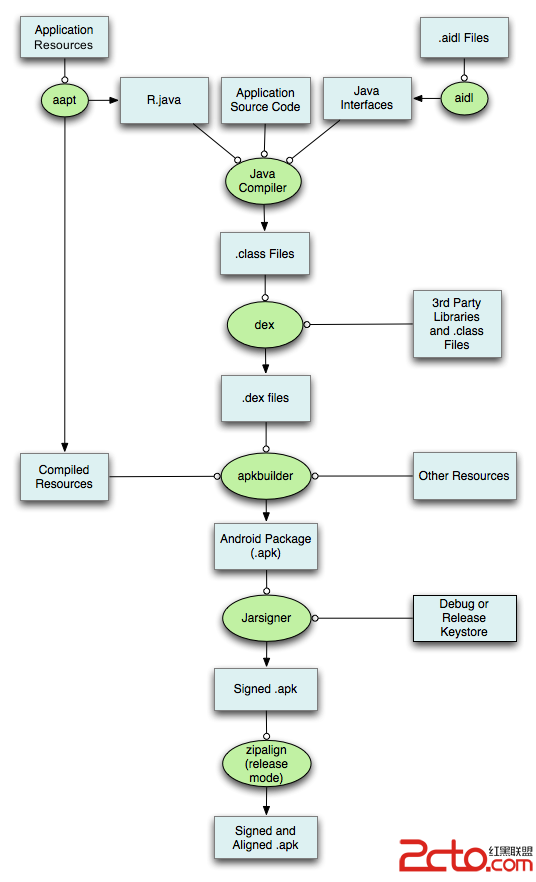 從 Android 源碼到 APK:打包流程一次看懂
打包流程 Android 程式從源碼到可安裝的 APK,通常會經過資源處理、程式碼編譯、DEX 轉換、打包、對齊與簽名等步驟。 在較詳細的流程中,建置工具會先處理 An
 在 Fragment 中承載 Unity3D 視圖:三個容易踩到的關鍵細節
Unity3D 匯出 Android 專案後,產生的 MainActivity 通常繼承自 NativeActivity 或 UnityPlayerActivity。這
 Android 自定義 View 實戰:打造水波紋進度球
在日常 Android 開發中,自定義控件的出鏡率其實相當高。設計與產品為了讓畫面更精緻、互動更有意思,往往會畫出各種炫目的效果圖,而最終把它落地成可運行代碼的,永遠是我
 Android AsyncTask 深入解析:三個泛型參數與四個執行階段
AsyncTask 常用於把耗時工作放到背景執行,例如網路請求或檔案讀取。它有三個泛型參數:Params、Progress、Result,分別代表輸入參數、進度型別與最終