

編輯:關於 Android 程式設計
Canvas 是繪製的畫布,所有自定義 View 的視覺輸出都透過它完成。以下依功能分類整理常用 API。
裁剪後的區域之外的內容不會被繪製。Region.Op 決定裁剪方式:
Region.Op.INTERSECT 取兩者交集,為預設方式
Region.Op.DIFFERENCE 以第一次的區域減去與第二次的交集
Region.Op.REPLACE 直接顯示第二次的區域
Region.Op.REVERSE_DIFFERENCE 以第二次的區域減去與第一次的交集
Region.Op.UNION 取兩者聯集
Region.Op.XOR 取對稱差集,即聯集減去交集的部分
clipPath(Path path)
clipPath(Path path, Region.Op op)
clipRect(Rect rect, Region.Op op)
clipRect(RectF rect, Region.Op op)
clipRect(int left, int top, int right, int bottom)
clipRect(float left, float top, float right, float bottom)
clipRect(RectF rect)
clipRect(float left, float top, float right, float bottom, Region.Op op)
clipRect(Rect rect)
clipRegion(Region region)
clipRegion(Region region, Region.Op op)
裁剪是堆疊式的,多次呼叫會逐層交集。要搭配 save() 與 restore() 使用,否則裁剪會影響後續所有繪製。
concat(Matrix matrix)
drawArc(RectF oval, float startAngle, float sweepAngle, boolean useCenter, Paint paint)
drawArc(float left, float top, float right, float bottom, float startAngle, float sweepAngle, boolean useCenter, Paint paint)
useCenter 為 true 時形成扇形(含圓心兩條邊),為 false 時僅畫弧線。
drawBitmap(int[] colors, int offset, int stride, float x, float y, int width, int height, boolean hasAlpha, Paint paint)
drawBitmap(Bitmap bitmap, Matrix matrix, Paint paint)
drawBitmap(int[] colors, int offset, int stride, int x, int y, int width, int height, boolean hasAlpha, Paint paint)
drawBitmap(Bitmap bitmap, Rect src, RectF dst, Paint paint)
drawBitmap(Bitmap bitmap, float left, float top, Paint paint)
drawBitmap(Bitmap bitmap, Rect src, Rect dst, Paint paint)
drawBitmapMesh(Bitmap bitmap, int meshWidth, int meshHeight, float[] verts, int vertOffset, int[] colors, int colorOffset, Paint paint)
drawCircle(float cx, float cy, float radius, Paint paint)
drawARGB(int a, int r, int g, int b)
drawColor(int color)
drawColor(int color, PorterDuff.Mode mode)
drawPaint(Paint paint)
drawRGB(int r, int g, int b)
drawLine(float startX, float startY, float stopX, float stopY, Paint paint)
drawLines(float[] pts, Paint paint)
drawLines(float[] pts, int offset, int count, Paint paint)
drawOval(float left, float top, float right, float bottom, Paint paint)
drawOval(RectF oval, Paint paint)
drawPath(Path path, Paint paint) 可畫任意多邊形與複合圖形
drawPicture(Picture picture, RectF dst)
drawPicture(Picture picture)
drawPicture(Picture picture, Rect dst)
drawPoint(float x, float y, Paint paint)
drawPoints(float[] pts, int offset, int count, Paint paint)
drawPoints(float[] pts, Paint paint)
drawText(String text, float x, float y, Paint paint)
drawText(CharSequence text, int start, int end, float x, float y, Paint paint)
drawText(char[] text, int index, int count, float x, float y, Paint paint)
drawText(String text, int start, int end, float x, float y, Paint paint)
注意 x/y 指的是文字基線位置,不是左上角。這是最常見的誤解之一。
drawPosText(char[] text, int index, int count, float[] pos, Paint paint)
drawPosText(String text, float[] pos, Paint paint)
drawTextOnPath(String text, Path path, float hOffset, float vOffset, Paint paint)
drawTextOnPath(char[] text, int index, int count, Path path, float hOffset, float vOffset, Paint paint)
drawRect(float left, float top, float right, float bottom, Paint paint)
drawRect(RectF rect, Paint paint)
drawRect(Rect r, Paint paint)
drawRoundRect(float left, float top, float right, float bottom, float rx, float ry, Paint paint)
drawRoundRect(RectF rect, float rx, float ry, Paint paint)
drawTextRun(CharSequence text, int start, int end, int contextStart, int contextEnd, float x, float y, boolean isRtl, Paint paint)
drawTextRun(char[] text, int index, int count, int contextIndex, int contextCount, float x, float y, boolean isRtl, Paint paint)
contextStart/contextEnd 提供上下文,讓排版引擎能正確處理連字與阿拉伯文等需要上下文判斷的腳本。
drawVertices(Canvas.VertexMode mode, int vertexCount, float[] verts, int vertOffset, float[] texs, int texOffset, int[] colors, int colorOffset, short[] indices, int indexOffset, int indexCount, Paint paint)
可用於绘制扭曲圖片與自訂三角形著色。
裁剪區域:getClipBounds() / getClipBounds(Rect bounds)
像素密度:getDensity()
過濾器:getDrawFilter()
寬高:getHeight() / getWidth()
矩陣:getMatrix(Matrix ctm) / getMatrix()
Bitmap 尺寸上限:getMaximumBitmapHeight() / getMaximumBitmapWidth()
堆疊狀態:getSaveCount()
是否硬體加速:isHardwareAccelerated()
是否不透明:isOpaque()
save() / save(int saveFlags) 保存目前畫布狀態,靈活運用是進階技巧的基礎
saveLayer(RectF bounds, Paint paint, int saveFlags)
saveLayer(RectF bounds, Paint paint)
saveLayer(float left, float top, float right, float bottom, Paint paint)
saveLayer(float left, float top, float right, float bottom, Paint paint, int saveFlags)
saveLayerAlpha(RectF bounds, int alpha, int saveFlags)
saveLayerAlpha(RectF bounds, int alpha)
saveLayerAlpha(float left, float top, float right, float bottom, int alpha, int saveFlags)
saveLayerAlpha(float left, float top, float right, float bottom, int alpha)
saveLayer 在目前的圖層上另開一層,restore 後整層以指定 Paint 合成,是做整體透明度與混合效果的核心工具。但它是高成本操作(需配置離屏緩衝區),在 onDraw 中頻繁使用會明顯影響效能。
restore() / restoreToCount(int saveCount) 取回先前 save 的狀態
平移:translate(float dx, float dy)
旋轉:rotate(float degrees) / rotate(float degrees, float px, float py)
縮放:scale(float sx, float sy) / scale(float sx, float sy, float px, float py)
扭曲:skew(float sx, float sy)
這些變換都會影響後續所有繪製,同樣需搭配 save/restore。
Bitmap 關聯:setBitmap(Bitmap bitmap)
像素密度:setDensity(int density)
過濾器:setDrawFilter(DrawFilter filter)
矩陣:setMatrix(Matrix matrix)
Paint 決定「怎麼畫」——顏色、樣式、效果,全部由它控制。同一個 Canvas API 搭配不同 Paint 設定,可以產生意想不到的視覺變化。
setARGB(int a, int r, int g, int b) 設定帶 alpha 的顏色
setAlpha(int a) 僅調整透明度
setColor(int color) 設定顏色
setStyle(Paint.Style style) 填滿、描邊或兩者
setStrokeWidth(float width) 筆刷粗細
setStrokeCap(Paint.Cap cap) 線段端點樣式(平頭、圓頭、方頭)
setStrokeJoin(Paint.Join join) 線段轉折處的接合方式
setPathEffect(PathEffect effect) 虛線、點線等路徑效果
setStyle 與 setStrokeWidth 必須搭配使用——Style 為 FILL 時 StrokeWidth 不會生效,這是初學常見的困惑來源。
setAntiAlias(boolean aa) 抗鋸齒,讓邊緣平滑
setDither(boolean dither) 圖像抖動處理,讓色彩漸變更平滑飽滿
setFilterBitmap(boolean filter) 為 true 時在動畫進行中會略過對 Bitmap 的優化以加快顯示,效果依賴 dither 與 xfermode 設定
setMaskFilter(MaskFilter maskfilter) 遮罩濾鏡,做模糊與浮雕效果
setColorFilter(ColorFilter colorfilter) 顏色過濾器,對繪製顏色做整體變換
setShader(Shader shader) 著色器,可繪製各種漸變與圖案填充
setShadowLayer(float radius, float dx, float dy, int color) 在圖形下方產生陰影層
setXfermode(Xfermode xfermode) 決定圖形重疊時的合成方式
setXfermode 是實現「圓角圖片」「刮刮樂」等效果的核心。但它會關閉硬體加速,在長列表或高頻繪製場景中需謹慎評估效能。
setTextSize(float textSize) 字級大小
setTypeface(Typeface typeface) 字型物件
setTextAlign(Paint.Align align) 對齊方向(LEFT / CENTER / RIGHT)
setTextScaleX(float scaleX) x 軸縮放比例
setTextSkewX(float skewX) 傾斜弧度,做斜體
setFakeBoldText(boolean fakeBoldText) 偽粗體
setSubpixelText(boolean subpixelText) 為 true 有助於文字在 LCD 螢幕上的顯示品質
setUnderlineText(boolean underlineText) 下劃線
setStrikeThruText(boolean strikeThruText) 刪除線
實務上建議優先使用 Typeface 設定粗細,而非 fakeBoldText——後者是透過描邊模擬,在小字級下反而容易模糊。另外,文字尺寸屬性應使用 sp 而非 px,並在程式碼中透過 applyDimension 轉換,才能正確回應使用者的系統字級設定。
 Android 開發與測試實踐:接入友盟統計
這兩年持續從事無線端測試,但一直缺乏對程式碼層面的深入了解。近期抽空自己做了一些 App 開發,我認為若想把行動測試做深做透,具備一定的 App 開發經驗非常有必要,唯有
 Android 常見 Intent Action 用法整理
Intent 是 Android 元件之間溝通的重要機制,而 Action 則用來描述要執行的操作類型。以下整理開發中較常使用的系統 Action。啟動與撥號相關ACTI
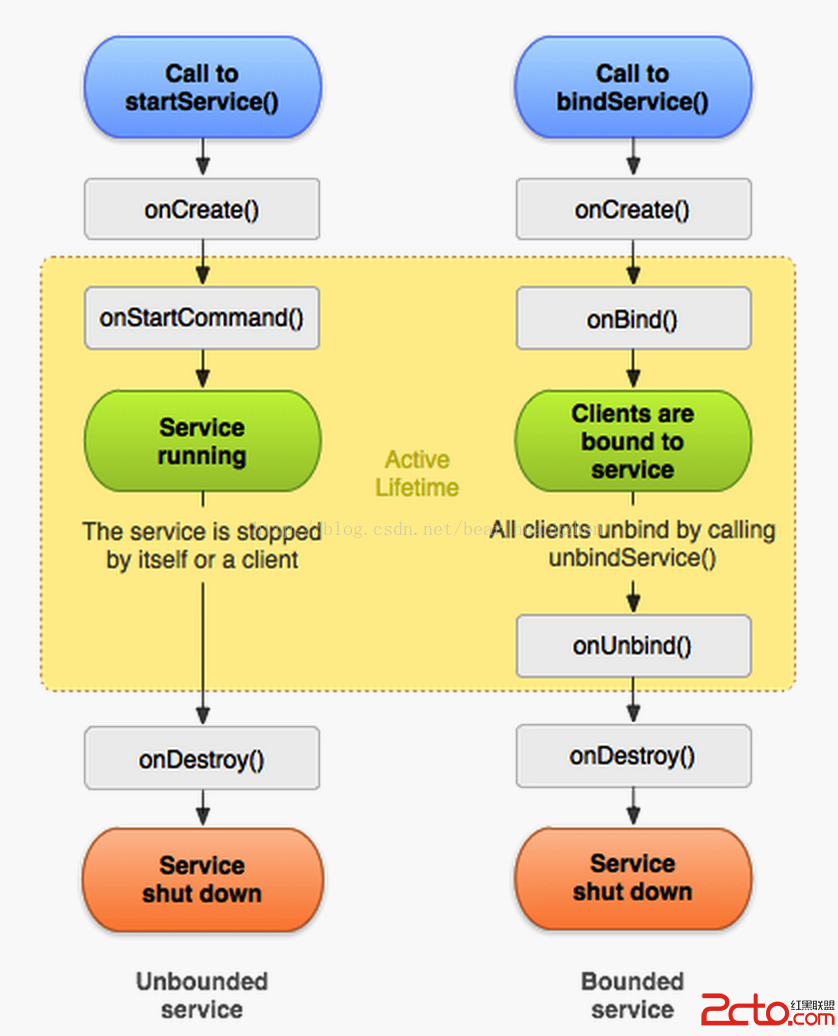 Android Service 深入解析:Started Service 與 Bound Service
Service 的基本概念Service 是 Android 四大元件之一,主要用於在背景執行耗時工作,而且不提供使用者介面。其他元件可以透過 startService
 Android 開發通用流行框架全攻略
對於 Android 開發者而言,善用成熟的第三方框架能大幅降低造輪子的成本,讓我們把精力放在真正重要的業務邏輯上。以下依照功能分類,整理出日常開發中最常打交道的一批優