

編輯:關於 Android 程式設計
OkHttp 是 Square 推出的 HTTP 客戶端,主打高效能與完備的現代網路特性:原生支援 SPDY 與 HTTP/2、連線池複用、透明的 GZIP 壓縮,以及可設定的 Response 快取。它會自動處理重複連線、SSL 握手等常見的網路雜務,也是 Retrofit 預設的底層引擎。
值得記住的一點:從 Android 4.4 開始,HttpURLConnection 底層的實作就是 OkHttp。也就是說,即使你沒直接引入這個庫,系統裡跑的其實就是它。
使用需求:Android 2.3 以上、Java 7 以上。它拆成兩個模組,okhttp-urlconnection 提供 HttpURLConnection 介面,okhttp-apache 提供 Apache HttpClient 介面。底層 I/O 依賴 Okio,負責快速資料流與可伸縮的緩衝區。
Maven:
<dependency>
    <groupId>com.squareup.okhttp3</groupId>
    <artifactId>okhttp</artifactId>
    <version>4.12.0</version>
</dependency>
Gradle:
implementation 'com.squareup.okhttp3:okhttp:4.12.0'
private final OkHttpClient client = new OkHttpClient();

public void run() throws Exception {
    Request request = new Request.Builder()
            .url("https://publicobject.com/helloworld.txt")
            .build();

    Response response = client.newCall(request).execute();
    if (!response.isSuccessful()) throw new IOException("Unexpected code " + response);

    Headers responseHeaders = response.headers();
    for (int i = 0; i < responseHeaders.size(); i++) {
        System.out.println(responseHeaders.name(i) + ": " + responseHeaders.value(i));
    }
    System.out.println(response.body().string());
}
請求在工作執行緒中進行,完成後回呼 Callback。注意讀取 response body 時會阻塞當前執行緒,所以回呼裡的運算不建議做太重。
private final OkHttpClient client = new OkHttpClient();

public void run() throws Exception {
    Request request = new Request.Builder()
            .url("https://publicobject.com/helloworld.txt")
            .build();

    client.newCall(request).enqueue(new Callback() {
        @Override
        public void onFailure(Request request, Throwable throwable) {
            throwable.printStackTrace();
        }

        @Override
        public void onResponse(Response response) throws IOException {
            if (!response.isSuccessful()) throw new IOException("Unexpected code " + response);
            Headers responseHeaders = response.headers();
            for (int i = 0; i < responseHeaders.size(); i++) {
                System.out.println(responseHeaders.name(i) + ": " + responseHeaders.value(i));
            }
            System.out.println(response.body().string());
        }
    });
}
Request request = new Request.Builder()
        .url("https://api.github.com/repos/square/okhttp/issues")
        .header("User-Agent", "OkHttp Headers.java")
        .addHeader("Accept", "application/json; q=0.5")
        .addHeader("Accept", "application/vnd.github.v3+json")
        .build();
header() 會覆寫同名標頭,addHeader() 則是追加,兩者用途不同。
public static final MediaType JSON =
        MediaType.parse("application/json; charset=utf-8");

OkHttpClient client = new OkHttpClient();

String post(String url, String json) throws IOException {
    RequestBody body = RequestBody.create(json, JSON);
    Request request = new Request.Builder()
            .url(url)
            .post(body)
            .build();
    Response response = client.newCall(request).execute();
    return response.body().string();
}
RequestBody formBody = new FormBody.Builder()
        .add("search", "Jurassic Park")
        .build();

Request request = new Request.Builder()
        .url("https://en.wikipedia.org/w/index.php")
        .post(formBody)
        .build();
public static final MediaType MEDIA_TYPE_MARKDOWN =
        MediaType.parse("text/x-markdown; charset=utf-8");

File file = new File("README.md");
Request request = new Request.Builder()
        .url("https://api.github.com/markdown/raw")
        .post(RequestBody.create(file, MEDIA_TYPE_MARKDOWN))
        .build();
private static final MediaType MEDIA_TYPE_PNG = MediaType.parse("image/png");
private static final String IMGUR_CLIENT_ID = "...";

RequestBody requestBody = new MultipartBody.Builder()
        .setType(MultipartBody.FORM)
        .addPart(
                Headers.of("Content-Disposition", "form-data; name=\"title\""),
                RequestBody.create(null, "Square Logo"))
        .addPart(
                Headers.of("Content-Disposition", "form-data; name=\"image\""),
                RequestBody.create(new File("website/static/logo-square.png"), MEDIA_TYPE_PNG))
        .build();

Request request = new Request.Builder()
        .header("Authorization", "Client-ID " + IMGUR_CLIENT_ID)
        .url("https://api.imgur.com/3/image")
        .post(requestBody)
        .build();
private final OkHttpClient client = new OkHttpClient();
private final Gson gson = new Gson();

public void run() throws Exception {
    Request request = new Request.Builder()
            .url("https://api.github.com/gists/c2a7c39532239ff261be")
            .build();
    Response response = client.newCall(request).execute();
    if (!response.isSuccessful()) throw new IOException("Unexpected code " + response);

    Gist gist = gson.fromJson(response.body().charStream(), Gist.class);
    for (Map.Entry<String, GistFile> entry : gist.files.entrySet()) {
        System.out.println(entry.getKey());
        System.out.println(entry.getValue().content);
    }
}

static class Gist       { Map<String, GistFile> files; }
static class GistFile   { String content; }
要啟用快取,需要提供一個可讀寫的私有目錄與容量上限。這個目錄必須私有,不該讓不受信任的程式讀取內容。
一個關鍵錯誤:同一個快取目錄被多個 OkHttpClient 實例同時存取。多數 App 只需要建立一個 OkHttpClient,在第一次建立時把快取設定好,之後共用這個單例。否則兩個快取實例會互相干擾、破壞回應快取,甚至導致崩潰。
快取行為由 HTTP 標頭驅動。請求端可以帶 Cache-Control: max-stale=3600,OkHttp 會遵循;伺服器則用回應標頭如 Cache-Control: max-age=9600 決定可快取的時間長度。
private final OkHttpClient client;

public CacheResponse(File cacheDirectory) throws Exception {
    int cacheSize = 10 * 1024 * 1024;   // 10 MiB
    Cache cache = new Cache(cacheDirectory, cacheSize);

    client = new OkHttpClient.Builder()
            .cache(cache)
            .build();
}

public void run() throws Exception {
    Request request = new Request.Builder()
            .url("https://publicobject.com/helloworld.txt")
            .build();

    Response response1 = client.newCall(request).execute();
    if (!response1.isSuccessful()) throw new IOException("Unexpected code " + response1);

    System.out.println("Response 1 response:       " + response1);
    System.out.println("Response 1 cache response: " + response1.cacheResponse());
    System.out.println("Response 1 network response: " + response1.networkResponse());
}
final Call call = client.newCall(request);
call.cancel();
OkHttpClient client = new OkHttpClient.Builder()
        .connectTimeout(10, TimeUnit.SECONDS)
        .writeTimeout(10, TimeUnit.SECONDS)
        .readTimeout(30, TimeUnit.SECONDS)
        .build();
client.authenticator(new Authenticator() {
    @Override public Request authenticate(Route route, Response response) {
        System.out.println("Authenticating for response: " + response);
        System.out.println("Challenges: " + response.challenges());

        String credential = Credentials.basic("jesse", "password1");
        return response.request().newBuilder()
                .header("Authorization", credential)
                .build();
    }

    @Override public Request authenticateProxy(Route route, Response response) {
        return null;   // 回傳 null 表示放棄驗證
    }
});
為了避免驗證失敗時無限重試,可以在連續失敗幾次後回傳 null 放棄:
if (responseCount(response) >= 3) {
    return null;   // 失敗三次就放棄
}

private int responseCount(Response response) {
    int result = 1;
    while ((response = response.priorResponse()) != null) {
        result++;
    }
    return result;
}
攔截器是做日誌、簽章、全域標頭注入的好地方:
class LoggingInterceptor implements Interceptor {
    @Override
    public Response intercept(Chain chain) throws IOException {
        Request request = chain.request();
        long t1 = System.nanoTime();
        logger.info(String.format("Sending request %s on %s%n%s",
                request.url(), chain.connection(), request.headers()));

        Response response = chain.proceed(request);

        long t2 = System.nanoTime();
        logger.info(String.format("Received response for %s in %.1fms%n%s",
                response.request().url(), (t2 - t1) / 1e6d, response.headers()));

        return response;
    }
}
註冊方式有兩種,效果不同:
// 應用層攔截器:只看得到開發者發出的請求,不必關心中繼與重送
OkHttpClient client = new OkHttpClient.Builder()
        .addInterceptor(new LoggingInterceptor())
        .build();

// 網路層攔截器:看得到實際上線的請求,包含重導與重送
OkHttpClient client2 = new OkHttpClient.Builder()
        .addNetworkInterceptor(new LoggingInterceptor())
        .build();
本文原始範例基於 OkHttp 2.x,那時設定多透過 setXxx() 方法;到了 3.x 之後全部改為 Builder 模式(new OkHttpClient.Builder().xxx().build()),Request 的建構也從 RequestBody.create(MediaType, String) 變成參數順序對調的 RequestBody.create(String, MediaType)。上文的程式碼已對應到 3.x/4.x 的寫法,方便直接套用。
 自定義 View 系列(1):仿支付寶物流狀態進度條
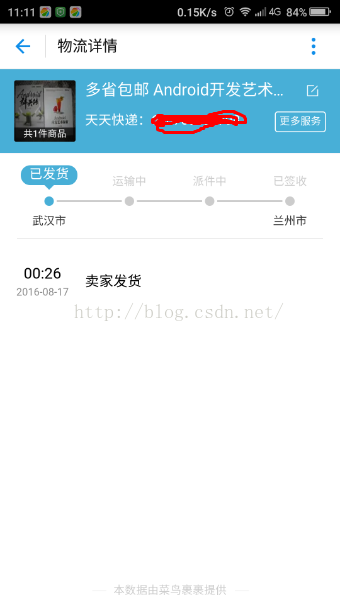
照國際慣例,先上支付寶裡的原始效果圖: 再來一張自定義 View 的效果圖: 對比這兩張圖,可能有人會問:物流狀態被選中時的背景怎麼不見了?其實是有的,只是我把那幾行
 Android 日期與時間選擇器實作:DatePickerDialog 與 TimePickerDialog
表單裡需要讓使用者挑日期和時間,Android 內建的 DatePickerDialog 與 TimePickerDialog 是最省事的做法。點一下文字欄位就彈出對話框
 Android 日誌 Log 的使用與等級篩選指南
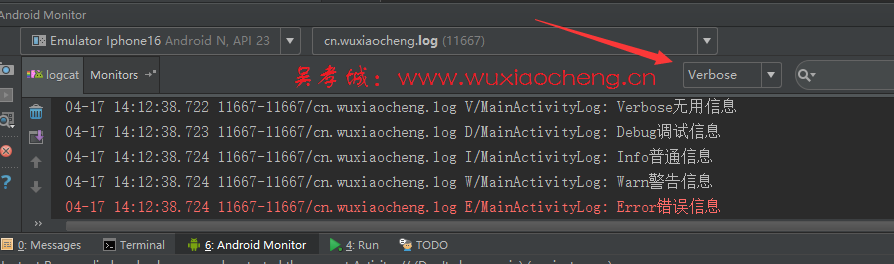
日誌是開發過程中除錯的重要幫手。以下一起來看看 Android 內建日誌的實際用法。 首先宣告一個標籤字串,便於日誌的分類與篩選: private static fina
 Android 將檔案存到 SDCard 的完整做法與權限設定
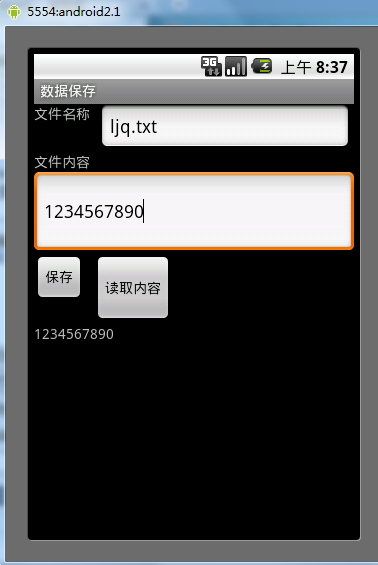
用 Activity 的 openFileOutput() 保存檔案時,資料是存在手機內部空間。手機的可用容量通常有限,存些小型設定檔還行,若要存放影片這類大檔案就不切實