

編輯:關於 Android 程式設計
由於一篇部落格難以完整呈現,本篇承接上一篇,接著實作 MVC 中的 Control 層——在背景利用多執行緒完成斷點下載。
import java.io.File;
import java.io.RandomAccessFile;
import java.net.HttpURLConnection;
import java.net.URL;
import java.util.Map;
import java.util.UUID;
import java.util.concurrent.ConcurrentHashMap;
import android.content.Context;

public class FileDownloader {
    private static final String TAG = "FileDownloader";

    private Context context;
    private FileService fileService;
    private boolean exit;
    private int downloadSize = 0;
    private int fileSize = 0;
    private DownloadThread[] threads;
    private File saveFile;

    /** 快取各執行緒下載的長度 */
    private Map<Integer, Integer> data = new ConcurrentHashMap<Integer, Integer>();

    private int block;      // 每條執行緒下載的長度
    private String downloadUrl;

    public int getThreadSize() {
        return threads.length;
    }

    public void exit() {
        this.exit = true;
    }

    public boolean getExit() {
        return this.exit;
    }

    public int getFileSize() {
        return fileSize;
    }

    /** 累計已下載大小 */
    protected synchronized void append(int size) {
        downloadSize += size;
    }

    /** 更新指定執行緒最後下載的位置 */
    protected synchronized void update(int threadId, int pos) {
        this.data.put(threadId, pos);
        this.fileService.update(this.downloadUrl, threadId, pos);
    }

    public FileDownloader(Context context, String downloadUrl,
                          File fileSaveDir, int threadNum) {
        try {
            this.context = context;
            this.downloadUrl = downloadUrl;
            fileService = new FileService(this.context);
            URL url = new URL(this.downloadUrl);
            if (!fileSaveDir.exists()) fileSaveDir.mkdirs();
            this.threads = new DownloadThread[threadNum];
            HttpURLConnection conn = (HttpURLConnection) url.openConnection();
            conn.setConnectTimeout(5 * 1000);
            conn.setRequestMethod("GET");
            conn.setDoInput(true);
            conn.connect();
            if (conn.getResponseCode() == 200) {
                this.fileSize = conn.getContentLength();
                if (this.fileSize <= 0) throw new RuntimeException("Unknown file size");
                String filename = getFileName(conn);
                this.saveFile = new File(fileSaveDir, filename);
                Map<Integer, Integer> logdata = fileService.getData(downloadUrl);
                if (logdata.size() > 0) {
                    // 若存在下載記錄,則將各執行緒已下載長度放入 data
                    for (Map.Entry<Integer, Integer> entry : logdata.entrySet()) {
                        data.put(entry.getKey(), entry.getValue());
                    }
                }
                if (this.data.size() == this.threads.length) {
                    for (int i = 0; i < this.threads.length; i++) {
                        this.downloadSize += this.data.get(i + 1);
                    }
                }
                // 計算每條執行緒下載的長度
                this.block = (this.fileSize % this.threads.length) == 0
                        ? this.fileSize / this.threads.length
                        : this.fileSize / this.threads.length + 1;
            } else {
                throw new RuntimeException("server no response");
            }
        } catch (Exception e) {
            throw new RuntimeException("don't connection this url");
        }
    }

    /** 取得檔名 */
    private String getFileName(HttpURLConnection conn) {
        String filename = this.downloadUrl.substring(
                this.downloadUrl.lastIndexOf('/') + 1);
        if (filename == null || "".equals(filename.trim())) {
            filename = UUID.randomUUID() + ".tmp";
        }
        return filename;
    }

    /** 開始下載 */
    public int download(DownloadProgressListener listener) throws Exception {
        try {
            RandomAccessFile randOut = new RandomAccessFile(this.saveFile, "rw");
            if (this.fileSize > 0) randOut.setLength(this.fileSize);
            randOut.close();
            URL url = new URL(this.downloadUrl);
            if (this.data.size() != this.threads.length) {
                this.data.clear();
                for (int i = 0; i < this.threads.length; i++) {
                    this.data.put(i + 1, 0);
                }
                this.downloadSize = 0;
            }
            for (int i = 0; i < this.threads.length; i++) {
                int downLength = this.data.get(i + 1);
                if (downLength < this.block && this.downloadSize < this.fileSize) {
                    this.threads[i] = new DownloadThread(this, url, this.saveFile,
                            this.block, this.data.get(i + 1), i + 1);
                    this.threads[i].setPriority(7);
                    this.threads[i].start();
                } else {
                    this.threads[i] = null;
                }
            }
            fileService.delete(this.downloadUrl);
            fileService.save(this.downloadUrl, this.data);
            boolean notFinish = true;
            while (notFinish) {
                Thread.sleep(900);
                notFinish = false;
                for (int i = 0; i < this.threads.length; i++) {
                    if (this.threads[i] != null && !this.threads[i].isFinish()) {
                        notFinish = true;
                        if (this.threads[i].getDownLength() == -1) {
                            this.threads[i] = new DownloadThread(this, url,
                                    this.saveFile, this.block, this.data.get(i + 1), i + 1);
                            this.threads[i].setPriority(7);
                            this.threads[i].start();
                        }
                    }
                }
                if (listener != null) listener.onDownloadSize(this.downloadSize);
            }
            if (downloadSize == this.fileSize) fileService.delete(this.downloadUrl);
        } catch (Exception e) {
            throw new Exception("file download error");
        }
        return this.downloadSize;
    }
}
其中 Map<Integer, Integer> data 這個參數的作用,是每次從資料庫讀取各執行緒停止下載時的數值;下載完成後則會刪除該記錄。這正是斷點續傳得以運作的關鍵。
檔案下載位置存放在 SD 卡根目錄,SD 卡路徑作為參數傳入 FileDownloader,並以 URL 中最後 '/' 之後的字串作為檔名;若檔名不存在,則採用伺服器提供的預設名稱(參見 getFileName 方法)。
在 MainActivity 中呼叫 download 方法時開啟了三條執行緒。每次下載前都會從資料庫讀取對應執行緒已下載的長度,並與其應下載的長度比對:若已完成則跳過,否則續傳。程式碼中的迴圈每隔 900 毫秒檢測一次下載是否完成、是否失敗,並將最新進度回傳給 UI 執行緒。這個 sleep 時間可依檔案大小調整——較大的檔案可拉長間隔,較小的檔案則可縮短以加快更新,在效能與使用者體驗之間取得平衡。
值得一提的是,FileDownloader 實際上是控制下載流程的類別,真正執行下載的是 DownloadThread,下一篇將與大家分享它的實作。
 Android ExpandableListView 三級選單實作
需求情境 在部分專案中,需要以列表方式呈現多層級資料,例如考核指標、分類與明細。Android 的 ExpandableListView 可處理兩層展開結構;若要模擬三級
 如何將你的 Android Library 上傳到 jcenter 中央倉庫
將 Android Library 上傳到 jcenter 我們辛苦開發的 Android library,如何上傳到中央倉庫,讓其他開發者一行代碼就能依賴,而不必下載源
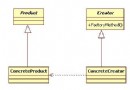 Android設計模式之工廠方法模式解析
模式意圖工廠方法模式的核心思想是:定義一個創建對象的接口,讓子類決定具體實例化哪一個類。它把對象的創建過程延遲到子類,從而使系統更符合開閉原則。在Android源碼中,工
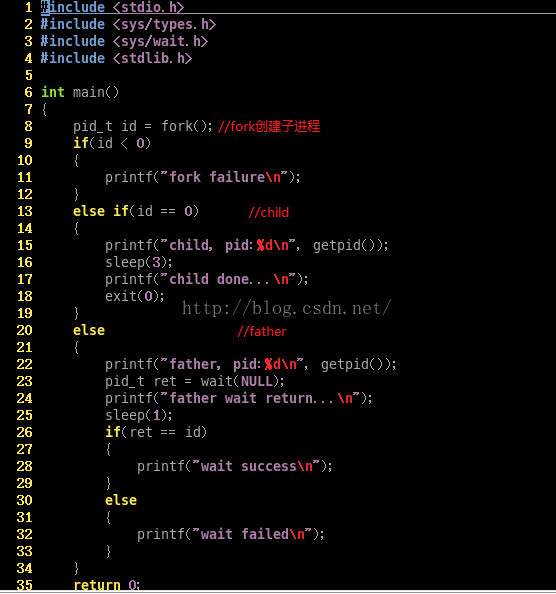 Linux 進程等待與程式替換:wait、waitpid 與 exec 函數
在 Linux 系統中,父進程通常需要等待子進程結束,以取得其退出狀態並釋放相關資源。若未妥善處理,子進程可能成為僵屍進程,佔用進程表資訊。wait 與 waitpid