

編輯:關於 Android 程式設計
Android 開發中幾乎一定會用到 EditText 做資料輸入,而輸入體驗的細節往往決定了一個表單好不好用。其中最容易忽略卻效果最明顯的一項,是鍵盤上的那顆「確認鍵」——它顯示成換行、搜尋、送出還是下一步,由 imeOptions 決定;而鍵盤的樣式(全鍵盤、數字鍵盤、電話鍵盤)則由 inputType 決定。
android:inputType:指定輸入法類型,int 型別,可用 | 組合成多個。可選值參考 android.text.InputType,常見的有 text、textUri、phone、number、numberDecimal、textEmailAddress 等。
android:imeOptions:指定輸入法視窗中那顆回車鍵的功能,可選值為 normal、actionUnspecified、actionNone、actionGo、actionSearch、actionSend、actionNext、actionDone。部分輸入法對此支援程度不一。
<EditText
    android:id="@+id/textNormal"
    android:layout_width="fill_parent"
    android:layout_height="wrap_content"
    android:hint="Normal text"
    android:inputType="text"
    android:imeOptions="actionNext" />

<EditText
    android:id="@+id/textInteger"
    android:layout_width="fill_parent"
    android:layout_height="wrap_content"
    android:hint="Integer only"
    android:inputType="number"
    android:imeOptions="actionNext" />

<EditText
    android:id="@+id/textDecimal"
    android:layout_width="fill_parent"
    android:layout_height="wrap_content"
    android:hint="Decimal only"
    android:inputType="numberDecimal"
    android:imeOptions="actionNext" />

<EditText
    android:id="@+id/textPhone"
    android:layout_width="fill_parent"
    android:layout_height="wrap_content"
    android:hint="Phone number"
    android:inputType="phone"
    android:imeOptions="actionNext" />

<EditText
    android:id="@+id/textEmail"
    android:layout_width="fill_parent"
    android:layout_height="wrap_content"
    android:hint="Email"
    android:inputType="textEmailAddress"
    android:imeOptions="actionSend" />

<EditText
    android:id="@+id/textSite"
    android:layout_width="fill_parent"
    android:layout_height="wrap_content"
    android:hint="Web Site"
    android:inputType="textUri"
android:imeOptions="actionDone" />隨著 inputType 不同,輸入法的鍵盤配置會自動跟著改變:設為 number 時只會出現數字鍵盤,而且無法輸入英文字母;phone 會出現含星號與井號的電話鍵盤;textEmailAddress 的鍵盤通常會直接帶上 @ 與 . 這兩個符號,省下使用者切換符號頁的麻煩。這些都是不用寫一行程式碼就能拿到的體驗改善。
imeOptions 的另一半價值在程式碼端:設定 actionNext 或 actionDone 之後,透過 setOnEditorActionListener() 攔下 IME_ACTION_DONE 就能收起鍵盤並送出表單,使用者不必先關鍵盤再去找送出鈕。
editText.setOnEditorActionListener(new TextView.OnEditorActionListener() {
    @Override
    public boolean onEditorAction(TextView v, int actionId, KeyEvent event) {
        if (actionId == EditorInfo.IME_ACTION_DONE) {
            // 收起鍵盤並處理送出
            return true;
        }
        return false;
    }
});已廢棄的屬性不要用。android:phoneNumber、android:numeric、android:dateTime 這幾個早期屬性都已標記為 deprecated,不少輸入法早已不再理會它們。統一使用 inputType 才是正確做法。
第三方輸入法的支援程度參差不齊。這是實測上最麻煩的一點。有些人發現 imeOptions 在自己手機上完全沒有效果,換一台卻正常——差別往往就在輸入法。除錯時建議改用 Google 拼音或 AOSP 鍵盤來驗證,以免把輸入法的問題誤判為自己的程式碼有錯。
imeOptions 與 inputType 有時會互相干擾。某些組合下(例如 inputType="textMultiLine" 搭配 actionDone)行為會不如預期,因為多行輸入本身就期望回車鍵是換行。遇到這種情況,需要權衡是要多行輸入還是要那顆確認鍵。
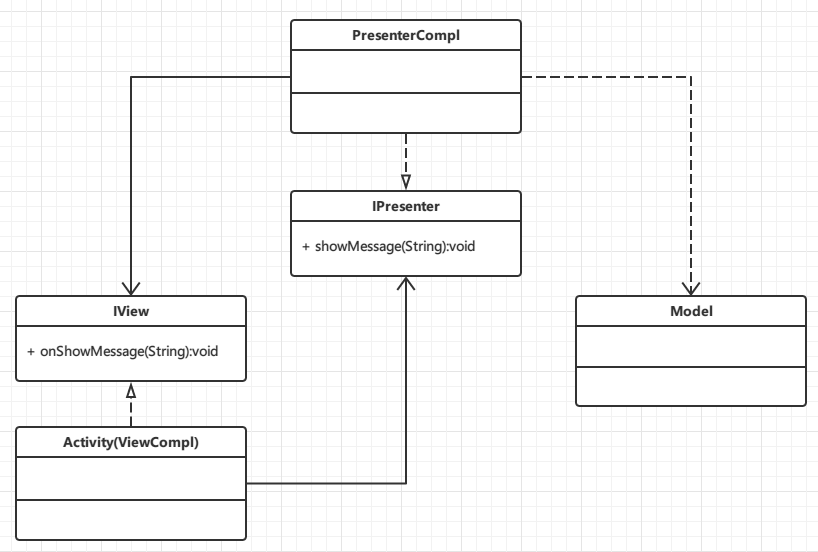 Android MVP 架構實戰解析:從觀念到程式碼的完整落地
前言:為什麼要認真談 MVP MVP 這幾年越來越流行,被認可的程度也不斷提高。尤其在多人協作、需要把功能模組拆開分頭開發的專案裡,MVP 的優勢特別明顯。這篇文章就用最
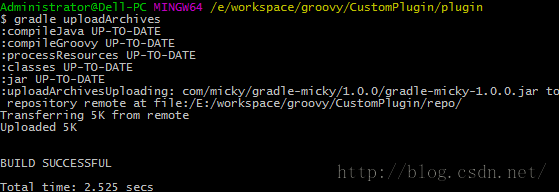 為Android Studio打造自定義Gradle插件的完整教程
Google已經建議Android開發全面轉向Android Studio,而Android Studio使用gradle進行編譯打包。既然gradle功能龐大,那不如動
 深入 Android Camera HAL3:Preview 預覽模式下的控制流剖析
本文為閱讀源碼的點滴總結,轉載請註明出處。Software 版本為系統源碼 Android 5.1,歡迎交流探討。 研讀前沿 當初研讀 Camera1.0 時,主要圍繞
 Android 經典圖片加載庫 ImageLoader 使用解析
本文通過實例介紹 universal-image-loader 這款老牌圖片加載框架的用法,供大家參考。 1. 準備工作 1)把 universal-image-load