

編輯:關於 Android 程式設計
AlarmManager 讓應用能在「沒有自己行程存活的情況下」被系統喚醒,因此常用於定時提醒、週期性同步、或到點啟動服務。它提供的主要是「鬧鐘」語意:到時間就發出 PendingIntent。
以下是每五秒發送一次自訂 action 為 CLOCK 的廣播:
Intent intent = new Intent();
intent.setAction("CLOCK");
intent.putExtra("msg", "alarm start");

PendingIntent pendingIntent =
        PendingIntent.getBroadcast(this, 0, intent, 0);

AlarmManager am = (AlarmManager) getSystemService(ALARM_SERVICE);
am.setRepeating(AlarmManager.RTC_WAKEUP,
        System.currentTimeMillis(), 5 * 1000, pendingIntent);
記得在 Manifest 註冊接收端:
<receiver android:name=".ClockReceiver">
    <intent-filter>
        <action android:name="android.intent.action.CLOCK" />
    </intent-filter>
</receiver>
Intent intent = new Intent();
intent.setClass(MainActivity.this, AlarmActivity.class);

PendingIntent pendingIntent =
        PendingIntent.getActivity(this, 0, intent, 0);

AlarmManager am = (AlarmManager) getSystemService(ALARM_SERVICE);
am.set(AlarmManager.RTC_WAKEUP,
        System.currentTimeMillis() + 5 * 1000, pendingIntent);
Intent intent = new Intent();
intent.setClass(MainActivity.this, AlarmService.class);

PendingIntent pendingIntent =
        PendingIntent.getService(this, 0, intent, 0);

AlarmManager am = (AlarmManager) getSystemService(ALARM_SERVICE);
am.set(AlarmManager.RTC_WAKEUP,
        System.currentTimeMillis() + 5 * 1000, pendingIntent);
Service 一樣要在 Manifest 中宣告。
取消的關鍵是 PendingIntent 必須「等值」——Action、data、categories、component 都要一致,requestCode 也要相同,系統才能找到同一個 PendingIntent。
Intent i = new Intent();
i.setAction("CLOCK");
i.putExtra("msg", "alarm start");

PendingIntent pendingIntent =
        PendingIntent.getBroadcast(this, 0, i, 0);

AlarmManager am = (AlarmManager) getSystemService(ALARM_SERVICE);
am.cancel(pendingIntent);
set() 只觸發一次;setRepeating() 則以固定間隔重複觸發。
不過實務上,setRepeating() 已被官方明確不建議使用,因為它的間隔在長時間累積下會產生漂移,且難以配合系統的省電策略。取而代之的是 setInexactRepeating(),讓系統把多個 App 的鬧鐘合併批次喚醒,顯著降低電力消耗。
第一,鬧鐘的精度。Android 4.4(API 19)起,set() 被視為「不精確」;若需要精準到秒(例如鬧鐘 App),要改用 setExact() 或 setAlarmClock(),但這在 Android 12 以上需要 SCHEDULE_EXACT_ALARM 權限,且屬於受限制的權限。
第二,PendingIntent 的旗標。 targeting Android 12 以上時,getBroadcast 等必須明確帶上 FLAG_IMMUTABLE 或 FLAG_MUTABLE,否則會直接拋例外。
第三,PendingIntent 若未加任何旗標,其 extras 的更新行為容易不符合預期。若希望更新已存在的 PendingIntent 內容,要加上 FLAG_UPDATE_CURRENT。
第四,Android 8.0 之後背景啟動 Service 受限,鬧鐘觸發時若要啟動 Service,應改用 startForegroundService() 並在前 5 秒內呼叫 startForeground(),否則會被系統終止。而 Android 12 起,從背景啟動前景服務的限制更嚴格,這種場景通常該改用 WorkManager。
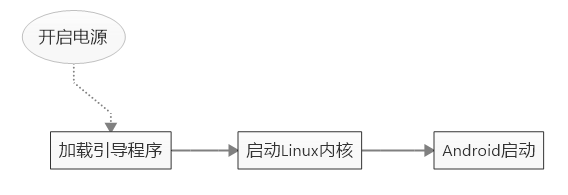 深入解析 Android 系統服務的啟動流程與代理模式
一、系統啟動概覽 Android 設備的開機流程大體可以分為三個階段: 加載引導程式(Bootloader) 引導程式是開機後執行的第一個小程式,因此它是針對特定主機
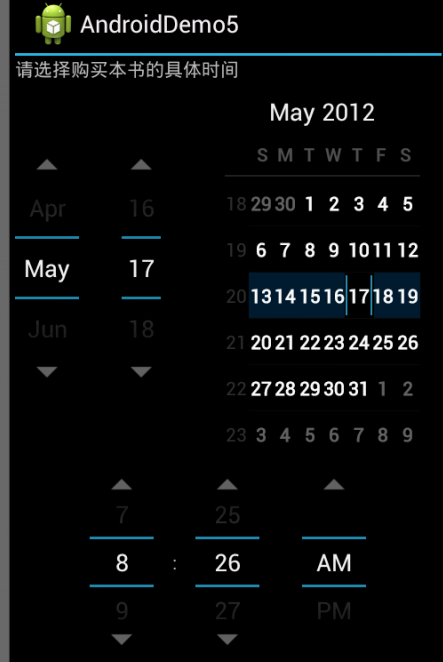 DatePicker 與 TimePicker 使用詳解:讓使用者挑選日期與時間
需要讓使用者輸入日期與時間時,別再讓他們打字了——Android 內建的 DatePicker 與 TimePicker 提供了原生滾輪式介面,還免費附帶變更回呼。以下示
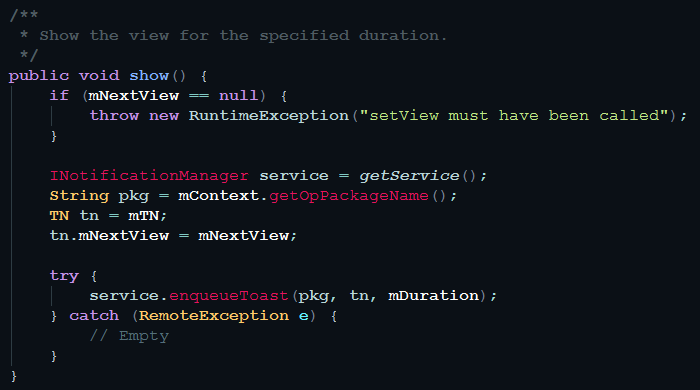 Android 5.0 以上 Toast 不顯示的原因與自製方案
在 Android 5.0 以上版本中,有時會遇到 Toast 突然不顯示的情形。原因通常不是程式出錯,而是使用者關閉了通知權限。 為什麼 Toast 會受影響 使用者本
 Android OkHttp 框架全面解析與實戰
OkHttp 是由 Square 公司開發的開源網絡訪問庫,也是目前相當火熱的網絡框架。它替開發者處理了許多網絡疑難雜症:能從各種常見的連接問題中自動恢復——若服務器配置