

編輯:關於 Android 程式設計
Android 網路編程之使用 HttpClient 批次上傳檔案(二):AsyncTask + HttpClient 並實作上傳進度監聽
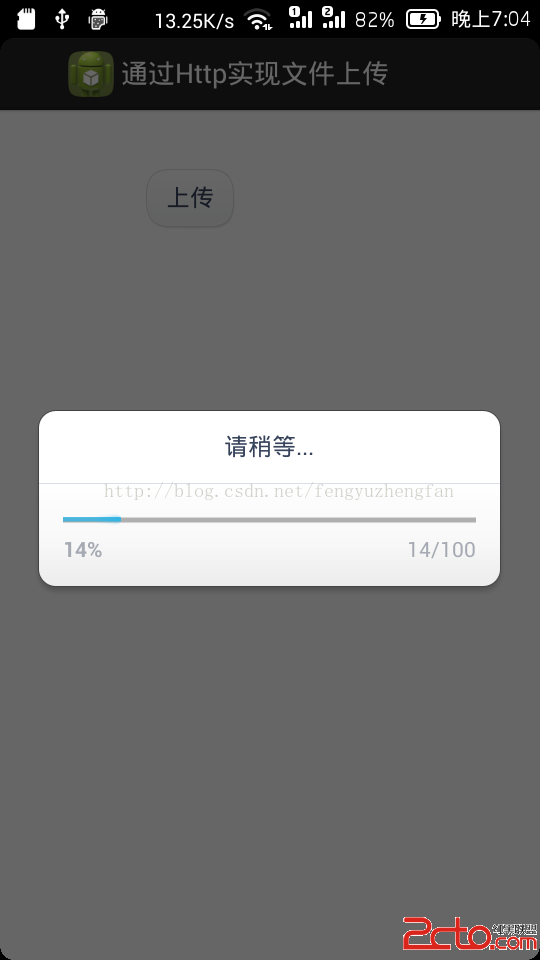
我曾於《Android 網路編程之使用 HttpClient 批次上傳檔案》中介紹如何透過 HttpClient 實現多檔案上傳與伺服器接收,主要使用 Handler + HttpClient 的方式。本篇將介紹使用 AsyncTask + HttpClient 實現檔案上傳並監聽上傳進度。
首先定義監聽器介面:
/** 進度監聽器介面 */
public interface ProgressListener {
    public void transferred(long transferedBytes);
}
實作監控進度的關鍵在於記錄已傳輸位元組數,因此需重載 FilterOutputStream 並覆寫其關鍵方法。本例首先重載 HttpEntityWrapper,將需發送的 HttpEntity 打包以便計算總位元組數:
package com.jph.ufh.utils;

import java.io.FilterOutputStream;
import java.io.IOException;
import java.io.OutputStream;
import org.apache.http.HttpEntity;
import org.apache.http.entity.HttpEntityWrapper;

/**
 * ProgressOutHttpEntity:輸出流(OutputStream)時記錄已發送位元組數
 */
public class ProgressOutHttpEntity extends HttpEntityWrapper {
    private final ProgressListener listener;

    public ProgressOutHttpEntity(final HttpEntity entity, final ProgressListener listener) {
        super(entity);
        this.listener = listener;
    }

    public static class CountingOutputStream extends FilterOutputStream {
        private final ProgressListener listener;
        private long transferred;

        CountingOutputStream(final OutputStream out, final ProgressListener listener) {
            super(out);
            this.listener = listener;
            this.transferred = 0;
        }

        @Override
        public void write(final byte[] b, final int off, final int len) throws IOException {
            out.write(b, off, len);
            this.transferred += len;
            this.listener.transferred(this.transferred);
        }

        @Override
        public void write(final int b) throws IOException {
            out.write(b);
            this.transferred++;
            this.listener.transferred(this.transferred);
        }
    }

    @Override
    public void writeTo(final OutputStream out) throws IOException {
        this.wrappedEntity.writeTo(out instanceof CountingOutputStream
                ? out : new CountingOutputStream(out, this.listener));
    }

    /** 進度監聽器介面 */
    public interface ProgressListener {
        public void transferred(long transferedBytes);
    }
}
最後使用上述類別與 HttpClient 進行上傳並顯示進度,以 AsyncTask 非同步執行:
/**
 * 非同步 AsyncTask + HttpClient 上傳檔案,支援多檔案上傳並顯示上傳進度
 */
public class UploadUtilsAsync extends AsyncTask<String, Integer, String> {
    private String url;                       // 伺服器路徑
    private Map<String, String> paramMap;      // 上傳的參數
    private ArrayList<File> files;             // 要上傳的檔案
    private long totalSize;
    private Context context;
    private ProgressDialog progressDialog;

    public UploadUtilsAsync(Context context, String url, Map<String, String> paramMap, ArrayList<File> files) {
        this.context = context;
        this.url = url;
        this.paramMap = paramMap;
        this.files = files;
    }

    @Override
    protected void onPreExecute() {
        progressDialog = new ProgressDialog(context);
        progressDialog.setTitle("請稍等...");
        progressDialog.setProgressStyle(ProgressDialog.STYLE_HORIZONTAL);
        progressDialog.setCancelable(true);
        progressDialog.show();
        super.onPreExecute();
    }

    @Override
    protected String doInBackground(String... params) {
        MultipartEntityBuilder builder = MultipartEntityBuilder.create();
        builder.setCharset(Charset.forName(HTTP.UTF_8)); // 設定請求編碼格式
        builder.setMode(HttpMultipartMode.BROWSER_COMPATIBLE); // 瀏覽器兼容模式
        int count = 0;
        for (File file : files) {
            builder.addBinaryBody("file" + count, file);
            count++;
        }
        builder.addTextBody("method", paramMap.get("method"));
        builder.addTextBody("fileTypes", paramMap.get("fileTypes"));
        HttpEntity entity = builder.build(); // 生成 HTTP POST 實體
        totalSize = entity.getContentLength(); // 取得上傳檔案的大小
        ProgressOutHttpEntity progressHttpEntity = new ProgressOutHttpEntity(entity,
                new ProgressListener() {
                    @Override
                    public void transferred(long transferedBytes) {
                        publishProgress((int) (100 * transferedBytes / totalSize));
                    }
                });
        return uploadFile(url, progressHttpEntity);
    }

    @Override
    protected void onProgressUpdate(Integer... values) {
        progressDialog.setProgress((int) values[0]);
        super.onProgressUpdate(values);
    }

    @Override
    protected void onPostExecute(String result) {
        Toast.makeText(context, result, Toast.LENGTH_LONG).show();
        progressDialog.dismiss();
        super.onPostExecute(result);
    }

    /** 向伺服器上傳檔案 */
    public String uploadFile(String url, ProgressOutHttpEntity entity) {
        HttpClient httpClient = new DefaultHttpClient();
        httpClient.getParams().setParameter(CoreProtocolPNames.PROTOCOL_VERSION, HttpVersion.HTTP_1_1);
        httpClient.getParams().setParameter(CoreConnectionPNames.CONNECTION_TIMEOUT, 5000);
        HttpPost httpPost = new HttpPost(url);
        httpPost.setEntity(entity);
        try {
            HttpResponse httpResponse = httpClient.execute(httpPost);
            if (httpResponse.getStatusLine().getStatusCode() == HttpStatus.SC_OK) {
                return "檔案上傳成功";
            }
        } catch (ClientProtocolException e) {
            e.printStackTrace();
        } catch (ConnectTimeoutException e) {
            e.printStackTrace();
        } catch (Exception e) {
            e.printStackTrace();
        } finally {
            if (httpClient != null && httpClient.getConnectionManager() != null) {
                httpClient.getConnectionManager().shutdown();
            }
        }
        return "檔案上傳失敗";
    }
}
關於伺服器端如何接收,可參考《Android 網路編程之使用 HttpClient 批次上傳檔案》,其中已有詳細介紹。
 XUtils3 數據庫模塊詳解:建表、增刪改查與表結構演進
上一篇講完了 XUtils3 的注解、網絡與圖片模塊,這次來啃數據庫。目前主流的 ORM 方案不少——OrmLite、GreenDao、ActiveAndroid、Rea
 Android 圖像處理入門:Shader 著色器解析
圖像處理基本概念在 Android 中,Bitmap 可理解為畫布,Canvas 是繪製操作的集合,drawing primitive 是 Path、Rect、Text、
 Android 通用下拉刷新與上拉加載控制元件
通用下拉刷新與上拉加載 在列表頁面中,下拉刷新與上拉加載是高頻互動。若每個頁面都重新實作,容易產生不一致的體驗。本文介紹一個通用型方案,讓 ListView、GridVi
 Android 實戰教學(二十五)打造網絡圖片查看器
提到網絡訪問,Android 早已有成熟的框架可供選擇,比如各類異步網絡庫。不過本篇不談框架,而是回歸本源,帶大家把最基礎的 HttpURLConnection 用一遍,