

編輯:關於 Android 程式設計
在自定義 ViewGroup 的開發過程中,觸摸事件的攔截幾乎是繞不開的一環。最典型的例子莫過於 ListView 的下拉刷新——手指下滑時,列表並不把事件交給子項,而是自己接管手勢。所謂事件攔截,指的就是父容器搶在子 View 之前把觸摸事件"截"下來,即使手指明明按在子 View 上,事件也不會再往下分發,而是轉交給父容器的 onTouchEvent 去處理。
聽起來簡單,可一旦把 DOWN、MOVE、UP 各個階段、返回值種種組合放在一起,整個交互流程就變得撲朔迷離。這篇文章就帶你把這套機制徹底梳理清楚。文章擱置了一段時間,若有任何疏漏,歡迎高手不吝指正。
先建立一個整體印象:一次觸摸事件的分發會依次走過 dispatchTouchEvent → onInterceptTouchEvent → onTouchEvent 這三個環節。攔截的動作就發生在 onInterceptTouchEvent 中,只要它返回 true,就代表父容器把事件攔下了。
從分發方向看,這是一個典型的"隧道"過程,自上而下:事件沿著視圖樹,從父容器一個個傳到子 View。比如 LinearLayout 裡放了一個 TextView,當你點擊 TextView 時,事件會先打到 LinearLayout,再抵達 TextView。倘若 LinearLayout 中途攔截了,TextView 只會收到一個 CANCEL 事件,後續的觸摸再也與它無關。
而事件的"處理"則是一個相反的冒泡過程。還是以 TextView 為例:正常情況下事件自上而下落到 TextView,TextView 對它進行處理。如果 TextView 的 dispatchTouchEvent 返回 true,說明事件被消費了;若返回 false,則代表它沒有處理,事件便自下而上(從 child 到 ViewGroup)去找父容器接手。父容器若也不處理,最終會交給 Activity 的 onTouchEvent 兜底。
ViewGroup 的攔截邏輯相對繁瑣。想攔截事件,你需要重寫 onInterceptTouchEvent 並返回 true,此後續的事件都會轉移到本 ViewGroup 的 onTouchEvent 中處理;而且一旦攔截生效,onInterceptTouchEvent 便再也收不到後續事件,所以你也必須重寫 onTouchEvent。我們先來看官方對 onInterceptTouchEvent 的原文說明:
public boolean onInterceptTouchEvent (MotionEvent ev)

Implement this method to intercept all touch screen motion events. This allows you to watch events as they are dispatched to your children, and take ownership of the current gesture at any point.

Using this function takes some care, as it has a fairly complicated interaction with View.onTouchEvent(MotionEvent), and using it requires implementing that method as well as this one in the correct way. Events will be received in the following order:

You will receive the down event here.
 The down event will be handled either by a child of this view group, or given to your own onTouchEvent() method to handle; this means you should implement onTouchEvent() to return true, so you will continue to see the rest of the gesture (instead of looking for a parent view to handle it). Also, by returning true from onTouchEvent(), you will not receive any following events in onInterceptTouchEvent() and all touch processing must happen in onTouchEvent() like normal.

For as long as you return false from this function, each following event (up to and including the final up) will be delivered first here and then to the target's onTouchEvent().

If you return true from here, you will not receive any following events: the target view will receive the same event but with the action ACTION_CANCEL, and all further events will be delivered to your onTouchEvent() method and no longer appear here.
翻譯過來大意如下:
實現這個方法可以攔截所有觸摸事件。這樣一來,你就能監聽到所有分發給子 View 的事件,並隨時接管當前手勢。
使用這個方法要格外小心,因為它與 View.onTouchEvent(MotionEvent) 的交互相當複雜,要正確發揮作用,必須把本 ViewGroup 的 onTouchEvent 與子控件的 onTouchEvent 一併妥善實現。事件的接收順序如下:
你會在這裡首先收到 ACTION_DOWN 事件。這個 DOWN 事件既可能由本 ViewGroup 的子控件處理,也可能交給你自己的 onTouchEvent 處理。這意味著你應該實現 onTouchEvent 並返回 true,這樣才能持續接收到後續手勢(否則事件會繼續向上尋找父容器處理)。而一旦 onTouchEvent 返回 true,onInterceptTouchEvent 就再也收不到後續事件,所有後續處理都會像往常一樣集中在 onTouchEvent 中完成。
只要 onInterceptTouchEvent 一直返回 false,那麼從當前事件直到最終的 ACTION_UP,每一個後續事件都會先送到這裡,再交給目標子控件的 onTouchEvent 處理(前提是子控件的 onTouchEvent 返回 true)。
反之,只要在這裡返回 true,onInterceptTouchEvent 就不會再收到任何後續事件;目標子控件除了收到一個 ACTION_CANCEL 之外也收不到後續事件,所有後續事件都會轉交到你自己的 onTouchEvent 中。
下面通過一個自定義的 TouchLayout(ViewGroup)搭配一個 TouchTv(TextView)來做實驗。
TouchLayout 類(ViewGroup):
import android.content.Context; import android.support.v4.view.MotionEventCompat; import android.util.AttributeSet; import android.util.Log; import android.view.MotionEvent; import android.widget.FrameLayout; import android.widget.Scroller; public class TouchLayout extends FrameLayout { private String TAG = TouchLayout.class.getSimpleName(); public TouchLayout(Context context) { super(context); } public TouchLayout(Context context, AttributeSet attrs) { this(context, attrs, 0); } public TouchLayout(Context context, AttributeSet attrs, int defStyle) { super(context, attrs, defStyle); // setClickable(true); } @Override public boolean dispatchTouchEvent(MotionEvent ev) { boolean result = super.dispatchTouchEvent(ev) ; return result; } @Override public boolean onInterceptTouchEvent(MotionEvent ev) { // final int action = MotionEventCompat.getActionMasked(ev); // Always handle the case of the touch gesture being complete. if (action == MotionEvent.ACTION_CANCEL || action == MotionEvent.ACTION_UP) { // Do not intercept touch event, let the child handle it return false; } TouchUtils.showEventInfo(TAG + "# onInterceptTouchEvent", action); return false; } @Override public boolean onTouchEvent(MotionEvent ev) { TouchUtils.showEventInfo(TAG + "# *** onTouchEvent", ev.getAction()); Log.d(TAG, "### is Clickable = " + isClickable()); return super.onTouchEvent(ev); // return true; } }TouchTv(View 類型):
public class TouchTv extends TextView { private String TAG = TouchTv.class.getSimpleName(); public TouchTv(Context context) { this(context, null); } public TouchTv(Context context, AttributeSet attrs) { this(context, attrs, 0); } public TouchTv(Context context, AttributeSet attrs, int defStyle) { super(context, attrs, defStyle); // setClickable(true); } @Override public boolean dispatchTouchEvent(MotionEvent ev) { TouchUtils.showEventInfo(TAG + "#dispatchTouchEvent", ev.getAction()); boolean result = super.dispatchTouchEvent(ev); Log.d(TAG, "### dispatchTouchEvent result = " + result); return result; } @Override public boolean onTouchEvent(MotionEvent ev) { TouchUtils.showEventInfo(TAG + "#onTouchEvent", ev.getAction()); boolean result = super.onTouchEvent(ev); Log.d(TAG, "### onTouchEvent result = " + result); return result; } }Activity:
public class MainActivity extends Activity { @Override protected void onCreate(Bundle savedInstanceState) { super.onCreate(savedInstanceState); setContentView(R.layout.touch_event_intercept); View myView = findViewById(R.id.my_button); ValueAnimator colorAnim = ObjectAnimator.ofInt(myView, "backgroundColor", /* Red */ 0xFFFF8080, /* Blue */0xFF8080FF); colorAnim.setDuration(3000); colorAnim.setEvaluator(new ArgbEvaluator()); colorAnim.setRepeatCount(ValueAnimator.INFINITE); colorAnim.setRepeatMode(ValueAnimator.REVERSE); colorAnim.start(); ObjectAnimator objectAnimator = ObjectAnimator.ofFloat(myView, "scaleX", 0.5f); objectAnimator.setDuration(3000); objectAnimator.setRepeatMode(ObjectAnimator.REVERSE); objectAnimator.start(); Log.d("", "### Activiti中getWindow()獲取的類型是 : " + this.getWindow()); // state list StateListDrawable stateListDrawable = new StateListDrawable(); stateListDrawable.addState(new int[] { android.R.attr.state_enabled }, getResources().getDrawable(R.drawable.ic_launcher)); stateListDrawable.addState(new int[] { android.R.attr.state_pressed }, getResources().getDrawable(R.drawable.ic_launcher)); } @Override public boolean dispatchTouchEvent(MotionEvent ev) { // Log.d("", "### activity dispatchTouchEvent"); return super.dispatchTouchEvent(ev); } @Override public boolean onTouchEvent(MotionEvent event) { TouchUtils.showEventInfo("activity onTouchEvent", event.getAction()); return super.onTouchEvent(event); } }布局文件 touch_event_intercept.xml:
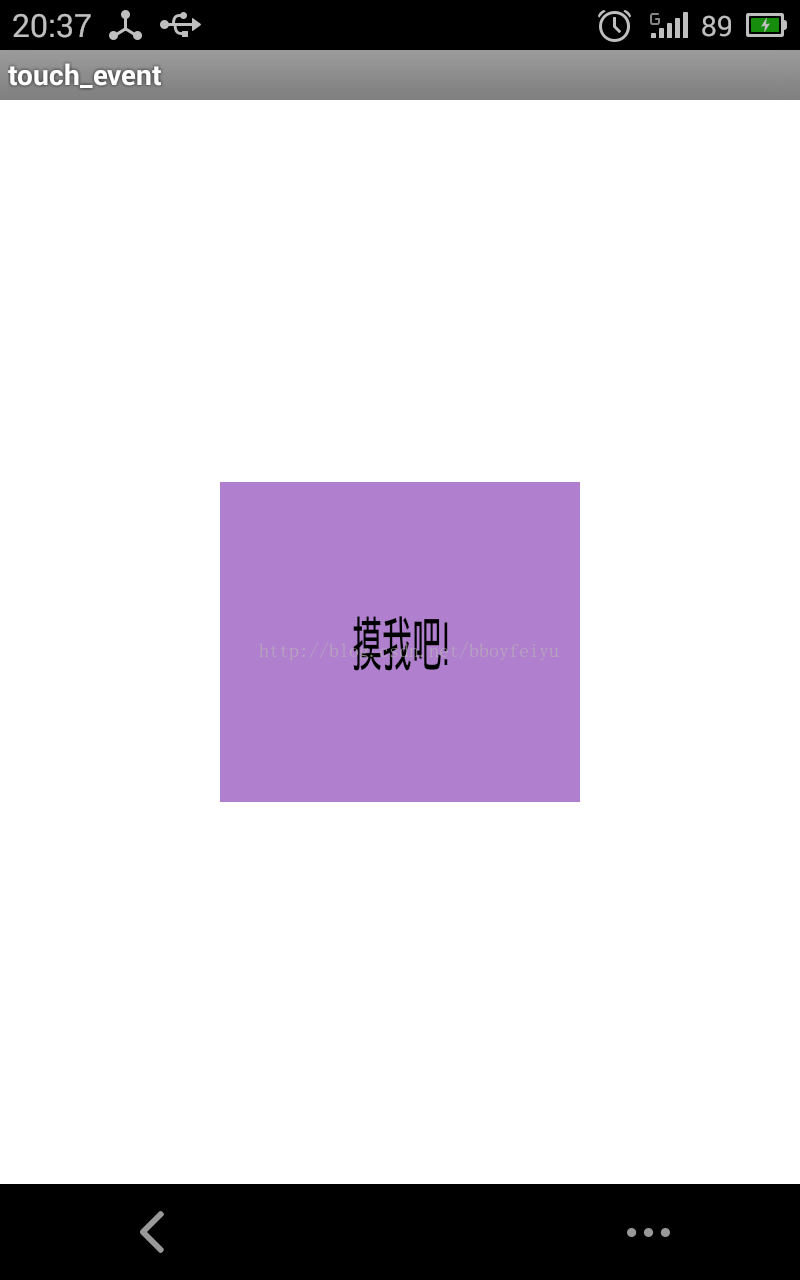
以下所有情景的觸摸事件都發生在 TouchTv 的範圍內。
條件:在 TouchLayout 的 onInterceptTouchEvent 中返回 true 進行攔截,並在 TouchLayout 的 onTouchEvent 中返回 true 消費事件。
說明:事件被攔截後,後續事件不再進入 onInterceptTouchEvent(If you return true from here, you will not receive any following events),而是直接進入 TouchLayout 的 onTouchEvent 處理。onTouchEvent 返回 true,代表事件被消費,不會再向上冒泡給父容器。
輸出:
// 事件攔截 10-01 20:22:52.892: D/TouchLayout# onInterceptTouchEvent(407): ### action --> ACTION_DOWN // 處理 10-01 20:22:52.892: D/TouchLayout# *** onTouchEvent(407): ### action --> ACTION_DOWN // DOWN的後續事件不經過onInterceptTouchEvent,直接交給TouchLayout的onTouchEvent處理 10-01 20:22:52.917: D/TouchLayout# *** onTouchEvent(407): ### action --> ACTION_MOVE 10-01 20:22:52.937: D/TouchLayout# *** onTouchEvent(407): ### action --> ACTION_MOVE 10-01 20:22:52.957: D/TouchLayout# *** onTouchEvent(407): ### action --> ACTION_MOVE 10-01 20:22:52.977: D/TouchLayout# *** onTouchEvent(407): ### action --> ACTION_MOVE 10-01 20:22:52.977: D/TouchLayout# *** onTouchEvent(407): ### action --> ACTION_MOVE 10-01 20:22:52.997: D/TouchLayout# *** onTouchEvent(407): ### action --> ACTION_MOVE 10-01 20:22:53.017: D/TouchLayout# *** onTouchEvent(407): ### action --> ACTION_MOVE 10-01 20:22:53.017: D/TouchLayout# *** onTouchEvent(407): ### action --> ACTION_UP
條件:在 TouchLayout 的 onInterceptTouchEvent 中於 ACTION_MOVE 時返回 true 攔截,TouchTv 的 onTouchEvent 返回 false,TouchLayout 的 onTouchEvent 返回 true 消費事件。
說明:被攔截之前,事件會先分發給 TouchTv 的 onTouchEvent 處理;被攔截之後,後續事件既不進入 onInterceptTouchEvent,也不再交給 TouchTv,而是直接走 TouchLayout 的 onTouchEvent。onTouchEvent 返回 true,事件被消費,不再向上冒泡。
輸出:
// DOWN中沒有對事件進行攔截,因此可以被TouchTv進行處理 10-01 20:32:05.017: D/TouchLayout# onInterceptTouchEvent(573): ### action --> ACTION_DOWN // TouchTv事件分發 10-01 20:32:05.017: D/TouchTv#dispatchTouchEvent(573): ### action --> ACTION_DOWN // TouchTv對事件進行處理,TouchTv的onTouchEvent返回false,導致事件交給TouchLayout的onTouchEvent處理 10-01 20:32:05.017: D/TouchTv#onTouchEvent(573): ### action --> ACTION_DOWN // TouchLayout的onTouchEvent處理DOWN事件 10-01 20:32:05.017: D/TouchLayout# *** onTouchEvent(573): ### action --> ACTION_DOWN // TouchLayout的onTouchEvent處理後續事件 10-01 20:32:05.062: D/TouchLayout# *** onTouchEvent(573): ### action --> ACTION_MOVE 10-01 20:32:05.082: D/TouchLayout# *** onTouchEvent(573): ### action --> ACTION_MOVE 10-01 20:32:05.267: D/TouchLayout# *** onTouchEvent(573): ### action --> ACTION_MOVE 10-01 20:32:05.287: D/TouchLayout# *** onTouchEvent(573): ### action --> ACTION_MOVE 10-01 20:32:05.307: D/TouchLayout# *** onTouchEvent(573): ### action --> ACTION_MOVE 10-01 20:32:05.307: D/TouchLayout# *** onTouchEvent(573): ### action --> ACTION_MOVE 10-01 20:32:05.312: D/TouchLayout# *** onTouchEvent(573): ### action --> ACTION_UP
條件:在 TouchLayout 的 onInterceptTouchEvent 中返回 true 攔截,但在 TouchLayout 的 onTouchEvent 中返回 false,導致事件未被消費。
說明:事件被攔截後,後續事件不進入 onInterceptTouchEvent,直接走 TouchLayout 的 onTouchEvent。onTouchEvent 返回 false,說明事件沒被消費,需要上交父容器;若最終無人處理,則交給 Activity 的 onTouchEvent。
輸出:
// 事件攔截onInterceptTouchEvent 10-01 20:16:03.617: D/TouchLayout# onInterceptTouchEvent(32675): ### action --> ACTION_DOWN // 事件處理onTouchEvent 10-01 20:16:03.617: D/TouchLayout# *** onTouchEvent(32675): ### action --> ACTION_DOWN // TouchLayout的dispatchTouchEvent最終返回了false, 10-01 20:16:03.617: D/TouchLayout(32675): ### dispatchTouchEvent, return false // 事件沒有被處理,最終交給了Activity的onTouchEvent處理 10-01 20:16:03.617: D/activity onTouchEvent(32675): ### action --> ACTION_DOWN 10-01 20:16:03.697: D/activity onTouchEvent(32675): ### action --> ACTION_MOVE 10-01 20:16:03.712: D/activity onTouchEvent(32675): ### action --> ACTION_MOVE 10-01 20:16:03.732: D/activity onTouchEvent(32675): ### action --> ACTION_MOVE 10-01 20:16:03.882: D/activity onTouchEvent(32675): ### action --> ACTION_MOVE 10-01 20:16:03.897: D/activity onTouchEvent(32675): ### action --> ACTION_MOVE 10-01 20:16:03.917: D/activity onTouchEvent(32675): ### action --> ACTION_UP
條件:TouchLayout 的 onInterceptTouchEvent 返回 false 不攔截,其 onTouchEvent 返回 true,但 TouchTv 的 onTouchEvent 返回 false,導致事件未被消費。
說明:不攔截時,事件最終進入 TouchTv 的 onTouchEvent,但它返回 false,說明未消費,需上交父容器;若最終無人處理,則交給 Activity 的 onTouchEvent。
輸出:
// TouchLayout不對事件進行攔截 10-01 20:43:04.682: D/TouchLayout# onInterceptTouchEvent(814): ### action --> ACTION_DOWN // 事件被TouchTv分發 10-01 20:43:04.682: D/TouchTv#dispatchTouchEvent(814): ### action --> ACTION_DOWN // 事件被TouchTv處理 10-01 20:43:04.682: D/TouchTv#onTouchEvent(814): ### action --> ACTION_DOWN // 事件被TouchTv的處理結果為false,因此該事件需要找parent來處理 10-01 20:43:04.682: D/TouchTv(814): ### dispatchTouchEvent result = false // 事件被交給TouchTv的parent的onTouchEvent處理,即TouchLayout的onTouchEvent,該方法返回true // 因此後續事件繼續交給TouchLayout處理 10-01 20:43:04.682: D/TouchLayout# *** onTouchEvent(814): ### action --> ACTION_DOWN 10-01 20:43:04.727: D/TouchLayout# *** onTouchEvent(814): ### action --> ACTION_MOVE 10-01 20:43:04.747: D/TouchLayout# *** onTouchEvent(814): ### action --> ACTION_MOVE 10-01 20:43:04.872: D/TouchLayout# *** onTouchEvent(814): ### action --> ACTION_MOVE 10-01 20:43:04.892: D/TouchLayout# *** onTouchEvent(814): ### action --> ACTION_MOVE 10-01 20:43:04.892: D/TouchLayout# *** onTouchEvent(814): ### action --> ACTION_UP
條件:TouchLayout 的 onInterceptTouchEvent 返回 false 不攔截,但 TouchTv 的 onTouchEvent 返回 true,事件被消費。
說明:不攔截時,事件最終進入 TouchTv 的 onTouchEvent,其返回 true,代表事件被消費。此後續事件會先經過 TouchLayout 的 onInterceptTouchEvent,再分發給 TouchTv。原文描述為:For as long as you return false from this function, each following event (up to and including the final up) will be delivered first here and then to the target's onTouchEvent().
輸出:
// TouchLayout不攔截事件,因此事件分發給TouchTv進行處理,而TouchTv的處理結果為true,因此後續的事件將會先從 // TouchLayout的onInterceptTouchEvent再到TouchTv的onTouchEvent 10-01 20:48:49.612: D/TouchLayout# onInterceptTouchEvent(1030): ### action --> ACTION_DOWN // TouchTv處理事件 10-01 20:48:49.612: D/TouchTv#dispatchTouchEvent(1030): ### action --> ACTION_DOWN 10-01 20:48:49.612: D/TouchTv#onTouchEvent(1030): ### action --> ACTION_DOWN 10-01 20:48:49.612: D/TouchTv(1030): ### dispatchTouchEvent result = true // 後續事件從TouchLayout的onInterceptTouchEvent再到TouchTv的onTouchEvent 10-01 20:48:49.697: D/TouchLayout# onInterceptTouchEvent(1030): ### action --> ACTION_MOVE 10-01 20:48:49.697: D/TouchTv#dispatchTouchEvent(1030): ### action --> ACTION_MOVE 10-01 20:48:49.697: D/TouchTv#onTouchEvent(1030): ### action --> ACTION_MOVE 10-01 20:48:49.697: D/TouchTv(1030): ### dispatchTouchEvent result = true 10-01 20:48:49.717: D/TouchLayout# onInterceptTouchEvent(1030): ### action --> ACTION_MOVE 10-01 20:48:49.717: D/TouchTv#dispatchTouchEvent(1030): ### action --> ACTION_MOVE 10-01 20:48:49.717: D/TouchTv#onTouchEvent(1030): ### action --> ACTION_MOVE 10-01 20:48:49.717: D/TouchTv(1030): ### dispatchTouchEvent result = true // UP事件直接在TouchTv中進行分發 10-01 20:48:49.782: D/TouchTv#dispatchTouchEvent(1030): ### action --> ACTION_UP 10-01 20:48:49.782: D/TouchTv#onTouchEvent(1030): ### action --> ACTION_UP 10-01 20:48:49.782: D/TouchTv(1030): ### dispatchTouchEvent result = true
條件:TouchLayout 的 onInterceptTouchEvent 在 DOWN 中返回 false,但在 MOVE 中返回 true,且 TouchTv 的 onTouchEvent 返回 true。
說明:DOWN 不攔截,TouchTv 得以正常處理;但 MOVE 時進行攔截,TouchTv 便收不到 MOVE 及之後的事件,只會收到一個 CANCEL,後續事件轉由 TouchLayout 的 onTouchEvent 處理。(If you return true from here, you will not receive any following events: the target view will receive the same event but with the action ACTION_CANCEL, and all further events will be delivered to your onTouchEvent() method and no longer appear here.)
輸出:
// TouchLayout不對DOWN進行攔截 10-01 20:56:37.642: D/TouchLayout# onInterceptTouchEvent(1205): ### action --> ACTION_DOWN // TouchTv分發與處理DOWN事件 10-01 20:56:37.642: D/TouchTv#dispatchTouchEvent(1205): ### action --> ACTION_DOWN 10-01 20:56:37.642: D/TouchTv#onTouchEvent(1205): ### action --> ACTION_DOWN 10-01 20:56:37.642: D/TouchTv(1205): ### dispatchTouchEvent result = true // TouchLayout對MOVE事件進行攔截 10-01 20:56:37.712: D/TouchLayout# onInterceptTouchEvent(1205): ### action --> ACTION_MOVE // TouchTv收到一個CANCEL事件,然後不會收到MOVE以及後續的事件 10-01 20:56:37.712: D/TouchTv#dispatchTouchEvent(1205): ### action --> ACTION_CANCEL 10-01 20:56:37.712: D/TouchTv#onTouchEvent(1205): ### action --> ACTION_CANCEL 10-01 20:56:37.712: D/TouchTv(1205): ### dispatchTouchEvent result = true // MOVE以及後續事件被TouchLayout處理 10-01 20:56:37.727: D/TouchLayout# *** onTouchEvent(1205): ### action --> ACTION_MOVE 10-01 20:56:37.747: D/TouchLayout# *** onTouchEvent(1205): ### action --> ACTION_MOVE 10-01 20:56:37.762: D/TouchLayout# *** onTouchEvent(1205): ### action --> ACTION_MOVE 10-01 20:56:37.777: D/TouchLayout# *** onTouchEvent(1205): ### action --> ACTION_MOVE 10-01 20:56:37.797: D/TouchLayout# *** onTouchEvent(1205): ### action --> ACTION_MOVE 10-01 20:56:37.997: D/TouchLayout# *** onTouchEvent(1205): ### action --> ACTION_MOVE 10-01 20:56:38.012: D/TouchLayout# *** onTouchEvent(1205): ### action --> ACTION_MOVE 10-01 20:56:38.017: D/TouchLayout# *** onTouchEvent(1205): ### action --> ACTION_UP
把上面幾種常見情況歸納一下,有三個關鍵點值得牢記:
1、若父 ViewGroup 的 onInterceptTouchEvent 返回 false,且觸摸目標 View 對事件的處理返回 true,那麼後續事件會先經過父容器的 onInterceptTouchEvent,再交給目標 View 處理。
2、若父 ViewGroup 的 onInterceptTouchEvent 返回 true(即攔截),事件便不再經過 onInterceptTouchEvent,而是直接進入 onTouchEvent。此時 onTouchEvent 返回 true 表示事件被處理;返回 false 則表示未處理,事件會上交其父容器,若無人接手,最終交給 Activity。
3、若在中途某個事件才攔截,目標 View 會收到一個 CANCEL 事件,後續事件不再交給它,而是轉交父容器的 onTouchEvent。情景六就是典型案例:DOWN 不攔截,TouchTv 正常處理;MOVE 時攔截,TouchTv 收到 CANCEL,MOVE 及之後的事件全交給 TouchLayout。這正是下拉刷新所需要的場景。
我們再結合 ViewGroup 的事件分發源碼來驗證:
/** * {@inheritDoc} */ @Override public boolean dispatchTouchEvent(MotionEvent ev) { if (!onFilterTouchEventForSecurity(ev)) { return false; } final int action = ev.getAction(); final float xf = ev.getX(); final float yf = ev.getY(); final float scrolledXFloat = xf + mScrollX; final float scrolledYFloat = yf + mScrollY; final Rect frame = mTempRect; // 是否禁用攔截,如果為true表示不能攔截事件;反之,則為可以攔截事件 boolean disallowIntercept = (mGroupFlags & FLAG_DISALLOW_INTERCEPT) != 0; // ACTION_DOWN事件,即按下事件 if (action == MotionEvent.ACTION_DOWN) { if (mMotionTarget != null) { mMotionTarget = null; } // If we're disallowing intercept or if we're allowing and we didn't // intercept。如果不允許事件攔截或者不攔截該事件,那麼執行下面的操作 if (disallowIntercept || !onInterceptTouchEvent(ev)) // 1、是否禁用攔截、是否攔截事件的判斷 // reset this event's action (just to protect ourselves) ev.setAction(MotionEvent.ACTION_DOWN); // We know we want to dispatch the event down, find a child // who can handle it, start with the front-most child. final int scrolledXInt = (int) scrolledXFloat; final int scrolledYInt = (int) scrolledYFloat; final View[] children = mChildren; final int count = mChildrenCount; for (int i = count - 1; i >= 0; i--) // 2、迭代所有子view,查找觸摸事件在哪個子view的坐標范圍內 final View child = children[i]; // 該child是可見的 if ((child.mViewFlags & VISIBILITY_MASK) == VISIBLE || child.getAnimation() != null) { // 3、獲取child的坐標范圍 child.getHitRect(frame); // 4、判斷發生該事件坐標是否在該child坐標范圍內 if (frame.contains(scrolledXInt, scrolledYInt)) // offset the event to the view's coordinate system final float xc = scrolledXFloat - child.mLeft; final float yc = scrolledYFloat - child.mTop; ev.setLocation(xc, yc); child.mPrivateFlags &= ~CANCEL_NEXT_UP_EVENT; // 5、child處理該事件,如果返回true,那麼mMotionTarget為該child。正常情況下, // dispatchTouchEvent(ev)的返回值即onTouchEcent的返回值。因此onTouchEcent如果返回為true, // 那麼mMotionTarget為觸摸事件所在位置的child。 if (child.dispatchTouchEvent(ev)) // 6、 mMotionTarget為該child mMotionTarget = child; return true; } } } } } }// end if boolean isUpOrCancel = (action == MotionEvent.ACTION_UP) || (action == MotionEvent.ACTION_CANCEL); if (isUpOrCancel) { // Note, we've already copied the previous state to our local // variable, so this takes effect on the next event mGroupFlags &= ~FLAG_DISALLOW_INTERCEPT; } // 觸摸事件的目標view, 即觸摸所在的view final View target = mMotionTarget; // 7、如果mMotionTarget為空,那麼執行super.super.dispatchTouchEvent(ev), // 即View.dispatchTouchEvent(ev),就是該View Group自己處理該touch事件,只是又走了一遍View的分發過程而已. // 攔截事件或者在不攔截事件且target view的onTouchEvent返回false的情況都會執行到這一步. if (target == null) { // We don't have a target, this means we're handling the // event as a regular view. ev.setLocation(xf, yf); if ((mPrivateFlags & CANCEL_NEXT_UP_EVENT) != 0) { ev.setAction(MotionEvent.ACTION_CANCEL); mPrivateFlags &= ~CANCEL_NEXT_UP_EVENT; } return super.dispatchTouchEvent(ev); } // 8、如果沒有禁用事件攔截,並且onInterceptTouchEvent(ev)返回為true,即進行事件攔截. ( 似乎總走不到這一步 ??? ) if (!disallowIntercept && onInterceptTouchEvent(ev)) { final float xc = scrolledXFloat - (float) target.mLeft; final float yc = scrolledYFloat - (float) target.mTop; mPrivateFlags &= ~CANCEL_NEXT_UP_EVENT; ev.setAction(MotionEvent.ACTION_CANCEL); ev.setLocation(xc, yc); // if (!target.dispatchTouchEvent(ev)) { // target didn't handle ACTION_CANCEL. not much we can do // but they should have. } // clear the target mMotionTarget = null; // Don't dispatch this event to our own view, because we already // saw it when intercepting; we just want to give the following // event to the normal onTouchEvent(). return true; } if (isUpOrCancel) { mMotionTarget = null; } // finally offset the event to the target's coordinate system and // dispatch the event. final float xc = scrolledXFloat - (float) target.mLeft; final float yc = scrolledYFloat - (float) target.mTop; ev.setLocation(xc, yc); if ((target.mPrivateFlags & CANCEL_NEXT_UP_EVENT) != 0) { ev.setAction(MotionEvent.ACTION_CANCEL); target.mPrivateFlags &= ~CANCEL_NEXT_UP_EVENT; mMotionTarget = null; } // 9、事件不攔截,且target view在ACTION_DOWN時返回true,那麼後續事件由target來處理事件 return target.dispatchTouchEvent(ev); }梳理一下源碼邏輯:若不攔截且 TouchTv 對事件返回 true,那麼 DOWN 時 mMotionTarget 就是 TouchTv,後續事件通過註釋 9 直接交給 TouchTv 處理。若 DOWN 時就攔截,mMotionTarget 為空,會走到註釋 7 的代碼,不斷調用 super.dispatchTouchEvent,最終落到本類的 onTouchEvent。若 DOWN 不攔截、MOVE 時攔截,則觸發註釋 8 的邏輯,target 收到 cancel 事件且 mMotionTarget 被置空,後續事件在註釋 7 處交由自己的 onTouchEvent 處理。
 Android 自定義視圖:打造類似淘寶商品詳情的雙頁切換效果
在電商類應用中,商品詳情頁通常需要兼顧資訊展示與沉浸式瀏覽。本文以一個類似淘寶詳情的頁面為例,說明如何透過自定義 ViewGroup 實作上下雙頁切換效果。 整體思路
 如何找回 Android 手機誤刪的照片
網路上不難看到這類新聞:另一半出了狀況,為了不讓對方發現手機裡的資料,不惜格式化甚至砸毀手機,結果對方拿著那支機器去找資料救援人員,幾天之後大部分檔案原封不動地回來了,只
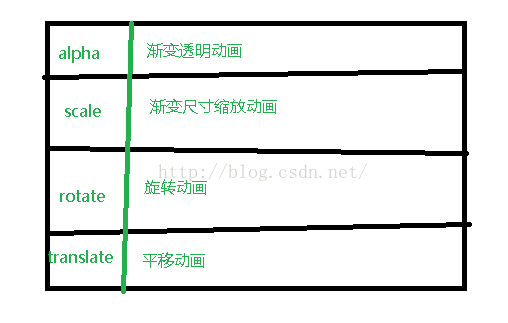 Android 動畫入門(一):Tween 動畫四兄弟與座標計算的眉角
想做一些有記憶點的動效,動畫是繞不開的一課。但所有花俏效果都得從基礎開始墊——底層不牢,學進階技術時容易在某一個環節卡住,連問題出在哪裡都說不上來。這篇就把最基礎的 Vi
 Android JNI 學習筆記(四):型別映射與在 Native 層反過來呼叫 Java
1. 前言 前面幾篇我們走完了 JNI 開發的基本流程、動態註冊 native 函數,以及編譯相關文件的寫法。但只到這裡還不夠——今天要補上兩塊拼圖:Java 與 JNI