

編輯:關於 Android 程式設計
Android 最基礎的動畫方案由 Animation 類別提供,兩種撰寫方式都支援:一是寫在 XML 裡,二是用 Java 程式碼動態產生。這篇把四種基本動畫與插入器的細節一次講清楚。
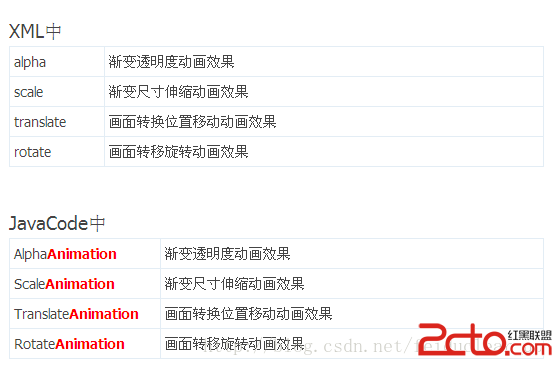
<set> 是所有動畫的根節點,底下可以掛多組子動畫:
| 屬性 | 說明 | 備註 |
|---|---|---|
| android:shareInterpolator | 是否共用插入器 | 共用時四個子節點使用同一個插入器 |
| android:interpolator | 指定動畫插入器 | 透過系統資源引用 |
| android:fillEnabled | 填充總開關 | 設為 true 時 fillAfter 與 fillBefore 都會生效,此時會忽略個別設定 |
| android:fillAfter | 動畫結束後是否保留轉換結果 | boolean |
| android:fillBefore | 動畫開始前是否套用轉換 | boolean |
| android:repeatMode | 重複模式 | "restart" 從頭開始;"reverse" 從末尾反推 |
| android:repeatCount | 重複次數 | integer,-1 為無限循環 |
| android:duration | 動畫持續時間 | integer |
| android:startOffset | 動畫間隔(執行前停留時間) | long |
| android:zAdjustment | 定義動畫 z 軸順序的變化 | [normal] / [top] / [bottom] |
| android:detachWallpaper | — | boolean |
插入器決定了動畫的「速度曲線」,也就是我們對動畫手感最直接的感受來源。
@android:anim/accelerate_decelerate_interpolator:先加速後減速。@android:anim/accelerate_interpolator:一路加速。@android:anim/decelerate_interpolator:一路減速。@android:anim/anticipate_interpolator:先往反方向退一小步,再沿設定方向前進。@android:anim/anticipate_overshoot_interpolator:先反退,衝過終點一點點,再回彈到最終位置。@android:anim/bounce_interpolator:抵達終點時連續彈跳幾下後停止。@android:anim/cycle_interpolator:週期性循環運動。@android:anim/linear_interpolator:等速移動。@android:anim/overshoot_interpolator:快速衝到終點並超出,再折回。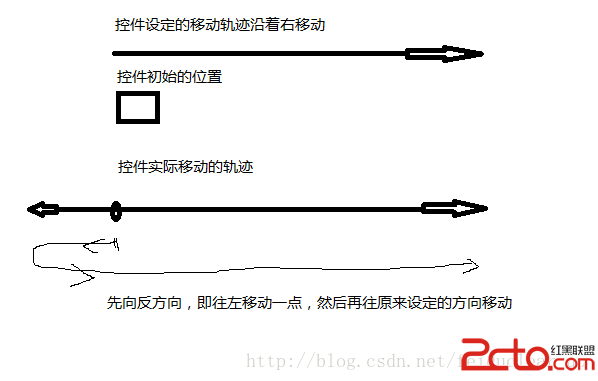
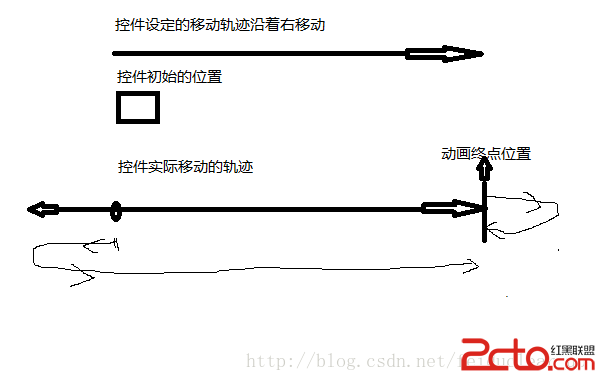
以 anticipate 系列為例,軌跡大致如下:
| Interpolator 物件 | 資源 ID | 功能作用 |
|---|---|---|
| AccelerateDecelerateInterpolator | @android:anim/accelerate_decelerate_interpolator | 先加速再減速 |
| AccelerateInterpolator | @android:anim/accelerate_interpolator | 加速 |
| AnticipateInterpolator | @android:anim/anticipate_interpolator | 先回退一小步然後加速前進 |
| AnticipateOvershootInterpolator | @android:anim/anticipate_overshoot_interpolator | 在上一個基礎上超出終點一小步再回到終點 |
| BounceInterpolator | @android:anim/bounce_interpolator | 最後階段彈球效果 |
| CycleInterpolator | @android:anim/cycle_interpolator | 週期運動 |
| DecelerateInterpolator | @android:anim/decelerate_interpolator | 減速 |
| LinearInterpolator | @android:anim/linear_interpolator | 等速 |
| OvershootInterpolator | @android:anim/overshoot_interpolator | 快速到達終點並超出一小步,最後回到終點 |
表二:alpha(透明度)
| 屬性 | 說明 | 備註 |
|---|---|---|
| android:fromAlpha | 動畫開始時的透明度 | float [0,1],0 全透明、1 全不透明 |
| android:toAlpha | 動畫結束時的透明度 | float [0,1] |
| android:duration | 動畫持續時間 | integer |
表三:scale(縮放)
| 屬性 | 說明 | 備註 |
|---|---|---|
| android:fromXScale / toXScale | X 軸的伸縮尺寸起訖值 | 0.0 表示收縮到消失、1.0 正常,小於 1 縮小、大於 1 放大 |
| android:fromYScale / toYScale | Y 軸的伸縮尺寸起訖值 | 同上 |
| android:pivotX | 縮放相對於物件的 X 基準位置 | [0%,100%],50% 為正中央 |
| android:pivotY | 縮放相對於物件的 Y 基準位置 | [0%,100%],50% 為正中央 |
表四:translate(位移)
| 屬性 | 說明 | 備註 |
|---|---|---|
| android:fromXDelta / toXDelta | X 軸位置的起訖值 | 預設以自己為參照物 |
| android:fromYDelta / toYDelta | Y 軸位置的起訖值 | 預設以自己為參照物 |
表五:rotate(旋轉)
| 屬性 | 說明 | 備註 |
|---|---|---|
| android:fromDegrees | 起始角度 | 負數逆時針、正數順時針 |
| android:toDegrees | 結束角度 | 可大於 360 度 |
| android:pivotX / pivotY | 旋轉中心點 | [0%,100%],50% 為正中央 |
XML 寫法:
<?xml version="1.0" encoding="utf-8"?>
<set xmlns:android="https://schemas.android.com/apk/res/android"
     android:fillAfter="true"
     android:fillBefore="false" >
    <alpha android:fromAlpha="0.0" android:toAlpha="1.0" android:duration="2000" />
</set>
這裡有個常被忽略的細節:如果你希望動畫停在最後一幀,android:fillAfter="true" 與 fillBefore="false" 必須寫在 <set> 上才有效,寫在子節點是不會生效的。
程式碼寫法:
Animation anim = new AlphaAnimation(0f, 1.0f);
anim.setDuration(2000);
anim.setRepeatCount(Animation.INFINITE);
anim.setRepeatMode(Animation.RESTART);
<?xml version="1.0" encoding="utf-8"?>
<set xmlns:android="https://schemas.android.com/apk/res/android"
     android:fillAfter="true"
     android:interpolator="@android:anim/decelerate_interpolator" >
    <scale android:duration="2000"
           android:fromXScale="0.5"
           android:fromYScale="0.5"
           android:pivotX="50.0%"
           android:pivotY="50.0%"
           android:repeatCount="3"
           android:repeatMode="reverse"
           android:toXScale="1.0"
           android:toYScale="1.0" />
</set>
pivotX / pivotY 設為 50% 代表從容器正中央開始縮放,這是實務上最常用的一組值。
Animation anim1 = new ScaleAnimation(0.5f, 1.0f, 0.5f, 1.0f, 0.5f, 0.5f);
anim1.setDuration(2000);
anim1.setRepeatCount(3);
anim1.setRepeatMode(Animation.REVERSE);
anim1.setInterpolator(this, interpolator.accelerate_decelerate);
anim1.setFillAfter(true);
Animation animTranlate = new TranslateAnimation(0, 0, 0, 400);
animTranlate.setDuration(2000);
animTranlate.setFillAfter(true);
animTranlate.setInterpolator(this, interpolator.bounce);
text.startAnimation(animTranlate);
<?xml version="1.0" encoding="utf-8"?>
<set xmlns:android="https://schemas.android.com/apk/res/android"
     android:fillAfter="true"
     android:interpolator="@android:anim/accelerate_decelerate_interpolator" >
    <rotate android:duration="2000"
            android:fromDegrees="0"
            android:pivotX="50%"
            android:pivotY="50%"
            android:toDegrees="180" />
</set>
Animation animRotate = new RotateAnimation(0f, 360f,
        Animation.RELATIVE_TO_SELF, 0.5f,
        Animation.RELATIVE_TO_SELF, 0.5f);
animRotate.setDuration(2000);
animRotate.setInterpolator(this, interpolator.bounce);
animRotate.setFillAfter(true);
animRotate.setStartOffset(2000);   // 執行前停留時間
text.startAnimation(animRotate);
XML 版本把多組子動畫塞進同一個 <set> 即可:
<?xml version="1.0" encoding="utf-8"?>
<set xmlns:android="https://schemas.android.com/apk/res/android"
     android:duration="2000"
     android:fillAfter="true"
     android:interpolator="@android:anim/accelerate_decelerate_interpolator" >
    <scale android:fromXScale="0"
           android:fromYScale="0"
           android:pivotX="50%"
           android:pivotY="50%"
           android:toXScale="1.0"
           android:toYScale="1.0" />
</set>
程式碼版本用 AnimationSet 收集:
Animation anim1 = new ScaleAnimation(0.5f, 1.0f, 0.5f, 1.0f, 0.5f, 0.5f);
anim1.setDuration(2000);
anim1.setRepeatCount(3);
anim1.setRepeatMode(Animation.REVERSE);
anim1.setInterpolator(this, interpolator.accelerate_decelerate);
anim1.setFillAfter(true);

Animation animTranlate = new TranslateAnimation(0, 0, 0, 400);
animTranlate.setDuration(2000);
animTranlate.setFillAfter(true);
animTranlate.setInterpolator(this, interpolator.bounce);

Animation animRotate = new RotateAnimation(0f, 360f,
        Animation.RELATIVE_TO_SELF, 0.5f,
        Animation.RELATIVE_TO_SELF, 0.5f);
animRotate.setDuration(2000);
animRotate.setInterpolator(this, interpolator.bounce);
animRotate.setFillAfter(true);

AnimationSet animationSet = new AnimationSet(true);
animationSet.addAnimation(animRotate);
animationSet.addAnimation(animTranlate);
animationSet.addAnimation(anim1);
text.startAnimation(animationSet);
構造子裡那個 true 參數等同於 XML 的 shareInterpolator,代表子動畫共用同一個插入器;若各子動畫想跑各自的速度曲線,記得改傳 false。
 DrawerLayout 官方側滑菜單詳解:單側與左右雙側完整實作
概述 本節是基礎 UI 控件系列的最後一個:DrawerLayout,官方提供的側滑菜單控件。和 ViewPager 一樣在 3.0 之後引入,低版本要使用得靠 v4 相
 Android 5.0 錄屏方案全解析:MediaCodec、MediaMuxer 與 MediaProjection
本文是圍繞「Android 直播助手」這個功能所做的研究與整理。由於過去對 Android 多媒體相關內容所知有限,只有一些概念性的認識,於是查了資料並歸納成文。 先補一
 Android 自訂控制項實作底部選單(上)
今天我們要封裝一個底部選單欄,這是大多數應用都會用到的元件,因此把它自訂出來,方便日後專案重複使用。 這個控制項的實作將分為上下兩篇來介紹。先來認識選單欄的子控制項 Me
 Android Design 解讀:Android 4.0 帶來的設計新里程碑
想成為一名出色的 Android 開發工程師,怎麼能不懂 Android 的設計規範呢?自從 Android 4.0 問世後,Google 為 Android 開發者制定