

編輯:關於 Android 程式設計
以下分析基於 Launcher2.3 的源碼。
每個應用的主 Activity 通常都會聲明:
<category android:name="android.intent.category.LAUNCHER" />這個 category 的作用是聲明「本 Activity 作為應用的入口」。Launcher 在掃描已安裝應用時,會查詢所有帶此 category 的 Activity,並為它們在桌面生成圖標。
從 Launcher2 源碼的時序圖可以看出,創建一個 shortcut 需要準備兩方面內容:一個 action,以及一個檢索後返回的 Intent。
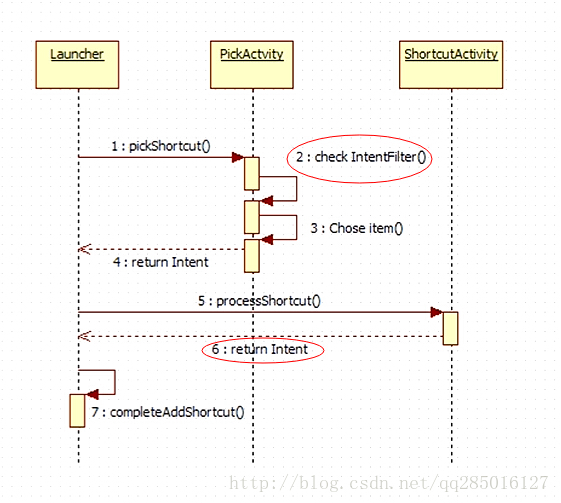
如果希望用戶能在桌面通過「添加 → 快捷方式」的菜單手動創建,就必須讓系統能發現你的 Activity。做法是添加一個匹配 ACTION_CREATE_SHORTCUT 的 intent-filter:
<activity
    android:name=".ShortCutActivity"
    android:label="我的快捷方式" >
    <intent-filter>
        <action android:name="android.intent.action.CREATE_SHORTCUT" />
        <category android:name="android.intent.category.DEFAULT" />
    </intent-filter>
</activity>當系統以 ACTION_CREATE_SHORTCUT 拉起你的 Activity 時,你必須通過 setResult 返回一個 Intent,其中攜帶圖標、名稱和目標 Intent 三項信息:
/**
 * @author Lean
 * @date: 2014-8-25
 */
public class ShortCutActivity extends Activity {

    @Override
    protected void onCreate(Bundle savedInstanceState) {
        super.onCreate(savedInstanceState);

        if (getIntent().getAction().equals(Intent.ACTION_CREATE_SHORTCUT)) {
            Intent returnIntent = new Intent();

            // 圖標
            returnIntent.putExtra(Intent.EXTRA_SHORTCUT_ICON_RESOURCE,
                    Intent.ShortcutIconResource.fromContext(this, R.drawable.ic_launcher));

            // 名稱
            returnIntent.putExtra(Intent.EXTRA_SHORTCUT_NAME, "a simple shortCut");

            // 點擊後要打開的目標
            returnIntent.putExtra(Intent.EXTRA_SHORTCUT_INTENT,
                    new Intent(this, MainActivity.class));

            setResult(RESULT_OK, returnIntent);
            finish();
        }
    }
}
三個 extra 缺一不可。EXTRA_SHORTCUT_INTENT 決定了點擊圖標後跳去哪裡,EXTRA_SHORTCUT_NAME 是桌面上顯示的文字,EXTRA_SHORTCUT_ICON_RESOURCE 則指定圖標資源。注意這裡用的是 ShortcutIconResource.fromContext() 而非直接傳 drawable id,這是因為 Launcher 運行在另一個進程,必須通過這種可跨進程傳遞的包裝形式傳遞圖標引用。
上述方式只能由用戶手動觸發。如果想在應用內部一鍵創建快捷方式,就需要主動發送廣播。Launcher2 源碼中定義了對應的 action:
com.android.launcher.action.INSTALL_SHORTCUT發送這條廣播需要相應權限,因此在 AndroidManifest.xml 中補充:
<uses-permission android:name="com.android.launcher.permission.INSTALL_SHORTCUT" />然後在代碼中組裝並發送廣播(同樣必須指定圖標、名稱與操作意圖):
Intent intent = new Intent();
intent.setAction("com.android.launcher.action.INSTALL_SHORTCUT");

intent.putExtra(Intent.EXTRA_SHORTCUT_ICON_RESOURCE, R.drawable.ic_launcher);
intent.putExtra(Intent.EXTRA_SHORTCUT_NAME, "a auto sample");
intent.putExtra(Intent.EXTRA_SHORTCUT_INTENT,
        new Intent(MainActivity.this, MainActivity.class));

sendBroadcast(intent);與安裝對應的是卸載廣播,action 為 com.android.launcher.action.UNINSTALL_SHORTCUT,需要權限 com.android.launcher.permission.UNINSTALL_SHORTCUT。這裡不需要傳圖標,只要給出當初創建時的 Intent 即可,Launcher 會以此作為唯一標識去匹配:
Intent intent = new Intent();
intent.setAction("com.android.launcher.action.UNINSTALL_SHORTCUT");
intent.putExtra(Intent.EXTRA_SHORTCUT_INTENT,
        new Intent(MainActivity.this, MainActivity.class));
sendBroadcast(intent);Intent.ShortcutIconResource 或記錄本地標記,做去重處理。ShortcutManager.requestPinShortcut(),並引導用戶確認固定。ShortCut 的本質是「一個帶圖標和名稱的 Intent 引用」。手動創建依賴 ACTION_CREATE_SHORTCUT 的 intent-filter 與 setResult 回傳;動態創建依賴 INSTALL_SHORTCUT 廣播與對應權限。理解 Launcher 掃描 category.LAUNCHER 生成圖標、以及通過 ACTION_CREATE_SHORTCUT 收集自定義快捷方式這兩條路徑,就掌握了桌面圖標的生成邏輯。
 Android 用 AnimationDrawable 輕鬆模擬動態圖
Drawable animation 是 Android 做逐幀動畫最省力的方式:把一張張連續的圖當作影格,依序播放就成了動畫。核心類別是 AnimationDrawab
 Android 進程通信:用 AIDL 實現跨進程並發調用
AIDL 概述 用 Messenger 實現的 IPC 有一個明顯不足:Service 內部維護著一個 Messenger,Messenger 內部又維護著一個 Hand
 21 天學會 Android 開發:MediaPlayer 影音播放實作
本文來談 MediaPlayer。它可以播放音訊與影片,是 Android 多媒體播放的核心類別。 如果只是要播影片,VideoView 更簡單易用;但客製化程度不如 M
 Material Design 新 UI 控件用法大全(二):TabLayout 與 CoordinatorLayout
序言 上一篇介紹了幾個比較基礎的新控件,相信大家对 Material Design 的視覺語言已經有了初步認識。這次我們繼續往下挖,看看 CoordinatorLayou