

編輯:關於 Android 程式設計
下載版本 1.4.2(最新版),或 fork me on github。
這是一個基於 Apache HttpClient 建構的非同步、回呼式 HTTP 用戶端。所有請求都在 App 的主 UI 線程之外發出,而回呼邏輯則透過 Android 的 Handler 訊息傳遞機制,在建立回呼的同一條線程上執行。
從 github 下載最新的 .jar 檔並放入 App 的 libs/ 資料夾,然後匯入 http 套件:
import com.loopj.android.http.*;

AsyncHttpClient client = new AsyncHttpClient();
client.get("https://www.google.com", new AsyncHttpResponseHandler() {
    @Override
    public void onSuccess(String response) {
        System.out.println(response);
    }
});
可建立一個帶靜態存取器的方法類別,方便與 API 溝通:
import com.loopj.android.http.*;

public class TwitterRestClient {
    private static final String BASE_URL = "https://api.twitter.com/1/";
    private static AsyncHttpClient client = new AsyncHttpClient();

    public static void get(String url, RequestParams params, AsyncHttpResponseHandler responseHandler) {
        client.get(getAbsoluteUrl(url), params, responseHandler);
    }

    public static void post(String url, RequestParams params, AsyncHttpResponseHandler responseHandler) {
        client.post(getAbsoluteUrl(url), params, responseHandler);
    }

    private static String getAbsoluteUrl(String relativeUrl) {
        return BASE_URL + relativeUrl;
    }
}
如此一來在程式中操作 API 就非常直觀:
TwitterRestClient.get("statuses/public_timeline.json", null, new JsonHttpResponseHandler() {
    @Override
    public void onSuccess(JSONArray timeline) {
        JSONObject firstEvent = timeline.getJSONObject(0);
        String tweetText = firstEvent.getString("text");
        System.out.println(tweetText);
    }
});
PersistentCookieStore 是 Apache HttpClient CookieStore 介面的實作,會自動把 Cookie 存到裝置的 SharedPreferences。這對以 Cookie 管理登入工作階段非常有用,使用者即使關閉再重開 App 仍能保持登入:
AsyncHttpClient myClient = new AsyncHttpClient();
PersistentCookieStore myCookieStore = new PersistentCookieStore(this);
myClient.setCookieStore(myCookieStore);
RequestParams params = new RequestParams();
params.put("key", "value");
params.put("more", "data");

// 單一參數
RequestParams params = new RequestParams("single", "value");

// 從 Map 建立
HashMap<String, String> paramMap = new HashMap<String, String>();
paramMap.put("key", "value");
RequestParams params = new RequestParams(paramMap);
// 上傳 InputStream
InputStream myInputStream = blah;
params.put("secret_passwords", myInputStream, "passwords.txt");

// 上傳 File
File myFile = new File("/path/to/file.png");
params.put("profile_picture", myFile);

// 上傳 byte 陣列
params.put("soundtrack", new ByteArrayInputStream(myByteArray), "she-wolf.mp3");
AsyncHttpClient client = new AsyncHttpClient();
String[] allowedContentTypes = new String[] { "image/png", "image/jpeg" };
client.get("https://example.com/file.png", new BinaryHttpResponseHandler(allowedContentTypes) {
    @Override
    public void onSuccess(byte[] fileData) {
        // 處理檔案
    }
});
AsyncHttpClient client = new AsyncHttpClient();
client.setBasicAuth("username", "password/token");
client.get("https://example.com");

// 更精確的驗證範圍(推薦)
client.setBasicAuth("username", "password", new AuthScope("example.com", 80, AuthScope.ANY_REALM));
client.get("https://example.com");
先 clone android-async-http 的 github 倉庫,將 local.properties.dist 複製為 local.properties 並編輯 sdk.dir 指向 Android SDK 安裝位置,然後執行:
ant package
就會生成 android-async-http-version.jar。
本專案採用對 Android 友善的 Apache License 2.0 授權條款。
James Smith,英國創業家與開發者,現居舊金山,是 Bugsnag 的共同創辦人,2009 至 2012 年間擔任 Heyzap 的 CTO。
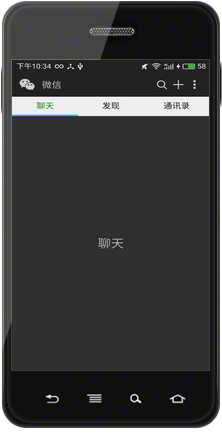 高仿微信 5.2.1 主介面:ViewPager、Fragment 與未讀紅點
這篇文章以模仿微信 5.2.1 主介面為例,說明如何製作自訂標題欄、分頁切換、滑動指示條與未讀訊息紅點。雖然是入門級 Demo,但涵蓋了 ViewPager、Fragme
 自定義 View 實現水面上漲進度條效果
效果預覽 實現思路 拆成兩個獨立的技術問題: 問題一:如何讓水面只出現在圓內部?利用 Paint 的 setXfermode 配合 PorterDuff.Mode.SR
 Android 向伺服器發送 JSON 資料的實作教學
本文講解如何從 Android 端把 JSON 資料送到伺服器,內容偏向基礎入門。核心步驟包括:使用 Gson 將物件序列化為 JSON、透過 HttpClient 送出
 React Native ActivityIndicator 加載指示器使用說明
在 React Native 中,ActivityIndicator 是常見的加載指示器元件,常被用來表示資料讀取、網路請求或畫面初始化中的等待狀態。它的外觀類似轉動的菊