

編輯:關於 Android 程式設計
工具類是項目裡最容易被複製來複製去的東西。這篇整理了六個高頻場景的實現,覆蓋多媒體、屏幕適配、文件管理、交互防抖、中文處理與網絡狀態判斷。
生成縮略圖有兩個關鍵點:一是控制記憶體,二是避免拉伸變形。
記憶體方面採用「三次解碼」策略:第一次只讀取寬高(inJustDecodeBounds = true,此時 bitmap 為 null),第二次按比例降採樣讀入縮小後的圖,第三次才用 ThumbnailUtils 裁出目標尺寸。變形方面,ThumbnailUtils 是 API 8 之後引入的工具,它會等比裁切而非硬拉伸。
import android.graphics.Bitmap;
import android.graphics.BitmapFactory;
import android.media.ThumbnailUtils;

/**
 * 縮略圖生成工具類
 */
public class ThumbnailGenerateUtils {

    private ThumbnailGenerateUtils() {}

    /**
     * 根據指定的圖像路徑和大小獲取縮略圖
     * @param imagePath 圖像路徑
     * @param width     指定輸出圖像的寬度
     * @param height    指定輸出圖像的高度
     * @return 生成的縮略圖
     */
    public static Bitmap getImageThumbnail(String imagePath, int width, int height) {
        Bitmap bitmap;
        BitmapFactory.Options options = new BitmapFactory.Options();

        // 第一次:只讀寬高,不真正載入像素
        options.inJustDecodeBounds = true;
        bitmap = BitmapFactory.decodeFile(imagePath, options);
        options.inJustDecodeBounds = false;

        int h = options.outHeight;
        int w = options.outWidth;
        int beWidth = w / width;
        int beHeight = h / height;
        int be = 1;
        if (beWidth < beHeight) {
            be = beWidth;
        } else {
            be = beHeight;
        }
        if (be <= 0) {
            be = 1;
        }
        options.inSampleSize = be;

        // 第二次:按比例降採樣讀入
        bitmap = BitmapFactory.decodeFile(imagePath, options);

        // 第三次:裁出目標尺寸
        bitmap = ThumbnailUtils.extractThumbnail(bitmap, width, height,
                ThumbnailUtils.OPTIONS_RECYCLE_INPUT);
        return bitmap;
    }

    /**
     * 獲取視頻的縮略圖
     * @param videoPath 視頻路徑
     * @param width     輸出寬度
     * @param height    輸出高度
     * @param kind      參照 MediaStore.Images.Thumbnails 的常量
     *                  MINI_KIND: 512 x 384,MICRO_KIND: 96 x 96
     */
    public static Bitmap getVideoThumbnail(String videoPath, int width, int height, int kind) {
        Bitmap bitmap = ThumbnailUtils.createVideoThumbnail(videoPath, kind);
        bitmap = ThumbnailUtils.extractThumbnail(bitmap, width, height,
                ThumbnailUtils.OPTIONS_RECYCLE_INPUT);
        return bitmap;
    }
}
補充一點:若目標尺寸都小於 MICRO_KIND,把 kind 傳 MICRO_KIND 更省記憶體;另外 createVideoThumbnail 在某些机型上可能返回 null(掃描不到視頻時),使用前記得判空。
/**
 * 密度計算工具
 */
public class DensityUtils {

    public static int dip2px(Context context, float dpValue) {
        final float scale = context.getResources().getDisplayMetrics().density;
        return (int) (dpValue * scale + 0.5f);
    }

    public static int px2dip(Context context, float pxValue) {
        final float scale = context.getResources().getDisplayMetrics().density;
        return (int) (pxValue / scale + 0.5f);
    }
}
+ 0.5f 是為了四捨五入而非直接截斷,這一步不能省,否則小數部分會被一律丟棄,累積誤差在密集佈局中很明顯。
import java.io.File;
import java.text.SimpleDateFormat;
import java.util.Date;
import android.os.Environment;

/**
 * 文件名稱操作工具類
 */
public class FileNameOperationUtils {

    private static SimpleDateFormat dateFormat = new SimpleDateFormat("yyyy.MM.dd");

    private FileNameOperationUtils() {}

    /** 生成按日期分層的文件夾,返回文件夾路徑 */
    public static String generateFolderName(String projectName) {
        String folderPath = Environment.getExternalStorageDirectory()
                + "/" + projectName + "/" + dateFormat.format(new Date());
        File folder = new File(folderPath);
        if (!folder.exists()) {
            folder.mkdirs();
        }
        return folderPath;
    }

    public static String getPictrueFileName() {
        return System.currentTimeMillis() / 1000 + ".jpg";
    }

    public static String getVideoFileName() {
        return System.currentTimeMillis() / 1000 + ".mp4";
    }

    public static String getAudioFileName() {
        return System.currentTimeMillis() / 1000 + ".3gp";
    }

    public static String getPictureAbsoluteFileName(String projectName) {
        return generateFolderName(projectName) + "/" + getPictrueFileName();
    }

    public static String getAudioAbsoluteFileName(String projectName) {
        return generateFolderName(projectName) + "/" + getAudioFileName();
    }

    /** 替換文件夾名稱 */
    public static boolean renameFolder(String fileName, String newFolderName) {
        File file = new File(fileName);
        if (!file.isDirectory()) {
            String folderPath = file.getPath().substring(0, file.getPath().lastIndexOf(File.separator));
            String oldFolderName = folderPath.substring(folderPath.lastIndexOf(File.separator) + 1);
            return new File(folderPath).renameTo(new File(folderPath.replace(oldFolderName, newFolderName)));
        } else {
            String oldFolderName = file.getPath().substring(file.getPath().lastIndexOf(File.separator) + 1);
            return file.renameTo(new File(file.getPath().replace(oldFolderName, newFolderName)));
        }
    }
}
這裡把原本寫死的 "\\" 換成了 File.separator,跨平台更穩妥。另外以「秒」為單位的時間戳在同一秒內連續調用會撞名,若場景可能高頻產檔,建議改用毫秒或加隨機串。
package com.iss.starwish.util;

import android.content.Context;
import android.widget.Toast;

/**
 * 防止按鈕連續點擊
 */
public class Utils {

    private static long lastClickTime;

    /** 防止用戶在 800ms 以內的連續點擊 */
    public static boolean isFastDoubleClick() {
        long time = System.currentTimeMillis();
        long timeD = time - lastClickTime;
        if (0 < timeD && timeD < 800) {
            return true;
        }
        lastClickTime = time;
        return false;
    }

    public static void show(Context context, String content) {
        Toast.makeText(context, content, Toast.LENGTH_SHORT).show();
    }

    public static void show(Context context, int strId) {
        Toast.makeText(context, strId, Toast.LENGTH_SHORT).show();
    }
}
這個實現依賴開源庫 pinyin4j-2.5.0.jar,是網上流傳較廣、可用性不錯的方案。
package net.tianyouwang.utils;

import net.sourceforge.pinyin4j.PinyinHelper;
import net.sourceforge.pinyin4j.format.HanyuPinyinCaseType;
import net.sourceforge.pinyin4j.format.HanyuPinyinOutputFormat;
import net.sourceforge.pinyin4j.format.HanyuPinyinToneType;
import net.sourceforge.pinyin4j.format.HanyuPinyinVCharType;
import net.sourceforge.pinyin4j.format.exception.BadHanyuPinyinOutputFormatCombination;

public class ChineseToPinyinUtil {

    private ChineseToPinyinUtil() {}

    /** 漢字轉換成拼音(小寫、不帶聲調) */
    public static String getPingYin(String src) {
        char[] t1 = src.toCharArray();
        String[] t2 = new String[t1.length];
        HanyuPinyinOutputFormat t3 = new HanyuPinyinOutputFormat();
        t3.setCaseType(HanyuPinyinCaseType.LOWERCASE);
        t3.setToneType(HanyuPinyinToneType.WITHOUT_TONE);
        t3.setVCharType(HanyuPinyinVCharType.WITH_V);
        String t4 = "";
        try {
            for (int i = 0; i < t1.length; i++) {
                // 判斷是否為漢字字元
                if (java.lang.Character.toString(t1[i]).matches("[\\u4E00-\\u9FA5]+")) {
                    t2 = PinyinHelper.toHanyuPinyinStringArray(t1[i], t3);
                    t4 += t2[0];
                } else {
                    t4 += java.lang.Character.toString(t1[i]);
                }
            }
            return t4;
        } catch (BadHanyuPinyinOutputFormatCombination e1) {
            e1.printStackTrace();
        }
        return t4;
    }

    /** 返回中文名稱的首字母 */
    public static String getPinYinHeadChar(String str) {
        String convert = "";
        for (int j = 0; j < str.length(); j++) {
            char word = str.charAt(j);
            String[] pinyinArray = PinyinHelper.toHanyuPinyinStringArray(word);
            if (pinyinArray != null) {
                convert += pinyinArray[0].charAt(0);
            } else {
                convert += word;
            }
        }
        return convert;
    }
}
注意 getPingYin 只取了 t2[0],也就是多音字的第一個讀音,人名地名場景可能需要額外詞庫。另外原實作用字串 += 拼接,字元多時建議換成 StringBuilder。
package net.tianyouwang.utils;

import android.content.Context;
import android.net.ConnectivityManager;
import android.net.NetworkInfo;
import android.telephony.TelephonyManager;

public class NetUtils {

    /** 判斷當前網絡是否連接 */
    public static boolean isNetworkAvailable(Context context) {
        ConnectivityManager cm = (ConnectivityManager) context
                .getSystemService(Context.CONNECTIVITY_SERVICE);
        if (cm == null) return false;
        NetworkInfo netinfo = cm.getActiveNetworkInfo();
        if (netinfo == null) {
            return false;
        }
        return netinfo.isConnected();
    }

    /** 獲取當前的網絡類型 */
    public static String getNetWorkType(Context context) {
        ConnectivityManager cm = (ConnectivityManager) context
                .getSystemService(Context.CONNECTIVITY_SERVICE);
        if (cm == null) return "";
        NetworkInfo netinfo = cm.getActiveNetworkInfo();
        if (netinfo != null) {
            int type = netinfo.getType();
            if (type == 0) { // 手機網絡
                int subtype = netinfo.getSubtype();
                if (subtype == TelephonyManager.NETWORK_TYPE_CDMA) {          // 電信 2G
                    return "2g";
                } else if (subtype == TelephonyManager.NETWORK_TYPE_EVDO_0
                        || subtype == TelephonyManager.NETWORK_TYPE_EVDO_A
                        || subtype == TelephonyManager.NETWORK_TYPE_EVDO_B) { // 電信 3G
                    return "3g";
                } else if (subtype == TelephonyManager.NETWORK_TYPE_GPRS) {   // 聯通 2G
                    return "2g";
                } else if (subtype == TelephonyManager.NETWORK_TYPE_EDGE) {   // 移動 2G
                    return "2g";
                } else if (subtype == TelephonyManager.NETWORK_TYPE_HSDPA
                        || subtype == TelephonyManager.NETWORK_TYPE_UMTS) {   // 聯通 3G
                    return "3g";
                }
            } else if (type == 1) { // WiFi
                return "wifi";
            }
        }
        return "3g";
    }
}
使用這類工具別忘了在清單中聲明 ACCESS_NETWORK_STATE 權限。另外從 Android 10 起 NetworkInfo 已被標記為不建議使用,新項目建議改用 ConnectivityManager.NetworkCallback 搭配 NetworkCapabilities,能更準確地判斷 Wi-Fi、蜂窩與 VPN 狀態。
 Android AlertDialog 多種形態效果實作解析
Android 內建的對話框大致可分為四類:功能最完整、實務上最常見的 AlertDialog;用來顯示耗時任務進度的 ProgressDialog;挑選日期的 Date
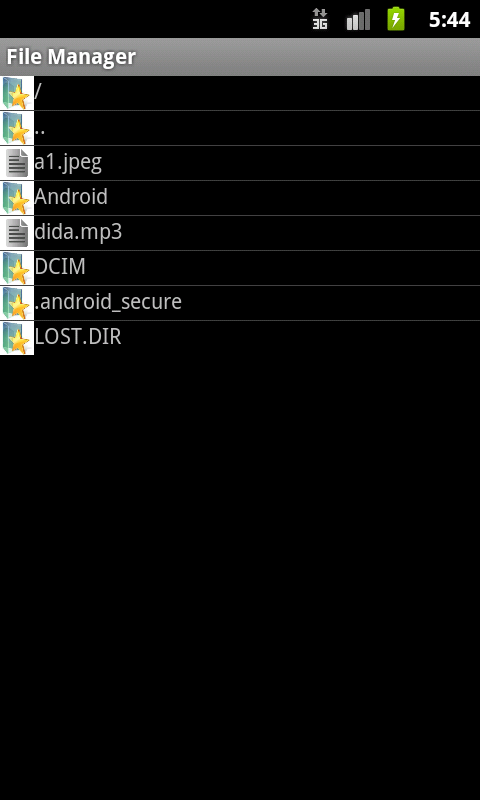 Android 簡單文件管理器實作教學
想動手做一個自己的文件管理器嗎?本文將運用 Java I/O、ListActivity、Dialog、Bitmap 等技術,實作一個簡單的文件管理器,支援查看目錄文件、修
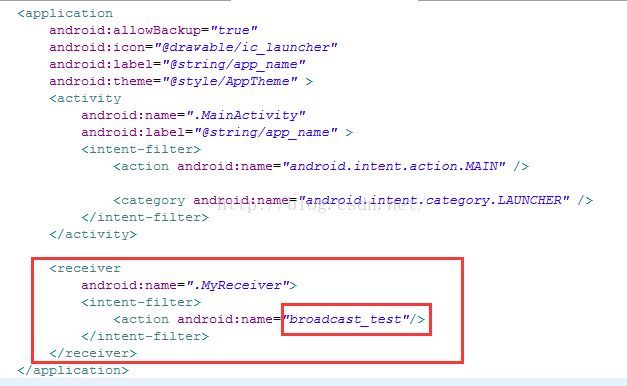 Android 四大組件之 BroadcastReceiver 深入解析
什麼是 BroadcastReceiver? BroadcastReceiver 是 Android 四大組件之一,在實際開發中發揮著舉足輕重的作用。廣播機制在 Andr
 華為麥芒5高配版值得加價嗎?標配版與高配版的三大差異
麥芒5的正面維持了較寬的黑邊設計,很「華為」的風格。真正讓人猶豫的是版本選擇:標配版 2399 元、高配版 2599 元,價差 200 元,到底多買到什麼?標配版與高配版